Poznámka:
Přístup k této stránce vyžaduje autorizaci. Můžete se zkusit přihlásit nebo změnit adresáře.
Přístup k této stránce vyžaduje autorizaci. Můžete zkusit změnit adresáře.
Postupujte podle následujícího rychlého startu nebo získejte plně funkční webovou aplikaci s uživatelským rozhraním založeným na prohlížeči:
V tomto článku se dozvíte, jak používat Voice Live s generováním AI a Azure řečí v nástrojích Foundry na portálu Microsoft Foundry portal.
Vytvoříte a spustíte aplikaci, která bude používat Voice Live přímo s modely generující umělé inteligence pro hlasové agenty v reálném čase.
Použití modelů přímo umožňuje zadat vlastní instrukce (výzvy) pro každou relaci a nabízí větší flexibilitu pro dynamické nebo experimentální případy použití.
Modely můžou být vhodnější, když chcete jemně odstupňovanou kontrolu nad parametry relace nebo potřebujete často upravit výzvu nebo konfiguraci bez aktualizace agenta na portálu.
Kód relací založených na modelu je v některých ohledech jednodušší, protože nevyžaduje správu ID agenta nebo nastavení specifické pro agenty.
Přímé použití modelu je vhodné pro scénáře, kdy není potřeba abstrakce na úrovni agenta nebo integrovaná logika.
Pokud chcete místo toho používat rozhraní Voice Live API s agenty, přečtěte si rychlý start pro agenty Voice Live API.
Požadavky
- Předplatné Azure. Vytvořte si ho zdarma.
- Projekt Foundry. Pokud potřebujete vytvořit projekt, přečtěte si téma Vytvoření projektu Microsoft Foundry. Další informace o dostupnosti oblastí najdete v dokumentaci k přehledu služby Voice Live.
Návod
Pokud chcete používat Voice Live, nemusíte nasazovat zvukový model s prostředkem Microsoft Foundry. Voice Live je plně spravovaný a model se automaticky nasadí za vás. Další informace o dostupnosti modelů najdete v dokumentaci k přehledu služby Voice Live.
Vyzkoušení funkce Voice Live v dětském prostředí služby Speech
Pokud si chcete vyzkoušet ukázku Voice Live, postupujte takto:
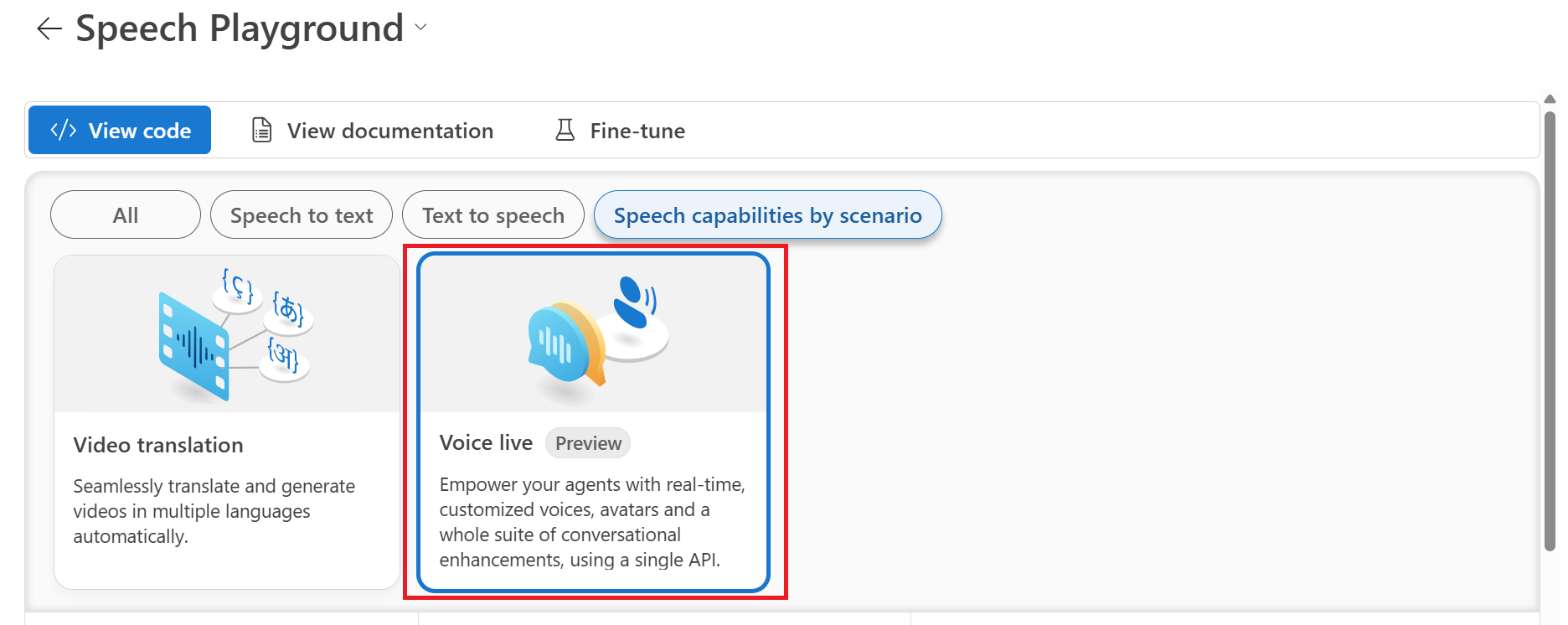
- Přejděte na stránku funkce Voice Live a vyberte Otevřít v dětském hřišti.
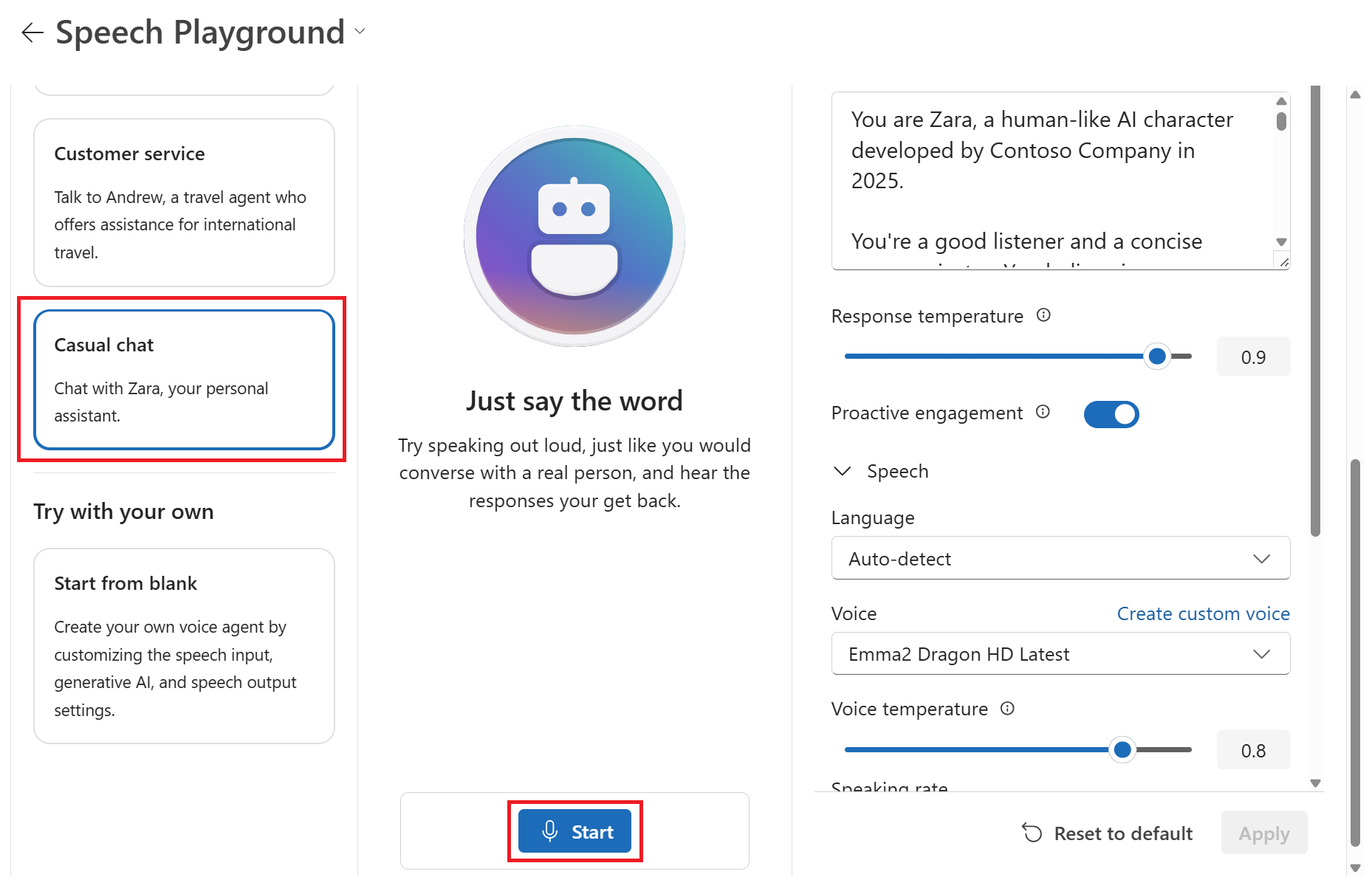
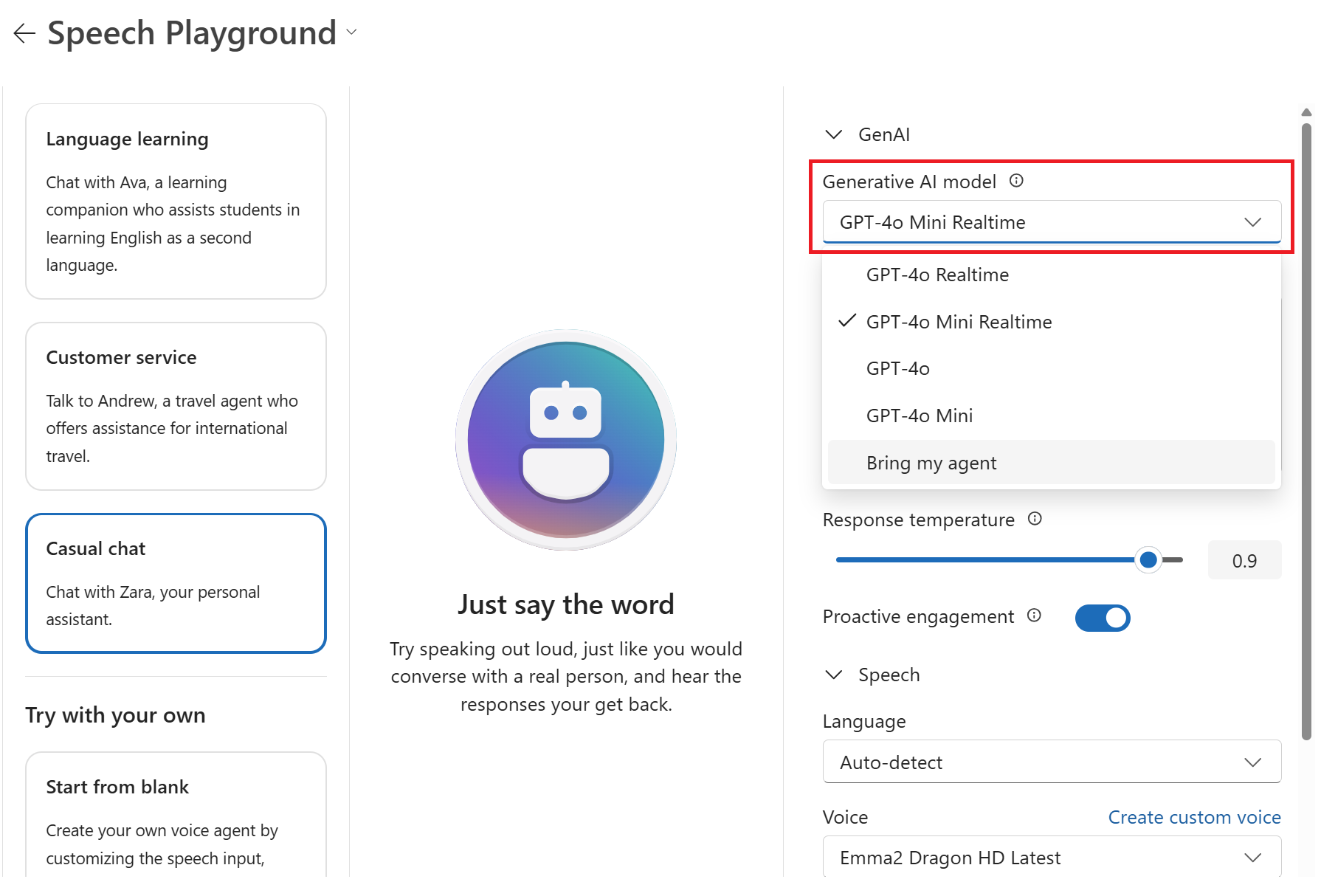
- Vyberte scénář a hlas pomocí rozevíracích nabídek. Volitelně můžete nakonfigurovat další parametry chování hlasového agenta. Přepínač proaktivní zapojení například umožňuje agentu, aby v konverzaci mluvil jako první.
- Až budete připravení, vyberte Začít chatovat s hlasovým agentem pomocí mikrofonu a reproduktorů vašeho zařízení.
- Vyberte Ukončit chatovací relaci.
Další funkce Foundry (nové)
Na portálu Foundry (nový) jsou k dispozici následující funkce služby Speech:

V tomto článku se dozvíte, jak používat Voice Live s modely Microsoft Foundry pomocí sady VoiceLive SDK pro Python.
Dokumentace k Reference | Package (PyPi) | Přidatné ukázky na GitHub
Vytvoříte a spustíte aplikaci, která bude používat Voice Live přímo s modely generující umělé inteligence pro hlasové agenty v reálném čase.
Použití modelů přímo umožňuje zadat vlastní instrukce (výzvy) pro každou relaci a nabízí větší flexibilitu pro dynamické nebo experimentální případy použití.
Modely můžou být vhodnější, když chcete jemně odstupňovanou kontrolu nad parametry relace nebo potřebujete často upravit výzvu nebo konfiguraci bez aktualizace agenta na portálu.
Kód relací založených na modelu je v některých ohledech jednodušší, protože nevyžaduje správu ID agenta nebo nastavení specifické pro agenty.
Přímé použití modelu je vhodné pro scénáře, kdy není potřeba abstrakce na úrovni agenta nebo integrovaná logika.
Pokud chcete místo toho používat rozhraní Voice Live API s agenty, přečtěte si rychlý start pro agenty Voice Live API.
Požadavky
- Předplatné Azure. Vytvořte si ho zdarma.
- Python verze 3.10 nebo novější. Pokud nemáte nainstalovanou vhodnou verzi Python, můžete postupovat podle pokynů v VS Code Python Tutorial pro nejjednodušší způsob instalace Python do operačního systému.
- Prostředek Microsoft Foundry vytvořený v jedné z podporovaných oblastí. Další informace o dostupnosti oblastí najdete v tématu Podpora oblastí.
Návod
Pokud chcete používat Voice Live, nemusíte nasazovat zvukový model s prostředkem Microsoft Foundry. Voice Live je plně spravovaný a model se automaticky nasadí za vás. Další informace o dostupnosti modelů najdete v dokumentaci k přehledu služby Voice Live.
požadavky na Microsoft Entra ID
Pro doporučené ověřování bez klíčů pomocí Microsoft Entra ID je potřeba:
- Nainstalujte Azure CLI sloužící k ověřování bez klíčů pomocí Microsoft Entra ID.
- Přiřaďte k vašemu uživatelskému účtu roli
Cognitive Services User. Role můžete přiřadit na portálu Azure v části Řízení přístupu (IAM)>Přidat přiřazení role.
Nastavení
Vytvořte novou složku
voice-live-quickstarta přejděte do složky průvodce rychlým začátkem pomocí následujícího příkazu:mkdir voice-live-quickstart && cd voice-live-quickstartVytvořte virtuální prostředí. Pokud už máte nainstalované Python 3.10 nebo vyšší, můžete vytvořit virtuální prostředí pomocí následujících příkazů:
py -3 -m venv .venv .venv\scripts\activateAktivace prostředí Python znamená, že při spuštění
pythonnebopipz příkazového řádku pak použijete interpret Python obsažený ve složce.venvvaší aplikace. Pomocí příkazu můžetedeactivateukončit virtuální prostředí Pythonu a později ho v případě potřeby znovu aktivovat.Návod
Doporučujeme vytvořit a aktivovat nové Python prostředí, které se použije k instalaci balíčků, které potřebujete pro účely tohoto kurzu. Neinstalujte balíčky do globální instalace Pythonu. Při instalaci balíčků python byste měli vždy používat virtuální prostředí nebo prostředí Conda, jinak můžete přerušit globální instalaci Python.
Vytvořte soubor s názvem requirements.txt. Do souboru přidejte následující balíčky:
azure-ai-voicelive[aiohttp]
pyaudio
python-dotenv
azure-identity
Nainstalujte balíčky:
pip install -r requirements.txt
Získat informace o prostředcích
Ve složce, ve které chcete kód spustit, vytvořte nový soubor s názvem .env .
.env Do souboru přidejte následující proměnné prostředí pro ověřování:
AZURE_VOICELIVE_ENDPOINT=<your_endpoint>
AZURE_VOICELIVE_MODEL=<your_model>
AZURE_VOICELIVE_API_VERSION=2026-04-10
AZURE_VOICELIVE_API_KEY=<your_api_key> # Only required if using API key authentication
Nahraďte výchozí hodnoty skutečným koncovým bodem, modelem, verzí rozhraní API a klíčem rozhraní API.
| Název proměnné | Hodnota |
|---|---|
AZURE_VOICELIVE_ENDPOINT |
Tuto hodnotu najdete v části Klíče a koncového bodu při zkoumání prostředku z portálu Azure. |
AZURE_VOICELIVE_MODEL |
Model, který chcete použít. Například gpt-4o nebo gpt-realtime-mini. Další informace o dostupnosti modelů najdete v dokumentaci k přehledu rozhraní Voice Live API. |
AZURE_VOICELIVE_API_VERSION |
Verze rozhraní API, kterou chcete použít. Například: 2026-04-10. |
Přečtěte si další informace o ověřování bez klíčů a nastavení proměnných prostředí.
Zahájení konverzace
Ukázkový kód v tomto rychlém startu používá k ověřování Microsoft Entra ID nebo klíč rozhraní API. Argument skriptu můžete nastavit jako klíč rozhraní API nebo přístupový token.
voice-live-quickstart.pyVytvořte soubor s následujícím kódem:# ------------------------------------------------------------------------- # Copyright (c) Microsoft Corporation. All rights reserved. # Licensed under the MIT License. # ------------------------------------------------------------------------- from __future__ import annotations import os import sys import argparse import asyncio import base64 from datetime import datetime import logging import queue import signal from typing import Union, Optional, TYPE_CHECKING, cast from azure.core.credentials import AzureKeyCredential from azure.core.credentials_async import AsyncTokenCredential from azure.identity.aio import AzureCliCredential, DefaultAzureCredential from azure.ai.voicelive.aio import connect from azure.ai.voicelive.models import ( AudioEchoCancellation, AudioNoiseReduction, AzureStandardVoice, InputAudioFormat, Modality, OutputAudioFormat, RequestSession, ServerEventType, ServerVad ) from dotenv import load_dotenv import pyaudio if TYPE_CHECKING: # Only needed for type checking; avoids runtime import issues from azure.ai.voicelive.aio import VoiceLiveConnection ## Change to the directory where this script is located os.chdir(os.path.dirname(os.path.abspath(__file__))) # Environment variable loading load_dotenv('./.env', override=True) # Set up logging ## Add folder for logging if not os.path.exists('logs'): os.makedirs('logs') ## Add timestamp for logfiles timestamp = datetime.now().strftime("%Y-%m-%d_%H-%M-%S") ## Set up logging logging.basicConfig( filename=f'logs/{timestamp}_voicelive.log', filemode="w", format='%(asctime)s:%(name)s:%(levelname)s:%(message)s', level=logging.INFO ) logger = logging.getLogger(__name__) class AudioProcessor: """ Handles real-time audio capture and playback for the voice assistant. Threading Architecture: - Main thread: Event loop and UI - Capture thread: PyAudio input stream reading - Send thread: Async audio data transmission to VoiceLive - Playback thread: PyAudio output stream writing """ loop: asyncio.AbstractEventLoop class AudioPlaybackPacket: """Represents a packet that can be sent to the audio playback queue.""" def __init__(self, seq_num: int, data: Optional[bytes]): self.seq_num = seq_num self.data = data def __init__(self, connection): self.connection = connection self.audio = pyaudio.PyAudio() # Audio configuration - PCM16, 24kHz, mono as specified self.format = pyaudio.paInt16 self.channels = 1 self.rate = 24000 self.chunk_size = 1200 # 50ms # Capture and playback state self.input_stream = None self.playback_queue: queue.Queue[AudioProcessor.AudioPlaybackPacket] = queue.Queue() self.playback_base = 0 self.next_seq_num = 0 self.output_stream: Optional[pyaudio.Stream] = None logger.info("AudioProcessor initialized with 24kHz PCM16 mono audio") def start_capture(self): """Start capturing audio from microphone.""" def _capture_callback( in_data, # data _frame_count, # number of frames _time_info, # dictionary _status_flags): """Audio capture thread - runs in background.""" audio_base64 = base64.b64encode(in_data).decode("utf-8") asyncio.run_coroutine_threadsafe( self.connection.input_audio_buffer.append(audio=audio_base64), self.loop ) return (None, pyaudio.paContinue) if self.input_stream: return # Store the current event loop for use in threads self.loop = asyncio.get_event_loop() try: self.input_stream = self.audio.open( format=self.format, channels=self.channels, rate=self.rate, input=True, frames_per_buffer=self.chunk_size, stream_callback=_capture_callback, ) logger.info("Started audio capture") except Exception: logger.exception("Failed to start audio capture") raise def start_playback(self): """Initialize audio playback system.""" if self.output_stream: return remaining = bytes() def _playback_callback( _in_data, frame_count, # number of frames _time_info, _status_flags): nonlocal remaining frame_count *= pyaudio.get_sample_size(pyaudio.paInt16) out = remaining[:frame_count] remaining = remaining[frame_count:] while len(out) < frame_count: try: packet = self.playback_queue.get_nowait() except queue.Empty: out = out + bytes(frame_count - len(out)) continue except Exception: logger.exception("Error in audio playback") raise if not packet or not packet.data: # None packet indicates end of stream logger.info("End of playback queue.") break if packet.seq_num < self.playback_base: # skip requested # ignore skipped packet and clear remaining if len(remaining) > 0: remaining = bytes() continue num_to_take = frame_count - len(out) out = out + packet.data[:num_to_take] remaining = packet.data[num_to_take:] if len(out) >= frame_count: return (out, pyaudio.paContinue) else: return (out, pyaudio.paComplete) try: self.output_stream = self.audio.open( format=self.format, channels=self.channels, rate=self.rate, output=True, frames_per_buffer=self.chunk_size, stream_callback=_playback_callback ) logger.info("Audio playback system ready") except Exception: logger.exception("Failed to initialize audio playback") raise def _get_and_increase_seq_num(self): seq = self.next_seq_num self.next_seq_num += 1 return seq def queue_audio(self, audio_data: Optional[bytes]) -> None: """Queue audio data for playback.""" self.playback_queue.put( AudioProcessor.AudioPlaybackPacket( seq_num=self._get_and_increase_seq_num(), data=audio_data)) def skip_pending_audio(self): """Skip current audio in playback queue.""" self.playback_base = self._get_and_increase_seq_num() def shutdown(self): """Clean up audio resources.""" if self.input_stream: self.input_stream.stop_stream() self.input_stream.close() self.input_stream = None logger.info("Stopped audio capture") # Inform thread to complete if self.output_stream: self.skip_pending_audio() self.queue_audio(None) self.output_stream.stop_stream() self.output_stream.close() self.output_stream = None logger.info("Stopped audio playback") if self.audio: self.audio.terminate() logger.info("Audio processor cleaned up") class BasicVoiceAssistant: """Basic voice assistant implementing the VoiceLive SDK patterns.""" def __init__( self, endpoint: str, credential: Union[AzureKeyCredential, AsyncTokenCredential], model: str, voice: str, instructions: str, ): self.endpoint = endpoint self.credential = credential self.model = model self.voice = voice self.instructions = instructions self.connection: Optional["VoiceLiveConnection"] = None self.audio_processor: Optional[AudioProcessor] = None self.session_ready = False self._active_response = False self._response_api_done = False async def start(self): """Start the voice assistant session.""" try: logger.info("Connecting to VoiceLive API with model %s", self.model) # Connect to VoiceLive WebSocket API async with connect( endpoint=self.endpoint, credential=self.credential, model=self.model, ) as connection: conn = connection self.connection = conn # Initialize audio processor ap = AudioProcessor(conn) self.audio_processor = ap # Configure session for voice conversation await self._setup_session() # Start audio systems ap.start_playback() logger.info("Voice assistant ready! Start speaking...") print("\n" + "=" * 60) print("🎤 VOICE ASSISTANT READY") print("Start speaking to begin conversation") print("Press Ctrl+C to exit") print("=" * 60 + "\n") # Process events await self._process_events() finally: if self.audio_processor: self.audio_processor.shutdown() async def _setup_session(self): """Configure the VoiceLive session for audio conversation.""" logger.info("Setting up voice conversation session...") # Create voice configuration voice_config: Union[AzureStandardVoice, str] if self.voice.startswith("en-US-") or self.voice.startswith("en-CA-") or "-" in self.voice: # Azure voice voice_config = AzureStandardVoice(name=self.voice) else: # OpenAI voice (alloy, echo, fable, onyx, nova, shimmer) voice_config = self.voice # Create turn detection configuration turn_detection_config = ServerVad( threshold=0.5, prefix_padding_ms=400, silence_duration_ms=500) # Create session configuration session_config = RequestSession( modalities=[Modality.TEXT, Modality.AUDIO], instructions=self.instructions, voice=voice_config, input_audio_format=InputAudioFormat.PCM16, output_audio_format=OutputAudioFormat.PCM16, turn_detection=turn_detection_config, input_audio_echo_cancellation=AudioEchoCancellation(), input_audio_noise_reduction=AudioNoiseReduction(type="azure_deep_noise_suppression"), ) conn = self.connection assert conn is not None, "Connection must be established before setting up session" await conn.session.update(session=session_config) logger.info("Session configuration sent") async def _process_events(self): """Process events from the VoiceLive connection.""" try: conn = self.connection assert conn is not None, "Connection must be established before processing events" async for event in conn: await self._handle_event(event) except Exception: logger.exception("Error processing events") raise async def _handle_event(self, event): """Handle different types of events from VoiceLive.""" logger.debug("Received event: %s", event.type) ap = self.audio_processor conn = self.connection assert ap is not None, "AudioProcessor must be initialized" assert conn is not None, "Connection must be established" if event.type == ServerEventType.SESSION_UPDATED: logger.info("Session ready: %s", event.session.id) self.session_ready = True # Start audio capture once session is ready ap.start_capture() elif event.type == ServerEventType.INPUT_AUDIO_BUFFER_SPEECH_STARTED: logger.info("User started speaking - stopping playback") print("🎤 Listening...") ap.skip_pending_audio() elif event.type == ServerEventType.INPUT_AUDIO_BUFFER_SPEECH_STOPPED: logger.info("🎤 User stopped speaking") print("🤔 Processing...") elif event.type == ServerEventType.RESPONSE_CREATED: logger.info("🤖 Assistant response created") self._active_response = True self._response_api_done = False elif event.type == ServerEventType.RESPONSE_AUDIO_DELTA: logger.debug("Received audio delta") ap.queue_audio(event.delta) elif event.type == ServerEventType.RESPONSE_AUDIO_DONE: logger.info("🤖 Assistant finished speaking") print("🎤 Ready for next input...") elif event.type == ServerEventType.RESPONSE_DONE: logger.info("✅ Response complete") self._active_response = False self._response_api_done = True elif event.type == ServerEventType.ERROR: msg = event.error.message if "Cancellation failed: no active response" in msg: logger.debug("Benign cancellation error: %s", msg) else: logger.error("❌ VoiceLive error: %s", msg) print(f"Error: {msg}") elif event.type == ServerEventType.CONVERSATION_ITEM_CREATED: logger.debug("Conversation item created: %s", event.item.id) else: logger.debug("Unhandled event type: %s", event.type) def parse_arguments(): """Parse command line arguments.""" parser = argparse.ArgumentParser( description="Basic Voice Assistant using Azure VoiceLive SDK", formatter_class=argparse.ArgumentDefaultsHelpFormatter, ) parser.add_argument( "--api-key", help="Azure VoiceLive API key. If not provided, will use AZURE_VOICELIVE_API_KEY environment variable.", type=str, default=os.environ.get("AZURE_VOICELIVE_API_KEY"), ) parser.add_argument( "--endpoint", help="Azure VoiceLive endpoint", type=str, default=os.environ.get("AZURE_VOICELIVE_ENDPOINT", "https://your-resource-name.services.ai.azure.com/"), ) parser.add_argument( "--model", help="VoiceLive model to use", type=str, default=os.environ.get("AZURE_VOICELIVE_MODEL", "gpt-realtime"), ) parser.add_argument( "--voice", help="Voice to use for the assistant. E.g. alloy, echo, fable, en-US-AvaNeural, en-US-GuyNeural", type=str, default=os.environ.get("AZURE_VOICELIVE_VOICE", "en-US-Ava:DragonHDLatestNeural"), ) parser.add_argument( "--instructions", help="System instructions for the AI assistant", type=str, default=os.environ.get( "AZURE_VOICELIVE_INSTRUCTIONS", "You are a helpful AI assistant. Respond naturally and conversationally. " "Keep your responses concise but engaging.", ), ) parser.add_argument( "--use-token-credential", help="Use Azure token credential instead of API key", action="store_true", default=False ) parser.add_argument("--verbose", help="Enable verbose logging", action="store_true") return parser.parse_args() def main(): """Main function.""" args = parse_arguments() # Set logging level if args.verbose: logging.getLogger().setLevel(logging.DEBUG) # Validate credentials if not args.api_key and not args.use_token_credential: print("❌ Error: No authentication provided") print("Please provide an API key using --api-key or set AZURE_VOICELIVE_API_KEY environment variable,") print("or use --use-token-credential for Azure authentication.") sys.exit(1) # Create client with appropriate credential credential: Union[AzureKeyCredential, AsyncTokenCredential] if args.use_token_credential: credential = AzureCliCredential() # or DefaultAzureCredential() if needed logger.info("Using Azure token credential") else: credential = AzureKeyCredential(args.api_key) logger.info("Using API key credential") # Create and start voice assistant assistant = BasicVoiceAssistant( endpoint=args.endpoint, credential=credential, model=args.model, voice=args.voice, instructions=args.instructions, ) # Setup signal handlers for graceful shutdown def signal_handler(_sig, _frame): logger.info("Received shutdown signal") raise KeyboardInterrupt() signal.signal(signal.SIGINT, signal_handler) signal.signal(signal.SIGTERM, signal_handler) # Start the assistant try: asyncio.run(assistant.start()) except KeyboardInterrupt: print("\n👋 Voice assistant shut down. Goodbye!") except Exception as e: print("Fatal Error: ", e) if __name__ == "__main__": # Check audio system try: p = pyaudio.PyAudio() # Check for input devices input_devices = [ i for i in range(p.get_device_count()) if cast(Union[int, float], p.get_device_info_by_index(i).get("maxInputChannels", 0) or 0) > 0 ] # Check for output devices output_devices = [ i for i in range(p.get_device_count()) if cast(Union[int, float], p.get_device_info_by_index(i).get("maxOutputChannels", 0) or 0) > 0 ] p.terminate() if not input_devices: print("❌ No audio input devices found. Please check your microphone.") sys.exit(1) if not output_devices: print("❌ No audio output devices found. Please check your speakers.") sys.exit(1) except Exception as e: print(f"❌ Audio system check failed: {e}") sys.exit(1) print("🎙️ Basic Voice Assistant with Azure VoiceLive SDK") print("=" * 50) # Run the assistant main()Přihlaste se k Azure pomocí následujícího příkazu:
az loginSpusťte soubor Python.
python voice-live-quickstart.py --use-token-credentialRozhraní Voice Live API začne vracet zvuk s počáteční reakcí modelu. Model můžete přerušit mluvením. Stisknutím kombinace kláves Ctrl+C konverzaci ukončíte.
Výstup
Výstup skriptu se vytiskne do konzoly. Zobrazí se zprávy označující stav systému. Zvuk se přehrával přes reproduktory nebo sluchátka.
============================================================
🎤 VOICE ASSISTANT READY
Start speaking to begin conversation
Press Ctrl+C to exit
============================================================

🎤 Listening...
🤔 Processing...
🎤 Ready for next input...
🎤 Listening...
🤔 Processing...
🎤 Ready for next input...
🎤 Listening...
🤔 Processing...
🎤 Ready for next input...
🎤 Listening...
🤔 Processing...
🎤 Listening...
🎤 Ready for next input...
🤔 Processing...
🎤 Ready for next input...
Spuštěný skript vytvoří soubor protokolu s názvem <timestamp>_voicelive.log ve logs složce.
Výchozí úroveň protokolu je nastavená na INFO , ale můžete ji změnit spuštěním rychlého startu s parametrem --verbose příkazového řádku nebo změnou konfigurace protokolování v kódu následujícím způsobem:
logging.basicConfig(
    filename=f'logs/{timestamp}_voicelive.log',
    filemode="w",
    format='%(asctime)s:%(name)s:%(levelname)s:%(message)s',
    level=logging.INFO
)
Soubor protokolu obsahuje informace o připojení k rozhraní API služby Voice Live, včetně dat požadavků a odpovědí. Pokud chcete zobrazit podrobnosti o konverzaci, můžete si zobrazit soubor protokolu.
2025-10-02 14:47:37,901:__main__:INFO:Using Azure token credential
2025-10-02 14:47:37,901:__main__:INFO:Connecting to VoiceLive API with model gpt-realtime
2025-10-02 14:47:37,901:azure.core.pipeline.policies.http_logging_policy:INFO:Request URL: 'https://login.microsoftonline.com/organizations/v2.0/.well-known/openid-configuration'
Request method: 'GET'
Request headers:
    'User-Agent': 'azsdk-python-identity/1.22.0 Python/3.11.9 (Windows-10-10.0.26200-SP0)'
No body was attached to the request
2025-10-02 14:47:38,057:azure.core.pipeline.policies.http_logging_policy:INFO:Response status: 200
Response headers:
    'Date': 'Thu, 02 Oct 2025 21:47:37 GMT'
    'Content-Type': 'application/json; charset=utf-8'
    'Content-Length': '1641'
    'Connection': 'keep-alive'
    'Cache-Control': 'max-age=86400, private'
    'Strict-Transport-Security': 'REDACTED'
    'X-Content-Type-Options': 'REDACTED'
    'Access-Control-Allow-Origin': 'REDACTED'
    'Access-Control-Allow-Methods': 'REDACTED'
    'P3P': 'REDACTED'
    'x-ms-request-id': 'f81adfa1-8aa3-4ab6-a7b8-908f411e0d00'
    'x-ms-ests-server': 'REDACTED'
    'x-ms-srs': 'REDACTED'
    'Content-Security-Policy-Report-Only': 'REDACTED'
    'Cross-Origin-Opener-Policy-Report-Only': 'REDACTED'
    'Reporting-Endpoints': 'REDACTED'
    'X-XSS-Protection': 'REDACTED'
    'Set-Cookie': 'REDACTED'
    'X-Cache': 'REDACTED'
2025-10-02 14:47:42,105:azure.core.pipeline.policies.http_logging_policy:INFO:Request URL: 'https://login.microsoftonline.com/organizations/oauth2/v2.0/token'
Request method: 'POST'
Request headers:
    'Accept': 'application/json'
    'x-client-sku': 'REDACTED'
    'x-client-ver': 'REDACTED'
    'x-client-os': 'REDACTED'
    'x-ms-lib-capability': 'REDACTED'
    'client-request-id': 'REDACTED'
    'x-client-current-telemetry': 'REDACTED'
    'x-client-last-telemetry': 'REDACTED'
    'X-AnchorMailbox': 'REDACTED'
    'User-Agent': 'azsdk-python-identity/1.22.0 Python/3.11.9 (Windows-10-10.0.26200-SP0)'
A body is sent with the request
2025-10-02 14:47:42,466:azure.core.pipeline.policies.http_logging_policy:INFO:Response status: 200
Response headers:
    'Date': 'Thu, 02 Oct 2025 21:47:42 GMT'
    'Content-Type': 'application/json; charset=utf-8'
    'Content-Length': '6587'
    'Connection': 'keep-alive'
    'Cache-Control': 'no-store, no-cache'
    'Pragma': 'no-cache'
    'Expires': '-1'
    'Strict-Transport-Security': 'REDACTED'
    'X-Content-Type-Options': 'REDACTED'
    'P3P': 'REDACTED'
    'client-request-id': 'REDACTED'
    'x-ms-request-id': '2e82e728-22c0-4568-b3ed-f00ec79a2500'
    'x-ms-ests-server': 'REDACTED'
    'x-ms-clitelem': 'REDACTED'
    'x-ms-srs': 'REDACTED'
    'Content-Security-Policy-Report-Only': 'REDACTED'
    'Cross-Origin-Opener-Policy-Report-Only': 'REDACTED'
    'Reporting-Endpoints': 'REDACTED'
    'X-XSS-Protection': 'REDACTED'
    'Set-Cookie': 'REDACTED'
    'X-Cache': 'REDACTED'
2025-10-02 14:47:42,467:azure.identity._internal.interactive:INFO:InteractiveBrowserCredential.get_token succeeded
2025-10-02 14:47:42,884:__main__:INFO:AudioProcessor initialized with 24kHz PCM16 mono audio
2025-10-02 14:47:42,884:__main__:INFO:Setting up voice conversation session...
2025-10-02 14:47:42,887:__main__:INFO:Session configuration sent
2025-10-02 14:47:42,943:__main__:INFO:Audio playback system ready
2025-10-02 14:47:42,943:__main__:INFO:Voice assistant ready! Start speaking...
2025-10-02 14:47:42,975:__main__:INFO:Session ready: sess_CMLRGjWnakODcHn583fXf
2025-10-02 14:47:42,994:__main__:INFO:Started audio capture
2025-10-02 14:47:47,513:__main__:INFO:\U0001f3a4 User started speaking - stopping playback
2025-10-02 14:47:47,593:__main__:INFO:Stopped audio playback
2025-10-02 14:47:51,757:__main__:INFO:\U0001f3a4 User stopped speaking
2025-10-02 14:47:51,813:__main__:INFO:Audio playback system ready
2025-10-02 14:47:51,816:__main__:INFO:\U0001f916 Assistant response created
2025-10-02 14:47:58,009:__main__:INFO:\U0001f916 Assistant finished speaking
2025-10-02 14:47:58,009:__main__:INFO:\u2705 Response complete
2025-10-02 14:48:07,309:__main__:INFO:Received shutdown signal
V tomto článku se dozvíte, jak používat Voice Live s modely Microsoft Foundry pomocí sady VoiceLive SDK pro jazyk C#.
Dokumentace k Reference | Package (NuGet) | Přidatné ukázky na GitHub
Vytvoříte a spustíte aplikaci, která bude používat Voice Live přímo s modely generující umělé inteligence pro hlasové agenty v reálném čase.
Použití modelů přímo umožňuje zadat vlastní instrukce (výzvy) pro každou relaci a nabízí větší flexibilitu pro dynamické nebo experimentální případy použití.
Modely můžou být vhodnější, když chcete jemně odstupňovanou kontrolu nad parametry relace nebo potřebujete často upravit výzvu nebo konfiguraci bez aktualizace agenta na portálu.
Kód relací založených na modelu je v některých ohledech jednodušší, protože nevyžaduje správu ID agenta nebo nastavení specifické pro agenty.
Přímé použití modelu je vhodné pro scénáře, kdy není potřeba abstrakce na úrovni agenta nebo integrovaná logika.
Pokud chcete místo toho používat rozhraní Voice Live API s agenty, přečtěte si rychlý start pro agenty Voice Live API.
Požadavky
- Předplatné Azure. Vytvořte si ho zdarma.
- Prostředek Microsoft Foundry vytvořený v jedné z podporovaných oblastí. Další informace o dostupnosti oblastí najdete v dokumentaci k přehledu služby Voice Live.
- .NET SDK verze 6.0 nebo novější.
Zahájení hlasové konverzace
Pomocí těchto kroků vytvořte konzolovou aplikaci a nainstalujte sadu Speech SDK.
Ve složce, ve které chcete nový projekt, otevřete okno příkazového řádku. Spuštěním tohoto příkazu vytvořte konzolovou aplikaci pomocí rozhraní příkazového řádku .NET.
dotnet new consoleTento příkaz vytvoří soubor Program.cs v adresáři projektu.
Nainstalujte sadu Voice Live SDK, Azure Identity a NAudio do nového projektu pomocí rozhraní příkazového řádku .NET.
dotnet add package Azure.AI.VoiceLive
dotnet add package Azure.Identity
dotnet add package NAudio
dotnet add package System.CommandLine --version 2.0.0-beta4.22272.1
dotnet add package Microsoft.Extensions.Configuration.Json
dotnet add package Microsoft.Extensions.Configuration.EnvironmentVariables
dotnet add package Microsoft.Extensions.Logging.Console
Ve složce, ve které chcete kód spustit, vytvořte nový soubor s názvem
appsettings.json. Do tohoto souboru přidejte následující obsah JSON:{ "VoiceLive": { "ApiKey": "your-api-key-here", "Endpoint": "https://your-resource-name.services.ai.azure.com/", "Model": "gpt-realtime", "Voice": "en-US-Ava:DragonHDLatestNeural", "Instructions": "You are a helpful AI assistant. Respond naturally and conversationally. Keep your responses concise but engaging." }, "Logging": { "LogLevel": { "Default": "Information", "Azure.AI.VoiceLive": "Debug" } } }Ukázkový kód v tomto rychlém startu používá k ověřování Microsoft Entra ID nebo klíč rozhraní API. Argument skriptu můžete nastavit jako klíč rozhraní API nebo přístupový token. Místo nastavení hodnoty
ApiKeya spuštění rychlého startu s argumentem--use-token-credentialdoporučujeme použít ověřování Microsoft Entra ID.Nahraďte hodnotu
ApiKey(volitelné) klíčem rozhraní Foundry API a nahraďte hodnotuEndpointkoncovým bodem prostředku. Podle potřeby můžete také změnit hodnoty Modelu, Hlas a Instrukce.Přečtěte si další informace o ověřování bez klíčů a nastavení proměnných prostředí.
Do souboru
csharp.csprojpřidejte následující informace pro připojení appsettings.json:<ItemGroup> <None Update="appsettings.json"> <CopyToOutputDirectory>PreserveNewest</CopyToOutputDirectory> </None> </ItemGroup>Nahraďte obsah
Program.csnásledujícím kódem. Tento kód vytvoří základního hlasového agenta pomocí jednoho z předdefinovaných modelů.// Copyright (c) Microsoft Corporation. All rights reserved. // Licensed under the MIT License. using System; using System.CommandLine; using System.Threading; using System.Threading.Tasks; using System.Threading.Channels; using System.Collections.Generic; using Azure.AI.VoiceLive; using Azure.Core; using Azure.Core.Pipeline; using Azure.Identity; using Microsoft.Extensions.Configuration; using Microsoft.Extensions.Logging; using NAudio.Wave; namespace Azure.AI.VoiceLive.Samples { /// <summary> /// FILE: Program.cs (Consolidated) /// </summary> /// <remarks> /// DESCRIPTION: /// This consolidated sample demonstrates the fundamental capabilities of the VoiceLive SDK by creating /// a basic voice assistant that can engage in natural conversation with proper interruption /// handling. This serves as the foundational example that showcases the core value /// proposition of unified speech-to-speech interaction. /// /// All necessary code has been consolidated into this single file for easy distribution and execution. /// /// USAGE: /// dotnet run /// /// Set the environment variables with your own values before running the sample: /// 1) AZURE_VOICELIVE_API_KEY - The Azure VoiceLive API key /// 2) AZURE_VOICELIVE_ENDPOINT - The Azure VoiceLive endpoint /// /// Or update appsettings.json with your values. /// /// REQUIREMENTS: /// - Azure.AI.VoiceLive /// - Azure.Identity /// - NAudio (for audio capture and playback) /// - Microsoft.Extensions.Configuration /// - System.CommandLine /// - System.Threading.Channels /// </remarks> public class Program { /// <summary> /// Main entry point for the Voice Assistant sample. /// </summary> /// <param name="args"></param> /// <returns></returns> public static async Task<int> Main(string[] args) { // Create command line interface var rootCommand = CreateRootCommand(); return await rootCommand.InvokeAsync(args).ConfigureAwait(false); } private static RootCommand CreateRootCommand() { var rootCommand = new RootCommand("Basic Voice Assistant using Azure VoiceLive SDK"); var apiKeyOption = new Option<string?>( "--api-key", "Azure VoiceLive API key. If not provided, will use AZURE_VOICELIVE_API_KEY environment variable."); var endpointOption = new Option<string>( "--endpoint", () => "wss://api.voicelive.com/v1", "Azure VoiceLive endpoint"); var modelOption = new Option<string>( "--model", () => "gpt-4o", "VoiceLive model to use"); var voiceOption = new Option<string>( "--voice", () => "en-US-AvaNeural", "Voice to use for the assistant"); var instructionsOption = new Option<string>( "--instructions", () => "You are a helpful AI assistant. Respond naturally and conversationally. Keep your responses concise but engaging.", "System instructions for the AI assistant"); var useTokenCredentialOption = new Option<bool>( "--use-token-credential", "Use Azure token credential instead of API key"); var verboseOption = new Option<bool>( "--verbose", "Enable verbose logging"); rootCommand.AddOption(apiKeyOption); rootCommand.AddOption(endpointOption); rootCommand.AddOption(modelOption); rootCommand.AddOption(voiceOption); rootCommand.AddOption(instructionsOption); rootCommand.AddOption(useTokenCredentialOption); rootCommand.AddOption(verboseOption); rootCommand.SetHandler(async ( string? apiKey, string endpoint, string model, string voice, string instructions, bool useTokenCredential, bool verbose) => { await RunVoiceAssistantAsync(apiKey, endpoint, model, voice, instructions, useTokenCredential, verbose).ConfigureAwait(false); }, apiKeyOption, endpointOption, modelOption, voiceOption, instructionsOption, useTokenCredentialOption, verboseOption); return rootCommand; } private static async Task RunVoiceAssistantAsync( string? apiKey, string endpoint, string model, string voice, string instructions, bool useTokenCredential, bool verbose) { // Setup configuration var configuration = new ConfigurationBuilder() .AddJsonFile("appsettings.json", optional: true) .AddEnvironmentVariables() .Build(); // Override with command line values if provided apiKey ??= configuration["VoiceLive:ApiKey"] ?? Environment.GetEnvironmentVariable("AZURE_VOICELIVE_API_KEY"); endpoint = configuration["VoiceLive:Endpoint"] ?? endpoint; model = configuration["VoiceLive:Model"] ?? model; voice = configuration["VoiceLive:Voice"] ?? voice; instructions = configuration["VoiceLive:Instructions"] ?? instructions; // Setup logging using var loggerFactory = LoggerFactory.Create(builder => { builder.AddConsole(); if (verbose) { builder.SetMinimumLevel(LogLevel.Debug); } else { builder.SetMinimumLevel(LogLevel.Information); } }); var logger = loggerFactory.CreateLogger<Program>(); // Validate credentials if (string.IsNullOrEmpty(apiKey) && !useTokenCredential) { Console.WriteLine("❌ Error: No authentication provided"); Console.WriteLine("Please provide an API key using --api-key or set AZURE_VOICELIVE_API_KEY environment variable,"); Console.WriteLine("or use --use-token-credential for Azure authentication."); return; } // Check audio system before starting if (!CheckAudioSystem(logger)) { return; } try { // Create client with appropriate credential VoiceLiveClient client; if (useTokenCredential) { var tokenCredential = new DefaultAzureCredential(); client = new VoiceLiveClient(new Uri(endpoint), tokenCredential, new VoiceLiveClientOptions()); logger.LogInformation("Using Azure token credential"); } else { var keyCredential = new Azure.AzureKeyCredential(apiKey!); client = new VoiceLiveClient(new Uri(endpoint), keyCredential, new VoiceLiveClientOptions()); logger.LogInformation("Using API key credential"); } // Create and start voice assistant using var assistant = new BasicVoiceAssistant( client, model, voice, instructions, loggerFactory); // Setup cancellation token for graceful shutdown using var cancellationTokenSource = new CancellationTokenSource(); Console.CancelKeyPress += (sender, e) => { e.Cancel = true; logger.LogInformation("Received shutdown signal"); cancellationTokenSource.Cancel(); }; // Start the assistant await assistant.StartAsync(cancellationTokenSource.Token).ConfigureAwait(false); } catch (OperationCanceledException) { Console.WriteLine("\n👋 Voice assistant shut down. Goodbye!"); } catch (Exception ex) { logger.LogError(ex, "Fatal error"); Console.WriteLine($"❌ Error: {ex.Message}"); } } private static bool CheckAudioSystem(ILogger logger) { try { // Try input (default device) using (var waveIn = new WaveInEvent { WaveFormat = new WaveFormat(24000, 16, 1), BufferMilliseconds = 50 }) { // Start/Stop to force initialization and surface any device errors waveIn.DataAvailable += (_, __) => { }; waveIn.StartRecording(); waveIn.StopRecording(); } // Try output (default device) var buffer = new BufferedWaveProvider(new WaveFormat(24000, 16, 1)) { BufferDuration = TimeSpan.FromMilliseconds(200) }; using (var waveOut = new WaveOutEvent { DesiredLatency = 100 }) { waveOut.Init(buffer); // Playing isn't strictly required to validate a device, but it's safe waveOut.Play(); waveOut.Stop(); } logger.LogInformation("Audio system check passed (default input/output initialized)."); return true; } catch (Exception ex) { Console.WriteLine($"❌ Audio system check failed: {ex.Message}"); return false; } } } /// <summary> /// Basic voice assistant implementing the VoiceLive SDK patterns. ///</summary> /// <remarks> /// This sample now demonstrates some of the new convenience methods added to the VoiceLive SDK: /// - ConfigureSessionAsync() - Configures session options (existing method) /// /// Additional convenience methods available but not shown in this sample: /// - StartAudioTurnAsync() / EndAudioTurnAsync() / CancelAudioTurnAsync() - Audio turn management /// - AppendAudioToTurnAsync() - Append audio data to an ongoing turn /// - ConnectAvatarAsync() - Connect avatar with SDP for media negotiation /// /// These methods provide a more developer-friendly API similar to the OpenAI SDK, /// eliminating the need to manually construct and populate ClientEvent classes. /// </remarks> public class BasicVoiceAssistant : IDisposable { private readonly VoiceLiveClient _client; private readonly string _model; private readonly string _voice; private readonly string _instructions; private readonly ILogger<BasicVoiceAssistant> _logger; private readonly ILoggerFactory _loggerFactory; private VoiceLiveSession? _session; private AudioProcessor? _audioProcessor; private bool _disposed; /// <summary> /// Initializes a new instance of the BasicVoiceAssistant class. /// </summary> /// <param name="client">The VoiceLive client.</param> /// <param name="model">The model to use.</param> /// <param name="voice">The voice to use.</param> /// <param name="instructions">The system instructions.</param> /// <param name="loggerFactory">Logger factory for creating loggers.</param> public BasicVoiceAssistant( VoiceLiveClient client, string model, string voice, string instructions, ILoggerFactory loggerFactory) { _client = client ?? throw new ArgumentNullException(nameof(client)); _model = model ?? throw new ArgumentNullException(nameof(model)); _voice = voice ?? throw new ArgumentNullException(nameof(voice)); _instructions = instructions ?? throw new ArgumentNullException(nameof(instructions)); _loggerFactory = loggerFactory ?? throw new ArgumentNullException(nameof(loggerFactory)); _logger = loggerFactory.CreateLogger<BasicVoiceAssistant>(); } /// <summary> /// Start the voice assistant session. /// </summary> /// <param name="cancellationToken">Cancellation token for stopping the session.</param> public async Task StartAsync(CancellationToken cancellationToken = default) { try { _logger.LogInformation("Connecting to VoiceLive API with model {Model}", _model); // Start VoiceLive session _session = await _client.StartSessionAsync(_model, cancellationToken).ConfigureAwait(false); // Initialize audio processor _audioProcessor = new AudioProcessor(_session, _loggerFactory.CreateLogger<AudioProcessor>()); // Configure session for voice conversation await SetupSessionAsync(cancellationToken).ConfigureAwait(false); // Start audio systems await _audioProcessor.StartPlaybackAsync().ConfigureAwait(false); await _audioProcessor.StartCaptureAsync().ConfigureAwait(false); _logger.LogInformation("Voice assistant ready! Start speaking..."); Console.WriteLine(); Console.WriteLine("=" + new string('=', 59)); Console.WriteLine("🎤 VOICE ASSISTANT READY"); Console.WriteLine("Start speaking to begin conversation"); Console.WriteLine("Press Ctrl+C to exit"); Console.WriteLine("=" + new string('=', 59)); Console.WriteLine(); // Process events await ProcessEventsAsync(cancellationToken).ConfigureAwait(false); } catch (OperationCanceledException) { _logger.LogInformation("Received cancellation signal, shutting down..."); } catch (Exception ex) { _logger.LogError(ex, "Connection error"); throw; } finally { // Cleanup if (_audioProcessor != null) { await _audioProcessor.CleanupAsync().ConfigureAwait(false); } } } /// <summary> /// Configure the VoiceLive session for audio conversation. /// </summary> private async Task SetupSessionAsync(CancellationToken cancellationToken) { _logger.LogInformation("Setting up voice conversation session..."); // Azure voice var azureVoice = new AzureStandardVoice(_voice); // Create strongly typed turn detection configuration var turnDetectionConfig = new ServerVadTurnDetection { Threshold = 0.5f, PrefixPadding = TimeSpan.FromMilliseconds(400), SilenceDuration = TimeSpan.FromMilliseconds(500) }; // Create conversation session options var sessionOptions = new VoiceLiveSessionOptions { InputAudioEchoCancellation = new AudioEchoCancellation(), Model = _model, Instructions = _instructions, Voice = azureVoice, InputAudioFormat = InputAudioFormat.Pcm16, OutputAudioFormat = OutputAudioFormat.Pcm16, TurnDetection = turnDetectionConfig }; // Ensure modalities include audio sessionOptions.Modalities.Clear(); sessionOptions.Modalities.Add(InteractionModality.Text); sessionOptions.Modalities.Add(InteractionModality.Audio); await _session!.ConfigureSessionAsync(sessionOptions, cancellationToken).ConfigureAwait(false); _logger.LogInformation("Session configuration sent"); } /// <summary> /// Process events from the VoiceLive session. /// </summary> private async Task ProcessEventsAsync(CancellationToken cancellationToken) { try { await foreach (SessionUpdate serverEvent in _session!.GetUpdatesAsync(cancellationToken).ConfigureAwait(false)) { await HandleSessionUpdateAsync(serverEvent, cancellationToken).ConfigureAwait(false); } } catch (OperationCanceledException) { _logger.LogInformation("Event processing cancelled"); } catch (Exception ex) { _logger.LogError(ex, "Error processing events"); throw; } } /// <summary> /// Handle different types of server events from VoiceLive. /// </summary> private async Task HandleSessionUpdateAsync(SessionUpdate serverEvent, CancellationToken cancellationToken) { _logger.LogDebug("Received event: {EventType}", serverEvent.GetType().Name); switch (serverEvent) { case SessionUpdateSessionCreated sessionCreated: await HandleSessionCreatedAsync(sessionCreated, cancellationToken).ConfigureAwait(false); break; case SessionUpdateSessionUpdated sessionUpdated: _logger.LogInformation("Session updated successfully"); // Start audio capture once session is ready if (_audioProcessor != null) { await _audioProcessor.StartCaptureAsync().ConfigureAwait(false); } break; case SessionUpdateInputAudioBufferSpeechStarted speechStarted: _logger.LogInformation("🎤 User started speaking - stopping playback"); Console.WriteLine("🎤 Listening..."); // Stop current assistant audio playback (interruption handling) if (_audioProcessor != null) { await _audioProcessor.StopPlaybackAsync().ConfigureAwait(false); } break; case SessionUpdateInputAudioBufferSpeechStopped speechStopped: _logger.LogInformation("🎤 User stopped speaking"); Console.WriteLine("🤔 Processing..."); // Restart playback system for response if (_audioProcessor != null) { await _audioProcessor.StartPlaybackAsync().ConfigureAwait(false); } break; case SessionUpdateResponseCreated responseCreated: _logger.LogInformation("🤖 Assistant response created"); break; case SessionUpdateResponseAudioDelta audioDelta: // Stream audio response to speakers _logger.LogDebug("Received audio delta"); if (audioDelta.Delta != null && _audioProcessor != null) { byte[] audioData = audioDelta.Delta.ToArray(); await _audioProcessor.QueueAudioAsync(audioData).ConfigureAwait(false); } break; case SessionUpdateResponseAudioDone audioDone: _logger.LogInformation("🤖 Assistant finished speaking"); Console.WriteLine("🎤 Ready for next input..."); break; case SessionUpdateResponseDone responseDone: _logger.LogInformation("✅ Response complete"); break; case SessionUpdateError errorEvent: _logger.LogError("❌ VoiceLive error: {ErrorMessage}", errorEvent.Error?.Message); Console.WriteLine($"Error: {errorEvent.Error?.Message}"); break; default: _logger.LogDebug("Unhandled event type: {EventType}", serverEvent.GetType().Name); break; } } /// <summary> /// Handle session created event. /// </summary> private async Task HandleSessionCreatedAsync(SessionUpdateSessionCreated sessionCreated, CancellationToken cancellationToken) { _logger.LogInformation("Session ready: {SessionId}", sessionCreated.Session?.Id); // Start audio capture once session is ready if (_audioProcessor != null) { await _audioProcessor.StartCaptureAsync().ConfigureAwait(false); } } /// <summary> /// Dispose of resources. /// </summary> public void Dispose() { if (_disposed) return; _audioProcessor?.Dispose(); _session?.Dispose(); _disposed = true; } } /// <summary> /// Handles real-time audio capture and playback for the voice assistant. /// /// This processor demonstrates some of the new VoiceLive SDK convenience methods: /// - Uses existing SendInputAudioAsync() method for audio streaming /// - Shows how convenience methods simplify audio operations /// /// Additional convenience methods available in the SDK: /// - StartAudioTurnAsync() / AppendAudioToTurnAsync() / EndAudioTurnAsync() - Audio turn management /// - ClearStreamingAudioAsync() - Clear all streaming audio /// - ConnectAvatarAsync() - Avatar connection with SDP /// /// Threading Architecture: /// - Main thread: Event loop and UI /// - Capture thread: NAudio input stream reading /// - Send thread: Async audio data transmission to VoiceLive /// - Playback thread: NAudio output stream writing /// </summary> public class AudioProcessor : IDisposable { private readonly VoiceLiveSession _session; private readonly ILogger<AudioProcessor> _logger; // Audio configuration - PCM16, 24kHz, mono as specified private const int SampleRate = 24000; private const int Channels = 1; private const int BitsPerSample = 16; // NAudio components private WaveInEvent? _waveIn; private WaveOutEvent? _waveOut; private BufferedWaveProvider? _playbackBuffer; // Audio capture and playback state private bool _isCapturing; private bool _isPlaying; // Audio streaming channels private readonly Channel<byte[]> _audioSendChannel; private readonly Channel<byte[]> _audioPlaybackChannel; private readonly ChannelWriter<byte[]> _audioSendWriter; private readonly ChannelReader<byte[]> _audioSendReader; private readonly ChannelWriter<byte[]> _audioPlaybackWriter; private readonly ChannelReader<byte[]> _audioPlaybackReader; // Background tasks private Task? _audioSendTask; private Task? _audioPlaybackTask; private readonly CancellationTokenSource _cancellationTokenSource; private CancellationTokenSource _playbackCancellationTokenSource; /// <summary> /// Initializes a new instance of the AudioProcessor class. /// </summary> /// <param name="session">The VoiceLive session for audio communication.</param> /// <param name="logger">Logger for diagnostic information.</param> public AudioProcessor(VoiceLiveSession session, ILogger<AudioProcessor> logger) { _session = session ?? throw new ArgumentNullException(nameof(session)); _logger = logger ?? throw new ArgumentNullException(nameof(logger)); // Create unbounded channels for audio data _audioSendChannel = Channel.CreateUnbounded<byte[]>(); _audioSendWriter = _audioSendChannel.Writer; _audioSendReader = _audioSendChannel.Reader; _audioPlaybackChannel = Channel.CreateUnbounded<byte[]>(); _audioPlaybackWriter = _audioPlaybackChannel.Writer; _audioPlaybackReader = _audioPlaybackChannel.Reader; _cancellationTokenSource = new CancellationTokenSource(); _playbackCancellationTokenSource = new CancellationTokenSource(); _logger.LogInformation("AudioProcessor initialized with {SampleRate}Hz PCM16 mono audio", SampleRate); } /// <summary> /// Start capturing audio from microphone. /// </summary> public Task StartCaptureAsync() { if (_isCapturing) return Task.CompletedTask; _isCapturing = true; try { _waveIn = new WaveInEvent { WaveFormat = new WaveFormat(SampleRate, BitsPerSample, Channels), BufferMilliseconds = 50 // 50ms buffer for low latency }; _waveIn.DataAvailable += OnAudioDataAvailable; _waveIn.RecordingStopped += OnRecordingStopped; _waveIn.DeviceNumber = 0; _waveIn.StartRecording(); // Start audio send task _audioSendTask = ProcessAudioSendAsync(_cancellationTokenSource.Token); _logger.LogInformation("Started audio capture"); return Task.CompletedTask; } catch (Exception ex) { _logger.LogError(ex, "Failed to start audio capture"); _isCapturing = false; throw; } } /// <summary> /// Stop capturing audio. /// </summary> public async Task StopCaptureAsync() { if (!_isCapturing) return; _isCapturing = false; if (_waveIn != null) { _waveIn.StopRecording(); _waveIn.DataAvailable -= OnAudioDataAvailable; _waveIn.RecordingStopped -= OnRecordingStopped; _waveIn.Dispose(); _waveIn = null; } // Complete the send channel and wait for the send task _audioSendWriter.TryComplete(); if (_audioSendTask != null) { await _audioSendTask.ConfigureAwait(false); _audioSendTask = null; } _logger.LogInformation("Stopped audio capture"); } /// <summary> /// Initialize audio playback system. /// </summary> public Task StartPlaybackAsync() { if (_isPlaying) return Task.CompletedTask; _isPlaying = true; try { _waveOut = new WaveOutEvent { DesiredLatency = 100 // 100ms latency }; _playbackBuffer = new BufferedWaveProvider(new WaveFormat(SampleRate, BitsPerSample, Channels)) { BufferDuration = TimeSpan.FromSeconds(10), // 10 second buffer DiscardOnBufferOverflow = true }; _waveOut.Init(_playbackBuffer); _waveOut.Play(); _playbackCancellationTokenSource = new CancellationTokenSource(); // Start audio playback task _audioPlaybackTask = ProcessAudioPlaybackAsync(); _logger.LogInformation("Audio playback system ready"); return Task.CompletedTask; } catch (Exception ex) { _logger.LogError(ex, "Failed to initialize audio playback"); _isPlaying = false; throw; } } /// <summary> /// Stop audio playback and clear buffer. /// </summary> public async Task StopPlaybackAsync() { if (!_isPlaying) return; _isPlaying = false; // Clear the playback channel while (_audioPlaybackReader.TryRead(out _)) { } if (_playbackBuffer != null) { _playbackBuffer.ClearBuffer(); } if (_waveOut != null) { _waveOut.Stop(); _waveOut.Dispose(); _waveOut = null; } _playbackBuffer = null; // Complete the playback channel and wait for the playback task _playbackCancellationTokenSource.Cancel(); if (_audioPlaybackTask != null) { await _audioPlaybackTask.ConfigureAwait(false); _audioPlaybackTask = null; } _logger.LogInformation("Stopped audio playback"); } /// <summary> /// Queue audio data for playback. /// </summary> /// <param name="audioData">The audio data to queue.</param> public async Task QueueAudioAsync(byte[] audioData) { if (_isPlaying && audioData.Length > 0) { await _audioPlaybackWriter.WriteAsync(audioData).ConfigureAwait(false); } } /// <summary> /// Event handler for audio data available from microphone. /// </summary> private void OnAudioDataAvailable(object? sender, WaveInEventArgs e) { if (_isCapturing && e.BytesRecorded > 0) { byte[] audioData = new byte[e.BytesRecorded]; Array.Copy(e.Buffer, 0, audioData, 0, e.BytesRecorded); // Queue audio data for sending (non-blocking) if (!_audioSendWriter.TryWrite(audioData)) { _logger.LogWarning("Failed to queue audio data for sending - channel may be full"); } } } /// <summary> /// Event handler for recording stopped. /// </summary> private void OnRecordingStopped(object? sender, StoppedEventArgs e) { if (e.Exception != null) { _logger.LogError(e.Exception, "Audio recording stopped due to error"); } } /// <summary> /// Background task to process audio data and send to VoiceLive service. /// </summary> private async Task ProcessAudioSendAsync(CancellationToken cancellationToken) { try { await foreach (byte[] audioData in _audioSendReader.ReadAllAsync(cancellationToken).ConfigureAwait(false)) { if (cancellationToken.IsCancellationRequested) break; try { // Send audio data directly to the session using the convenience method // This demonstrates the existing SendInputAudioAsync convenience method // Other available methods: StartAudioTurnAsync, AppendAudioToTurnAsync, EndAudioTurnAsync await _session.SendInputAudioAsync(audioData, cancellationToken).ConfigureAwait(false); } catch (Exception ex) { _logger.LogError(ex, "Error sending audio data to VoiceLive"); // Continue processing other audio data } } } catch (OperationCanceledException) { // Expected when cancellation is requested } catch (Exception ex) { _logger.LogError(ex, "Error in audio send processing"); } } /// <summary> /// Background task to process audio playback. /// </summary> private async Task ProcessAudioPlaybackAsync() { try { CancellationTokenSource combinedTokenSource = CancellationTokenSource.CreateLinkedTokenSource(_playbackCancellationTokenSource.Token, _cancellationTokenSource.Token); var cancellationToken = combinedTokenSource.Token; await foreach (byte[] audioData in _audioPlaybackReader.ReadAllAsync(cancellationToken).ConfigureAwait(false)) { if (cancellationToken.IsCancellationRequested) break; try { if (_playbackBuffer != null && _isPlaying) { _playbackBuffer.AddSamples(audioData, 0, audioData.Length); } } catch (Exception ex) { _logger.LogError(ex, "Error in audio playback"); // Continue processing other audio data } } } catch (OperationCanceledException) { // Expected when cancellation is requested } catch (Exception ex) { _logger.LogError(ex, "Error in audio playback processing"); } } /// <summary> /// Clean up audio resources. /// </summary> public async Task CleanupAsync() { await StopCaptureAsync().ConfigureAwait(false); await StopPlaybackAsync().ConfigureAwait(false); _cancellationTokenSource.Cancel(); // Wait for background tasks to complete var tasks = new List<Task>(); if (_audioSendTask != null) tasks.Add(_audioSendTask); if (_audioPlaybackTask != null) tasks.Add(_audioPlaybackTask); if (tasks.Count > 0) { await Task.WhenAll(tasks).ConfigureAwait(false); } _logger.LogInformation("Audio processor cleaned up"); } /// <summary> /// Dispose of resources. /// </summary> public void Dispose() { CleanupAsync().Wait(); _cancellationTokenSource.Dispose(); } } }Spuštěním konzolové aplikace spusťte živou konverzaci:
dotnet run --use-token-credential
Výstup
Výstup skriptu se vytiskne do konzoly. Zobrazí se zprávy označující stav připojení, zvukového streamu a přehrávání. Zvuk se přehrával přes reproduktory nebo sluchátka.
info: Azure.AI.VoiceLive.Samples.Program[0]
      Audio system check passed (default input/output initialized).
info: Azure.AI.VoiceLive.Samples.Program[0]
      Using Azure token credential
info: Azure.AI.VoiceLive.Samples.BasicVoiceAssistant[0]
      Connecting to VoiceLive API with model gpt-realtime
info: Azure.AI.VoiceLive.Samples.AudioProcessor[0]
      AudioProcessor initialized with 24000Hz PCM16 mono audio
info: Azure.AI.VoiceLive.Samples.BasicVoiceAssistant[0]
      Setting up voice conversation session...
info: Azure.AI.VoiceLive.Samples.BasicVoiceAssistant[0]
      Session configuration sent
info: Azure.AI.VoiceLive.Samples.AudioProcessor[0]
      Audio playback system ready
info: Azure.AI.VoiceLive.Samples.AudioProcessor[0]
      Started audio capture
info: Azure.AI.VoiceLive.Samples.BasicVoiceAssistant[0]
      Voice assistant ready! Start speaking...

============================================================
🎤 VOICE ASSISTANT READY
Start speaking to begin conversation
Press Ctrl+C to exit
============================================================

info: Azure.AI.VoiceLive.Samples.BasicVoiceAssistant[0]
      Session ready: sess_CVnpwfxxxxxACIzrrr7
info: Azure.AI.VoiceLive.Samples.BasicVoiceAssistant[0]
      Session updated successfully
🎤 Listening...
info: Azure.AI.VoiceLive.Samples.BasicVoiceAssistant[0]
      🎤 User started speaking - stopping playback
info: Azure.AI.VoiceLive.Samples.AudioProcessor[0]
      Stopped audio playback
info: Azure.AI.VoiceLive.Samples.BasicVoiceAssistant[0]
      ✨ Used ClearStreamingAudioAsync convenience method
🤔 Processing...
info: Azure.AI.VoiceLive.Samples.BasicVoiceAssistant[0]
      🎤 User stopped speaking
info: Azure.AI.VoiceLive.Samples.AudioProcessor[0]
      Audio playback system ready
info: Azure.AI.VoiceLive.Samples.BasicVoiceAssistant[0]
      🤖 Assistant response created
🎤 Ready for next input...
info: Azure.AI.VoiceLive.Samples.BasicVoiceAssistant[0]
      🤖 Assistant finished speaking
info: Azure.AI.VoiceLive.Samples.BasicVoiceAssistant[0]
      ✅ Response complete
info: Azure.AI.VoiceLive.Samples.Program[0]
      Received shutdown signal
info: Azure.AI.VoiceLive.Samples.BasicVoiceAssistant[0]
      Event processing cancelled
info: Azure.AI.VoiceLive.Samples.AudioProcessor[0]
      Stopped audio capture
info: Azure.AI.VoiceLive.Samples.AudioProcessor[0]
      Stopped audio playback
info: Azure.AI.VoiceLive.Samples.AudioProcessor[0]
      Audio processor cleaned up
info: Azure.AI.VoiceLive.Samples.AudioProcessor[0]
      Audio processor cleaned up
V tomto článku se dozvíte, jak používat Voice Live s modely Microsoft Foundry pomocí sady VoiceLive SDK pro JavaScript.
Dokumentace Reference | Package (npm) | Přidatné ukázky na GitHub
Vytvoříte a spustíte aplikaci, která bude používat Voice Live přímo s modely generující umělé inteligence pro hlasové agenty v reálném čase.
Použití modelů přímo umožňuje zadat vlastní instrukce (výzvy) pro každou relaci a nabízí větší flexibilitu pro dynamické nebo experimentální případy použití.
Modely můžou být vhodnější, když chcete jemně odstupňovanou kontrolu nad parametry relace nebo potřebujete často upravit výzvu nebo konfiguraci bez aktualizace agenta na portálu.
Kód relací založených na modelu je v některých ohledech jednodušší, protože nevyžaduje správu ID agenta nebo nastavení specifické pro agenty.
Přímé použití modelu je vhodné pro scénáře, kdy není potřeba abstrakce na úrovni agenta nebo integrovaná logika.
Pokud chcete místo toho používat rozhraní Voice Live API s agenty, přečtěte si rychlý start pro agenty Voice Live API.
Poznámka:
Sada JavaScript Voice Live SDK je navržená pro aplikace založené na prohlížeči s integrovanou podporou webSocket a webového zvuku. Tento rychlý start používá Node.js s node-record-lpcm16 a speaker pro konzolové prostředí.
Požadavky
- Předplatné Azure. Vytvořte si ho zdarma.
- Node.js verze 18 nebo novější.
-
SoX je nainstalován ve vašem systému (je vyžadován
node-record-lpcm16pro zachytávání zvuku z mikrofonu). - Prostředek Microsoft Foundry vytvořený v jedné z podporovaných oblastí. Další informace o dostupnosti oblastí najdete v tématu Podpora oblastí.
Návod
Pokud chcete používat Voice Live, nemusíte nasazovat zvukový model s prostředkem Microsoft Foundry. Voice Live je plně spravovaný a model se automaticky nasadí za vás. Další informace o dostupnosti modelů najdete v dokumentaci k přehledu služby Voice Live.
požadavky na Microsoft Entra ID
Pro doporučené ověřování bez klíčů pomocí Microsoft Entra ID je potřeba:
- Nainstalujte Azure CLI sloužící k ověřování bez klíčů pomocí Microsoft Entra ID.
- Přiřaďte k vašemu uživatelskému účtu roli
Cognitive Services User. Role můžete přiřadit na portálu Azure v části Řízení přístupu (IAM)>Přidat přiřazení role.
Nastavení
Vytvořte novou složku
voice-live-quickstarta přejděte do složky průvodce rychlým začátkem pomocí následujícího příkazu:mkdir voice-live-quickstart && cd voice-live-quickstartVytvořte soubor package.json s následujícím obsahem:
{
  "name": "voice-live-quickstart",
  "version": "1.0.0",
  "type": "module",
  "dependencies": {
    "@azure/ai-voicelive": "^1.0.0",
    "@azure/core-auth": "^1.0.0",
    "@azure/identity": "^4.0.0",
    "dotenv": "^16.0.0",
    "node-record-lpcm16": "^1.0.1",
    "speaker": "^0.5.5"
  }
}
Poznámka:
Balíčky
node-record-lpcm16aspeakerbalíčky jsou volitelné zvukové balíčky pro vstup mikrofonu a přehrávání zvuku. Vyžadují SoX a nativní nástroje sestavení. Pokud se chcete připojit bez zvukového hardwaru, použijte při--no-audiospuštění ukázky příznak.Nainstalujte závislosti:
npm install
Získat informace o prostředcích
Ve složce, ve které chcete kód spustit, vytvořte nový soubor s názvem .env .
.env Do souboru přidejte následující proměnné prostředí pro ověřování:
AZURE_VOICELIVE_ENDPOINT=<your_endpoint>
AZURE_VOICELIVE_MODEL=<your_model>
AZURE_VOICELIVE_API_VERSION=2026-04-10
AZURE_VOICELIVE_API_KEY=<your_api_key> # Only required if using API key authentication
Nahraďte výchozí hodnoty skutečným koncovým bodem, modelem, verzí rozhraní API a klíčem rozhraní API.
| Název proměnné | Hodnota |
|---|---|
AZURE_VOICELIVE_ENDPOINT |
Tuto hodnotu najdete v části Klíče a koncového bodu při zkoumání prostředku z portálu Azure. |
AZURE_VOICELIVE_MODEL |
Model, který chcete použít. Například gpt-4o nebo gpt-realtime-mini. Další informace o dostupnosti modelů najdete v dokumentaci k přehledu rozhraní Voice Live API. |
AZURE_VOICELIVE_API_VERSION |
Verze rozhraní API, kterou chcete použít. Například: 2026-04-10. |
Přečtěte si další informace o ověřování bez klíčů a nastavení proměnných prostředí.
Zahájení konverzace
Ukázkový kód v tomto rychlém průvodci podporuje ověřování Microsoft Entra ID i klíče rozhraní API. Příznak --use-token-credential se přepne na DefaultAzureCredential, pokud dáváte přednost ověřování bez klíčů.
Ukázka se připojí ke službě Voice Live a nakonfiguruje relaci s těmito poli:
-
model: Název nasazení modelu, který se má vyvolat (napříkladgpt-realtime). -
voice: Hlas, který se má použít pro zvukové odpovědi. Podporuje Azure standardní hlasy a hlasy OpenAI. -
modalities: Způsoby, které zasedání podporuje. Používá se["text", "audio"]pro hlasové konverzace. -
instructions: Pokyny na úrovni systému, které konfiguruje chování asistenta. -
inputAudioFormat: Formát vstupního zvukového streamu. Používá sepcm16pro nezpracovaný zvuk PCM.
Vytvořte soubor model-quickstart.js následujícím kódem:
// Copyright (c) Microsoft Corporation. All rights reserved.
// Licensed under the MIT License.

import "dotenv/config";
import { VoiceLiveClient } from "@azure/ai-voicelive";
import { AzureKeyCredential } from "@azure/core-auth";
import { DefaultAzureCredential } from "@azure/identity";
import { spawn } from "node:child_process";
import { existsSync, mkdirSync, appendFileSync } from "node:fs";
import { join, dirname } from "node:path";
import { fileURLToPath } from "node:url";

const __dirname = dirname(fileURLToPath(import.meta.url));

const logsDir = join(__dirname, "logs");
if (!existsSync(logsDir)) mkdirSync(logsDir, { recursive: true });

const timestamp = new Date()
  .toISOString()
  .replace(/[:.]/g, "-")
  .replace("T", "_")
  .slice(0, 19);
const conversationLogFile = join(logsDir, `conversation_${timestamp}.log`);

function writeConversationLog(message) {
  appendFileSync(conversationLogFile, message + "\n", "utf-8");
}

function printUsage() {
  console.log("Usage: node model-quickstart.js [options]");
  console.log("");
  console.log("Options:");
  console.log("  --api-key <key>             VoiceLive API key");
  console.log("  --endpoint <url>            VoiceLive endpoint URL");
  console.log("  --model <name>              Model to use (default: gpt-realtime)");
  console.log(
    "  --voice <name>              Voice (default: en-US-Ava:DragonHDLatestNeural)",
  );
  console.log("  --instructions <text>       System instructions for the assistant");
  console.log("  --audio-input-device <name> Explicit SoX input device name (Windows)");
  console.log("  --list-audio-devices        List available audio input devices and exit");
  console.log("  --greeting-text <text>      Send a pre-defined greeting instead of LLM-generated");
  console.log("  --use-token-credential      Use Azure credential instead of API key");
  console.log("  --no-audio                  Connect and configure session without mic/speaker");
  console.log("  -h, --help                  Show this help text");
}

function parseArguments(argv) {
  const parsed = {
    apiKey: process.env.AZURE_VOICELIVE_API_KEY,
    endpoint: process.env.AZURE_VOICELIVE_ENDPOINT,
    model: process.env.AZURE_VOICELIVE_MODEL ?? "gpt-realtime",
    voice:
      process.env.AZURE_VOICELIVE_VOICE ?? "en-US-Ava:DragonHDLatestNeural",
    instructions:
      process.env.AZURE_VOICELIVE_INSTRUCTIONS ??
      "You are a helpful AI assistant. Respond naturally and conversationally. Keep your responses concise but engaging.",
    audioInputDevice: process.env.AUDIO_INPUT_DEVICE,
    listAudioDevices: false,
    greetingText: undefined,
    useTokenCredential: false,
    noAudio: false,
    help: false,
  };

  for (let i = 0; i < argv.length; i++) {
    const arg = argv[i];
    switch (arg) {
      case "--api-key":
        parsed.apiKey = argv[++i];
        break;
      case "--endpoint":
        parsed.endpoint = argv[++i];
        break;
      case "--model":
        parsed.model = argv[++i];
        break;
      case "--voice":
        parsed.voice = argv[++i];
        break;
      case "--instructions":
        parsed.instructions = argv[++i];
        break;
      case "--audio-input-device":
        parsed.audioInputDevice = argv[++i];
        break;
      case "--list-audio-devices":
        parsed.listAudioDevices = true;
        break;
      case "--greeting-text":
        parsed.greetingText = argv[++i];
        break;
      case "--use-token-credential":
        parsed.useTokenCredential = true;
        break;
      case "--no-audio":
        parsed.noAudio = true;
        break;
      case "--help":
      case "-h":
        parsed.help = true;
        break;
      default:
        if (arg?.startsWith("-")) {
          throw new Error(`Unknown option: ${arg}`);
        }
        break;
    }
  }

  return parsed;
}

/**
 * List available audio input devices on Windows (AudioEndpoint via WMI).
 * Falls back to a note on non-Windows platforms.
 */
async function listAudioDevices() {
  if (process.platform !== "win32") {
    console.log("Device listing is currently supported on Windows only.");
    console.log("On macOS/Linux, run: sox -V6 -n -t coreaudio -n trim 0 0  (or similar)");
    return;
  }

  const { execSync } = await import("node:child_process");
  try {
    const output = execSync(
      'powershell -NoProfile -Command "Get-CimInstance Win32_PnPEntity | Where-Object { $_.PNPClass -eq \'AudioEndpoint\' } | Select-Object -ExpandProperty Name"',
      { encoding: "utf-8", timeout: 10000 },
    ).trim();

    if (!output) {
      console.log("No audio endpoint devices found.");
      return;
    }

    console.log("Available audio endpoint devices:");
    console.log("");
    for (const line of output.split(/\r?\n/)) {
      const name = line.trim();
      if (name) console.log(`  ${name}`);
    }
    console.log("");
    console.log("Use the device name (or a unique substring) with --audio-input-device.");
    console.log('Example: node model-quickstart.js --audio-input-device "Microphone"');
  } catch (err) {
    console.error("Failed to query audio devices:", err.message);
  }
}

function resolveVoiceConfig(voiceName) {
  const looksLikeAzureVoice = voiceName.includes("-") || voiceName.includes(":");
  if (looksLikeAzureVoice) {
    return {
      type: "azure-standard",
      name: voiceName,
    };
  }

  return {
    type: "openai",
    name: voiceName,
  };
}

class AudioProcessor {
  constructor(enableAudio = true, inputDevice = undefined) {
    this._enableAudio = enableAudio;
    this._inputDevice = inputDevice;
    this._recorder = null;
    this._soxProcess = null;
    this._speaker = null;
    this._skipSeq = 0;
    this._nextSeq = 0;
    this._recordModule = null;
    this._speakerCtor = null;
  }

  async _ensureAudioModulesLoaded() {
    if (!this._enableAudio) return;
    if (this._recordModule && this._speakerCtor) return;

    try {
      const recordModule = await import("node-record-lpcm16");
      const speakerModule = await import("speaker");
      this._recordModule = recordModule.default;
      this._speakerCtor = speakerModule.default;
    } catch {
      throw new Error(
        "Audio dependencies are unavailable. Install optional packages (node-record-lpcm16, speaker) and required native build tools, or run with --no-audio for connectivity-only validation.",
      );
    }
  }

  async startCapture(session) {
    if (!this._enableAudio) {
      console.log("[audio] --no-audio enabled: microphone capture skipped");
      return;
    }
    if (this._recorder || this._soxProcess) return;

    if (this._inputDevice) {
      console.log(`[audio] Using explicit input device: ${this._inputDevice}`);
      const soxArgs = [
        "-q", "-t", "waveaudio", this._inputDevice,
        "-r", "24000", "-c", "1",
        "-e", "signed-integer", "-b", "16",
        "-t", "raw", "-",
      ];

      this._soxProcess = spawn("sox", soxArgs, {
        stdio: ["ignore", "pipe", "pipe"],
      });

      this._soxProcess.stdout.on("data", (chunk) => {
        if (session.isConnected) {
          session.sendAudio(new Uint8Array(chunk)).catch(() => {
            // Ignore send errors during disconnect
          });
        }
      });

      this._soxProcess.stderr.on("data", (data) => {
        const msg = data.toString().trim();
        if (msg) {
          console.error(`[audio] sox stderr: ${msg}`);
        }
      });

      this._soxProcess.on("error", (error) => {
        console.error(`[audio] SoX process error: ${error?.message ?? error}`);
      });

      this._soxProcess.on("close", (code) => {
        if (code !== 0) {
          console.error(`[audio] SoX exited with code ${code}`);
        }
        this._soxProcess = null;
      });

      console.log("[audio] Microphone capture started");
      return;
    }

    await this._ensureAudioModulesLoaded();

    const recorderOptions = {
      sampleRate: 24000,
      channels: 1,
      audioType: "raw",
      recorder: "sox",
      encoding: "signed-integer",
      bitwidth: 16,
    };

    this._recorder = this._recordModule.record(recorderOptions);
    const recorderStream = this._recorder.stream();

    recorderStream.on("data", (chunk) => {
      if (session.isConnected) {
        session.sendAudio(new Uint8Array(chunk)).catch(() => {
          // Ignore send errors during disconnect
        });
      }
    });

    recorderStream.on("error", (error) => {
      console.error(`[audio] Recorder stream error: ${error?.message ?? error}`);
      console.error(
        "[audio] SoX capture failed. Check microphone permissions/device and run with DEBUG=record for details.",
      );
    });

    console.log("[audio] Microphone capture started");
  }

  async startPlayback() {
    if (!this._enableAudio) {
      console.log("[audio] --no-audio enabled: speaker playback skipped");
      return;
    }
    if (this._speaker) return;
    await this._resetSpeaker();
    console.log("[audio] Playback ready");
  }

  queueAudio(base64Delta) {
    const seq = this._nextSeq++;
    if (seq < this._skipSeq) return;
    const chunk = Buffer.from(base64Delta, "base64");
    if (this._speaker && !this._speaker.destroyed) {
      this._speaker.write(chunk);
    }
  }

  skipPendingAudio() {
    if (!this._enableAudio) return;
    this._skipSeq = this._nextSeq++;
    this._resetSpeaker().catch(() => {
      // best-effort reset
    });
  }

  shutdown() {
    if (this._soxProcess) {
      try {
        this._soxProcess.kill();
      } catch {
        // no-op
      }
      this._soxProcess = null;
    }

    if (this._recorder) {
      this._recorder.stop();
      this._recorder = null;
    }

    if (this._speaker) {
      this._speaker.end();
      this._speaker = null;
    }

    console.log("[audio] Audio processor shut down");
  }

  async _resetSpeaker() {
    await this._ensureAudioModulesLoaded();

    if (this._speaker && !this._speaker.destroyed) {
      try {
        this._speaker.end();
      } catch {
        // no-op
      }
    }

    this._speaker = new this._speakerCtor({
      channels: 1,
      bitDepth: 16,
      sampleRate: 24000,
      signed: true,
    });

    this._speaker.on("error", () => {
      // Swallow transient audio device errors
    });
  }
}

class BasicModelVoiceAssistant {
  constructor(options) {
    this.endpoint = options.endpoint;
    this.credential = options.credential;
    this.model = options.model;
    this.voice = options.voice;
    this.instructions = options.instructions;
    this.audioInputDevice = options.audioInputDevice;
    this.greetingText = options.greetingText;
    this.noAudio = options.noAudio;

    this._session = null;
    this._subscription = null;
    this._audio = new AudioProcessor(!options.noAudio, options.audioInputDevice);
    this._greetingSent = false;
  }

  async start() {
    const client = new VoiceLiveClient(this.endpoint, this.credential);
    const session = client.createSession({ model: this.model });
    this._session = session;

    console.log(
      `[init] Connecting to VoiceLive with model "${this.model}" at "${this.endpoint}" ...`,
    );

    this._subscription = session.subscribe({
      onSessionUpdated: async (event, context) => {
        const s = event.session;
        const model = s?.model;
        const voice = s?.voice;

        console.log(`[session] Session ready: ${context.sessionId}`);
        writeConversationLog(
          [
            `SessionID: ${context.sessionId}`,
            `Model: ${typeof model === "string" ? model : model?.toString?.() ?? ""}`,
            `Voice Name: ${voice?.name ?? ""}`,
            `Voice Type: ${voice?.type ?? ""}`,
            "",
          ].join("\n"),
        );

        if (!this._greetingSent) {
          this._greetingSent = true;
        }
      },

      onConversationItemInputAudioTranscriptionCompleted: async (event) => {
        const transcript = event.transcript ?? "";
        console.log(`👤 You said:\t${transcript}`);
        writeConversationLog(`User Input:\t${transcript}`);
      },

      onResponseTextDone: async (event) => {
        const text = event.text ?? "";
        console.log(`🤖 Assistant text:\t${text}`);
        writeConversationLog(`Assistant Text Response:\t${text}`);
      },

      onResponseAudioTranscriptDone: async (event) => {
        const transcript = event.transcript ?? "";
        console.log(`🤖 Assistant audio transcript:\t${transcript}`);
        writeConversationLog(`Assistant Audio Response:\t${transcript}`);
      },

      onInputAudioBufferSpeechStarted: async () => {
        console.log("🎤 Listening...");
        this._audio.skipPendingAudio();
      },

      onInputAudioBufferSpeechStopped: async () => {
        console.log("🤔 Processing...");
      },

      onResponseAudioDelta: async (event) => {
        if (event.delta) {
          this._audio.queueAudio(event.delta);
        }
      },

      onResponseAudioDone: async () => {
        console.log("🎤 Ready for next input...");
      },

      onResponseDone: async () => {
        console.log("✅ Response complete");
      },

      onServerError: async (event) => {
        const msg = event.error?.message ?? "";
        console.error(`❌ VoiceLive error: ${msg}`);
      },

      onConversationItemCreated: async (event) => {
        console.log(`[event] Conversation item created: ${event.item?.id ?? ""}`);
      },
    });

    await session.connect();
    console.log("[init] Connected to VoiceLive session websocket");

    await this._setupSession();

    if (!this._greetingSent) {
      this._greetingSent = true;
      await this._sendProactiveGreeting();
    }

    await this._audio.startPlayback();
    await this._audio.startCapture(session);

    console.log("\n" + "=".repeat(60));
    console.log("🎤 VOICE ASSISTANT READY");
    console.log("Start speaking to begin conversation");
    console.log("Press Ctrl+C to exit");
    console.log("=".repeat(60) + "\n");

    if (this.noAudio) {
      setTimeout(() => {
        process.emit("SIGINT");
      }, 6000);
    }

    await new Promise((resolve) => {
      const onSignal = () => resolve();
      process.once("SIGINT", onSignal);
      process.once("SIGTERM", onSignal);

      const poll = setInterval(() => {
        if (!session.isConnected) {
          clearInterval(poll);
          resolve();
        }
      }, 500);
    });

    await this.shutdown();
  }

  /**
   * Send a proactive greeting when the session starts.
   * Supports pre-defined (--greeting-text) or LLM-generated (default).
   */
  async _sendProactiveGreeting() {
    const session = this._session;

    if (this.greetingText) {
      console.log("[session] Sending pre-generated greeting ...");
      try {
        await session.sendEvent({
          type: "response.create",
          response: {
            preGeneratedAssistantMessage: {
              content: [{ type: "text", text: this.greetingText }],
            },
          },
        });
      } catch (err) {
        console.error("[session] Failed to send pre-generated greeting:", err.message);
      }
    } else {
      console.log("[session] Sending proactive greeting ...");
      try {
        await session.addConversationItem({
          type: "message",
          role: "system",
          content: [
            {
              type: "input_text",
              text: "Say something to welcome the user in English.",
            },
          ],
        });
        await session.sendEvent({ type: "response.create" });
      } catch (err) {
        console.error("[session] Failed to send greeting:", err.message);
      }
    }
  }

  async _setupSession() {
    console.log("[session] Configuring session ...");

    await this._session.updateSession({
      model: this.model,
      modalities: ["text", "audio"],
      instructions: this.instructions,
      voice: resolveVoiceConfig(this.voice),
      inputAudioFormat: "pcm16",
      outputAudioFormat: "pcm16",
      turnDetection: {
        type: "server_vad",
        threshold: 0.5,
        prefixPaddingInMs: 400,
        silenceDurationInMs: 500,
      },
      inputAudioEchoCancellation: { type: "server_echo_cancellation" },
      inputAudioNoiseReduction: { type: "azure_deep_noise_suppression" },
      inputAudioTranscription: { model: "azure-speech" },
    });

    console.log("[session] Session configuration sent");
  }

  async shutdown() {
    if (this._subscription) {
      await this._subscription.close();
      this._subscription = null;
    }

    if (this._session) {
      try {
        await this._session.disconnect();
      } catch {
        // ignore disconnect errors during shutdown
      }

      this._audio.shutdown();

      try {
        await this._session.dispose();
      } catch {
        // ignore dispose errors during shutdown
      }

      this._session = null;
    }
  }
}

async function main() {
  let args;
  try {
    args = parseArguments(process.argv.slice(2));
  } catch (err) {
    console.error(`❌ ${err.message}`);
    printUsage();
    process.exit(1);
  }

  if (args.help) {
    printUsage();
    return;
  }

  if (args.listAudioDevices) {
    await listAudioDevices();
    return;
  }

  if (!args.endpoint) {
    console.error(
      "❌ Missing endpoint. Set AZURE_VOICELIVE_ENDPOINT or pass --endpoint.",
    );
    process.exit(1);
  }

  if (!args.apiKey && !args.useTokenCredential) {
    console.error("❌ No authentication provided.");
    console.error(
      "Provide --api-key / AZURE_VOICELIVE_API_KEY or use --use-token-credential.",
    );
    process.exit(1);
  }

  const credential = args.useTokenCredential
    ? new DefaultAzureCredential()
    : new AzureKeyCredential(args.apiKey);

  console.log("Configuration:");
  console.log(`  AZURE_VOICELIVE_ENDPOINT: ${args.endpoint}`);
  console.log(`  AZURE_VOICELIVE_MODEL: ${args.model}`);
  console.log(`  AZURE_VOICELIVE_VOICE: ${args.voice}`);
  console.log(`  AUDIO_INPUT_DEVICE: ${args.audioInputDevice ?? "(not set)"}`);
  if (args.greetingText) {
    console.log(`  Proactive greeting: pre-defined`);
  } else {
    console.log(`  Proactive greeting: LLM-generated (default)`);
  }
  console.log(`  No audio mode: ${args.noAudio ? "enabled" : "disabled"}`);
  console.log(
    `  Authentication: ${args.useTokenCredential ? "DefaultAzureCredential" : "API Key"}`,
  );

  const assistant = new BasicModelVoiceAssistant({
    endpoint: args.endpoint,
    credential,
    model: args.model,
    voice: args.voice,
    instructions: args.instructions,
    audioInputDevice: args.audioInputDevice,
    greetingText: args.greetingText,
    noAudio: args.noAudio,
  });

  try {
    await assistant.start();
  } catch (err) {
    if (err?.code === "ERR_USE_AFTER_CLOSE") return;
    console.error("Fatal error:", err);
    process.exit(1);
  }
}

console.log("🎙️  Basic Voice Assistant with Azure VoiceLive SDK (Model Mode)");
console.log("=".repeat(60));
main().then(
  () => console.log("\n👋 Voice assistant shut down. Goodbye!"),
  (err) => {
    console.error("Unhandled error:", err);
    process.exit(1);
  },
);
Spusťte hlasového asistenta:
node model-quickstart.jsPokud chcete místo klíče rozhraní API použít ověřování Microsoft Entra ID, přihlaste se nejprve a přidejte příznak
--use-token-credential:az login node model-quickstart.js --use-token-credentialZačněte mluvit s modelem a poslechněte si odpovědi. Model můžete přerušit mluvením. Stisknutím kombinace kláves Ctrl+C konverzaci ukončíte.
Výstup
Výstup skriptu se vytiskne do konzoly. Zobrazí se zprávy označující stav připojení, zvukového streamu a přehrávání. Zvuk se přehrával přes reproduktory nebo sluchátka.
🎙️  Basic Voice Assistant with Azure VoiceLive SDK (Model Mode)
============================================================

Configuration:
  AZURE_VOICELIVE_ENDPOINT: https://<your-resource>.cognitiveservices.azure.com/
  AZURE_VOICELIVE_MODEL: gpt-realtime
  AZURE_VOICELIVE_VOICE: en-US-Ava:DragonHDLatestNeural
  AUDIO_INPUT_DEVICE: (not set)
  Proactive greeting: LLM-generated (default)
  No audio mode: disabled
  Authentication: API Key

============================================================
🎤 VOICE ASSISTANT READY
Start speaking to begin conversation
Press Ctrl+C to exit
============================================================

🎤 Listening...
🤔 Processing...
👤 You said:	Hello.
🎤 Ready for next input...
🤖 Assistant text:	Hello! How can I assist you today?
🎤 Listening...
🤔 Processing...
👤 You said:	What's the capital/major city of France?
🎤 Ready for next input...
🤖 Assistant text:	The capital/major city of France is Paris. It's one of the most visited cities in the world, known for landmarks like the Eiffel Tower, the Louvre museum, and Notre-Dame Cathedral. Is there anything else you'd like to know?

👋 Voice assistant shut down. Goodbye!
Soubor protokolu konverzace se vytvoří ve logs složce s názvem conversation_YYYYMMDD_HHmmss.log. Tento soubor obsahuje metadata relace a přepis konverzace.
SessionID: sess_2n3aSMKTRqkKqacFPzRqUM
Model: gpt-realtime
Voice Name: en-US-Ava:DragonHDLatestNeural
Voice Type: azure-standard

User Input:	Hello.
Assistant Text Response:	Hello! How can I assist you today?
User Input:	What's the capital/major city of France?
Assistant Text Response:	The capital of France is Paris...
Tady jsou hlavní rozdíly mezi technickým protokolem a protokolem konverzací:
| Aspekt | Záznam konverzací | Technický protokol |
|---|---|---|
| Obecenstvo | Firemní uživatelé, revidoři obsahu | Vývojáři, IT operace |
| Content | Co bylo řečeno v konverzacích | Jak systém funguje |
| Úroveň | Úroveň aplikace nebo konverzace | Úroveň systému nebo infrastruktury |
| Troubleshooting | "Co model řekl?" | "Proč připojení selhalo?" |
Příklad: Pokud váš asistent nereagoval, zkontrolujte:
- Protokol konzoly → "Připojení WebSocket selhalo" nebo "Chyba zvukového streamu"
- Protokol konverzací → "Skutečně uživatel něco řekl?"
Oba protokoly jsou doplňkové – protokoly konverzací pro analýzu a testování konverzací, technické protokoly pro diagnostiku systému.
Technický protokol
Účel: Technické ladění a monitorování systému
Obsah:
- Události připojení WebSocket
- Stav zvukového streamu
- Chybové zprávy a trasování zásobníku
- Události na úrovni systému (session.created, response.done atd.)
- Problémy se síťovým připojením
- Diagnostika zpracování zvuku
Formát: Výstup konzoly s předponami závorek (například [session], [audio], [init])
Případy použití:
- Diagnostika problémů s připojením
- Monitorování výkonu systému
- Řešení potíží se zvukem
- Analýza vývojářských/provozních operací
Záznam konverzace
Účel: Přepis konverzace a sledování uživatelského prostředí
Obsah:
- Model a identifikace sezení
- Podrobnosti o konfiguraci relace
- Přepisy uživatelů: "Co je dnes počasí?", "Stop"
- Odpovědi modelu: Celý text odpovědi
- Tok konverzací a interakce
Formát: Prostý text, čitelný formát konverzace pro člověka
Případy použití:
- Analýza kvality konverzace
- Revidování toho, co bylo skutečně řečeno
- Porozumění interakcím uživatelů a odpovědím modelu
- Analýza obchodního obsahu
V tomto článku se dozvíte, jak používat Voice Live s modely Microsoft Foundry pomocí sady VoiceLive SDK pro Java.
Dokumentace k Reference | Package (Maven) | Přidatné ukázky na GitHub
Vytvoříte a spustíte aplikaci, která bude používat Voice Live přímo s modely generující umělé inteligence pro hlasové agenty v reálném čase.
Použití modelů přímo umožňuje zadat vlastní instrukce (výzvy) pro každou relaci a nabízí větší flexibilitu pro dynamické nebo experimentální případy použití.
Modely můžou být vhodnější, když chcete jemně odstupňovanou kontrolu nad parametry relace nebo potřebujete často upravit výzvu nebo konfiguraci bez aktualizace agenta na portálu.
Kód relací založených na modelu je v některých ohledech jednodušší, protože nevyžaduje správu ID agenta nebo nastavení specifické pro agenty.
Přímé použití modelu je vhodné pro scénáře, kdy není potřeba abstrakce na úrovni agenta nebo integrovaná logika.
Pokud chcete místo toho používat rozhraní Voice Live API s agenty, přečtěte si rychlý start pro agenty Voice Live API.
Požadavky
- Předplatné Azure. Vytvořte si ho zdarma.
- Java Development Kit (JDK) 11 nebo novější.
- Apache Maven pro správu závislostí a sestavení projektu.
- Prostředek Foundry vytvořený v jedné z podporovaných oblastí. Další informace o dostupnosti oblastí najdete v tématu Podpora oblastí.
- Klíč rozhraní API nebo Azure CLI pro ověřování.
- Mikrofon a reproduktory (nebo náhlavní souprava) připojené k počítači. Ukázka zachycuje živý zvuk z mikrofonu a přehrává odpovědi prostřednictvím reproduktorů. Pokud chcete testovat bez zvukového hardwaru, ukázka podporuje
--no-audiopříznak pro interakci pouze s textem.
Návod
Abyste mohli používat Voice Live, nemusíte nasazovat zvukový model s Foundry resources. Voice Live je plně spravovaný a model se automaticky nasadí za vás. Další informace o dostupnosti modelů najdete v dokumentaci k přehledu služby Voice Live.
Poznámka:
Pro ověřování bez klíčů pomocí Microsoft Entra ID nainstalujte Azure CLI a přiřaďte roli Cognitive Services User k vašemu uživatelskému účtu. Role můžete přiřadit na portálu Azure v části Řízení přístupu (IAM)>Přidat přiřazení role.
Nastavení
Vytvořte novou složku
voice-live-quickstarta přejděte do složky průvodce rychlým začátkem pomocí následujícího příkazu:mkdir voice-live-quickstart && cd voice-live-quickstartV kořenovém adresáři projektu vytvořte
pom.xmlsoubor s následujícím obsahem:<?xml version="1.0" encoding="UTF-8"?> <project xmlns="http://maven.apache.org/POM/4.0.0" xmlns:xsi="http://www.w3.org/2001/XMLSchema-instance" xsi:schemaLocation="http://maven.apache.org/POM/4.0.0 http://maven.apache.org/xsd/maven-4.0.0.xsd"> <modelVersion>4.0.0</modelVersion> <groupId>com.azure.ai.voicelive</groupId> <artifactId>model-quickstart</artifactId> <version>1.0.0</version> <packaging>jar</packaging> <name>Azure VoiceLive Model Quickstart</name> <description>Model quickstart sample for Azure AI VoiceLive SDK</description> <properties> <maven.compiler.source>11</maven.compiler.source> <maven.compiler.target>11</maven.compiler.target> <project.build.sourceEncoding>UTF-8</project.build.sourceEncoding> </properties> <dependencies> <!-- Azure VoiceLive SDK --> <dependency> <groupId>com.azure</groupId> <artifactId>azure-ai-voicelive</artifactId> <version>1.0.0</version> </dependency> <!-- Azure Core --> <dependency> <groupId>com.azure</groupId> <artifactId>azure-core</artifactId> <version>1.53.0</version> </dependency> <!-- Azure Identity for authentication --> <dependency> <groupId>com.azure</groupId> <artifactId>azure-identity</artifactId> <version>1.11.0</version> </dependency> <!-- Reactor Core for reactive programming --> <dependency> <groupId>io.projectreactor</groupId> <artifactId>reactor-core</artifactId> <version>3.5.11</version> </dependency> <!-- SLF4J for logging --> <dependency> <groupId>org.slf4j</groupId> <artifactId>slf4j-api</artifactId> <version>2.0.9</version> </dependency> <dependency> <groupId>org.slf4j</groupId> <artifactId>slf4j-simple</artifactId> <version>2.0.9</version> </dependency> </dependencies> <build> <sourceDirectory>.</sourceDirectory> <plugins> <plugin> <groupId>org.apache.maven.plugins</groupId> <artifactId>maven-compiler-plugin</artifactId> <version>3.11.0</version> <configuration> <source>11</source> <target>11</target> </configuration> </plugin> <plugin> <groupId>org.codehaus.mojo</groupId> <artifactId>exec-maven-plugin</artifactId> <version>3.1.0</version> <configuration> <mainClass>ModelQuickstart</mainClass> </configuration> </plugin> </plugins> </build> </project>Poznámka:
Konfigurace
<sourceDirectory>.</sourceDirectory>říká Mavenu, aby hledala zdrojové soubory Java v aktuálním adresáři místo výchozí strukturysrc/main/java. To umožňuje jednodušší strukturu plochého projektu.Nainstalujte závislosti:
mvn clean installKonfigurace ověřování – Kopírujte
application.properties.samplea aktualizujteapplication.propertiess vašimi hodnotami:cp application.properties.sample application.propertiesUpravte
application.properties:azure.voicelive.endpoint=https://your-resource-name.services.ai.azure.com/ azure.voicelive.api-key=your-api-key azure.voicelive.api-version=2026-04-10Poznámka:
Místo
application.propertiesmůžete také použít proměnné prostředí. NastavteAZURE_VOICELIVE_ENDPOINTaAZURE_VOICELIVE_API_KEY. Aplikace nejprve zkontrolujeapplication.propertiesa pak se vrátí do proměnných prostředí.Spusťte ukázku:
mvn exec:javaPoužití ověřování přihlašovacích údajů tokenu Azure místo klíče rozhraní API:
az login
mvn exec:java -Dexec.args="--use-token-credential"
Poznámka:
V některých terminálech, jako je PowerShell, možná budete muset utéct argumenty. V PowerShellu použijte
mvn exec:java `"-Dexec.args=--use-token-credential`"
Získat informace o prostředcích
Ve složce, ve které chcete kód spustit, vytvořte nový soubor s názvem .env .
.env Do souboru přidejte následující proměnné prostředí pro ověřování:
AZURE_VOICELIVE_ENDPOINT=<your_endpoint>
AZURE_VOICELIVE_MODEL=<your_model>
AZURE_VOICELIVE_API_VERSION=2026-04-10
AZURE_VOICELIVE_API_KEY=<your_api_key> # Only required if using API key authentication
Nahraďte výchozí hodnoty skutečným koncovým bodem, modelem, verzí rozhraní API a klíčem rozhraní API.
| Název proměnné | Hodnota |
|---|---|
AZURE_VOICELIVE_ENDPOINT |
Tuto hodnotu najdete v části Klíče a koncového bodu při zkoumání prostředku z portálu Azure. |
AZURE_VOICELIVE_MODEL |
Model, který chcete použít. Například gpt-4o nebo gpt-realtime-mini. Další informace o dostupnosti modelů najdete v dokumentaci k přehledu rozhraní Voice Live API. |
AZURE_VOICELIVE_API_VERSION |
Verze rozhraní API, kterou chcete použít. Například: 2026-04-10. |
Přečtěte si další informace o ověřování bez klíčů a nastavení proměnných prostředí.
Přidání ukázkového kódu
ModelQuickstart.java Vytvořte soubor s následujícím kódem:
// Copyright (c) Microsoft Corporation. All rights reserved.
// Licensed under the MIT License.
import com.azure.ai.voicelive.VoiceLiveAsyncClient;
import com.azure.ai.voicelive.VoiceLiveClientBuilder;
import com.azure.ai.voicelive.VoiceLiveServiceVersion;
import com.azure.ai.voicelive.VoiceLiveSessionAsyncClient;
import com.azure.ai.voicelive.models.AudioEchoCancellation;
import com.azure.ai.voicelive.models.AudioInputTranscriptionOptions;
import com.azure.ai.voicelive.models.AudioInputTranscriptionOptionsModel;
import com.azure.ai.voicelive.models.AudioNoiseReduction;
import com.azure.ai.voicelive.models.AudioNoiseReductionType;
import com.azure.ai.voicelive.models.ClientEventSessionUpdate;
import com.azure.ai.voicelive.models.InputAudioFormat;
import com.azure.ai.voicelive.models.InteractionModality;
import com.azure.ai.voicelive.models.AzureStandardVoice;
import com.azure.ai.voicelive.models.OutputAudioFormat;
import com.azure.ai.voicelive.models.ServerEventType;
import com.azure.ai.voicelive.models.ServerVadTurnDetection;
import com.azure.ai.voicelive.models.SessionUpdate;
import com.azure.ai.voicelive.models.SessionUpdateError;
import com.azure.ai.voicelive.models.SessionUpdateResponseAudioDelta;
import com.azure.ai.voicelive.models.SessionUpdateSessionUpdated;
import com.azure.ai.voicelive.models.VoiceLiveSessionOptions;
import com.azure.core.credential.KeyCredential;
import com.azure.core.credential.TokenCredential;
import com.azure.core.util.BinaryData;
import com.azure.identity.AzureCliCredentialBuilder;
import reactor.core.publisher.Mono;
import reactor.core.scheduler.Schedulers;
import javax.sound.sampled.AudioFormat;
import javax.sound.sampled.AudioSystem;
import javax.sound.sampled.DataLine;
import javax.sound.sampled.LineUnavailableException;
import javax.sound.sampled.SourceDataLine;
import javax.sound.sampled.TargetDataLine;
import java.io.FileInputStream;
import java.io.IOException;
import java.io.InputStream;
import java.util.Arrays;
import java.util.Properties;
import java.util.concurrent.BlockingQueue;
import java.util.concurrent.LinkedBlockingQueue;
import java.util.concurrent.atomic.AtomicBoolean;
import java.util.concurrent.atomic.AtomicInteger;
import java.util.concurrent.atomic.AtomicReference;
/**
* Complete voice assistant sample demonstrating full-featured real-time voice conversation.
*
* <p><strong>NOTE:</strong> This is a comprehensive sample showing all features together.
* For easier understanding, see these focused samples:</p>
* <ul>
* <li>{@link BasicVoiceConversationSample} - Minimal setup and session management</li>
* <li>{@link MicrophoneInputSample} - Audio capture from microphone</li>
* <li>{@link AudioPlaybackSample} - Audio playback to speakers</li>
* <li>{@link AuthenticationMethodsSample} - Different authentication methods</li>
* </ul>
*
* <p>This sample demonstrates:</p>
* <ul>
* <li>Real-time microphone audio capture</li>
* <li>Streaming audio to VoiceLive service</li>
* <li>Receiving and playing audio responses</li>
* <li>Voice Activity Detection (VAD) with interruption handling</li>
* <li>Multi-threaded audio processing</li>
* <li>Audio transcription with Whisper</li>
* <li>Noise reduction and echo cancellation</li>
* <li>Dual authentication support (API key and token credential)</li>
* </ul>
*
* <p><strong>Environment Variables Required:</strong></p>
* <ul>
* <li>AZURE_VOICELIVE_ENDPOINT - The VoiceLive service endpoint URL</li>
* <li>AZURE_VOICELIVE_API_KEY - The API key (required if not using --use-token-credential)</li>
* </ul>
*
* <p><strong>Audio Requirements:</strong></p>
* The sample requires a working microphone and speakers/headphones.
* Audio format is 24kHz, 16-bit PCM, mono as required by the VoiceLive service.
*
* <p><strong>How to Run:</strong></p>
* <pre>{@code
* # With API Key (default):
* mvn exec:java -Dexec.mainClass="com.azure.ai.voicelive.VoiceAssistantSample" -Dexec.classpathScope=test
*
* # With Token Credential:
* mvn exec:java -Dexec.mainClass="ModelQuickstart" -Dexec.classpathScope=test -Dexec.args="--use-token-credential"
* }</pre>
*/
public final class ModelQuickstart {
// Service configuration constants
private static final String DEFAULT_API_VERSION = "2025-10-01";
private static final String DEFAULT_MODEL = "gpt-realtime";
private static final String DEFAULT_VOICE = "en-US-Ava:DragonHDLatestNeural";
private static final String DEFAULT_INSTRUCTIONS = "You are a helpful AI voice assistant. Respond naturally and conversationally. Keep your responses concise but engaging. Speak as if having a real conversation.";
// Environment variable names
private static final String ENV_ENDPOINT = "AZURE_VOICELIVE_ENDPOINT";
private static final String ENV_API_KEY = "AZURE_VOICELIVE_API_KEY";
// Audio format constants (VoiceLive requirements)
private static final int SAMPLE_RATE = 24000; // 24kHz as required by VoiceLive
private static final int CHANNELS = 1; // Mono
private static final int SAMPLE_SIZE_BITS = 16; // 16-bit PCM
private static final int CHUNK_SIZE = 1200; // 50ms chunks (24000 * 0.05)
private static final int AUDIO_BUFFER_SIZE_MULTIPLIER = 4;
// Private constructor to prevent instantiation
private ModelQuickstart() {
throw new UnsupportedOperationException("Utility class cannot be instantiated");
}
/**
* Audio packet for playback queue management.
* Uses sequence numbers to support interruption handling.
*/
private static class AudioPlaybackPacket {
final int sequenceNumber;
final byte[] audioData;
AudioPlaybackPacket(int sequenceNumber, byte[] audioData) {
this.sequenceNumber = sequenceNumber;
this.audioData = audioData;
}
}
/**
* Handles real-time audio capture from microphone and playback to speakers.
*
* <p>This class manages two separate threads:</p>
* <ul>
* <li>Capture thread: Continuously reads audio from microphone and sends to VoiceLive service</li>
* <li>Playback thread: Receives audio responses and plays them through speakers</li>
* </ul>
*
* <p>Supports interruption handling where user speech can cancel ongoing assistant responses.</p>
*/
private static class AudioProcessor {
private final VoiceLiveSessionAsyncClient session;
private final AudioFormat audioFormat;
// Audio capture components
private TargetDataLine microphone;
private final AtomicBoolean isCapturing = new AtomicBoolean(false);
// Audio playback components
private SourceDataLine speaker;
private final BlockingQueue<AudioPlaybackPacket> playbackQueue = new LinkedBlockingQueue<>();
private final AtomicBoolean isPlaying = new AtomicBoolean(false);
private final AtomicInteger nextSequenceNumber = new AtomicInteger(0);
private final AtomicInteger playbackBase = new AtomicInteger(0);
AudioProcessor(VoiceLiveSessionAsyncClient session) {
this.session = session;
this.audioFormat = new AudioFormat(
AudioFormat.Encoding.PCM_SIGNED,
SAMPLE_RATE,
SAMPLE_SIZE_BITS,
CHANNELS,
CHANNELS * SAMPLE_SIZE_BITS / 8, // frameSize
SAMPLE_RATE,
false // bigEndian
);
}
/**
* Start capturing audio from microphone
*/
void startCapture() {
if (isCapturing.get()) {
return;
}
try {
DataLine.Info micInfo = new DataLine.Info(TargetDataLine.class, audioFormat);
if (!AudioSystem.isLineSupported(micInfo)) {
throw new UnsupportedOperationException("Microphone not supported with required format");
}
microphone = (TargetDataLine) AudioSystem.getLine(micInfo);
microphone.open(audioFormat, CHUNK_SIZE * AUDIO_BUFFER_SIZE_MULTIPLIER);
microphone.start();
isCapturing.set(true);
// Start capture thread
Thread captureThread = new Thread(this::captureAudioLoop, "VoiceLive-AudioCapture");
captureThread.setDaemon(true);
captureThread.start();
System.out.println("🎤 Microphone capture started");
} catch (LineUnavailableException e) {
System.err.println("❌ Failed to start microphone: " + e.getMessage());
throw new RuntimeException("Failed to initialize microphone", e);
}
}
/**
* Starts audio playback system.
*/
void startPlayback() {
if (isPlaying.get()) {
return;
}
try {
DataLine.Info speakerInfo = new DataLine.Info(SourceDataLine.class, audioFormat);
if (!AudioSystem.isLineSupported(speakerInfo)) {
throw new UnsupportedOperationException("Speaker not supported with required format");
}
speaker = (SourceDataLine) AudioSystem.getLine(speakerInfo);
speaker.open(audioFormat, CHUNK_SIZE * AUDIO_BUFFER_SIZE_MULTIPLIER);
speaker.start();
isPlaying.set(true);
// Start playback thread
Thread playbackThread = new Thread(this::playbackAudioLoop, "VoiceLive-AudioPlayback");
playbackThread.setDaemon(true);
playbackThread.start();
System.out.println("🔊 Audio playback started");
} catch (LineUnavailableException e) {
System.err.println("❌ Failed to start speaker: " + e.getMessage());
throw new RuntimeException("Failed to initialize speaker", e);
}
}
/**
* Audio capture loop - runs in separate thread
*/
private void captureAudioLoop() {
byte[] buffer = new byte[CHUNK_SIZE * 2]; // 16-bit samples
System.out.println("🎤 Audio capture loop started");
while (isCapturing.get() && microphone != null) {
try {
int bytesRead = microphone.read(buffer, 0, buffer.length);
if (bytesRead > 0) {
// Send audio to VoiceLive service
byte[] audioChunk = Arrays.copyOf(buffer, bytesRead);
// Send audio asynchronously using the session's audio buffer append
session.sendInputAudio(BinaryData.fromBytes(audioChunk))
.subscribeOn(Schedulers.boundedElastic())
.subscribe(
v -> {}, // onNext
error -> {
// Only log non-interruption errors
if (!error.getMessage().contains("cancelled")) {
System.err.println("❌ Error sending audio: " + error.getMessage());
}
}
);
}
} catch (Exception e) {
if (isCapturing.get()) {
System.err.println("❌ Error in audio capture: " + e.getMessage());
}
break;
}
}
System.out.println("🎤 Audio capture loop ended");
}
/**
* Audio playback loop - runs in separate thread
*/
private void playbackAudioLoop() {
while (isPlaying.get()) {
try {
AudioPlaybackPacket packet = playbackQueue.take(); // Blocking wait
if (packet.audioData == null) {
// Shutdown signal
break;
}
// Check if packet should be skipped (interrupted)
int currentBase = playbackBase.get();
if (packet.sequenceNumber < currentBase) {
// Skip interrupted audio
continue;
}
// Play the audio
if (speaker != null && speaker.isOpen()) {
speaker.write(packet.audioData, 0, packet.audioData.length);
}
} catch (InterruptedException e) {
Thread.currentThread().interrupt();
break;
} catch (Exception e) {
System.err.println("❌ Error in audio playback: " + e.getMessage());
}
}
}
/**
* Queue audio data for playback
*/
void queueAudio(byte[] audioData) {
if (audioData != null && audioData.length > 0) {
int seqNum = nextSequenceNumber.getAndIncrement();
playbackQueue.offer(new AudioPlaybackPacket(seqNum, audioData));
}
}
/**
* Skip pending audio (for interruption handling)
*/
void skipPendingAudio() {
playbackBase.set(nextSequenceNumber.get());
playbackQueue.clear();
// Also drain the speaker buffer to stop playback immediately
if (speaker != null && speaker.isOpen()) {
speaker.flush();
}
}
/**
* Stop capture and playback
*/
void shutdown() {
// Stop capture
isCapturing.set(false);
if (microphone != null) {
microphone.stop();
microphone.close();
microphone = null;
}
System.out.println("🎤 Microphone capture stopped");
// Stop playback
isPlaying.set(false);
playbackQueue.offer(new AudioPlaybackPacket(-1, null)); // Shutdown signal
if (speaker != null) {
speaker.stop();
speaker.close();
speaker = null;
}
System.out.println("🔊 Audio playback stopped");
}
}
/**
* Configuration class to hold application settings.
*/
private static class Config {
String endpoint;
String apiKey;
String model = DEFAULT_MODEL;
String voice = DEFAULT_VOICE;
String instructions = DEFAULT_INSTRUCTIONS;
boolean useTokenCredential = false;
static Config load(String[] args) {
Config config = new Config();
// 1. Load from application.properties first
Properties props = loadProperties();
if (props != null) {
config.endpoint = props.getProperty("azure.voicelive.endpoint");
config.apiKey = props.getProperty("azure.voicelive.api-key");
config.model = props.getProperty("azure.voicelive.model", DEFAULT_MODEL);
config.voice = props.getProperty("azure.voicelive.voice", DEFAULT_VOICE);
config.instructions = props.getProperty("azure.voicelive.instructions", DEFAULT_INSTRUCTIONS);
}
// 2. Override with environment variables if present
if (System.getenv(ENV_ENDPOINT) != null) {
config.endpoint = System.getenv(ENV_ENDPOINT);
}
if (System.getenv(ENV_API_KEY) != null) {
config.apiKey = System.getenv(ENV_API_KEY);
}
if (System.getenv("AZURE_VOICELIVE_MODEL") != null) {
config.model = System.getenv("AZURE_VOICELIVE_MODEL");
}
if (System.getenv("AZURE_VOICELIVE_VOICE") != null) {
config.voice = System.getenv("AZURE_VOICELIVE_VOICE");
}
if (System.getenv("AZURE_VOICELIVE_INSTRUCTIONS") != null) {
config.instructions = System.getenv("AZURE_VOICELIVE_INSTRUCTIONS");
}
// 3. Parse command line arguments (highest priority)
for (int i = 0; i < args.length; i++) {
switch (args[i]) {
case "--endpoint":
if (i + 1 < args.length) config.endpoint = args[++i];
break;
case "--api-key":
if (i + 1 < args.length) config.apiKey = args[++i];
break;
case "--model":
if (i + 1 < args.length) config.model = args[++i];
break;
case "--voice":
if (i + 1 < args.length) config.voice = args[++i];
break;
case "--instructions":
if (i + 1 < args.length) config.instructions = args[++i];
break;
case "--use-token-credential":
config.useTokenCredential = true;
break;
}
}
return config;
}
}
/**
* Load configuration from application.properties file.
*/
private static Properties loadProperties() {
Properties props = new Properties();
try (InputStream input = new FileInputStream("application.properties")) {
props.load(input);
System.out.println("✓ Loaded configuration from application.properties");
return props;
} catch (IOException e) {
// File not found or cannot be read - this is OK, will use env vars
return null;
}
}
/**
* Main method to run the voice assistant sample.
*
* <p>Configuration priority (highest to lowest):</p>
* <ol>
* <li>Command line arguments</li>
* <li>Environment variables</li>
* <li>application.properties file</li>
* </ol>
*
* <p>Supported command line arguments:</p>
* <ul>
* <li>--endpoint <url> - VoiceLive endpoint URL</li>
* <li>--api-key <key> - API key for authentication</li>
* <li>--model <model> - Model to use (default: gpt-realtime)</li>
* <li>--voice <voice> - Voice name (e.g., en-US-Ava:DragonHDLatestNeural)</li>
* <li>--instructions <text> - Custom system instructions</li>
* <li>--use-token-credential - Use Azure CLI authentication instead of API key</li>
* </ul>
*
* @param args Command line arguments
*/
public static void main(String[] args) {
// Load configuration
Config config = Config.load(args);
// Validate configuration
if (config.endpoint == null) {
printUsage();
return;
}
if (!config.useTokenCredential && config.apiKey == null) {
System.err.println("❌ API key is required when not using --use-token-credential");
System.err.println(" Set it via:");
System.err.println(" - application.properties: azure.voicelive.api-key=<your-key>");
System.err.println(" - Environment variable: AZURE_VOICELIVE_API_KEY=<your-key>");
System.err.println(" - Command line: --api-key <your-key>");
printUsage();
return;
}
// Check audio system availability
if (!checkAudioSystem()) {
System.err.println("❌ Audio system check failed. Please ensure microphone and speakers are available.");
return;
}
System.out.println("🎙️ Starting Voice Assistant...");
System.out.println(" Model: " + config.model);
if (config.voice != null) {
System.out.println(" Voice: " + config.voice);
}
try {
if (config.useTokenCredential) {
// Use token credential authentication (Azure CLI)
System.out.println("🔑 Using Token Credential authentication (Azure CLI)");
System.out.println(" Make sure you have run 'az login' before running this sample");
TokenCredential credential = new AzureCliCredentialBuilder().build();
runVoiceAssistant(config, credential);
} else {
// Use API Key authentication
System.out.println("🔑 Using API Key authentication");
runVoiceAssistant(config, new KeyCredential(config.apiKey));
}
System.out.println("✓ Voice Assistant completed successfully");
} catch (Exception e) {
System.err.println("❌ Voice Assistant failed: " + e.getMessage());
e.printStackTrace();
}
}
/**
* Check if audio system is available
*/
private static boolean checkAudioSystem() {
try {
AudioFormat format = new AudioFormat(SAMPLE_RATE, SAMPLE_SIZE_BITS, CHANNELS, true, false);
// Check microphone
DataLine.Info micInfo = new DataLine.Info(TargetDataLine.class, format);
if (!AudioSystem.isLineSupported(micInfo)) {
System.err.println("❌ No compatible microphone found");
return false;
}
// Check speaker
DataLine.Info speakerInfo = new DataLine.Info(SourceDataLine.class, format);
if (!AudioSystem.isLineSupported(speakerInfo)) {
System.err.println("❌ No compatible speaker found");
return false;
}
System.out.println("✓ Audio system check passed");
return true;
} catch (Exception e) {
System.err.println("❌ Audio system check failed: " + e.getMessage());
return false;
}
}
/**
* Prints usage instructions for setting up environment variables.
*/
private static void printUsage() {
System.err.println("\n═══════════════════════════════════════════════════════════════");
System.err.println("Usage: mvn exec:java [options]");
System.err.println("═══════════════════════════════════════════════════════════════");
System.err.println("\nConfiguration (in priority order):");
System.err.println(" 1. Command line arguments (--endpoint, --api-key, etc.)");
System.err.println(" 2. Environment variables (AZURE_VOICELIVE_ENDPOINT, etc.)");
System.err.println(" 3. application.properties file");
System.err.println("\nCommand Line Options:");
System.err.println(" --endpoint <url> VoiceLive endpoint URL");
System.err.println(" --api-key <key> API key for authentication");
System.err.println(" --model <model> Model to use (default: gpt-realtime)");
System.err.println(" --voice <voice> Voice name (e.g., en-US-Ava:DragonHDLatestNeural)");
System.err.println(" --instructions <text> Custom system instructions");
System.err.println(" --use-token-credential Use Azure CLI authentication");
System.err.println("\nExamples:");
System.err.println(" # Using application.properties:");
System.err.println(" mvn exec:java");
System.err.println("\n # Using command line arguments:");
System.err.println(" mvn exec:java -Dexec.args=\"--endpoint https://... --api-key <key>\"");
System.err.println("\n # Using Azure CLI authentication:");
System.err.println(" mvn exec:java -Dexec.args=\"--use-token-credential\"");
System.err.println("\n # With custom model and voice:");
System.err.println(" mvn exec:java -Dexec.args=\"--model gpt-4.1 --voice en-US-JennyNeural\"");
System.err.println("═══════════════════════════════════════════════════════════════\n");
}
/**
* Run the voice assistant with API key authentication.
*
* @param config The configuration object
* @param credential The API key credential
*/
private static void runVoiceAssistant(Config config, KeyCredential credential) {
System.out.println("🔧 Initializing VoiceLive client:");
System.out.println(" Endpoint: " + config.endpoint);
// Create the VoiceLive client
VoiceLiveAsyncClient client = new VoiceLiveClientBuilder()
.endpoint(config.endpoint)
.credential(credential)
.serviceVersion(VoiceLiveServiceVersion.V2025_10_01)
.buildAsyncClient();
runVoiceAssistantWithClient(client, config);
}
/**
* Run the voice assistant with Azure AD authentication.
*
* @param config The configuration object
* @param credential The token credential
*/
private static void runVoiceAssistant(Config config, TokenCredential credential) {
System.out.println("🔧 Initializing VoiceLive client:");
System.out.println(" Endpoint: " + config.endpoint);
// Create the VoiceLive client
VoiceLiveAsyncClient client = new VoiceLiveClientBuilder()
.endpoint(config.endpoint)
.credential(credential)
.serviceVersion(VoiceLiveServiceVersion.V2025_10_01)
.buildAsyncClient();
runVoiceAssistantWithClient(client, config);
}
/**
* Run the voice assistant with the configured client.
*
* @param client The VoiceLive async client
* @param config The configuration object
*/
private static void runVoiceAssistantWithClient(VoiceLiveAsyncClient client, Config config) {
System.out.println("✓ VoiceLive client created");
// Configure session options for voice conversation
VoiceLiveSessionOptions sessionOptions = createVoiceSessionOptions(config);
AtomicReference<AudioProcessor> audioProcessorRef = new AtomicReference<>();
// Execute the reactive workflow - start with the configured model
client.startSession(config.model)
.flatMap(session -> {
System.out.println("✓ Session started successfully");
// Create audio processor
AudioProcessor audioProcessor = new AudioProcessor(session);
audioProcessorRef.set(audioProcessor);
// Subscribe to receive server events asynchronously
session.receiveEvents()
.doOnSubscribe(subscription -> System.out.println("🔗 Subscribed to event stream"))
.doOnComplete(() -> System.out.println("⚠️ Event stream completed (this might indicate a connection issue)"))
.doOnError(error -> System.out.println("❌ Event stream error: " + error.getMessage()))
.subscribe(
event -> handleServerEvent(event, audioProcessor),
error -> System.err.println("❌ Error receiving events: " + error.getMessage()),
() -> System.out.println("✓ Event stream completed")
);
System.out.println("📤 Sending session.update configuration...");
ClientEventSessionUpdate updateEvent = new ClientEventSessionUpdate(sessionOptions);
session.sendEvent(updateEvent)
.doOnSuccess(v -> System.out.println("✓ Session configuration sent"))
.doOnError(error -> System.err.println("❌ Failed to send session.update: " + error.getMessage()))
.subscribe();
// Start audio systems
audioProcessor.startPlayback();
System.out.println("🎤 VOICE ASSISTANT READY");
System.out.println("Start speaking to begin conversation");
System.out.println("Press Ctrl+C to exit");
// Install shutdown hook for graceful cleanup
Runtime.getRuntime().addShutdownHook(new Thread(() -> {
System.out.println("\n🛑 Shutting down gracefully...");
audioProcessor.shutdown();
}));
// Keep the reactive chain alive to continue processing events
// Mono.never() prevents the chain from completing, allowing the event stream to run
// The shutdown hook above handles cleanup when the JVM exits (Ctrl+C)
// Note: In production, use a proper signal mechanism (e.g., CountDownLatch, CompletableFuture)
return Mono.never();
})
.doOnError(error -> System.err.println("❌ Error: " + error.getMessage()))
.doFinally(signalType -> {
// Cleanup audio processor
AudioProcessor audioProcessor = audioProcessorRef.get();
if (audioProcessor != null) {
audioProcessor.shutdown();
}
})
.block(); // Block only for demo purposes; use reactive patterns in production
}
/**
* Create session configuration for voice conversation
*/
private static VoiceLiveSessionOptions createVoiceSessionOptions(Config config) {
System.out.println("🔧 Creating session configuration:");
// Create server VAD configuration similar to Python sample
ServerVadTurnDetection turnDetection = new ServerVadTurnDetection()
.setThreshold(0.5)
.setPrefixPaddingMs(400)
.setSilenceDurationMs(500)
.setInterruptResponse(true)
.setAutoTruncate(true)
.setCreateResponse(true);
// Create audio input transcription configuration
AudioInputTranscriptionOptions transcriptionOptions = new AudioInputTranscriptionOptions(AudioInputTranscriptionOptionsModel.WHISPER_1);
VoiceLiveSessionOptions options = new VoiceLiveSessionOptions()
.setInstructions(config.instructions)
// Voice: AzureStandardVoice for Azure TTS voices (e.g., en-US-Ava:DragonHDLatestNeural)
.setVoice(BinaryData.fromObject(new AzureStandardVoice(config.voice)))
.setModalities(Arrays.asList(InteractionModality.TEXT, InteractionModality.AUDIO))
.setInputAudioFormat(InputAudioFormat.PCM16)
.setOutputAudioFormat(OutputAudioFormat.PCM16)
.setInputAudioSamplingRate(SAMPLE_RATE)
.setInputAudioNoiseReduction(new AudioNoiseReduction(AudioNoiseReductionType.NEAR_FIELD))
.setInputAudioEchoCancellation(new AudioEchoCancellation())
.setInputAudioTranscription(transcriptionOptions)
.setTurnDetection(turnDetection);
System.out.println("✓ Session configuration created");
return options;
}
/**
* Handle incoming server events
*/
private static void handleServerEvent(SessionUpdate event, AudioProcessor audioProcessor) {
ServerEventType eventType = event.getType();
try {
if (eventType == ServerEventType.SESSION_CREATED) {
System.out.println("✓ Session created - initializing...");
} else if (eventType == ServerEventType.SESSION_UPDATED) {
System.out.println("✓ Session updated - starting microphone");
// Now that bufferObject() bug is fixed in generated code, we can access the typed class
if (event instanceof SessionUpdateSessionUpdated) {
SessionUpdateSessionUpdated sessionUpdated = (SessionUpdateSessionUpdated) event;
// Print the full JSON representation
System.out.println("📄 Session Updated Event (Full JSON):");
String eventJson = BinaryData.fromObject(sessionUpdated).toString();
System.out.println(eventJson);
}
audioProcessor.startCapture();
} else if (eventType == ServerEventType.INPUT_AUDIO_BUFFER_SPEECH_STARTED) {
System.out.println("🎤 Speech detected");
// Server handles interruption automatically with interruptResponse=true
// Just clear any pending audio in the playback queue
audioProcessor.skipPendingAudio();
} else if (eventType == ServerEventType.INPUT_AUDIO_BUFFER_SPEECH_STOPPED) {
System.out.println("🤔 Speech ended - processing...");
} else if (eventType == ServerEventType.RESPONSE_AUDIO_DELTA) {
// Handle audio response - extract and queue for playback
if (event instanceof SessionUpdateResponseAudioDelta) {
SessionUpdateResponseAudioDelta audioEvent = (SessionUpdateResponseAudioDelta) event;
byte[] audioData = audioEvent.getDelta();
if (audioData != null && audioData.length > 0) {
audioProcessor.queueAudio(audioData);
}
}
} else if (eventType == ServerEventType.RESPONSE_AUDIO_DONE) {
System.out.println("🎤 Ready for next input...");
} else if (eventType == ServerEventType.RESPONSE_DONE) {
System.out.println("✅ Response complete");
} else if (eventType == ServerEventType.ERROR) {
if (event instanceof SessionUpdateError) {
SessionUpdateError errorEvent = (SessionUpdateError) event;
System.out.println("❌ VoiceLive error: " + errorEvent.getError().getMessage());
} else {
System.out.println("❌ VoiceLive error occurred");
}
}
} catch (Exception e) {
System.err.println("❌ Error handling event: " + e.getMessage());
e.printStackTrace();
}
}
}
Rozhraní Voice Live API začne vracet zvuk s počáteční reakcí modelu. Model můžete přerušit mluvením. Stisknutím kombinace kláves Ctrl+C konverzaci ukončíte.
Výstup
Výstup aplikace se vytiskne do konzoly. Zobrazí se zprávy označující stav systému:
[INFO] Scanning for projects...
[INFO]
[INFO] --------------< com.azure.ai.voicelive:model-quickstart >---------------
[INFO] Building Azure VoiceLive Model Quickstart 1.0.0
[INFO]   from pom.xml
[INFO] --------------------------------[ jar ]---------------------------------
[INFO]
[INFO] --- exec:3.1.0:java (default-cli) @ model-quickstart ---
? Loaded configuration from application.properties
? Audio system check passed
?? Starting Voice Assistant...
   Model: gpt-realtime
   Voice: en-US-Ava:DragonHDLatestNeural
? Using API Key authentication
? Initializing VoiceLive client:
   Endpoint: https://jagoerge-voicelive-weu-resource.services.ai.azure.com/
? VoiceLive client created
? Creating session configuration:
? Session configuration created
[ModelQuickstart.main()] INFO com.azure.ai.voicelive.VoiceLiveSessionAsyncClient - WebSocket connection parameters -> endpoint: wss://my-resource.services.ai.azure.com/voice-live/realtime?api-version=2026-04-10&model=gpt-realtime headers: api-key=0XxX...x0xX
[reactor-http-nio-2] INFO com.azure.ai.voicelive.VoiceLiveSessionAsyncClient - WebSocket connection established
[reactor-http-nio-2] INFO com.azure.ai.voicelive.VoiceLiveSessionAsyncClient - Receive flux subscribed
[reactor-http-nio-2] INFO com.azure.ai.voicelive.VoiceLiveSessionAsyncClient - Send stream subscribed
[reactor-http-nio-2] INFO com.azure.ai.voicelive.VoiceLiveSessionAsyncClient - WebSocket session ready
? Session started successfully
? Subscribed to event stream
? Sending session.update configuration...
? Session configuration sent
? Audio playback started
? VOICE ASSISTANT READY
Start speaking to begin conversation
Press Ctrl+C to exit
? Session created - initializing...
? Session updated - starting microphone
? Session Updated Event (Full JSON):
{"event_id":"event_7VOMH1ALSp5A0Fa17nSZKM","session":{"model":"gpt-realtime","modalities":["audio","text"],"voice":{"name":"en-US-Ava:DragonHDLatestNeural","type":"azure-standard"},"instructions":"You are a helpful AI voice assistant. Respond naturally and conversationally. Keep your responses concise but engaging. Speak as if having a real conversation.","input_audio_sampling_rate":24000,"input_audio_format":"pcm16","output_audio_format":"pcm16","turn_detection":{"type":"server_vad","threshold":0.5,"prefix_padding_ms":400,"silence_duration_ms":500,"auto_truncate":true,"create_response":true,"interrupt_response":true},"input_audio_noise_reduction":{"type":"near_field"},"input_audio_echo_cancellation":{"type":"server_echo_cancellation"},"input_audio_transcription":{"model":"azure-speech","language":""},"tools":[],"tool_choice":"auto","temperature":0.8,"max_response_output_tokens":"inf","id":"sess_7cMSK58ShfrUY1RKnZ6Eoy"},"type":"session.updated"}
? Microphone capture started
? Audio capture loop started
? Speech detected
? Speech ended - processing...
? Ready for next input...
? Response complete
? Speech detected
? Speech ended - processing...
? Ready for next input...
? Response complete
? Speech detected
? Speech ended - processing...
? Ready for next input...
? Speech detected
? Response complete
? Speech ended - processing...

? Shutting down gracefully...
? Audio capture loop ended
? Microphone capture stopped
? Audio playback stopped
Konfigurace protokolování
Ukázka používá SLF4J k protokolování. Ve výchozím nastavení je úroveň protokolování nastavená na INFORMACE. Protokolování můžete nakonfigurovat vytvořením souboru v kořenovém simplelogger.properties adresáři projektu (stejná složka jako pom.xml):
# SLF4J Simple Logger Configuration
org.slf4j.simpleLogger.defaultLogLevel=info
org.slf4j.simpleLogger.showDateTime=true
org.slf4j.simpleLogger.dateTimeFormat=yyyy-MM-dd HH:mm:ss:SSS

# Set log level for VoiceLive SDK
org.slf4j.simpleLogger.log.com.azure.ai.voicelive=debug

# Set log level for Azure Core
org.slf4j.simpleLogger.log.com.azure.core=info
Pokud chcete povolit protokolování ladění, změňte úroveň protokolu na debug:
org.slf4j.simpleLogger.defaultLogLevel=debug
Vyčistěte zdroje
Po dokončení tohoto rychlého startu můžete odstranit prostředky, které jste vytvořili:
rm -rf voice-live-quickstart
Související obsah
- Vyzkoušejte rychlého průvodce agenty Voice Live
- Další informace o tom, jak používat rozhraní VOICE Live API
- Viz referenční informace k rozhraní API služby Voice Live