Hi Hedra3,
I'm Rodrigo and I will help you.
You probably had your Desktop synced with Onedrive, open the File Explorer, right click Desktop library > Properties > Location tab, you will see the actual Desktop folder location, this can explain better your issue and we can proceed to fix this.
Alright, so I was going to send something along the lines of this:
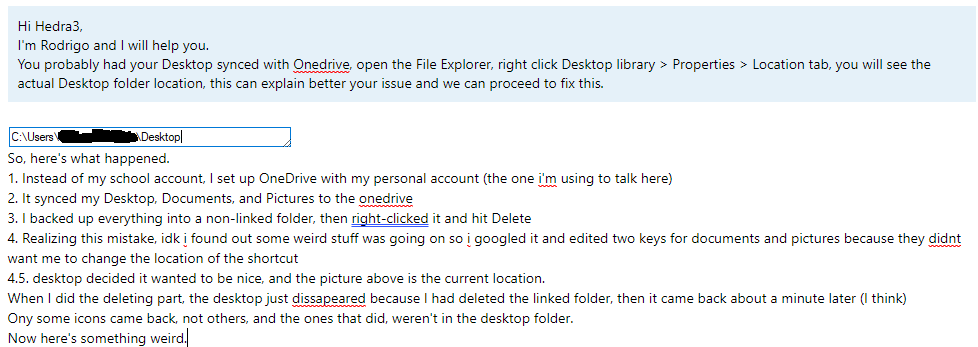
But when I was going to upload a picture of a properties > details part of it, I noticed the ones that came back were, not in my desktop, if that makes any sense. This is what I mean:
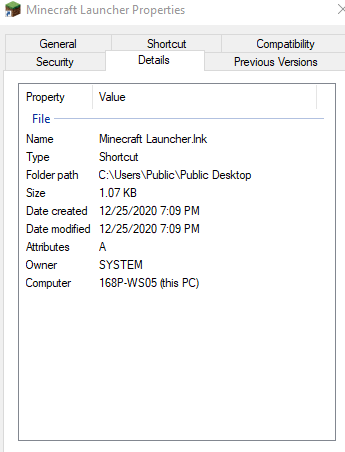
At least I managed to figure it out. Wait, I noticed something else wrong. Other than the wrong path, it's attributes are A, which I know to be administrator. Anyone know why?
Quick edit: Found the public desktop folder, and everything that isn't in my normal desktop is there. Honestly, no idea what to do from here.
' cx='32' cy='32' r='32' /%3E%3Ctext x='50%25' y='55%25' dominant-baseline='middle' text-anchor='middle' fill='%23FFF' %3EA%3C/text%3E%3C/svg%3E)

