Share via

Windows 10 Virtualization disable/enable

Ian Xue 81 Reputation points
2020-08-07T09:56:58.483+00:00

As i know, it's not possible to easily disable/enable Hyper-V without reboot on win10. But maybe is there a way to somehow "Hide" it from another applications? Maybe "Half disable/stop running Hyper-V apps". Bcs it's not convenient to reboot all the time, if i need to run an app that requires disabled Hyper-V.

source link
https://social.technet.microsoft.com/Forums/en-US/dc318d64-1fd0-42de-8486-bba08ad0ac02/windows-10-virtualization-disableenable?forum=win10itprovirt

Windows for business | Windows Client for IT Pros | Storage high availability | Virtualization and Hyper-V
0 comments No comments

3 answers

Sort by: Most helpful
  1. Paul Dash 31 Reputation points
    2020-09-27T15:16:29.67+00:00

    If you want to "hide" virtualization from an app, how about running it in a child partition, meaning launch it in its own virtual machine. Provided you don't have nested virtualization enabled, this should make the app see a processor without the virtualization extensions.

    Then again... if the app is looking for that, maybe it's trying to use those extensions for its own purposes. What's your exact scenario?

    Was this answer helpful?

    0 comments No comments

  2. Anonymous
    2020-08-07T10:02:06.273+00:00

    Hi,

    Thank you for your question.

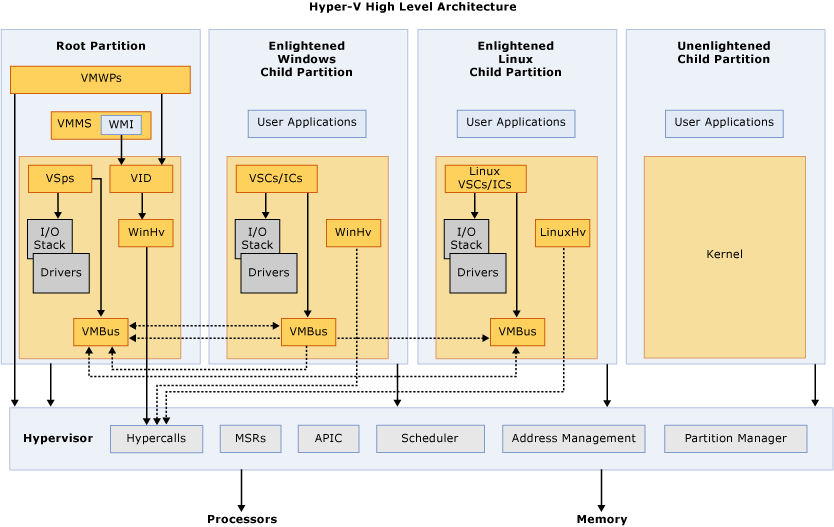
    As per my understanding, you're trying to disable Hyper-V without rebooting. Unfortunately, the role of Hyper-V can't be disabled without rebooting once it's installed. In fact Hyper-V is not an application running on Windows, but an underlying virtualization hypervisor. The hypervisor is the virtualization platform and supports isolation in terms of a partition. A partition is a logical unit of isolation in which operating systems execute. The host Windows runs in the root partition which creates the child partitions.
    16405-hv-architecture.png

    You may refer to the link below for more details

    https://learn.microsoft.com/en-us/virtualization/hyper-v-on-windows/reference/hyper-v-architecture

    Was this answer helpful?

    0 comments No comments

  3. Leon Laude 86,116 Reputation points
    2020-08-07T10:02:04.287+00:00

    Hi,

    Unfortunately it is not possible to "partially" disable Hyper-V, either you disable or enable it properly which requires a restart.
    The Hyper-V role is not something you keep enabling or disabling, it should be a one time thing.


    (If the reply was helpful please don't forget to accept as answer, thank you)

    Best regards,
    Leon

    Was this answer helpful?

    0 comments No comments

Your answer

Answers can be marked as 'Accepted' by the question author and 'Recommended' by moderators, which helps users know the answer solved the author's problem.