Note
Access to this page requires authorization. You can try signing in or changing directories.
Access to this page requires authorization. You can try changing directories.
Transform your traditional CRUD web applications for the AI era by adding agentic capabilities with frameworks like Microsoft Semantic Kernel, LangGraph, or Foundry Agent Service. Instead of users navigating forms, textboxes, and dropdowns, you can offer a conversational interface that lets users "talk to an agent" that intelligently performs the same operations your app provides. This approach enables your web app to reason, plan, and take actions on behalf of users.
Overview
Agentic web applications represent a paradigm shift from traditional web interfaces. Rather than requiring users to understand and navigate your application's structure, agentic apps use AI to understand user intent, plan multi-step actions, and execute complex workflows autonomously.
Key characteristics of agentic web applications include:
- Conversational interfaces: Users express goals in natural language rather than clicking through forms
- Autonomous reasoning: Agents break down complex requests into executable steps
- Multi-step planning: Agents chain multiple operations to accomplish sophisticated tasks
- Tool usage: Agents call your existing APIs and functions as needed to complete user requests
- Context awareness: Agents maintain conversation history and application state across interactions
- Error handling: Agents recover from failures and adapt their approach based on results
Frameworks like Semantic Kernel, LangGraph, and Foundry Agent Service provide the orchestration layer that connects large language models with your application's business logic, enabling these agentic capabilities in your App Service applications.
When to build agentic web applications
Consider adding agentic capabilities when:
- Complex workflows are common: Users frequently need to perform multi-step operations that could be simplified through conversation
- Domain expertise is required: Your application requires specialized knowledge that an AI agent can learn and apply
- User experience matters: You want to reduce training time and make your application more intuitive
- Data exploration is important: Users need to query, analyze, and visualize data in flexible ways
- Task automation is valuable: Repetitive or time-consuming workflows could benefit from AI-assisted completion
Agentic patterns work especially well for enterprise applications, data analysis tools, content management systems, and administrative interfaces where the combination of natural language understanding and automated workflows provides significant productivity gains.
Choosing an agent framework
App Service supports any agent framework that runs on your chosen language stack. You have complete flexibility to use the tools and frameworks that best fit your needs. Popular options include:
- Semantic Kernel: Microsoft's cross-platform SDK for .NET, Python, and Java, ideal for building custom agents with full control
- LangGraph: Python and JavaScript framework for building stateful, multi-agent systems with complex workflows
- Foundry Agent Service: Managed service for hosting production-ready agents with built-in monitoring and scalability
- Custom frameworks: Any other agentic framework supported by your language (e.g., AutoGen, CrewAI, or proprietary solutions)
Get started with tutorials
- Tutorial: Build an agentic web app in Azure App Service with Microsoft Semantic Kernel or Foundry Agent Service (.NET)
- Blog series: Build long-running AI agents with Microsoft Agent Framework
Monitor agents in App Service
When you build your agent in code that runs on App Service (orchestration in your application), the agent metrics aren't visible in Azure AI Foundry because Foundry only sees fully managed Foundry agents. To close that gap, App Service surfaces an AI (preview) blade with an Agents tab that aggregates per-agent telemetry directly from your application:
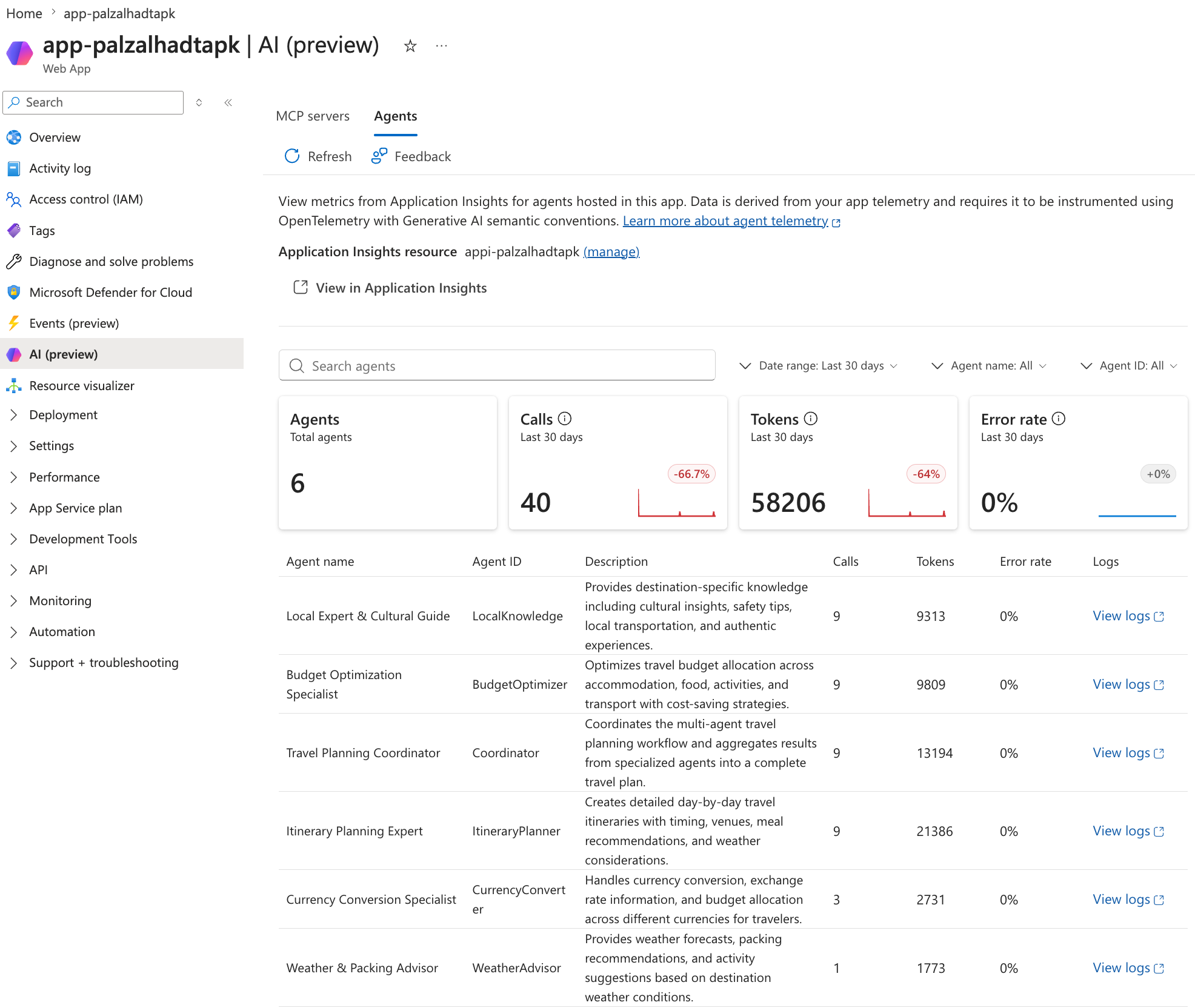
The tab lights up when your app meets three requirements:
- Application Insights is connected to your App Service app. The Agents tab reads telemetry from the connected Application Insights resource.
- Your app emits OpenTelemetry traces and metrics. The Azure Monitor OpenTelemetry distro is the recommended way to wire this up for .NET, Python, Node.js, and Java apps. For more information, see Enable Azure Monitor OpenTelemetry.
- Your agents emit the OpenTelemetry generative AI semantic conventions. The Agents tab groups and aggregates on the
gen_ai.agent.name,gen_ai.agent.id, andgen_ai.usage.*attributes. Most agent frameworks (including Microsoft Agent Framework, Semantic Kernel, and LangGraph) can be configured to emit these attributes.
From the Agents tab, select View in Application Insights to open the Agents (preview) view in Application Insights, where you can drill into agent runs, tool calls, token consumption by model, and traces with Gen AI errors.
Get started monitoring your agents
- Tutorial: Monitor a multi-agent app on App Service with OpenTelemetry and Application Insights (.NET)
- Application Insights overview
- Agents (preview) view in Application Insights