Hello @LD ,
Thank you for taking time to post this issue in Microsoft Q&A forum.
If you want to import the files into the project and keep the folder structure, this method may work, please refer to following steps:
1). Prepare the folders and subfolders.
2). Put the folders into the bin (folder) > Debug or Release folder in your project folder.
3). Open your project in Visual Studio > click the Show All Files button > expand the bin, Debug > select and right-click the parent folder > choose Include in Project option.
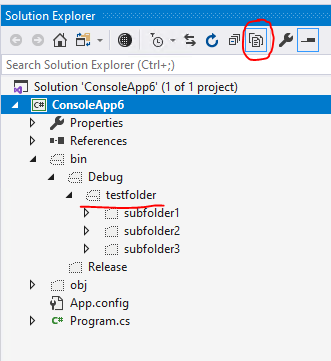
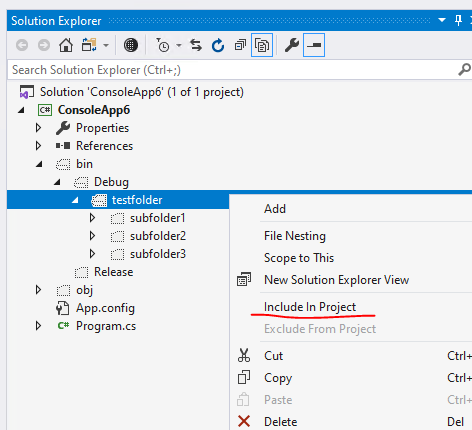
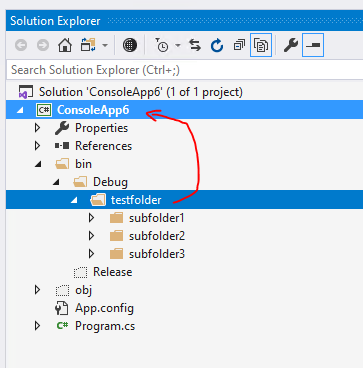
4). Select and drag the parent folder to your project > click OK, if you see a pop-up window mentioned One or more files will be moved to XXXX… > the parent folder and the subfolders will be moved and included in your project.
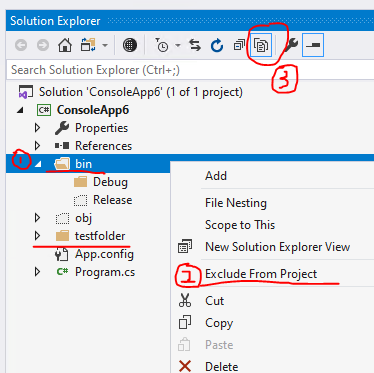
5). Right-click the bin > choose Exclude From Project > after that the bin folder will be exclude from your project > then click the Show All Files button again.
I hope this helps.
Sincerely,
Tianyu
- If the answer is helpful, please click "Accept Answer" and upvote it.
Note: Please follow the steps in our documentation to enable e-mail notifications if you want to receive the related email notification for this thread.
' cx='32' cy='32' r='32' /%3E%3Ctext x='50%25' y='55%25' dominant-baseline='middle' text-anchor='middle' fill='%23FFF' %3EL%3C/text%3E%3C/svg%3E)
' cx='32' cy='32' r='32' /%3E%3Ctext x='50%25' y='55%25' dominant-baseline='middle' text-anchor='middle' fill='%23FFF' %3ETS%3C/text%3E%3C/svg%3E)
' cx='32' cy='32' r='32' /%3E%3Ctext x='50%25' y='55%25' dominant-baseline='middle' text-anchor='middle' fill='%23FFF' %3ED%3C/text%3E%3C/svg%3E)