Share via

PowerShell script Help

AMITGUY 181 Reputation points
2020-11-11T03:58:02.043+00:00

Hello,

I am writing a script but the output is not really comming out the way I need it to. I have already tried export-csv -notypeinformation etc. Just need another look or suggestion, thanks in advance. Below is my script:

ForEach ($system in Get-Content "c:\temp\servers.txt")
{
Clear-Variable -Name "ClientInfo"
cls
$ClientName = $system
$HostID = (Get-CsHostId -Filter "hostname:'$ClientName'")
$HostID2 = $HostID.resources
$ClientInfo = (Get-CsHostinfo $HostID2).resources
$ClientInfo2 = $ClientInfo.hostname, $ClientInfo.device_id
$PathFolder = "C:\temp\"
$PathFile = "Results.csv"
$PathFinal = $PathFolder + $PathFile
$ClientInfo2 | Out-File -append -NoClobber $PathFinal
}

My Result file comes out this way:

         Server1
         ID1
         Server2
         ID2

What Ideally I would is my Result file to be this way:

         Server1             ID1

         Server2             ID2

Please advise. Instead of using Out-File I have already tried export-csv but I get just numbers.

Windows for business | Windows Server | User experience | PowerShell
0 comments No comments

Answer accepted by question author

Anonymous
2020-11-13T09:14:40.42+00:00

Hi,

The hostname and device_id are seperated in the csv with the second route. When you import it with Import-Csv $PathFinal or open it in excel, it looks like this

hostname device_id  
-------- ---------  
server1  ID1  

Best Regards,
Ian

============================================

If the Answer is helpful, please click "Accept Answer" and upvote it.
Note: Please follow the steps in our documentation to enable e-mail notifications if you want to receive the related email notification for this thread.

Was this answer helpful?


4 additional answers

Sort by: Most helpful
  1. Bill Stewart 186 Reputation points
    2020-11-13T14:30:49.24+00:00

    I don't have the objects you're referencing, but I am guessing you are looking for something like the following:

    Get-Content "C:\temp\servers.txt" | ForEach-Object {
      $csHostId = Get-CsHostId -Filter "hostName:$_"
      $csHostInfoRes = Get-CsHostInfo $csHostId.resources
      [PSCustomObject] @{
        "hostname" = $csHostInfoRes.hostname
        "deviceid" = $csHostInfoRes.device_id
      }
    } | Export-Csv "C:\temp\results.csv" -NoTypeInformation
    

    Was this answer helpful?

    1 person found this answer helpful.
    0 comments No comments

  2. Andrew Eckrich 16 Reputation points
    2020-11-13T10:49:51.003+00:00

    For Microsoft/Windows scripts,try the TechNet link below.

    https://gallery.technet.microsoft.com/scriptcenter

    Was this answer helpful?

    0 comments No comments

  3. AMITGUY 181 Reputation points
    2020-11-13T05:12:59.747+00:00

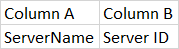
    Thank you for providing this. I tried both routes, however I would like the result in a CS in seperate columns

    Column A  
ServerID

    Was this answer helpful?

    0 comments No comments

  4. Anonymous
    2020-11-11T06:32:23.9+00:00

    Hi,

    If you just want to output the array in one line youcan simply add -join " "

    $ClientInfo2 -join " " | Out-File -append -NoClobber $PathFinal  
    

    If you want to export to a csv file it could be like this

    $ClientInfo2 = [pscustomobject] @{  
        hostname = $ClientInfo.hostname  
        device_id = $ClientInfo.device_id  
    }  
    $ClientInfo2 | Export-Csv -Append -NoClobber $PathFinal  
    

    Best Regards,
    Ian

    ============================================

    If the Answer is helpful, please click "Accept Answer" and upvote it.
    Note: Please follow the steps in our documentation to enable e-mail notifications if you want to receive the related email notification for this thread.

    Was this answer helpful?

    0 comments No comments

Your answer

Answers can be marked as 'Accepted' by the question author and 'Recommended' by moderators, which helps users know the answer solved the author's problem.