Microsoft 365 and Office | SharePoint | For business | Windows
A group of Microsoft Products and technologies used for sharing and managing content, knowledge, and applications.

This browser is no longer supported.
Upgrade to Microsoft Edge to take advantage of the latest features, security updates, and technical support.
' cx='32' cy='32' r='32' /%3E%3Ctext x='50%25' y='55%25' dominant-baseline='middle' text-anchor='middle' fill='%23FFF' %3ECC%3C/text%3E%3C/svg%3E)
Hi All,
Is it possible to stop users from see any documents on a SharePoint site that they have not created/uploaded themselves but be able to upload/create documents on the site? Can this be done in site permissions?
We want to limit what a certain user can see on one of our SharePoint sites. Any help would be appreciated.
Thanks,
Cathal
A group of Microsoft Products and technologies used for sharing and managing content, knowledge, and applications.

Hi @Cathal Condon ,
I'm looking into your issue now and I will reply you as soon as possible.
Thanks for your understanding and patience :-)
Thanks,
Elsie Lu
Hi @Cathal Condon ,
Would you tell me whether your issue has been resolved or have any update ?
I am looking forward to your reply.
Thanks,
Elsie Lu
Hi @Cathal Condon ,
Per my test, this requirement can be directly realized in the list, you can go to the list settings> Advanced settings>Read Access:
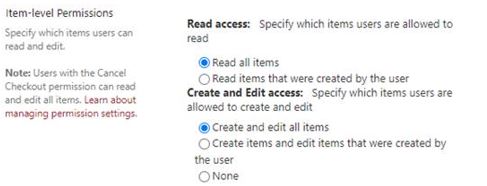
As far as I know, there is no such setting in the Document library. If you have the edit permission, you can set who can view or edit the Item through Manage Access. However, this method may not be very convenient if there are many files, and it may also affect Performance.
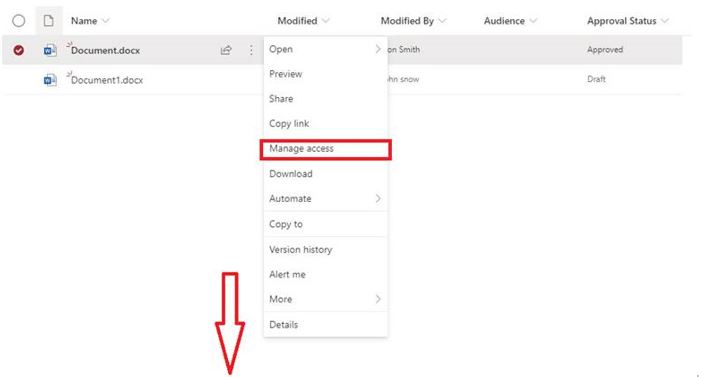
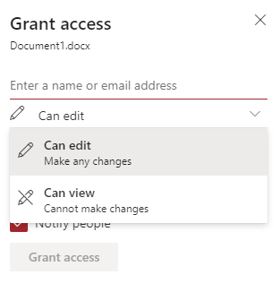
Another way is : Enable Draft Item Security.
If you enable Content Approval on the library, you have the option of limiting draft visibility to only approvers and the item author. However, as soon as a document is published for all to see, the library's permissions will apply as normal.
Here is an official document you can have a look:
https://support.microsoft.com/en-us/office/require-approval-of-items-in-a-list-or-library-cd0761c4-8c3f-4ea2-9435-13c28aa23d08
In your case, maybe you can do not give this user permission in this site, create a separate library, share with the user and then give him unique permissions in this library. If you need to synchronize files to other libraries, you can use flow or manually transfer.
Similar post for your reference:
https://social.technet.microsoft.com/Forums/azure/en-US/089f997a-e4fa-43ab-9ba0-a983b80940d6/how-can-we-force-a-user-to-only-edit-the-document-that-he-has-submitted?forum=sharepointgeneralprevious
If the answer is helpful, please click "Accept Answer" and upvote it.
Note: Please follow the steps in our documentation to enable e-mail notifications if you want to receive the related email notification for this thread.

hi please find the link
https://support.google.com/a/users/answer/9308868?hl=en
hope you will fix the issue if issue resolve please accept answer