Share via

DNS setup in test environment

Tim 41 Reputation points
2021-03-14T20:11:04.567+00:00

Hello, I hope someone can help me with setting up a dns server in my home test environment. Essentially I don’t need DC or DHCP just DNS but I cant seem to get it to work. I have a DNS Server and SQLServer I’m trying to get DNS working with before adding other servers. ![77581-image.png][1] ![77504-image.png][2] I am creating this set up in hyper v and on the DNS server I have done as follows 1. Added DNS feature via Server Manager 2. Went through configuration wizard ![77571-image.png][3] But it didnt seem to be working and on dns server nslookup gave a timeout message and could not resolve its own hostname. I then added a reverse lookup zone. ![77515-image.png][4] nslookup no longer gives the timeout message but still cannot resolve dnsserver or sqlserver host names. I also restarted the DNS server service at various points. I thought that the records would be added automatically but this did not happen so I manually added them: ![77573-image.png][5] I also added the ip of the dnsserver in the following location ![77563-image.png][6] However, after trying these steps and searching online it’s still not working as per below output from dnsserver. ![77574-image.png][7] Kind regards, Tim [1]: /api/attachments/77581-image.png?platform=QnA [2]: /api/attachments/77504-image.png?platform=QnA [3]: /api/attachments/77571-image.png?platform=QnA [4]: /api/attachments/77515-image.png?platform=QnA [5]: /api/attachments/77573-image.png?platform=QnA [6]: /api/attachments/77563-image.png?platform=QnA [7]: /api/attachments/77574-image.png?platform=QnA

Windows for business | Windows Client for IT Pros | Networking | Network connectivity and file sharing
0 comments No comments

Answer accepted by question author

Anonymous
2021-03-15T03:55:51.267+00:00

Hi ,

For DNS in workgroup environment, if we want DNS service to properly work, you need configure with a Primary DNS Suffix matching one of the zones that DNS will be authoritative for (meaning that DNS is hosting the zone).

Otherwise, you will occur the following problem:
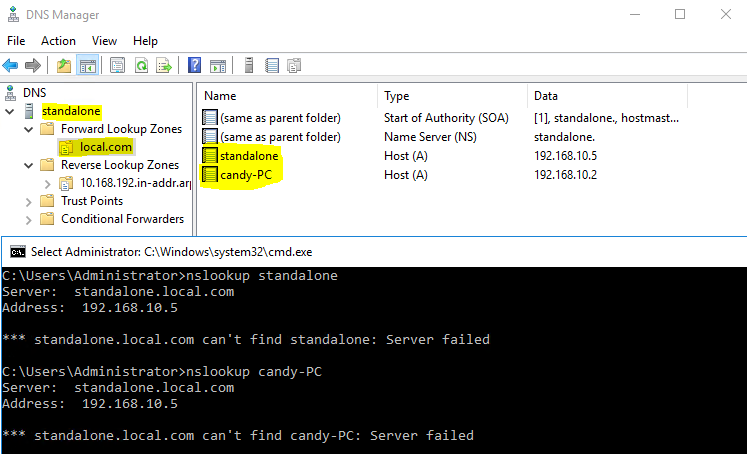
77560-1.png

Please configure the Primary DNS Suffix as picture below:
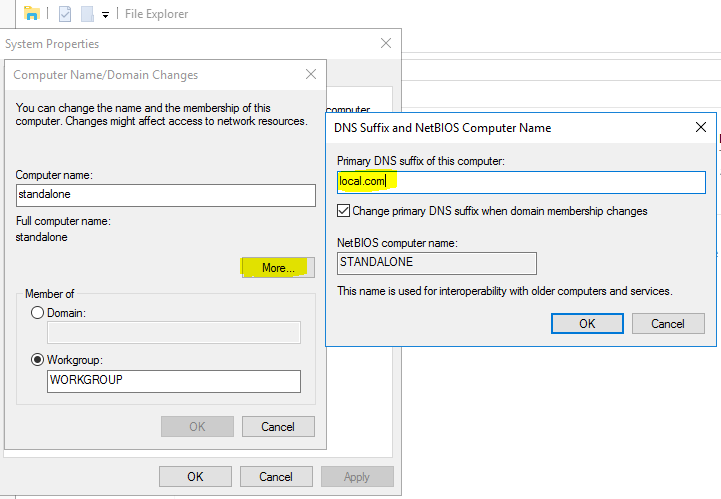
77545-2.png

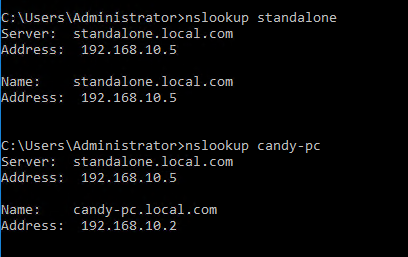
After the restart, nslookup will work fine on DNS server:
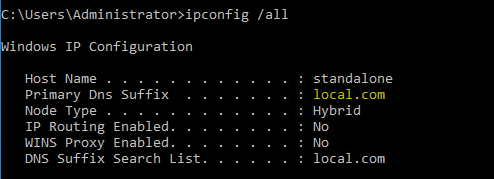
77625-3.png

77632-image.png

For more details ,you can refer to the following article. This will help you understand better:

https://blogs.msmvps.com/acefekay/tag/dns-in-a-workgroup/

Best Regards,

Candy

--------------------------------------------------------------

If the Answer is helpful, please click "Accept Answer" and upvote it.

Note: Please follow the steps in our documentation to enable e-mail notifications if you want to receive the related email notification for this thread.

Was this answer helpful?

0 comments No comments

1 additional answer

Sort by: Most helpful
  1. Tim 41 Reputation points
    2021-03-15T19:13:34.26+00:00

    Thanks Kitty Cat Candy. Looks like I have some reading to do but it appears you've give me the last piece I was missing.

    Was this answer helpful?


Your answer

Answers can be marked as 'Accepted' by the question author and 'Recommended' by moderators, which helps users know the answer solved the author's problem.