Developer technologies | Visual Studio | Debugging
A core feature of Visual Studio that allows developers to inspect, analyze, and troubleshoot code during execution.
This browser is no longer supported.
Upgrade to Microsoft Edge to take advantage of the latest features, security updates, and technical support.
' cx='32' cy='32' r='32' /%3E%3Ctext x='50%25' y='55%25' dominant-baseline='middle' text-anchor='middle' fill='%23FFF' %3EBM%3C/text%3E%3C/svg%3E)
I'm using Visual Studio 2019 to build a MUD (a text based game popular in the early '90's). I'm trying to figure out a way to "play the game" and watch the code execute while I'm doing it. And by "play the game" I mean enter a command like "cast 'acid blast' goblin", set a break point in the code where that command is initiated and then step through the code line-by-line and see the output as it shows in the game. Yes, I realize I might have to step through 90 lines of code before I see output but that's the point. I want to see how a particular command is executed.
The problem I'm running into is the game as it is runs from an executable created when the code compiles. I run the .exe file from a DOS prompt and the game runs in the background. I connect to the game from a MUD client and play the game that way. I can enter "cast 'acid blast' goblin" in the game client but I can't see the code at that point. I need a way to start the game from VS and be able to enter commands and watch the code while it executes in VS.
Do you guys know how to do that?
A core feature of Visual Studio that allows developers to inspect, analyze, and troubleshoot code during execution.
' cx='32' cy='32' r='32' /%3E%3Ctext x='50%25' y='55%25' dominant-baseline='middle' text-anchor='middle' fill='%23FFF' %3EPM%3C/text%3E%3C/svg%3E)
Hi, @Bishop Minter
I have not heard from you for a couple of days. Please let me know if there is anything that I can help here.
I'll try to explain it another way. When I open the game in VS it compiles just fine. When I open the game via the executable created by VS the game works fine. The problem is this: When I'm playing the game I can enter a command like "cast 'acid blast' goblin" or "cast 'detect invis'". If I have the code open in VS I need a way to enter commands like that in the debugger so I can see the order of operations in which the code executes that command. In other words, I need to be able to open a working version of the game from VS. I've seen this done before where you have a DOS (or command line) interface on one screen and the game running in VS on another. I can put a break point at the first function called when a command is entered at the command line. Then I can go step-by-step in the debugger and see how the command is actually executed from the moment the command is entered at the command line to the output displayed on the command line once the command has successfully completed.
This game was written over 10 years ago and this is how the games creator describes the execution of a spell:
"Lets assume a player is already connected, and logged in and has the spell etc.
The player types "cast 'acid blast' target", game_loop() recognizes that there is input waiting from the player connection, it redirects the input to interpret() which finds there is a cast command... it then executes the function for this command - do_cast(). do_cast() redirects to do_newcast() which searchs skill_table[] for a spell called "acid blast", after finding it and confirming it has a spell function set, it then executes the spell function (Which is called spell_acid_blast() in this case), and that function does what it is supposed to do."
So let's say I've compile the code and it creates an executable called "reignofshadow.exe". I open a command prompt in Windows 10 and run the executable.
Once this executable runs, the game remains open in the same command prompt window "in the background"
I open a mud client that allows me to connect to the game
https://d.pr/i/4QstsT
https://d.pr/i/CInD3j
Once I'm playing the game I can enter commands like "cast 'acid blast' goblin"
This is where the problem comes in. Once I'm playing the game it's completely disconnected from the code I have open in VS. There's no way for the code in VS to know I've entered a command in my mud client and thus no way for me debug that command. I need a way to start the game from VS that I can play from a command prompt (not using a mud client at all) so I can enter commands and then step through the code in the debugger. So using the image above as reference, I want to be able to enter the command "cast 'acid blast' goblin" at the command prompt, jump back to VS and watch the code execute, line by line, from game_loop(), to interpret(), to do_cast(), to do_newcast(), to skill_table[], to spell_acid_blast() until the game outputs the "You are fighting to kill in this fight." back to the command prompt.
I hope this more clearly explains what I'm needing.
' cx='32' cy='32' r='32' /%3E%3Ctext x='50%25' y='55%25' dominant-baseline='middle' text-anchor='middle' fill='%23FFF' %3EDL%3C/text%3E%3C/svg%3E)
It appears from your screen shots that you have 2 programs:
You appear to want to debug the server process - which presumably receives some information from the commands you enter in the client application.
You should be able to start debugging the server from the loaded solution in Visual Studio by pressing F5.
When you run the client and execute a command, if you know where such command handling is done in the server, you should be able to hit a suitably placed breakpoint.
I guess I'm not explaining myself very well. I know how to debug code. I'm not asking how to set a break point. I need to know how to run an application from VS so that I have a command line where I can enter commands into the application and debug the commands given. I know there is a way to do this but I don't think anyone understands what I'm asking for...
You're right - I don't understand your problem.
Hi, @Bishop Minter
Welcome to Microsoft Q&A!
As David Lowndes-6766 said, if you want to try to set breakpoints and want to execute code line by line, you should perform these operations in debug mode.
You can refer to this document for information about debugging.
*
Update:
I don’t quite understand your needs, are you talking about application arguments?
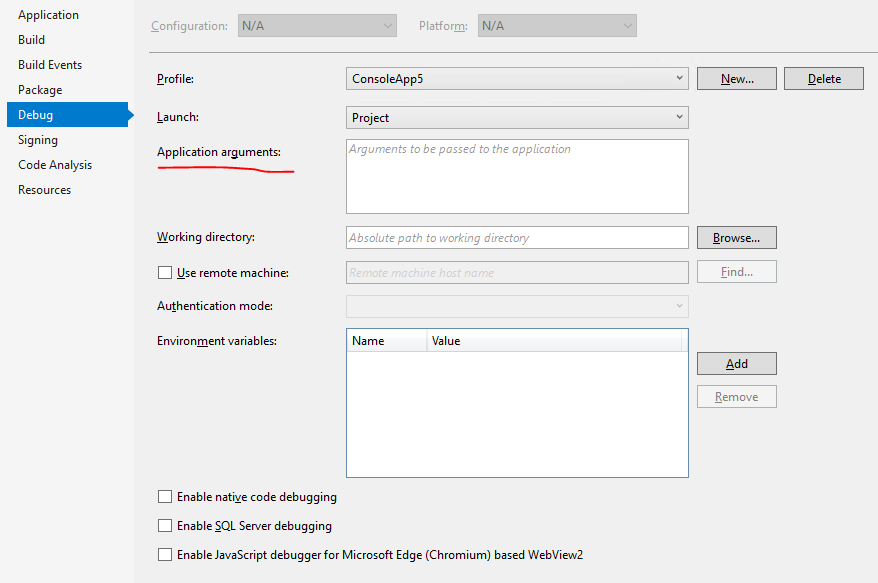
Sincerely,
Peng
*
If the answer is helpful, please click "Accept Answer" and upvote it.
Note: Please follow the steps in our documentation to enable e-mail notifications if you want to receive the related email notification for this thread
Thanks for the advice. But the MUD is started with a .exe file and played from a command prompt. If I attach to the process once it's started VS doesn't see the code and there's no way to enter commands. I need a way to start the mud from within VS so I can debug commands as I enter them.
You say "VS doesn't see the code". I'm not sure what you mean by that, but are you building and debugging a debug version of the program? It's normal for a release build not to have the debug information available, so ensure you're trying to debug a debug build configuration.
You should be able to attach the VS debugger to the process that you start from the command line - or just debug that project from VS directly.