Describe Microsoft Sentinel integration with Microsoft Security Copilot
Microsoft Sentinel integrates with Microsoft Security Copilot to bring AI-assisted capabilities directly into security operations workflows. Rather than replacing analyst judgment, the integration surfaces relevant context faster—so your team can investigate and respond to threats more efficiently.
How the integration works
The integration between Microsoft Sentinel and Security Copilot works across two experiences:
- The embedded experience in the Microsoft Defender portal: Because Microsoft Sentinel incidents are unified with Microsoft Defender XDR incidents in the Defender portal, Security Copilot capabilities are available for any incident—including those that originate in Microsoft Sentinel. Analysts can summarize incidents, analyze scripts, assess suspicious files, and generate reports without leaving the portal.
- The standalone Security Copilot experience: Security Copilot connects to Microsoft Sentinel as a data source through two plugins—Microsoft Sentinel and Natural language to KQL for Microsoft Sentinel. These plugins allow analysts to ask questions about incidents and data in a conversational, chat-based interface.
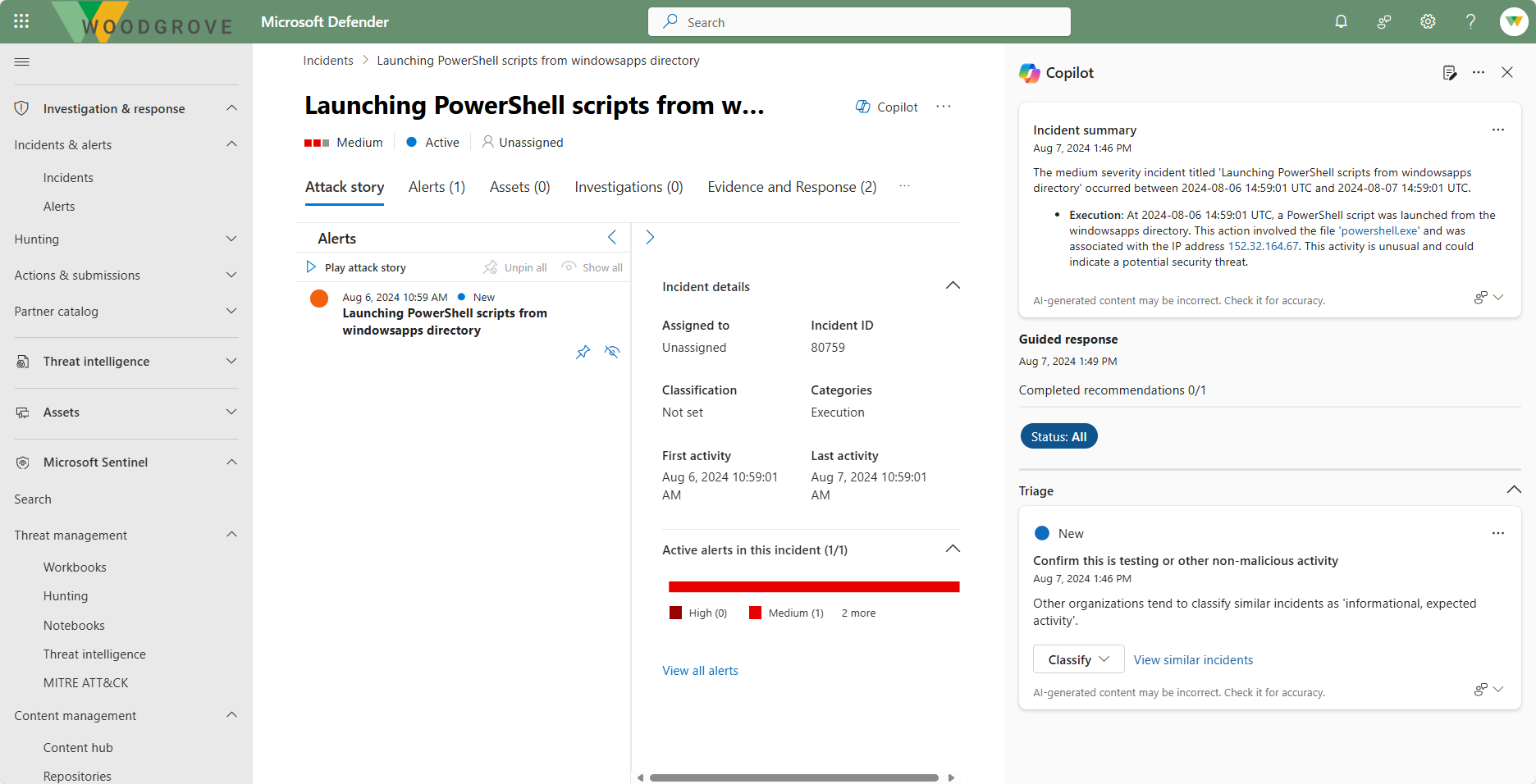
Security Copilot capabilities in the Defender portal
When Microsoft Sentinel is onboarded to the Defender portal, the following Security Copilot capabilities are available for Microsoft Sentinel incidents and data.
Incident summarization
When you open a Microsoft Sentinel incident, Security Copilot automatically generates a natural-language summary describing what happened, which entities are involved, and what the likely impact is. The summary includes the attack timeline, affected assets, indicators of compromise (IoCs), and threat actor names when available. This helps analysts quickly understand the scope of a threat without manually reviewing every alert and log entry.
Guided responses
Security Copilot provides AI-generated response recommendations specific to each incident. Recommendations are organized into four categories: triage (classify the incident), containment (stop the attack from spreading), investigation (further analysis steps), and remediation (specific actions for affected entities). These aren't automated actions—they're suggestions that help analysts decide how to proceed, especially useful for less experienced team members.
Script and command-line analysis
Attackers often use obfuscated scripts to avoid detection. Security Copilot can analyze potentially malicious scripts, such as PowerShell command lines, and provide a plain-language explanation of what the script does, whether it's malicious, and which MITRE ATT&CK techniques it uses. This eliminates the need for external reverse-engineering tools and lets analysts of varying experience levels assess threats quickly.
File analysis
Security Copilot assesses suspicious files by generating a summary that includes detection information, related file certificates, API calls, and strings found in the file. This analysis is generated automatically when an analyst opens a file page, accelerating investigation of potentially malicious files associated with Microsoft Sentinel incidents.
Identity and device summarization
During an investigation, analysts often need to assess whether a user account is compromised or whether a device is at risk. Security Copilot generates:
- Identity summaries that include the user's role, recent role changes, sign-in behaviors, authentication methods, and risk flags from Microsoft Entra ID.
- Device summaries that include the device's security posture, protection status, unusual activity, vulnerable software, and relevant Microsoft Intune information.
These summaries let analysts quickly evaluate the entities involved in a Microsoft Sentinel incident without navigating to multiple consoles.
Incident report generation
After an investigation, Security Copilot can compile all incident information—including the summary, response actions taken, timestamps, analysts involved, and classification reasoning—into a structured report. Analysts can export the report to PDF or post it to the incident activity log, saving significant documentation time.
Natural language to KQL for threat hunting
Threat hunting in Microsoft Sentinel typically requires writing queries in Kusto Query Language (KQL), which has a learning curve. The natural language to KQL capability lets analysts describe what they're looking for in plain language, and Security Copilot generates a ready-to-run KQL query against Microsoft Sentinel data.
For example, an analyst can type "Show me sign-in attempts from unfamiliar locations in the last 48 hours" and receive a KQL query they can run immediately or refine. This capability is available in both the standalone experience and the advanced hunting section of the Defender portal.
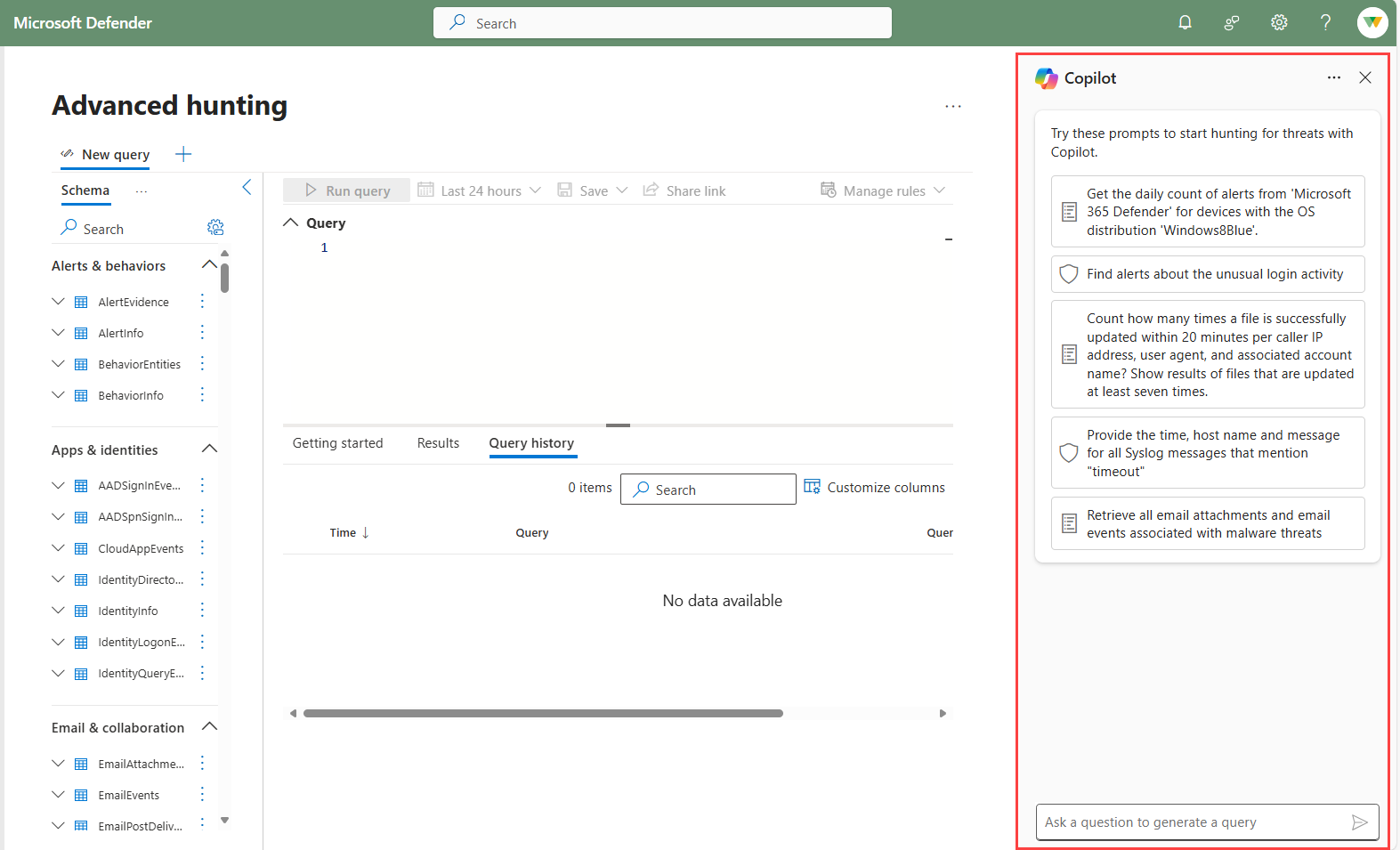
Threat intelligence
Security Copilot consolidates and summarizes threat intelligence to help security teams understand which threats are most relevant to their environment. Analysts can ask Copilot to summarize threats based on their organization's exposure levels or find threat actors that might target their industry.
AI agents
In addition to the analyst-driven capabilities described above, Security Copilot includes autonomous AI agents that operate in the background. Two agents are especially relevant for Microsoft Sentinel:
- Security Alert Triage Agent—an autonomous agent that helps security teams triage alerts at scale. It applies AI-driven reasoning across evidence to classify alerts for supported security workloads—including phishing, identity, and cloud alerts—delivering clear verdicts that identify which alerts represent real attacks and which are false positives. This enables analysts to focus on investigating genuine threats, with transparent, step-by-step reasoning to support every decision.
- Dynamic Threat Detection Agent—an always-on service that uses AI to identify gaps in traditional rule-based detection by correlating alerts, events, anomalies, and threat intelligence across Microsoft Defender and Microsoft Sentinel environments. When it identifies a threat that traditional rule-based detection missed, it generates a dynamic alert with full context, natural language explanations, mapped MITRE ATT&CK techniques, and recommended remediation steps.
The standalone experience
In the standalone Security Copilot portal, the Microsoft Sentinel plugin lets analysts interact with their security data conversationally. Analysts can ask questions like "What are the top five high priority Microsoft Sentinel incidents?" or "Tell me about the entities associated with that incident." The Microsoft Sentinel incident investigation promptbook assembles a sequence of prompts automatically—retrieving the incident report, related alerts, reputation scores, and details about users and devices involved—giving analysts a structured starting point.
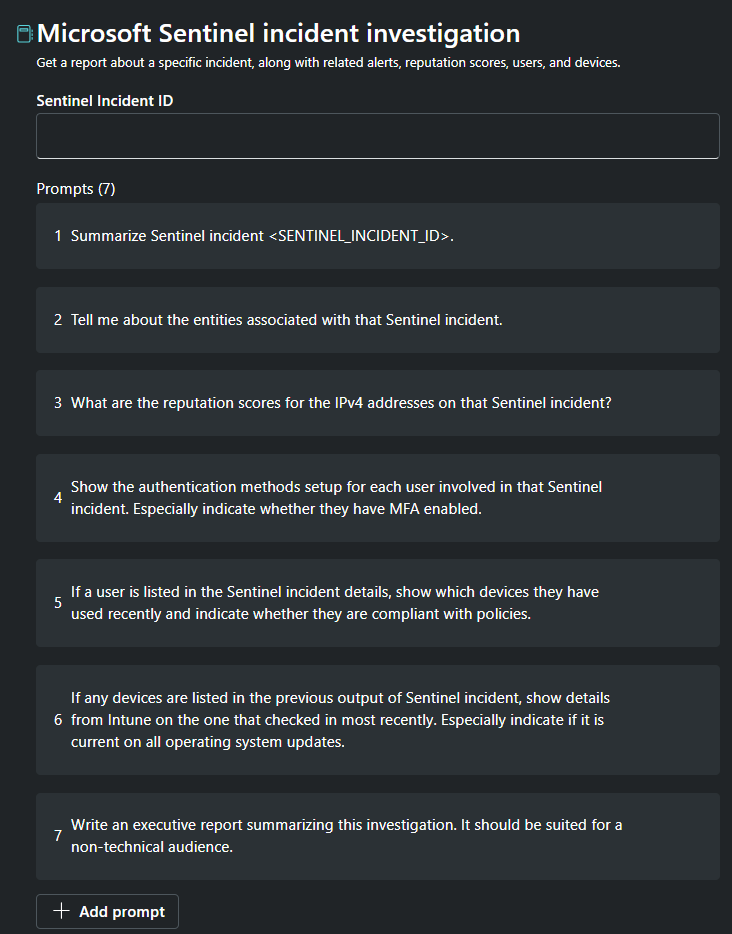
Why this integration matters
Security operations teams deal with high volumes of alerts, complex investigations, and time pressure. The integration of Microsoft Sentinel with Security Copilot helps address those challenges by:
- Reducing investigation time: AI-generated summaries, script analysis, and file analysis help analysts understand incidents in minutes rather than hours.
- Making hunting more accessible: Natural language queries remove a technical barrier, enabling analysts who aren't KQL experts to participate in proactive threat detection.
- Streamlining documentation: Automated incident reports save time on post-investigation paperwork.
- Keeping humans in control: Security Copilot provides suggestions and surfaces information—analysts make the final decisions.