Monitor your networks using Azure Network Watcher
- 9 minutes
Azure Network Watcher
Azure Network Watcher is a regional service that enables you to monitor and diagnose network conditions. Network diagnostic and visualization tools help you understand, diagnose, and gain insights to your network in Azure. Network Watcher is designed to monitor and repair the network health of IaaS products that includes virtual machines, virtual networks, Application Gateways, and Load Balancers.
Azure Network Watcher (video)
Note
Network Watcher is automatically enabled when you create a virtual network.
Azure Network Watcher tools
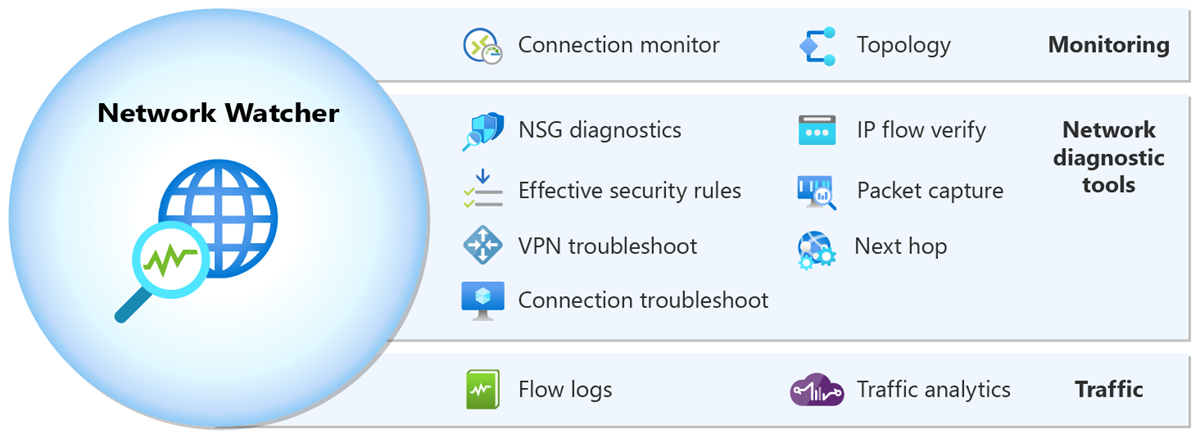
Monitoring tools
Network topology gives you an interactive map of your network across subscriptions, resource groups, and locations. You can click on resources to view traffic and connectivity details and use diagnostic tools within the map.
Connection monitor provides end-to-end connection monitoring for Azure and hybrid endpoints.
Diagnostic tools
IP Flow Verify helps you to detect traffic filtering issues at a virtual machine level. It checks if a packet is allowed or denied to or from an IP address (IPv4 or IPv6 address). It also tells you which security rule allowed or denied the traffic.
Next Hop helps you detect routing issues. It checks if traffic is routed correctly to the intended destination.
Effective security rules shows you all security rules applied to the network interface, the subnet the network interface is in, and the aggregate of both.
Connection troubleshoot tests connections between resources. For example, a virtual machine, a virtual machine scale set, or an application gateway.
Packet Capture lets you remotely create packet capture sessions to record all network traffic to and from a virtual machine (VM) or a virtual machine scale set.
NSG diagnostics detects traffic filtering issues at a virtual machine, virtual machine scale set, or application gateway level. Checks if a packet is allowed or denied to or from an IP address, IP prefix, or service tag. Identifies which security rule allowed or denied the traffic.
VPN troubleshoot enables you to troubleshoot virtual network gateways and their connections.
Traffic tools
Flow logs allows you to log information about your Azure IP traffic.
VNet flow logs (recommended): Enable logging at the virtual network level. Capture all supported workloads in the VNet without needing multi-level configuration. Also, record Azure Virtual Network Manager security admin rule decisions and traffic encryption status.
NSG flow logs: Retiring September 30, 2027. No new NSG flow logs can be created after June 30, 2025. Existing deployments should migrate to VNet flow logs.
Traffic analytics provides rich visualizations of flow logs data.
Tip
Learn more about Azure Network Watcher in the Introduction to Network Watcher training module.
Check your knowledge
Feedback
Was this page helpful?
No
Need help with this topic?
Want to try using Ask Learn to clarify or guide you through this topic?