Note
Access to this page requires authorization. You can try signing in or changing directories.
Access to this page requires authorization. You can try changing directories.
This article outlines the best practices and limitations when you use operations agents in Real-Time Intelligence.
Best practices
Operations agents help organizations operationalize clear business goals by continuously monitoring real-time data, evaluating explicit thresholds, and recommending actions when defined conditions are met. For example, operations agents help you respond proactively when inventory availability drops to a critical level. Use the following best practices for operations agents.
Eventhouse tables: If eventhouse tables contain nested columns such as JSON, flatten the tables before you configure the agent. Flat tables with descriptive column names improve the agent's ability to parse and evaluate data.
Eventhouse column descriptions: If a column's purpose is unclear from its name, add a plain-language description by using the description field in your KQL table schema. This description helps the agent interpret data values correctly.
Ingestion time column: The operations agent defaults to using the ingestion time of the table to identify when records arrived. The agent uses this value when it queries for latest data and to calculate changes in the data over time. Make sure that the ingestion time is populated.
Business object identification: If the agent needs to monitor a specific business object such as a station, sensor, or personnel record, identify the column that uniquely identifies the object (for example,
StationIDorSensorID). If you're using a KQL database source, specify which table it belongs to. If you're using an ontology source, specify the entity that the agent should use.Field name quoting: If a rule references column or property names that contain special characters, such as underscores or hyphens, enclose the column name in quotation marks (""). This practice ensures that the agent identifies it correctly.
Quantifiable conditions: If a rule uses qualitative language such as "low availability" or "high temperature," replace it with a specific numeric threshold.
- For example, use a phrase like "fewer than 3 bikes available" or "temperature exceeds 80". The agent uses the default LLM knowledge to suggest thresholds for common terms, such as "acidic conditions" means pH <7.
Rule separation: If you define multiple rules, describe each rule on a separate line or bullet point. Don't combine conditions from different rules in the same sentence.
Rule order: If the agent needs to prioritize certain rules, list higher-priority rules first. LLMs might interpret information differently based on its position in the prompt.
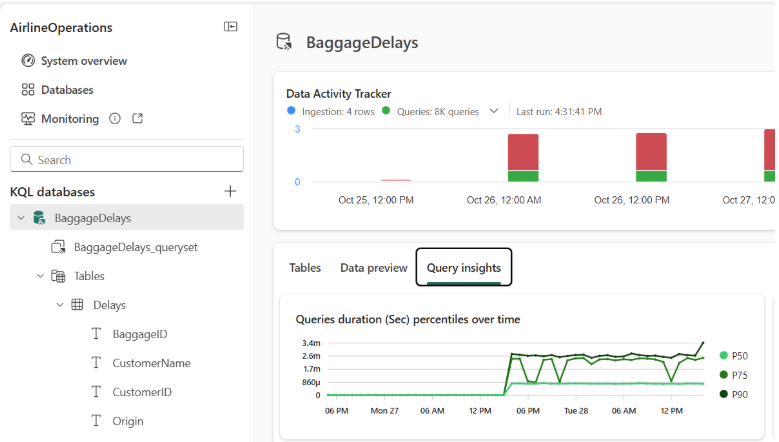
Track agent queries and data access: Review the data sources and queries the agent uses by checking the monitored Eventhouse or KQL database. Use the Query insights tab to view executed queries and validate the generated KQL.
Sample instructions
Here's an example of how you can lay out your instructions to the agent to be clear about its operational rules and the semantic information about the fields in your data.
*** Operational Instructions ***
1. Alert me when a trip has high occupancy level.
2. Alert me when a trip has high departure delay.

*** Semantic Instructions ***
1. Information about a trip can be found in 'TripUpdateFlattened' table, each identified by the 'trip_id' column.
2. Information about a vehicle can be found in 'VehiclePositionsFlat' table, each identified the 'vehicle_id' column.
3. A trip is a associated with multiple vehicles via shared trip ID.
4. Occupancy status of a trip is calculated as the latest occupancy status from the vehicle the trip is associated with. The value 'HIGH' means high occupancy level.
5. The departure delay is measured in number of seconds. Higher than 300 seconds of delay is considered significant.
Limitations
Operations agents have functional, platform, and behavioral limitations that you should consider when designing rules and monitoring scenarios.
Data source limitations
- Currently, operations agents only support monitoring data in regular Eventhouse tables. Shortcut tables, functions, and materialized views aren't supported.
- When using a Fabric Ontology as the agent's data source:
- The ontology must be in the same workspace as the operations agent.
- Ontology entities that you want the agent to monitor must have at least one static property to use as the identifier for entities. Timeseries properties should be bound to eventhouse fields.
Monitoring and rule limitations
- Ontology monitoring supports basic property values only. Aggregations such as an average, minimum, or maximum value aren't supported.
- Rules that require 'AND' conditions aren't supported (for example, braking index for a runway is over 0.8 and the surface temp is < 40).
Language and model behavior limitations
- Operations agents rely on a large language model (LLM). Outputs are probabilistic and can be incorrect, it's important to carefully review the results and recommendations they provide. For more information, see Privacy, security, and responsible use of Copilot for Real-Time Intelligence.
- Currently, operations agents only support English language for instructions and business goals.
Runtime limitations
- The agent runs queries every five minutes when active.
- Operations expire if no action is taken within three days. After expiration, actions can no longer be approved.
Permissions and access limitations
- The agent operates by using the delegated identity and permissions of its creator. This means:
- Queries and actions use the creator’s credentials.
- By default, the creator receives recommendation messages. Changing the recipient doesn't change the credentials used for queries and actions.
Messaging and throttling limitations
- Heavy usage can result in message throttling. In these cases, simplified non-LLM-generated messages might be sent in Microsoft Teams.
Regional and workspace limitations
- Operations agent is available in Microsoft Fabric regions, excluding South Central US and East US.
- Operations agent isn't currently supported in workspaces encrypted with Customer-managed keys for Fabric workspaces.