Note
Access to this page requires authorization. You can try signing in or changing directories.
Access to this page requires authorization. You can try changing directories.
Deploying updates to IoT devices at scale can be constrained by bandwidth, connectivity, and the size of update content. These constraints are especially challenging for devices connected over cellular or metered networks.
Delta updates (also called differential updates or diff updates) in Device Update for IoT Hub help address this constraint by allowing devices to download only the differences between two versions of an update instead of the full update. This approach reduces the amount of data transferred to each device and, in many scenarios, allows devices to download updates more quickly, especially on constrained or metered networks.
A single deployment can include multiple delta updates to support fleets where devices are on different starting versions.
When to use delta updates
Delta updates are most beneficial when the differences between the source and target versions represent a small portion of the full update. In these cases, the delta payload is significantly smaller than the full update, which reduces bandwidth consumption and can improve download efficiency, especially across large fleets operating on constrained or variable networks.
When most of the update content changes between versions, the delta might provide limited bandwidth savings. In those scenarios, using the full update directly might be simpler to generate and manage.
Delta updates trade additional on-device storage and processing for reduced network usage. Devices must retain a source update locally to apply a delta and perform extra computation to reconstruct the target version, which can impact total update time depending on device capabilities. Consider these trade-offs when deciding whether delta updates fit your fleet’s constraints.
Supported update formats
The current implementation of delta updates in Device Update for IoT Hub supports image-based updates delivered in SWUpdate (SWU) format. Microsoft provides this functionality as a reference implementation, including the source code for delta generation and the on-device reconstruction logic. This reference implementation demonstrates how delta updates can be integrated into a device update workflow and can be extended or adapted to support other update formats or alternative delta and reconstruction approaches as needed.
How delta updates work
A delta update is a compact update artifact that contains only the differences between two versions of an update:
- The source version is the version currently installed on the device.
- The target version is the version you want the device to run.
Instead of downloading the full target version, the device downloads the delta update and combines it with the source version already present on the device to reconstruct the full target update before installation.
Before deployment, you generate delta updates using Microsoft-provided reference tooling and import them into Device Update alongside the full target update.
Because a delta update depends on the source version, the corresponding source version must be available on the device. The Device Update agent typically caches previously installed updates for future use. If needed, you can also pre-stage source versions on the device before deployment.
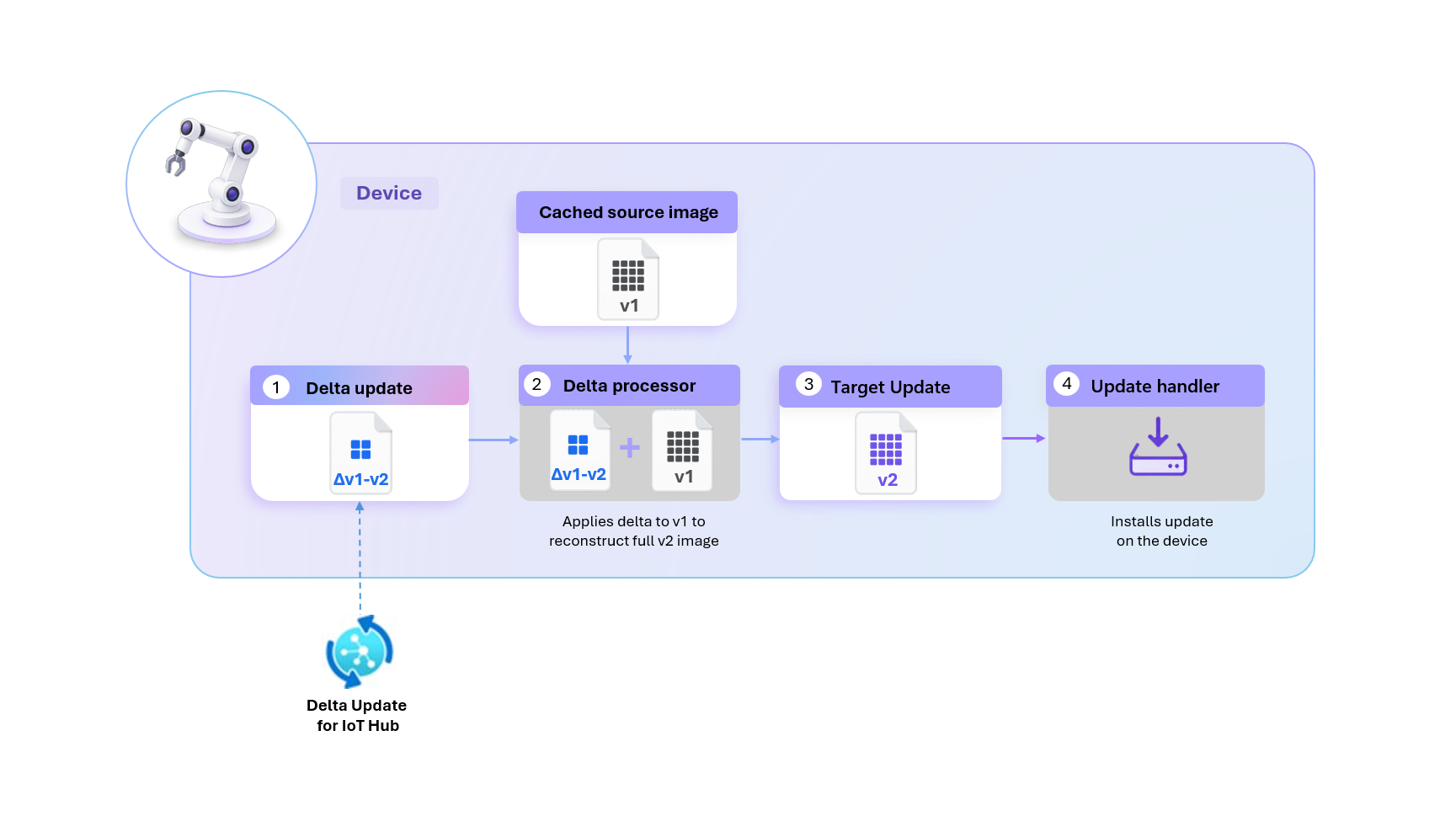
The following diagram illustrates this process at a high level. On the device, the delta update is applied by downloading a delta artifact, combining it with a cached source version to reconstruct the full target update, and then installing that update.
Deployment contents
A deployment that uses delta updates must include:
The full target update.
One or more delta updates, each generated for a specific source-to-target version transition. To serve devices on different starting versions, include a delta update for each source version you want to support (for example, a v1 → v3 delta for devices on v1 and a v2 → v3 delta for devices on v2, both targeting v3).
Always include the full target update so that devices without a compatible source version can still reach the target version. This inclusion means that adding delta updates to a deployment doesn't introduce extra risk - devices that can't use the delta path still install the full update.
For step-by-step instructions on generating and importing delta updates, see Deploy delta updates with Device Update for IoT Hub.
Per-device evaluation
When a deployment runs, the Device Update agent on each device evaluates which update path to apply based on the device's current state.
For each device:
The Device Update agent determines whether the device has a cached source update that's compatible with one of the delta updates in the deployment.
If a compatible delta update is available:
The device downloads the delta update.
The delta processor reconstructs the full target update by combining the delta update with the cached source update on the device.
The update handler installs the reconstructed update.
If no compatible delta update is available, the device downloads and installs the full target update.
Each device performs this evaluation independently. As a result, devices in the same deployment might follow different update paths depending on which cached source update is on the device and which delta updates are available.
A device applies at most one delta update per deployment. Delta updates aren't applied in sequence to reach the target version, so each delta update must be generated to go directly from a source version to the target version. If no compatible delta is available, the device installs the full target update.
Components
Delta updates rely on several components on the device to reconstruct and install updates.
Device Update agent: Orchestrates the update lifecycle on the device, including evaluating available updates, downloading content, coordinating installation, and reporting results to the service.
Delta processor: An extension that reconstructs the full target update on the device by combining the downloaded delta update with the locally available source version.
Update handler: Performs the installation of the update on the device. Different handlers support different update formats.
Supported scenarios
Delta updates support a range of deployment scenarios, from simple single-version upgrades to more complex fleet rollouts where devices are on different starting versions. If a device can't use the delta path, it installs the full target update instead, so every device in the deployment can reach the target version.
Upgrading devices on the same version
All devices in the deployment are on the same source version. You generate a single delta update between the source version and the target version, and each device applies it to reach the target.
For example, all devices are on v2. The deployment includes a delta update for v2 → v3 and the full v3 update. Each device applies the delta to reach v3.
Upgrading a mixed-version fleet
Devices in the fleet run different starting versions. A single deployment can include multiple delta updates and the full target update, so each device uses the appropriate path based on its current version. Each device applies one delta update going directly to the target version, or installs the full update if no compatible delta is available.
For example, a deployment targets v3 and includes a v1 → v3 delta, a v2 → v3 delta, and the full v3 update. Devices on v1 apply the v1 → v3 delta. Devices on v2 apply the v2 → v3 delta. Devices on any other version install the full v3 update.
Considerations
Device storage capacity: Delta updates require a source version to be available on the device. The Device Update agent caches previously installed updates, so devices need enough storage capacity to retain these cached versions in addition to the space needed for new updates.
Multiple delta update artifacts: Deployments that support delta updates include the full target update and one or more delta update files. To serve devices on different starting versions, include a delta update for each source version you want to support, with each delta going directly from the source to the target version.
Per-device path selection: Within the same deployment, devices might follow different update paths depending on which delta updates are available for their current source version. This behavior is expected.
Next steps
To generate and deploy delta updates, see: