Azure Data Factory
An Azure service for ingesting, preparing, and transforming data at scale.
This browser is no longer supported.
Upgrade to Microsoft Edge to take advantage of the latest features, security updates, and technical support.
' cx='32' cy='32' r='32' /%3E%3Ctext x='50%25' y='55%25' dominant-baseline='middle' text-anchor='middle' fill='%23FFF' %3ESK%3C/text%3E%3C/svg%3E)
Hi,
We are trying to parameterize the dates ( Source options - "Filter by last modified" start time (UTC)) in the data factory- data flow - but its not allowing us to fetch the expected result.
The date parameterization logic is not getting picked up and is getting trespassed with NO EROORS.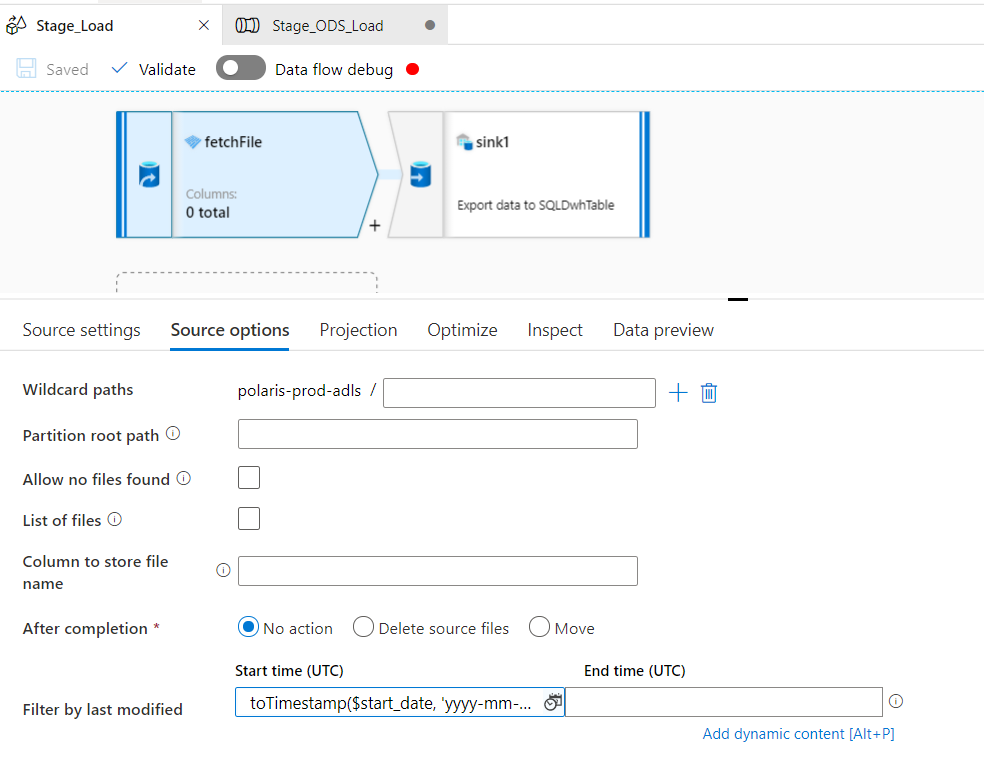
Input date format: 2021-04-12 04:53:00.0000000
Logic applied - toTimestamp($start_date, 'yyyy-mm-dd\'T\'HH:mm:ss')
An Azure service for ingesting, preparing, and transforming data at scale.
' cx='32' cy='32' r='32' /%3E%3Ctext x='50%25' y='55%25' dominant-baseline='middle' text-anchor='middle' fill='%23FFF' %3ESS%3C/text%3E%3C/svg%3E)
Thanks for using Microsoft Q&A !!
I am able to reproduce this and checking internally with the products team. I will update you back with my findings.
Thanks
Saurabh
@Saurabh Sharma Thanks, please let me know if you need anything else to troubleshoot on this, thanks.
Sure @Singh, Kumar Deepesh .
@Saurabh Sharma Any update here on this please?
@Singh, Kumar Deepesh Sorry for the delay on this issue. I am waiting for products team response as they are still investigating this behavior. I will update you as soon as I hear back. Thanks for your patience.
' cx='32' cy='32' r='32' /%3E%3Ctext x='50%25' y='55%25' dominant-baseline='middle' text-anchor='middle' fill='%23FFF' %3EJM%3C/text%3E%3C/svg%3E)
Were you able to solve this issue. I am trying to apply Filter By Last Modified in Data Flow where source is Azure Data Lake .
It seems the filtering logic is getting passed and all files are being retrieved.
Hi @Singh, Kumar Deepesh ,
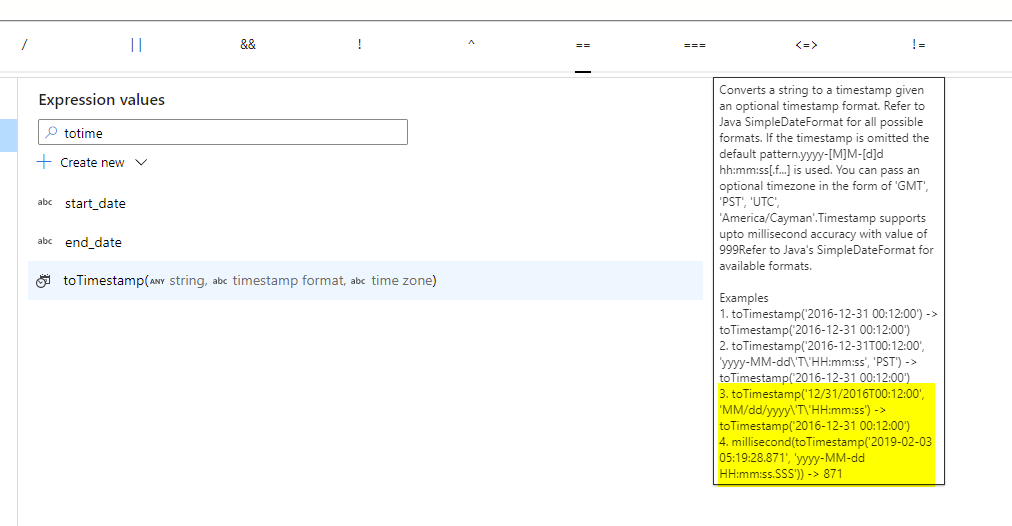
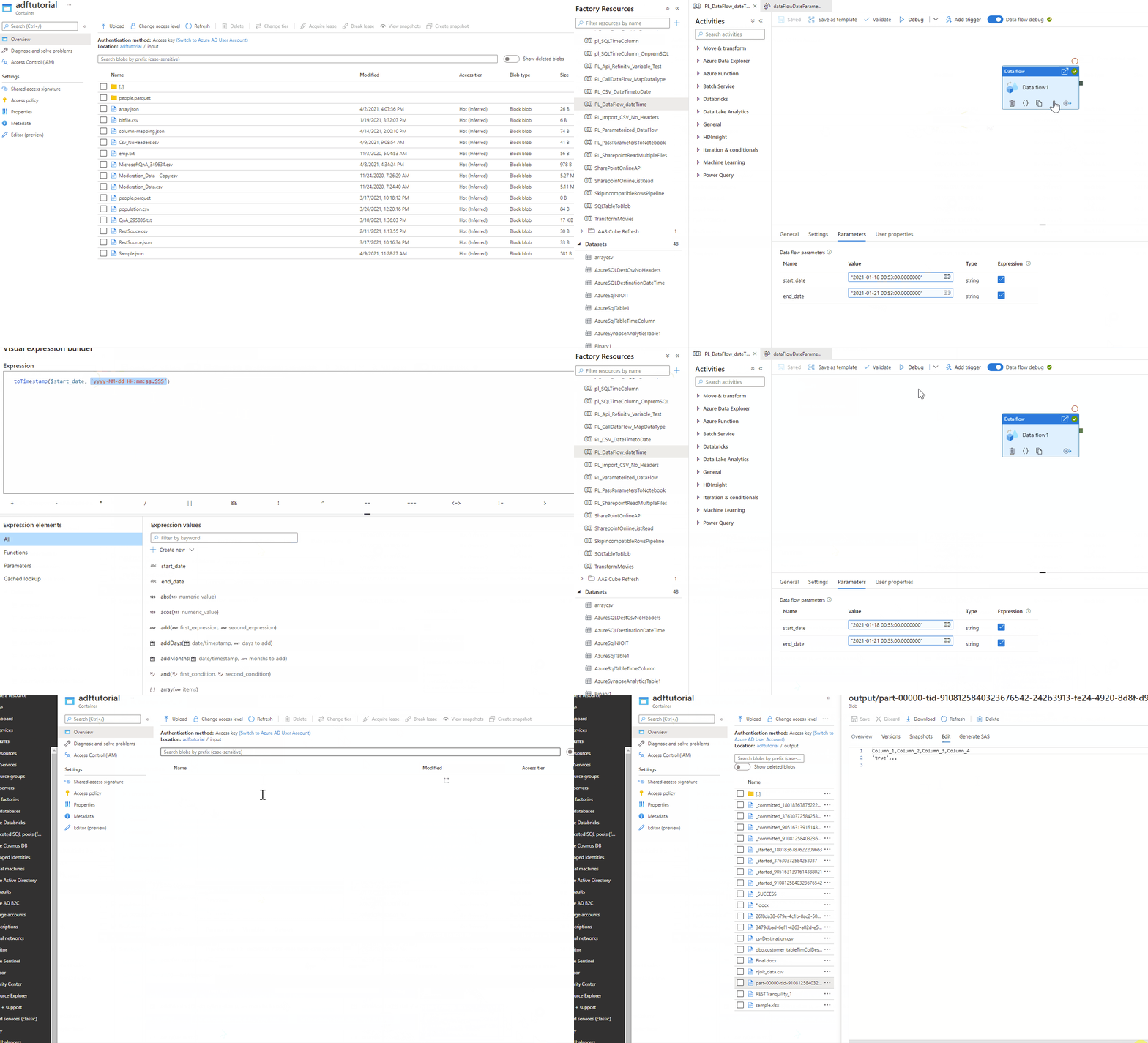
If your Input date format: 2021-04-12 04:53:00.0000000 then you need to use 'yyyy-MM-dd HH:mm:ss.SSS' in your toTimeStamp function, so you could try something like this - toTimestamp('2021-04-12 04:53:00.000', 'yyyy-MM-dd HH:mm:ss.SSS') in your code to convert it to required format.
In order to use Time format like toTimestamp($start_date, 'yyyy-mm-dd\'T\'HH:mm:ss') your input date format should be 2021-04-12T04:53:00.
Please refer to the highlighted text -
Please refer to the documentation. I have also checked this in my environment it works as expected. (See the below gif)
Please let me know if you have any other questions.
Please do not forget to "Accept the answer" wherever the information provided helps you to help others in the community.
Please let me know if you find above reply useful. If yes, do click on 'Mark as answer' link in above reply. This will help other community members facing similar query to refer to this solution.
Thanks.
Saurabh