Note
Access to this page requires authorization. You can try signing in or changing directories.
Access to this page requires authorization. You can try changing directories.
Note
The staged data options described in this article are currently in preview.
When you enable staging on a query, Dataflow Gen2 writes intermediate results to an internal staging Lakehouse so the engine can use Fabric compute for transformations or to land data in a destination.
The Staged Data section in the dataflow Scale settings lets you tune two aspects of that pipeline:
- Optimized copy to Lakehouse (Preview) — Use a faster path to write staged data to a Fabric Lakehouse data destination.
- Enable V-Order compression (Preview) — Apply V-Order compression to data written to the staging Lakehouse.
Both options apply at the dataflow level and only take effect in Dataflow Gen2.
Where to find the settings
- Open your dataflow in the Power Query editor.
- Select Options from the menu.
- Go to the Scale tab.
- The two settings are listed under Staged Data.
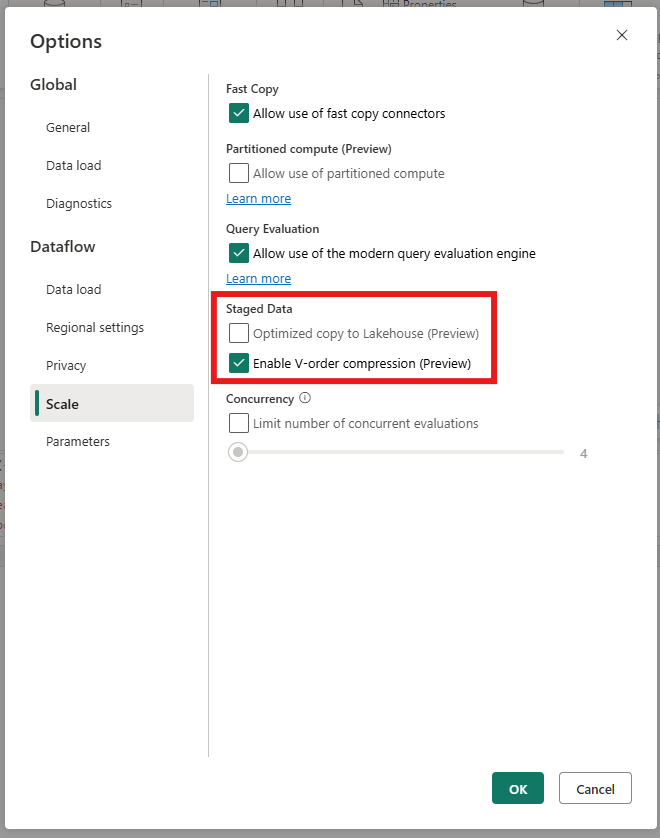
Optimized copy to Lakehouse (Preview)
When this option is on, Dataflow Gen2 uses an optimized data movement path for queries that:
- Have staging enabled, and
- Write to a Fabric Lakehouse data destination.
In the default path, data flows from the staging Warehouse to the Lakehouse with extra serialization and network hops. The optimized path reduces those hops, which can substantially shorten refresh time for staging-heavy dataflows that land in a Lakehouse.
When to use it
Turn this on when you stage queries that ultimately land in a Fabric Lakehouse data destination. Staging is most useful when:
- Your query contains transformations that don't fold to the source.
- You want to rely on Fabric staging compute (Lakehouse or Warehouse) to run heavy operations such as joins, group-by, or filters before writing to the destination.
For more on when staging helps, see Best practices for getting the best performance with Dataflow Gen2.
Default behavior
The option is off by default. For most dataflows that stage data and write to a Fabric Lakehouse, turning this option on is beneficial.
Considerations
- The option only takes effect on queries that have staging enabled and that write to a Fabric Lakehouse data destination. For queries that write to other destinations (Fabric Warehouse, Fabric SQL database, Azure SQL, Snowflake, KQL, Azure Data Lake Storage Gen2, file destinations), the option has no effect.
- If you turn off staging for a query, the optimized copy path doesn't apply to that query.
- The option applies to all qualifying queries in the dataflow. There's no per-query override today.
Enable V-Order compression (Preview)
V-Order is a write-time optimization for the Parquet file format that improves read performance for downstream Fabric engines, at the cost of additional CPU during the write. For background and cross-engine guidance, see Delta Lake table optimization and V-Order and Cross-workload table maintenance and optimization.
When this option is on, Dataflow Gen2 applies V-Order compression to data written to the staging Lakehouse. When it's off, staged data is written without V-Order.
When to turn V-Order on or off for staging
The staging Lakehouse holds intermediate data that's used only by Dataflow Gen2 itself: the dataflow re-reads staged data during the same refresh to apply further transformations or to write to a destination, and the Dataflow connector reads from the staged data when other items query the dataflow's output. End-user query engines (Power BI Direct Lake, Fabric Warehouse, SQL analytics endpoint, Spark) don't read the staging Lakehouse directly. Those scenarios apply to your Lakehouse data destination instead. For destination guidance, see Enable V-Order compression on a Lakehouse destination.
Because staged data is typically read a small number of times within the same refresh, turning V-Order off for staging is a good choice for most dataflows. Skipping V-Order reduces write-time CPU and shortens refresh duration, especially for large staging writes. Consider turning V-Order on for staging if the dataflow's staged output is consumed many times through the Dataflow connector and you want to favor read performance for those downstream queries over staging write cost.
Default behavior
The option is on by default. Use the guidance above to decide what's right for your dataflow.
Where else V-Order applies
In addition to the dataflow-level setting that controls the staging Lakehouse, V-Order can also be controlled on the Lakehouse data destination connection itself, through the Enable use of V-Order compression advanced option. That setting controls whether data written to the destination Lakehouse is V-Order compressed. The destination is the surface read by Direct Lake, Fabric Warehouse, the SQL analytics endpoint, and Spark, so destination-level guidance is scenario based.
For details on the destination-level option, see Enable V-Order compression on a Lakehouse destination.
Related content
- Best practices for getting the best performance with Dataflow Gen2
- Dataflow Gen2 data destinations and managed settings
- Delta Lake table optimization and V-Order
- Cross-workload table maintenance and optimization
- Modern Evaluator for Dataflow Gen2 with CI/CD
- Use partitioned compute in Dataflow Gen2 (Preview)