Microsoft 365 and Office | Install, redeem, activate | For business | Windows
Processes in Microsoft 365 for setting up Office apps, redeeming product keys, and activating licenses.

This browser is no longer supported.
Upgrade to Microsoft Edge to take advantage of the latest features, security updates, and technical support.

Hi Everyone,
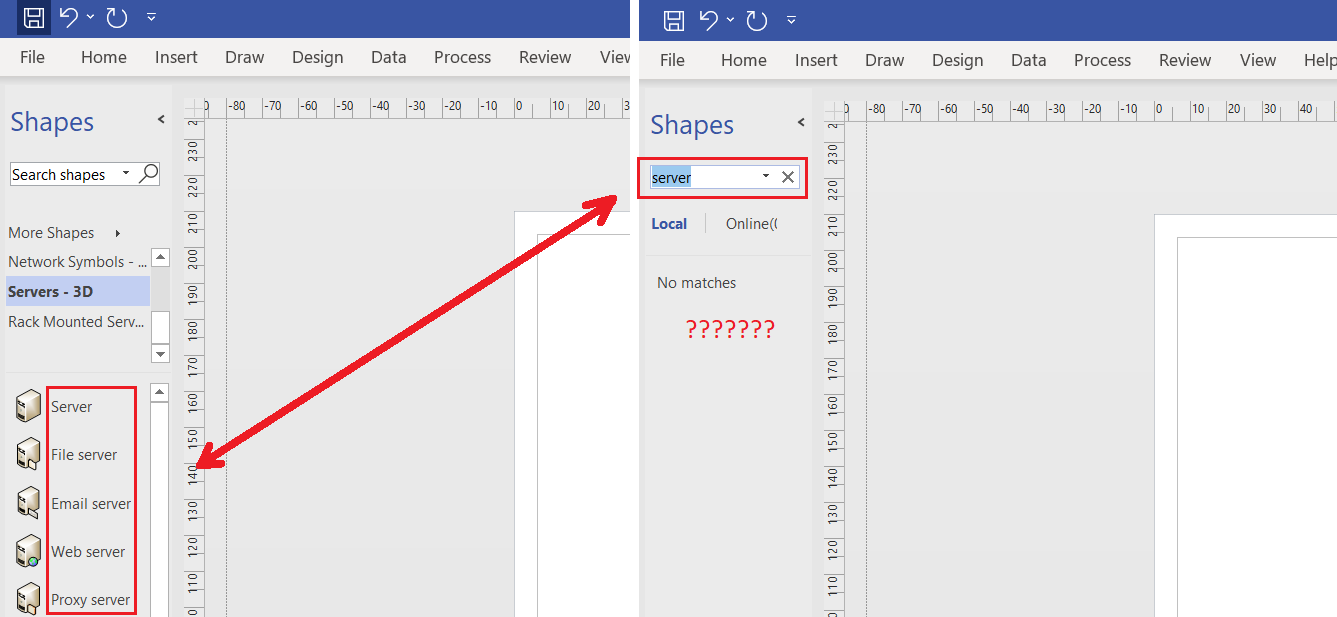
There is a Microsoft® Visio® Plan 2 MSO (16.0.14228.20216) 64-bit
When I opened a new file with pre-opened stencils I see all stencils , but when I try to search - nothig. How can I fix it?
This problem has been around for several years...
Thank you in advance!
Processes in Microsoft 365 for setting up Office apps, redeeming product keys, and activating licenses.
A professional diagramming tool that helps users visualize complex information through easy-to-understand diagrams.
' cx='32' cy='32' r='32' /%3E%3Ctext x='50%25' y='55%25' dominant-baseline='middle' text-anchor='middle' fill='%23FFF' %3EA%3C/text%3E%3C/svg%3E)
We have found an issue because of which shape search for Visio in not currently working on Windows 11. The fix is in works. Please follow the steps at the end of this article for a temporary work around. https://support.microsoft.com/office/use-the-shapes-window-to-organize-and-find-shapes-2e468457-1059-49d3-8955-32b2527cce98

When are we going to have a fix for this in Windows 11?
Thank you.
' cx='32' cy='32' r='32' /%3E%3Ctext x='50%25' y='55%25' dominant-baseline='middle' text-anchor='middle' fill='%23FFF' %3EA3%3C/text%3E%3C/svg%3E)
This problem still exists in Version 2307. The link provided previously no longer works as the registry paths do not match the ones in the fix steps. Considering the price of Visio Plan 2, it is shameful that the shape search has stopped working for all this time!!! The app is practically unusable without shape search. A massive productivity hit and a huge waste of time...
three years later - there is any progress:
Microsoft® Visio® Plan 2 MSO (Version 2401 Build 16.0.17231.20290) 64-bit

I have Windows 11, search doesn't work at all since years, I would expect Microsoft to fix basic features in Visio since you need to pay monthly for it. Does anyone know if Visio is considered as a modern application at Microsoft? It seems like it's legacy.
' cx='32' cy='32' r='32' /%3E%3Ctext x='50%25' y='55%25' dominant-baseline='middle' text-anchor='middle' fill='%23FFF' %3EFM%3C/text%3E%3C/svg%3E)
This problem is making Microsoft visio very useless.
Which is very frustrating, Microsoft does not react to this problem which dates back to 2021.
Maybe they are busy on COVID
' cx='32' cy='32' r='32' /%3E%3Ctext x='50%25' y='55%25' dominant-baseline='middle' text-anchor='middle' fill='%23FFF' %3EPR%3C/text%3E%3C/svg%3E)
I have this issue since years.
It was partially resolved for a very short period of time some 2-3 years ago, however, since then it is back and no fix is in the horizon...
I have many shapes and stencils and I waste around 1-2 hours just to find the shapes I need each time I start working on a project.
Very frustrating, considering the fact the software is pricy, and makes you look for alternatives like Miro...
' cx='32' cy='32' r='32' /%3E%3Ctext x='50%25' y='55%25' dominant-baseline='middle' text-anchor='middle' fill='%23FFF' %3EAA%3C/text%3E%3C/svg%3E)
Indeed, this does not work, never worked. I have over 10 000 shapes, and I created my own database, I search there, then I can find the right stencil and select the shape. Loooong workaround, but once I have the shapes I use the most, it is not a big thing.
I mentioned this issue 10 years ago already ...
It was working, but one day it stopped working. First MS said they disabled Online Search, but local search still doesn't work.