Share via

Windows Product key scam

Anonymous
2017-03-18T17:44:56+00:00

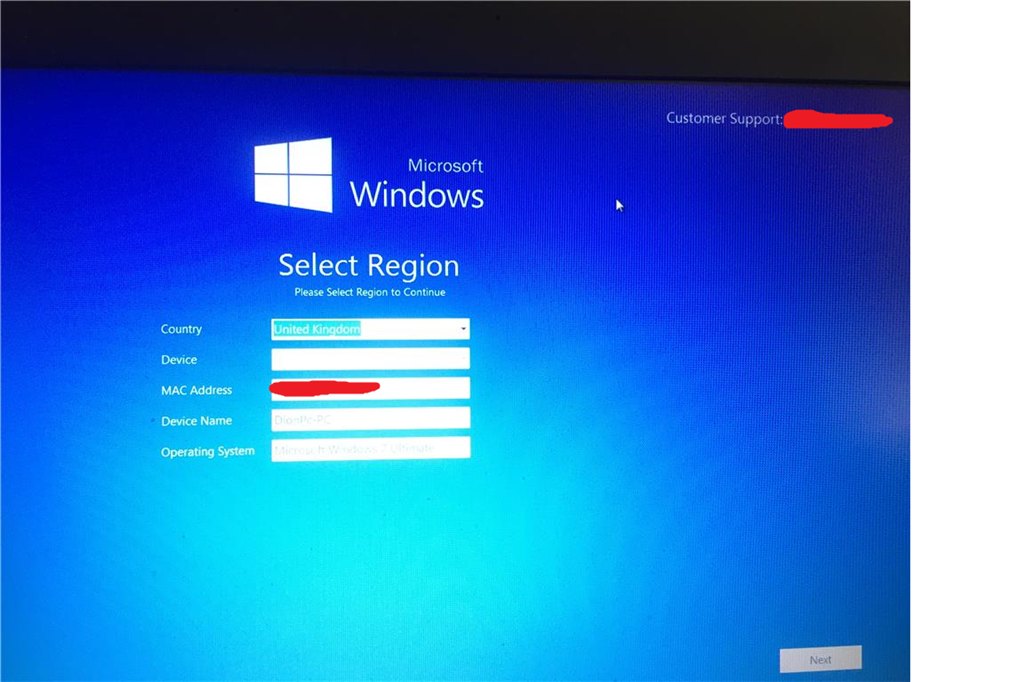
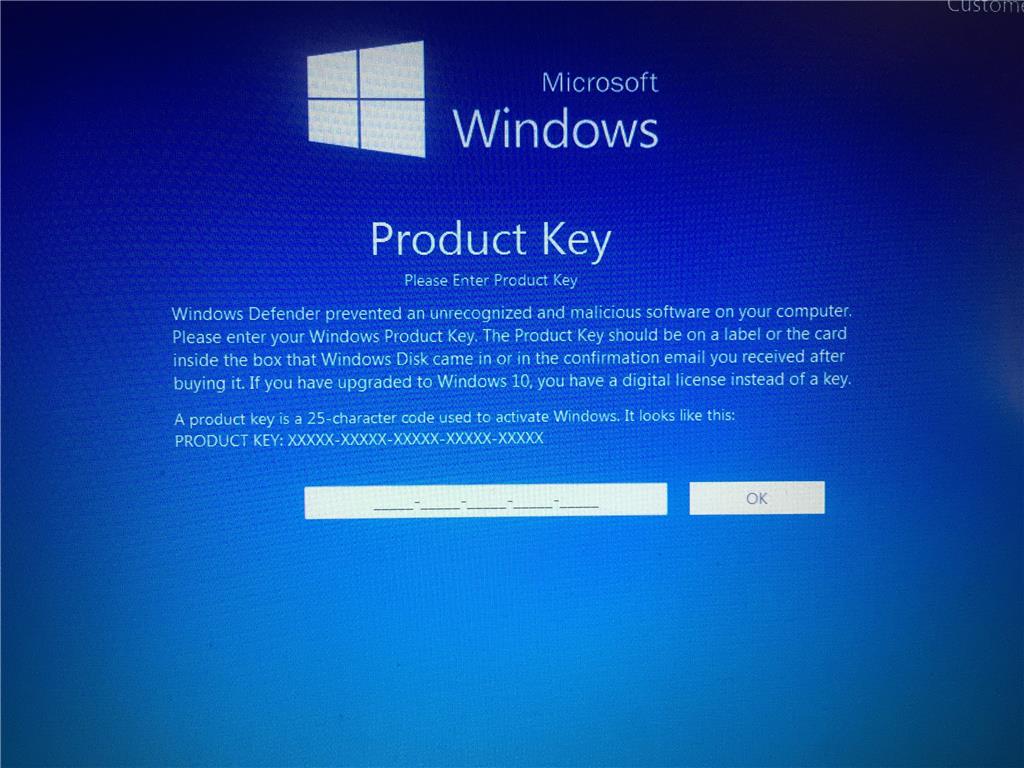
Been battling a virus for a while now. Now that I removed everything this new pop-up comes on when I login to my user on windows 7. As soon as I get to the home page where it shows start up menu and my apps it then proceeds to slow up and glitch into this page. This is a scam. I've contacted windows saying they have no notion of this . They could not help me for the fact that it blocks me when I'm on the pic after 5-10 minites. I've tried turning on task manager to end this process but it loads up but in the background since this pop up is like a "screen/cover" of my homepage . I called the number and they are just scammers who want a free version of windows. Can anybody help?
* * Post moved to the appropriate forum category

* * Personal information deleted by the moderator. Please see the Microsoft Community Frequently Asked Questions for more information on how you can protect your privacy.

Windows for home | Previous Windows versions | Security and privacy

Locked Question. This question was migrated from the Microsoft Support Community. You can vote on whether it's helpful, but you can't add comments or replies or follow the question.

0 comments No comments

5 answers

Sort by: Most helpful
  1. Anonymous
    2017-03-19T09:26:56+00:00

    Try:

    To close the screen you can enter THTY4-89LK6-RTI23-XZTOP-05ERY as the product key.

    Source and further instructions in this removal guide: https://www.bleepingcomputer.com/virus-removal/remove-fake-windows-defender-prevented-malicious-software-scam

    Was this answer helpful?

    9 people found this answer helpful.
    0 comments No comments
  2. Anonymous
    2017-03-31T06:16:11+00:00

    In case you still have the same problem:

    See if the steps mentioned in this removal guide help: https://www.bleepingcomputer.com/virus-removal/remove-select-region-tech-support-scam

    Was this answer helpful?

    8 people found this answer helpful.
    0 comments No comments
  3. Anonymous
    2017-03-19T08:29:44+00:00

    Hello,

    We suggest that you refer to the Microsoft Safety & Security Center to report the issue.

    If you have further questions, feel free to ask us.

    Regards.

    Was this answer helpful?

    2 people found this answer helpful.
    0 comments No comments
  4. Anonymous
    2017-03-24T00:09:13+00:00

    Oh. You came back...

    Hm.

    How sad that that not worked...

    Suggestion to ask for free expert help at Bleepingcomputer.com.

    The links you'll find in the removal guide.

    Good luck.

    Was this answer helpful?

    0 comments No comments
  5. Anonymous
    2017-03-23T23:53:17+00:00

    Just put that in. Still no luck. 

    Was this answer helpful?

    0 comments No comments
