' cx='32' cy='32' r='32' /%3E%3Ctext x='50%25' y='55%25' dominant-baseline='middle' text-anchor='middle' fill='%23FFF' %3EU%3C/text%3E%3C/svg%3E)

' cx='32' cy='32' r='32' /%3E%3Ctext x='50%25' y='55%25' dominant-baseline='middle' text-anchor='middle' fill='%23FFF' %3EJY%3C/text%3E%3C/svg%3E)
Hi,
By default, the startup sound has been removed to improve the boot time and performance since windows 8. However, there are options we can change via either control panel or the GPO to enable the startup sound.
Take control panel as example:
Control Panel -> Sounds tab and check the option "Play Windows Startup sound"
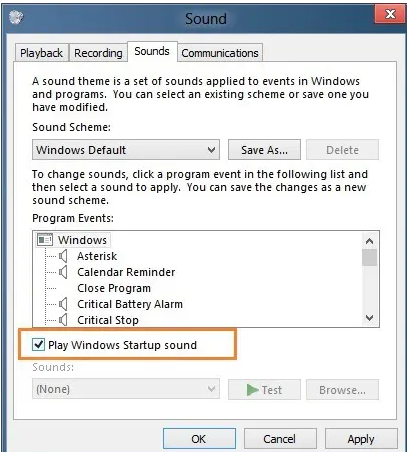
However, kindly note that as mentioned in both shared links, only a a full shut down will bring back the startup sound which is different than simply choose Shutdown option:
How to play the logon or startup sound in Windows 8.1 or Windows 8
https://winaero.com/how-to-play-the-logon-or-startup-sound-in-windows-8-1-or-windows-8/
Change Windows Startup and Shutdown Sounds
"you have to perform a full shutdown in Windows 8 in order to hear the login sound when you startup. In order to perform a full shutdown in 8.1, you have to right-click on the Start Button, choose Shut down or sign out and then click on Shut down."
https://www.online-tech-tips.com/computer-tips/change-windows-sounds/
----------
Hope this helps and please help to accept as Answer if the response is useful.
Thanks,
Jenny