Share via

Windows 7 Home Basic

Anonymous
2018-01-16T17:11:37+00:00

Hello Gurus,

I'd purchased a Sony VAIO laptop around 5 years ago. Unfortunately the OS CD which came along with it, sent by the manufacturer, is misplaced somewhere. Recently when my laptop OS got corrupt, I grabbed a OS CD(Win 7 Home Basic 64 Bit) from my friend who got it while purchasing her Dell laptop. While installing I deleted all the partitions for a clean Windows re-install, but got the following error a lot of times during installing, aborting the install.

Windows cannot install required files. The file may be corrupt or missing. Make sure all files required for installation are available and restart the installation. Error Code 0x80070570.

Finally when the windows got installed after innumerable attempts, the Windows won't start and it would go to the Safe mode page in loop, w/o starting the windows normally even after selecting that option. It wouldn't even go the command prompt, when that option is selected. When any option is selected it would boot going to the Safe mode option page.

What could be the problem? Will Dell OS CD won't work on Sony machine, though the Windows will be registered with license key got while purchasing Sony laptop? Where can the untouched OS ISO can be downloaded from?

Pl advise.

Regards,

Chidambar Deshpande

Windows for home | Previous Windows versions | Install and upgrade

Locked Question. This question was migrated from the Microsoft Support Community. You can vote on whether it's helpful, but you can't add comments or replies or follow the question.

0 comments No comments

4 answers

Sort by: Most helpful
  1. Anonymous
    2018-01-17T10:51:25+00:00

    Hello SoloLay12,

    Thanks for your reply. Actually I'd tried that option before, but I forgot to mention that in the question. When I'd tried that option, I got the following error message (this option can't be exercised),

    Error The product key you entered appears to be for software pre-installed by the device manufacturer. Please contact the device manufacturer for software recovery options.

    Regards,

    Chidambar Deshpande

    Was this answer helpful?

    1 person found this answer helpful.
    0 comments No comments
  2. Anonymous
    2018-01-17T11:07:35+00:00

    Thank you very much Andre for your elaborate / descriptive reply. I'd tried the option a) below,

    Step 1:

    a) HeiDoc.net: http://www.heidoc.net/joomla/technology-science/microsoft/67-microsoft-windows-and-office-iso-download-toolWindows ISO Downloader, can't select Windows 7, the option is greyed out.

    b) https://tb.rg-adguard.net: Doesn't list Windows 7 Home Basic in the drop-down.

    Pl advise.

    Regards,

    Chidambar

    Was this answer helpful?

    0 comments No comments
  3. Anonymous
    2018-01-17T04:12:28+00:00

    Step 1: You need to download the install files for Windows 7 if you are reinstalling it on a system where it was previously installed. You can use the following resources:

    Microsoft Windows and Office ISO Download Tool – HeiDoc.net

    https://tb.rg-adguard.net/index.php?sid=74a7cf51-12ed-19f5-2885-3b48ad9ee67b

    Step 2: Make a bootable copy:

    Step 3: Download any necessary drivers you might need for Windows 7 from the manufacturers website. 

    Step 4: Perform a custom install - see the Windows 7 section of the following article how to do that:

    Step 5: how find your product key and reactivate:

    Windows 7 came preinstalled on my computer, how do I find the product key?

    The product key is usually located on the COA sticker attached to the bottom of your laptop or in the battery compartment. In some rare cases it can also be found in the memory compartment. For tower systems, look at the top or the side of the system unit. It looks like the following:
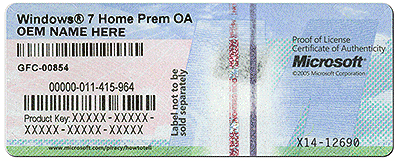
    If the Certificate of Authenticity (COA) sticker is damaged or letters or not legible, you will have to consider the following options:

    • Use a digital camera to capture a picture of the COA then enlarge it on your computer.
    • If the COA sticker is damaged, then you would need to use the recovery partition to reinstall Windows 7, this will exempt the need to use the product key to activate your Windows 7 installation.
    • If your recovery partition is not available or damaged, you should contact the manufacturerof your computer and request a recovery disc set you can use to reinstall Windows 7. They might charge a small shipping and handling fee. This will exempt the need to use the product key also.

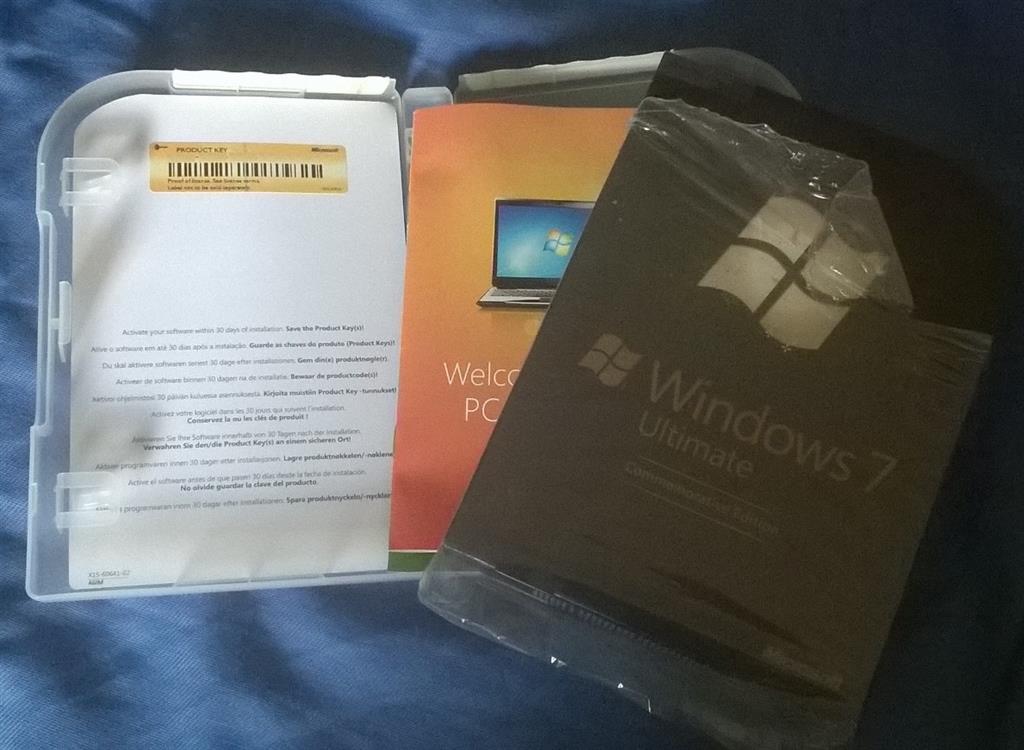
    I bought a retail box copy of Windows 7 or Windows 8 or Windows 8.1; where do I find the product key?

    For Windows 7, the product key can be located on a pamphlet in inside the Windows 7 box.
    Troubleshooting activation:

    How to: Fix Windows 7 or Windows 8.1 Reporting Not Activated or Genuine after Rollback from Windows 10

    Was this answer helpful?

    0 comments No comments
  4. Anonymous
    2018-01-16T18:49:13+00:00

    You can download Win 7 ISO from microsoft if you still have your product key here.

    https://www.microsoft.com/en-us/software-download/windows7

    Then do the following.

    https://www.howtogeek.com/howto/9585/how-to-setup-a-usb-flash-drive-to-install-windows-7/

    Was this answer helpful?

    0 comments No comments
