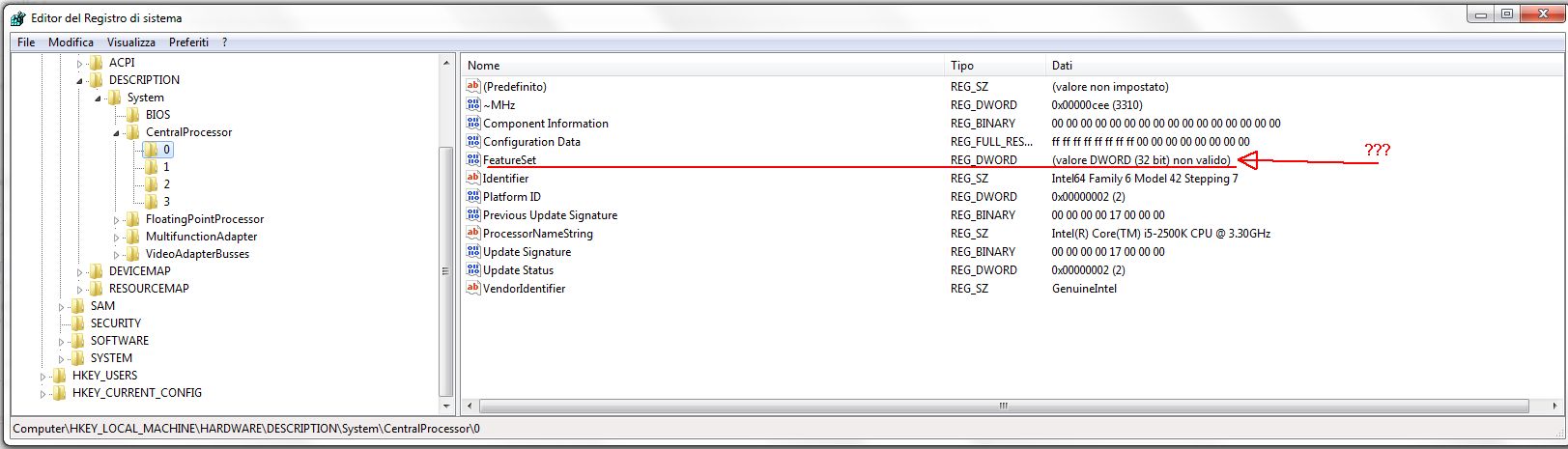
When I look at
[HKEY_LOCAL_MACHINE\HARDWARE\DESCRIPTION\System\CentralProcessor\0]
I see what is at the bottom of this page (it means "DWORD value (32 bit) not valid")
The content is this one
[QUOTE]
Windows Registry Editor Version 5.00
[HKEY_LOCAL_MACHINE\HARDWARE\DESCRIPTION\System\CentralProcessor\0]
"Component Information"=hex:00,00,00,00,00,00,00,00,00,00,00,00,00,00,00,00
"Identifier"="Intel64 Family 6 Model 42 Stepping 7"
"Configuration Data"=hex(9):ff,ff,ff,ff,ff,ff,ff,ff,00,00,00,00,00,00,00,00
"ProcessorNameString"="Intel(R) Core(TM) i5-2500K CPU @ 3.30GHz"
"VendorIdentifier"="GenuineIntel"
"FeatureSet"=hex(4):fe,3f,19,21,00,00,00,00
"~MHz"=dword:00000cee
"Update Signature"=hex:00,00,00,00,17,00,00,00
"Update Status"=dword:00000002
"Previous Update Signature"=hex:00,00,00,00,17,00,00,00
"Platform ID"=dword:00000002
[/QUOTE]
I saved that key some time ago and this is what was contained in it
[QUOTE]
Windows Registry Editor Version 5.00
[HKEY_LOCAL_MACHINE\HARDWARE\DESCRIPTION\System\CentralProcessor\0]
"Component Information"=hex:00,00,00,00,00,00,00,00,00,00,00,00,00,00,00,00
"Identifier"="Intel64 Family 6 Model 42 Stepping 7"
"Configuration Data"=hex(9):ff,ff,ff,ff,ff,ff,ff,ff,00,00,00,00,00,00,00,00
"ProcessorNameString"="Intel(R) Core(TM) i5-2500K CPU @ 3.30GHz"
"VendorIdentifier"="GenuineIntel"
"FeatureSet"=dword:21193ffe
"~MHz"=dword:00000cee
"Update Signature"=hex:00,00,00,00,17,00,00,00
"Update Status"=dword:00000002
"Previous Update Signature"=hex:00,00,00,00,17,00,00,00
"Platform ID"=dword:00000002
[/QUOTE]
That string was then (how?) changed from
"FeatureSet"=dword:21193ffe
into
"FeatureSet"=hex(4):fe,3f,19,21,00,00,00,00
I tried to restore the original key changing the registry key writing on it, but after the PC is restarted, the "invalid" key represents again (maybe it is restored taking the new key from somewhere else)
Also processors 1, 2, 3 have that same "invalid" key.
My questions are:
- do I have to be worried?
- how can I restore the original key (if that is what must be done)?
- is it something changed is some windows update?
- does that "invalid" key affect the PC performance?
- does it come directly from the HW so that "changing" it has no sense? (obviously I didn't make any hardware change to the PC)
' cx='32' cy='32' r='32' /%3E%3Ctext x='50%25' y='55%25' dominant-baseline='middle' text-anchor='middle' fill='%23FFF' %3EA%3C/text%3E%3C/svg%3E)
