Share via

A Problem with the Network Connection, 0 kb/s on download and upload at the same time.

Anonymous
2020-07-14T20:45:22+00:00

As the title suggests, the problem concerns the connection, after a while I am connected to the network, the connection crashes randomly, without a good reason, it can happen three times in a row in a few minutes, and then disappear for a few hours , and then start again, restarting is a temporary and unsustainable solution, it is true that it does not do it for a while, but when I have to use the PC for school or various commitments, I cannot start to restart the PC every few hours.

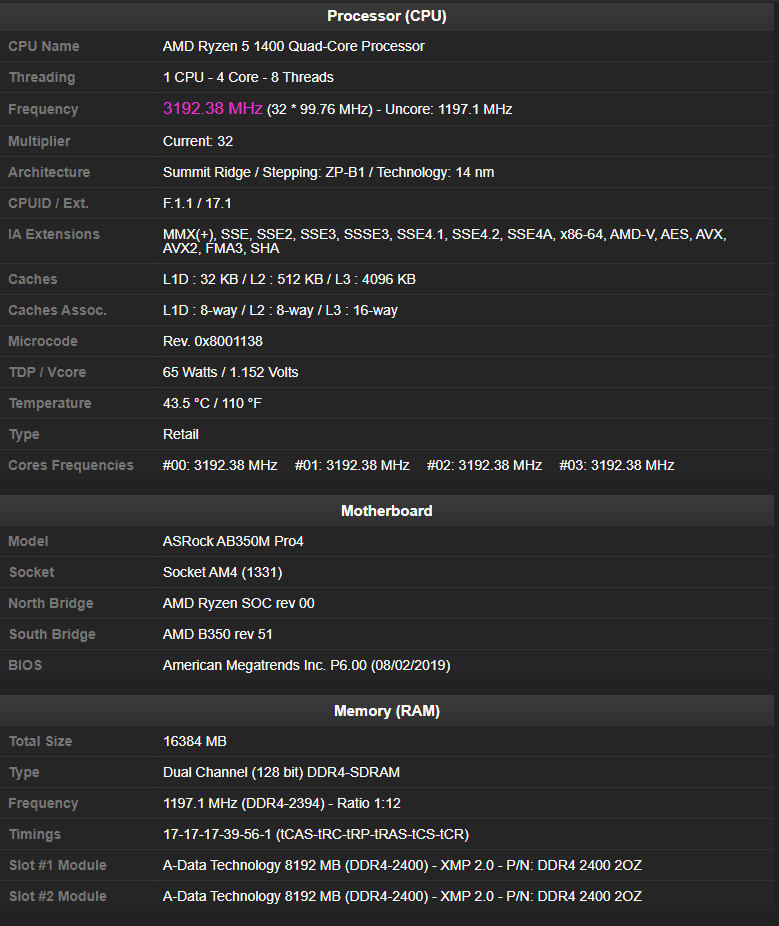
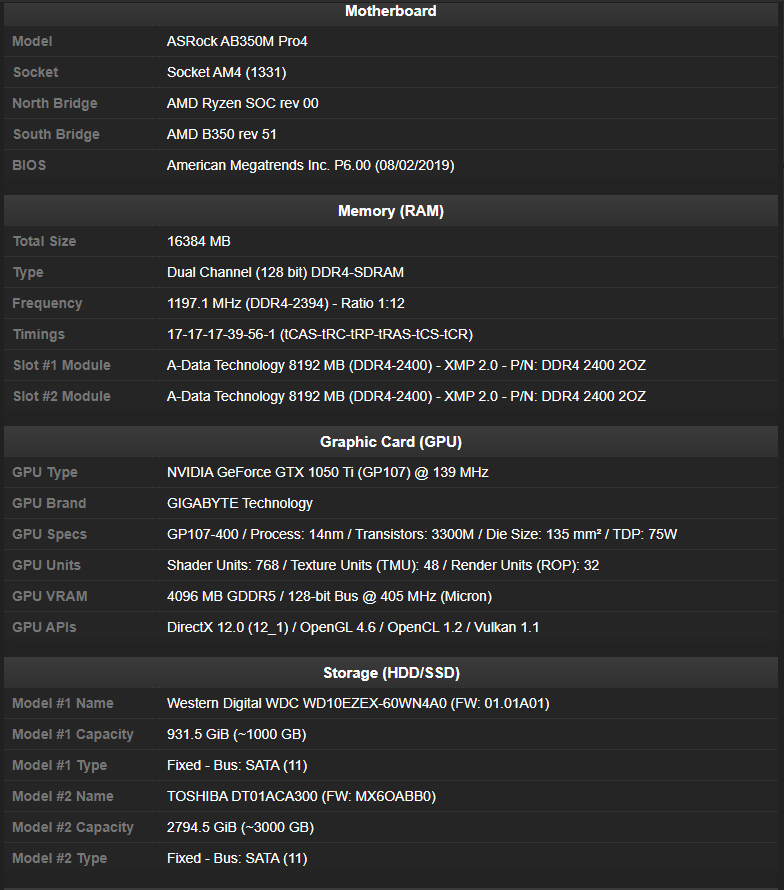
I updated my bios with the latest firmware, and updated to the last driver of my network card, i use ethernet connection, no wifi, and as far i know, my pc is not overclocked; here are screen of my pc hardware
Windows for home | Windows 10 | Internet and connectivity

Locked Question. This question was migrated from the Microsoft Support Community. You can vote on whether it's helpful, but you can't add comments or replies or follow the question.

0 comments No comments

12 answers

Sort by: Most helpful
  1. Anonymous
    2020-07-15T02:11:38+00:00

    This may not be the real answer as it may be with your provider.

    I will try to use the Pwith the settings you recommended, and I will see if everything went well will reply here, and it is not my internet provider, because it is stable, I have more PCs in my house.

    Was this answer helpful?

    1 person found this answer helpful.
    0 comments No comments
  2. Anonymous
    2020-07-14T22:55:00+00:00

    Go win key+X, Go Device Manager, Network adapters, click on adapter, click on Power Management, clear the check mark before "Allow the computer to turn off this device to save power"

    i don't find the option you say

    Was this answer helpful?

    1 person found this answer helpful.
    0 comments No comments
  3. Jan J.23 13,580 Reputation points Independent Advisor
    2020-07-14T20:50:14+00:00

    Hi and thanks for reaching out. My name is Jan an independent Microsoft Advisor and a user like you. I'll be happy to help you out today.

    Press Windows key then search 'Network reset"

    Then open network reset

    and click "reset"

    restart wifi router

    unplugged your wifi router for 60 seconds

    then plug it back in.

    Download the latest network driver at the Manufacturer's site and install it.

    Was this answer helpful?

    1 person found this answer helpful.
    0 comments No comments
  4. Deleted

    This answer has been deleted due to a violation of our Code of Conduct. The answer was manually reported or identified through automated detection before action was taken. Please refer to our Code of Conduct for more information.


    Comments have been turned off. Learn more

  5. Anonymous
    2020-07-14T20:49:18+00:00

    Go win key+X, Go Device Manager, Network adapters, click on adapter, click on Power Management, clear the check mark before "Allow the computer to turn off this device to save power"

    Was this answer helpful?

    0 comments No comments