Share via

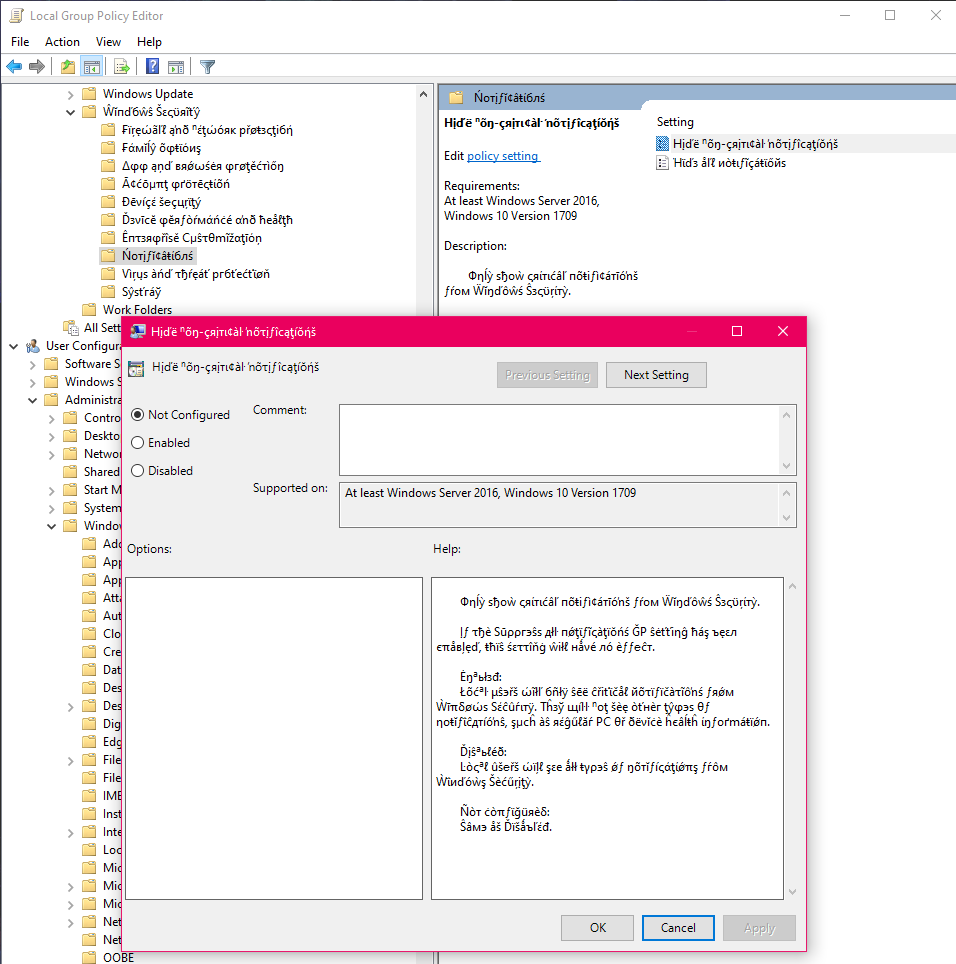
"Zalgo" text in group policy editor

Anonymous
2020-10-23T22:25:23+00:00

Hello

I am currently setting up my new computer, and found very weird mangled text in the Group Policy Editor.

It is still readable, but it definitively looks like it shouldn't be there.

The only affected section is "Windows Security" in

Local Computer Policy > Computer Configuration > Administrative Templates > Windows Components

The computer is brand new, the OS is brand new (USB drive from a sealed retail box).

I didn't get the time to install things that could have come with viruses, not have I installed anything that should be able to tweak the system in any way.

It's readable, so I don't if I it happens to simply be a bug or an error with the Windows build.

But I'd like to know what is happening, and if I need to worry about it.

I also found this forum post from 6 days ago detailing the exact same issue.https://www.tenforums.com/general-support/166514-windows-10-group-policy-editor-strange-text-font.html

System version:

Windows 10 Pro, Version 1909 (OS Build 18363.1139)
Windows for home | Windows 10 | Settings

Locked Question. This question was migrated from the Microsoft Support Community. You can vote on whether it's helpful, but you can't add comments or replies or follow the question.

0 comments No comments

4 answers

Sort by: Most helpful
  1. Anonymous
    2020-10-28T14:00:32+00:00

    Sorry for not keeping this thread updated.

    Turned out that doing the 2004 upgrade did the trick.

    Considering that both my case and the only one I could find online are fresh 1909 installs that happened in a very narrow time frame (less than a week apart, seemingly), I believe that it is something weird with recent builds of 1909 or with a recent automatic update for 1909.

    Was this answer helpful?

    1 person found this answer helpful.
    0 comments No comments
  2. Anonymous
    2020-10-24T20:49:06+00:00

    Tried resetting Fonts to default? Control Panel > Appearance and Personalization > Fonts > Font settings > Restore default font settings.

    Was this answer helpful?

    1 person found this answer helpful.
    0 comments No comments
  3. Anonymous
    2020-10-23T23:03:46+00:00

    Hi, thanks for the fast reply!

    Unfortunately, this didn't do the trick and the problem persists

    Was this answer helpful?

    0 comments No comments
  4. Anonymous
    2020-10-23T22:51:47+00:00

    Hi and thanks for reaching out. My name is William. I'm a Microsoft Windows Certified Professional and Systems Administrator. I'll be happy to help you out today.

    Recommend downloading and applying the latest admx templates to see if it corrects that settings in gp: https://www.microsoft.com/en-us/download/101445

    Was this answer helpful?

    0 comments No comments
