SQL Server | Other
Additional SQL Server features and topics not covered by specific categories
This browser is no longer supported.
Upgrade to Microsoft Edge to take advantage of the latest features, security updates, and technical support.
' cx='32' cy='32' r='32' /%3E%3Ctext x='50%25' y='55%25' dominant-baseline='middle' text-anchor='middle' fill='%23FFF' %3EJM%3C/text%3E%3C/svg%3E)
Hello, I have the next problem.
In SSMS 2012 I had an oracle 11g linked server, recently this oracle DB has been migrated to oracle 19c, in the server where I'm running SQL Server we installed the Oracle 19c client, so now we have two oracle clients installed, the 11g and the 19c, but now that I try to link this new DB in SSMS it shows the ora 28040 error:
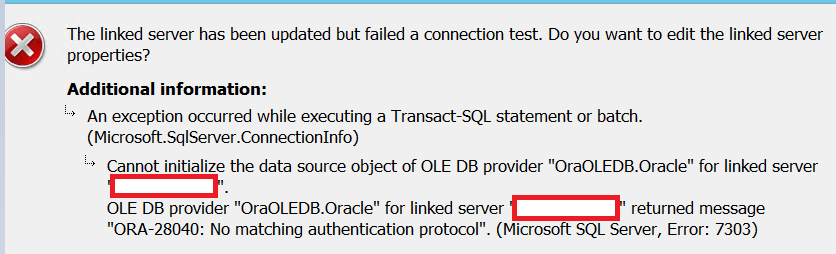
I have read that this could be solved configuring the sqlnet.ora file in the destination server adding the SQLNET.ALLOWED_LOGON_VERSION=8, but I also read that this is more like a workaround and the solution would be to install the new client (the 19c in this case), but now, since I already have installed the 19c client I would like to know how to link this serverver without configuring the sqlnet.ora file in the destination server.
This are the linked server properties

Thank you in advice
Additional SQL Server features and topics not covered by specific categories
' cx='32' cy='32' r='32' /%3E%3Ctext x='50%25' y='55%25' dominant-baseline='middle' text-anchor='middle' fill='%23FFF' %3ESX%3C/text%3E%3C/svg%3E)
Hi @Juan Manuel Eugenio Popoca ,
We have not received a response from you. Did the reply could help you? If the response helped, do "Accept Answer". If it doesn't work, please let us know the progress. By doing so, it will benefit all community members who are having this similar issue. Your contribution is highly appreciated.
Best regards,
Seeya
' cx='32' cy='32' r='32' /%3E%3Ctext x='50%25' y='55%25' dominant-baseline='middle' text-anchor='middle' fill='%23FFF' %3ETP%3C/text%3E%3C/svg%3E)
The error you are receiving indicates the driver you have installed on the SQL Server is not compatible with the Oracle server you are connecting too. SQL Server uses the Oracle client installed on the server. You need to upgrade the client on the server to a client compatible with Oracle 19c.

so now we have two oracle clients installed, the 11g
You may have, but you use OleDB, that's a ActiveX (COM) provider, and only one can be registered on a machine; wellcome to DLL hell: https://en.wikipedia.org/wiki/DLL_Hell
You have to ensure that the new OleDB for Ora 19c is registered.
Hi @Juan Manuel Eugenio Popoca ,
This is a article for those who encounter similar problems to refer: https://logic.edchen.org/how-to-resolve-ora-28040-no-matching-authentication-protocol/
Best regards,
Seeya
If the answer is the right solution, please click "Accept Answer" and kindly upvote it. If you have extra questions about this answer, please click "Comment".
Note: Please follow the steps in our documentation to enable e-mail notifications if you want to receive the related email notification for this thread.

SSMS is not using any provider - SQL Server is. SSMS is only the frontend tool.
I don't know much about the Oracle providers, but if the two versions have the same name and GUID, you may need to uninstall the old version before you slap on the new one.
unfortunately since it is a productive environment I'm not able to uninstall and install software, at the end we decided to migrate the SPs to ETLs in SSIS, for some reason in Visual Studio it is posible to connecto to the Oracle Server.
Anymway, thank you for answer and if someone knows how to solve this problem I would appreciate if you share the solution with me, in case I face this problem again.
Also I found on the web that the Oracle Client 11.0..2 is not able to connect to Oracle 19c, the recomendation was to upgrade to the version 11.0.4.
Anymway, thank you for answer and if someone knows how to solve this problem I would appreciate if you share the solution with me, in case I face this problem again.
Well, you answer the problem yourself:
Also I found on the web that the Oracle Client 11.0..2 is not able to connect to Oracle 19c, the recomendation was to upgrade to the version 11.0.4.
Now you say:
unfortunately since it is a productive environment I'm not able to uninstall and install software,
So moral of the story is that upgrades of system is something that must be planned carefully to avoid issues like this.
But I would also suggest that this demonstrates the need of keeping your system updated. I don't know when 11.0.4 of Oracle Client came out, but I would expect that it sufficiently long ago for you to have had one or more maintenance windows to install it.
That error is an Oracle error. You would probably get a better answer from an Oracle forum.
However, online answers to this question seem to indicate the Oracle JDBC driver needs to be updated in order to connect to v19.
https://www.oracle.com/database/technologies/appdev/jdbc-downloads.html
I've been looking in Oracle Forums and they say that the solution is to install the client according with the DB i want to connect with.
I'm not sure it is a driver´s problem since I have installed the new client, I have read that each oracle client installation has an oracleOLDB.oracle file that is used in the SSMS linked server providers, it seems that the SSMS provider is using the oracleOLDB from the 11g Client instead of the 19c version.
Could you help to understand how this linked server providers are configured? and how can I add a new provider or modify the actual provider in order to use the oracleOLDB from 19c version?