Share via

Laptop randomly freezes or bluescreens with different variations of Event 41, Kernel-Power listed in the event viewer.

Anonymous
2024-10-29T14:54:41+00:00

About once or twice per day, my laptop randomly bluescreens, restarts, or freezes (I must force shut down to recover).

The event viewer indicates "Event 41, Kernel-Power" with different bug check codes.

After reading thispost I thought I might have the same issue. I followed the suggested fix, but the problem persists.

Here are some more details:

About this PC page in windows settings:

Processor AMD Ryzen 7 8840HS w/ Radeon 780M Graphics 3.30 GHz

Installed RAM 16,0 GB (15,3 GB usable)

System type 64-bit operating system, x64-based processor

Pen and touch Pen and touch support with 20 touch points

Make and model: HP Envy x360 2-in-1 Laptop 14-fa0xxx

Windows specs page:

Edition Windows 11 Home Single Language

Version 23H2

Installed on ‎2024/‎10/‎05

OS build 22631.4317

Experience Windows Feature Experience Pack 1000.22700.1041.0

Windows update does not have any driver or BIOS updates. I also checked under the optional updates in advanced settings.

Laptop was purchased new, less than a month ago. I've had this issue since the first few days of ownership, as seen in the event viewer screenshot below.

Screenshot of my event viewer:
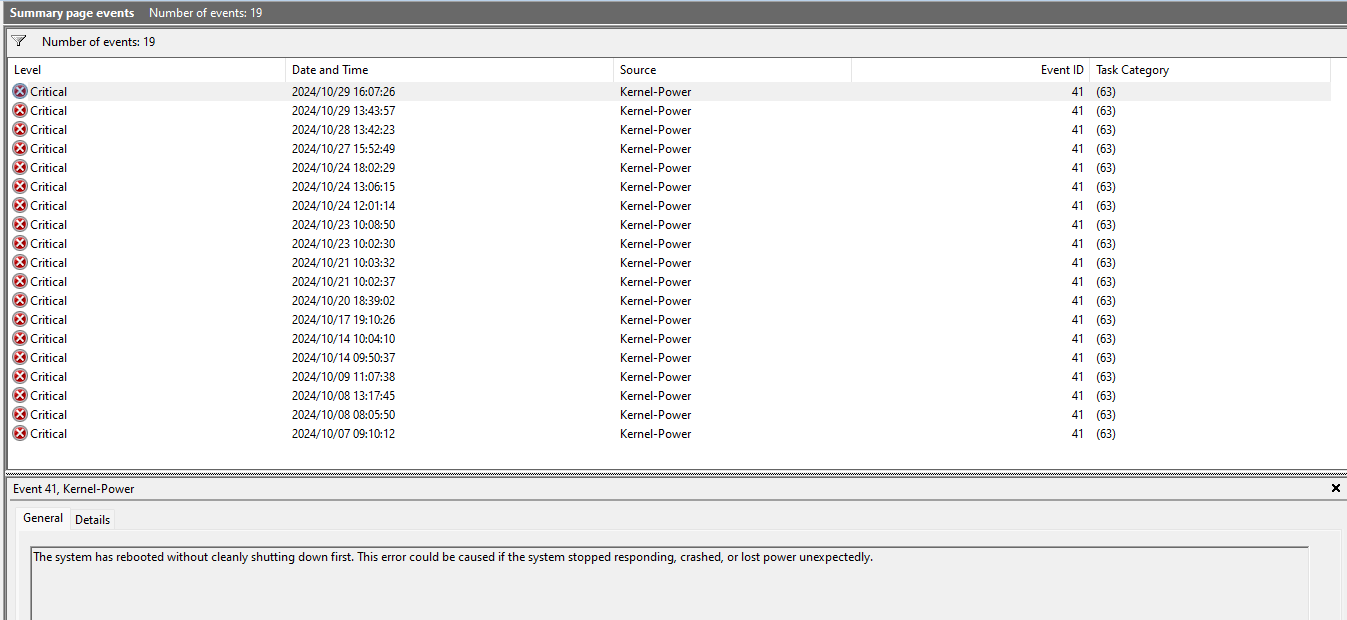
Here are the details for the four events that appear to have a corresponding minidump: https://1drv.ms/f/s!Aoa0W5g5aIxkkt8xcAy1-nZXNj-4DQ?e=DEClDs

Here are the actual contents of C:\Windows\Minidump: https://1drv.ms/f/s!Aoa0W5g5aIxkkt82DsYOVU83Mg8fvQ?e=kc3kX4

Some help on how to resolve this problem would be appreciated. Let me know if there is any other information I could provide to help.

Windows for home | Windows 11 | Performance and system failures

Locked Question. This question was migrated from the Microsoft Support Community. You can vote on whether it's helpful, but you can't add comments or replies or follow the question.

0 comments No comments

9 answers

Sort by: Most helpful
  1. Anonymous
    2024-10-30T13:01:07+00:00

    I've been in the BIOS and did not see any mention of disabling the different power states. I will have a look again.

    As for the power supply, i don't have an extra one, but I will try to note if the issue only occurs when plugged in (as opposed to on battery).

    Thanks for the help!

    Update:
    It just happened on battery power, so it's not the charger.

    I checked the BIOS again and it seems like different C-states can't be disabled (can't find any options related to them).

    Was this answer helpful?

    0 comments No comments
  2. Anonymous
    2024-10-30T09:10:24+00:00

    I've been in the BIOS and did not see any mention of disabling the different power states. I will have a look again.

    As for the power supply, i don't have an extra one, but I will try to note if the issue only occurs when plugged in (as opposed to on battery).

    Thanks for the help!

    Was this answer helpful?

    0 comments No comments
  3. Igor Leyko 111K Reputation points Independent Advisor
    2024-10-29T20:45:11+00:00

    Sorry, I did not look at the dumps. In most cases hardware problems cannot be diagnosed by dumps.

    Kernel-Power 41 (63) error mostly means the problem with power supplying. Can you replace power supply unit for checking? It may mean problems with power management in BIOS or motherboard too.

    And you may try to turn off all CPU power saving modes in BIOS (different C states) to check if the problem is in motherboard.

    See some details at https://docs.microsoft.com/en-us/windows/client...

    Was this answer helpful?

    0 comments No comments
  4. Anonymous
    2024-10-29T17:47:05+00:00

    Thanks for the response!

    Is there any way of finding out from the dumps what most likely caused these errors? Even something as vague as motherboard issues or RAM issues? Knowing this could significantly help with escalation speed when working with customer support.

    Was this answer helpful?

    0 comments No comments
  5. Igor Leyko 111K Reputation points Independent Advisor
    2024-10-29T16:41:19+00:00

    Hi,

    My name is Igor, it's a pleasure for me to help others and I'll try to help you.

    Kernel-Power 41 necessarily appears after forcible turn off. If these events appear by themself, this means hardware problem and laptop need to be checked in a service center.

    Was this answer helpful?

    0 comments No comments
