Share via

Constant BSODs since April 2025.

Anonymous
2025-04-25T04:10:59+00:00

Hello everybody, I need help and guidance in regards to a consistent problem I've been having with my computer lately.

Ever since the beginning of April of 2025, I've been coming across a bunch of random BSODs and the latest one happening today (04/24/2025).

The BSODs have been happening so much that I was able to log them down individually with the error codes which I will post now:

April 1: 0x0000003b (0x00000000c0000005, 0xfffff804a72449cb, 0xffffa484ce4bd460, 0x0000000000000000). SYSTEM_SERVICE_EXCEPTION April 1: 0x00000139 (0x0000000000000003, 0xffffa90a1282f260, 0xffffa90a1282f1b8, 0x0000000000000000). KERNEL_SECURITY_CHECK_FAILURE

April 5: 0x0000000a (0x0000000000000002, 0x0000000000000002, 0x0000000000000000, 0xfffff806eed204f2). IRQL_NOT_LESS_OR_EQUAL

April 16: 0x0000003b (0x00000000c0000005, 0xfffff806c0c44a18, 0xffff998591bf5520, 0x0000000000000000). SYSTEM_SERVICE_EXCEPTION

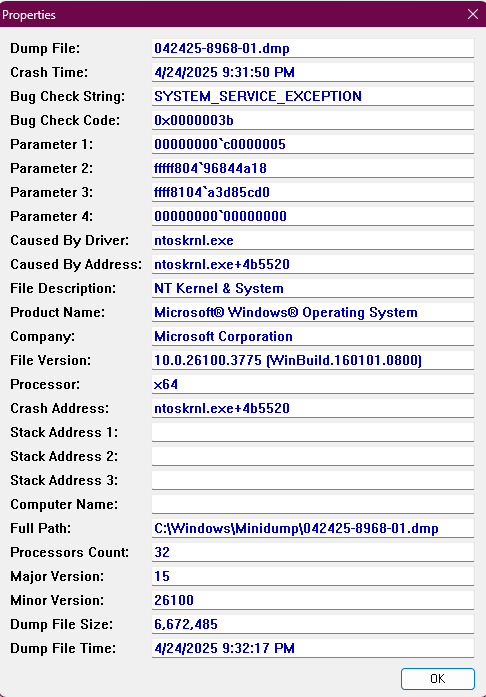
April 24: 0x0000003b (0x00000000c0000005, 0xfffff80496844a18, 0xffff8104a3d85cd0, 0x0000000000000000). SYSTEM_SERVICE_EXCEPTION

On the third time it happened on April 5, I disabled XMP from my BIOS and reinstalled my GPU driver to the latest update (RTX 4090) and I was able to not get any BSODs for an entire week but it happened again on April 16. After that happened, I decided to reinstall my BIOS with the latest driver and completely reinstall Windows 11, hoping that the cause of my consistent BSODs was a corrupt Windows OS but unfortunately as of today (04/24/2025) it came back after gaming session with a friend of mine.

Before I reinstalled Windows 11, I started using BlueScreenView to see what was causing all my BSODs and every single one of them was caused by driver: ntoskrnl.exe

That's about as much as I can tell you as of now, here's the latest dmp file of my blue screen, and a file to my system info both links for Mediafire and OneDrive are the same dmp file, please choose either (or both).

Mediafire:

https://www.mediafire.com/file/vyat8rc1hoz0ylh/042425-8968-01.dmp/file

OneDrive:

042425-8968-01.dmp

System Info:

SystemInformation.txt

BlueScrewView result:
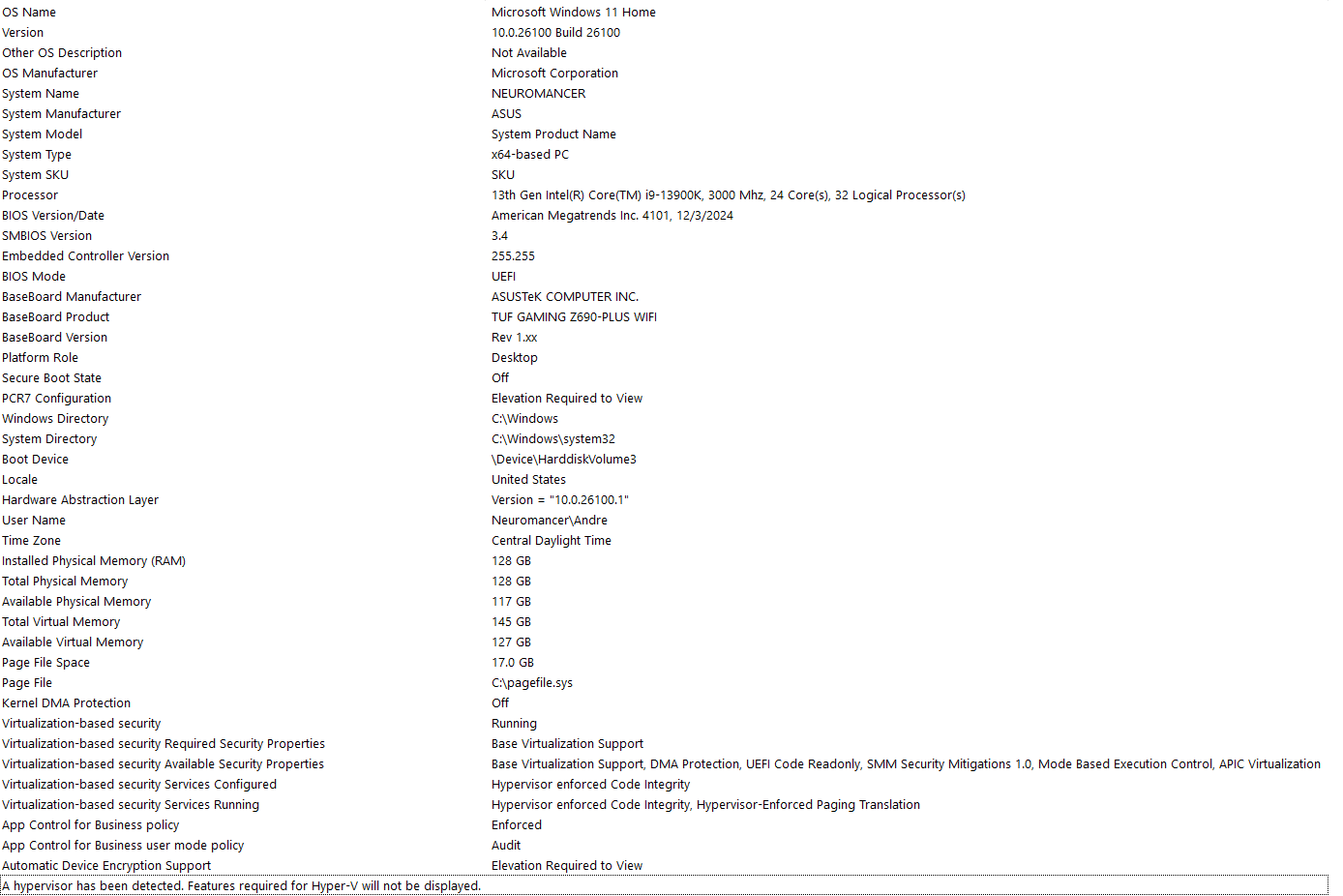
System Info:
That's really about it, I hope one of you guys can help me out here, with this posted, I'm gonna conduct a MemTest86 to see if my RAM could be the culprit.

Thank you for reading and please help!

Windows for home | Windows 11 | Performance and system failures

Locked Question. This question was migrated from the Microsoft Support Community. You can vote on whether it's helpful, but you can't add comments or replies or follow the question.

0 comments No comments

7 answers

Sort by: Most helpful
  1. Anonymous
    2025-05-07T04:04:31+00:00

    Another bluescreen, I decided to reseat my GPU, unfortunately my desktop has no space for my GPU to put in the other PCI slot so I had to use the same one. As soon as I started up my computer, I got another blue screen but this time my screen went black instead of a typical BSOD, I went to event viewer and it was a blue screen.

    Event Log:

    Event Files May-06-2025 Another Bluescreen.evtx

    Minidump:

    050625-9218-01.dmp

    Was this answer helpful?

    1 person found this answer helpful.
    0 comments No comments
  2. Anonymous
    2025-04-27T02:04:17+00:00

    Hello Bernard, thank you for replying and offering a solution. I already went ahead and reinstalled the NVIDIA Driver following the link's step by step guide. In regards to the Armoury Crate Service, I decided not to reinstall it after using the Armoury Crate Uninstaller to remove it from my computer, since I have no use of it and never used it since making my computer 2 years ago.

    I'll keep you up to date if anything happens, unfortunately the BSODs happen randomly so I can't really tell when and if it comes back, also a new Windows update came out talking about fixing the BSODs that happened under an earlier April 2025 update, under the Normal Rollout section:

    https://support.microsoft.com/en-us/topic/april-25-2025-kb5055627-os-build-26100-3915-preview-9324a361-965a-4496-8fd8-ba8a9de9fc38

    While it may be a pipe dream that a specific update may have been causing the BSODs, I doubt it but its always good to bring it up. Another thing I would like to add, I was able to do a MEMTEST86 test overnight and all my RAM passed, so I can scratch out that the RAMs are causing the BSODs (I'll keep XMP disabled since I don't like overclocking). But based on the system log I gave you, and you detecting the armoury crate services causing a bunch of errors, hopefully removing that program can make a difference as to whether or not the BSOD will come back.

    Anyways, thank you for now, I'll keep you updated if the BSOD comes back and I'll follow your advice in reinstalling my GPU to a different PCIe slot if it does happen again.

    Was this answer helpful?

    0 comments No comments
  3. Lester Bernard Reyes 81,670 Reputation points Independent Advisor
    2025-04-26T07:10:33+00:00

    Hi, thank you for patiently waiting. After checking and analyzing the event logs, there are multiple Armoury Crate Service errors on the PC, in this case, I recommend reinstalling the Armoury Crate by following the steps from the link below:

    https://rog.asus.com/articles/guides/how-to-cle...

    Note: This is a non-Microsoft website. The page appears to be providing accurate, safe information. Watch out for ads on the site that may advertise products frequently classified as a PUP (Potentially Unwanted Products). Thoroughly research any product advertised on the site before you decide to download and install it.

    Method 2. Let us run a clean installation of the Nvidia driver, this is different from doing DDU or updating the driver as this will remove all entries and replace them with compatible ones, kindly follow the steps from the link below:

    https://nvidia.custhelp.com/app/answers/detail/...

    Note: This is a non-Microsoft website. The page appears to be providing accurate, safe information. Watch out for ads on the site that may advertise products frequently classified as a PUP (Potentially Unwanted Products). Thoroughly research any product advertised on the site before you decide to download and install it.

    Additional note: If the issue persists, and since you have reinstalled Windows, I suggest removing the GPU and placing it into another PCIe port available; however, if all fails, I suggest contacting a local technician to physically check the device for any hardware-related issues.

    Was this answer helpful?

    0 comments No comments
  4. Anonymous
    2025-04-25T20:50:03+00:00

    Hello Bernard, thank you for taking the case. Apologies for not replying in time, I followed the link's step by step guide on saving the system log and I was able to save mine. As for the other mini dump files, unfortunately, I do not have them since they were wiped out after reinstalling Windows 11.

    Here is the OneDrive link to my saved system log file:

    Event Files April 24-25 2025.evtx

    Was this answer helpful?

    0 comments No comments
  5. Lester Bernard Reyes 81,670 Reputation points Independent Advisor
    2025-04-25T05:00:15+00:00

    Hi, thanks for reaching out. My name is Bernard, a Windows fan like you. I'll be happy to help you out today, my timezone is UTC +8.

    I understand the issue you have, there is nothing to worry I am here to assist. Can you further check if you have more dump files on the PC? Upon checking the Minidump file, it is only displaying general errors. In addition, can you please check the System logs on the PC so that I can further examine the root cause of the issue?

    To do this, kindly follow the steps from this link:

    https://www.yourwindowsguide.com/2017/12/how-to...

    Note: This is a non-Microsoft website. The page appears to be providing accurate, safe information. Watch out for ads on the site that may advertise products frequently classified as a PUP (Potentially Unwanted Products). Thoroughly research any product advertised on the site before you decide to download and install it.

    Then, please upload it by following the steps from the link.

    Let me know how it goes and I hope that helps.

    Bernard

    Was this answer helpful?

    0 comments No comments
