Microsoft 365 and Office | SharePoint Server | For business
A family of Microsoft on-premises document management and storage systems.

This browser is no longer supported.
Upgrade to Microsoft Edge to take advantage of the latest features, security updates, and technical support.
' cx='32' cy='32' r='32' /%3E%3Ctext x='50%25' y='55%25' dominant-baseline='middle' text-anchor='middle' fill='%23FFF' %3ERG%3C/text%3E%3C/svg%3E)
Dear Team,
We are planning to change the SQL server in SharePoint farm due to the lifetime expiration of the server by using the below article. Before changing the server we are checking the UDL test.
https://learn.microsoft.com/en-us/sharepoint/troubleshoot/administration/how-to-change-the-database-in-farms
Without the UDL result, we cannot take call to change the SQL Server in SharePoint
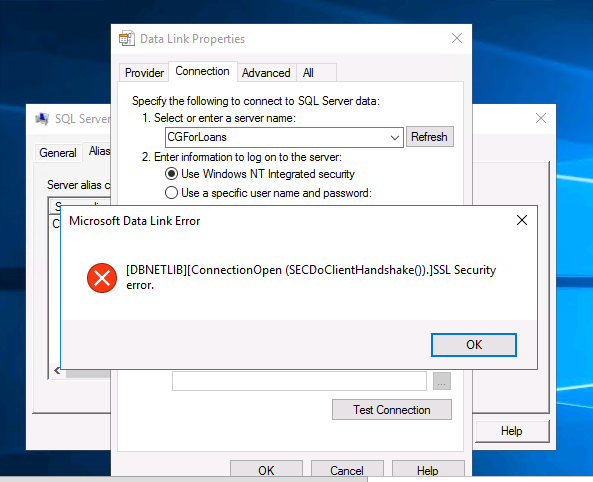
UDL test connection is getting failed, but on local and remote servers we are able to connect.
Farm details::
OS 2016
SQL 2016
SharePoint 2019 (2 SharePoint servers APP & WFE)
TLS 1.2 is enabled on the SharePoint server and SQL server for both the client and server.
Please provide the best solution to pass the UDL connection.
' cx='32' cy='32' r='32' /%3E%3Ctext x='50%25' y='55%25' dominant-baseline='middle' text-anchor='middle' fill='%23FFF' %3EYK%3C/text%3E%3C/svg%3E)
Please specify what provider/driver was selected in the Provider tab.
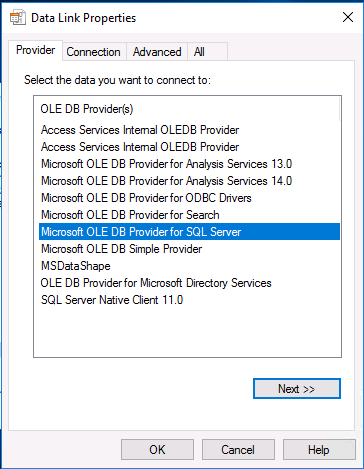
We select Microsoft OLE DB Provider for SQL Server
Hi @Rahul Gollapalli ,
All Microsoft OLEDB providers are deprecated, and NOT recommended to be used, except Microsoft OLE DB Driver for SQL Server (MSOLEDBSQL).
Check it out here:
https://learn.microsoft.com/en-us/answers/questions/1029316/ssis-connect-to-azure-sql-database-with-mfa.html

The Microsoft OLE DB Provider for SQL Server ships with the OS, but it is more than 20 years old. SQL Server Native Client 11.0 is a little better.
The most recent OLE DB provider is MSOLEDBSQL19, you can download it here.