Azure Monitor
An Azure service that is used to collect, analyze, and act on telemetry data from Azure and on-premises environments.
This browser is no longer supported.
Upgrade to Microsoft Edge to take advantage of the latest features, security updates, and technical support.
' cx='32' cy='32' r='32' /%3E%3Ctext x='50%25' y='55%25' dominant-baseline='middle' text-anchor='middle' fill='%23FFF' %3EMR%3C/text%3E%3C/svg%3E)
I need to implement re-trying failed requests manually. Is there any mechanisms already implemented in APIM? Or there is only one way - get failed requests by status, transform them to a new requests and re-send manually?
' cx='32' cy='32' r='32' /%3E%3Ctext x='50%25' y='55%25' dominant-baseline='middle' text-anchor='middle' fill='%23FFF' %3EMM%3C/text%3E%3C/svg%3E)
@Maksymilian Rebrii Thank you for reaching out to Microsoft Q&A. Based on the statement, I understand you would like to retry failed requests in APIM using policy.
Have you explored retry policy? With retry policy, you can specify conditions, interval, number of retry attempts etc and check out Retry docs and samples. Also, you can even implement to retry with fail-over region like this example. Here is the description from docs:
<retry
    condition="boolean expression or literal"
    count="number of retry attempts"
    interval="retry interval in seconds"
    max-interval="maximum retry interval in seconds"
    delta="retry interval delta in seconds"
    first-fast-retry="boolean expression or literal">
        <!-- One or more child policies. No restrictions -->
</retry>
Please let me know if this answers your question or feel free to add any other.
@MuthuKumaranMurugaachari-MSFT , yep. I tried it. It's main problem that it executes retry not in background and it leads to freeze the UI. I need the mechanism which does it in background. For instance, the client made call on third-party service while it was down. And in a 20 minutes it started up again, so It's waited that request would retry again. So, maybe it's some problems with configuration. Could you give some advices, please
@MuthuKumaranMurugaachari-MSFT I've found this article and, if I understand correctly, the library for executing such queries. Using it can I get the whole type of requests(get, post, etc)? If yes, which query should I use? In the article it's query=requests, while in the samples of the library - query= AppRequests. Could you provide some documentations for it, or maybe I'm wrong and retry policy can be set up to do its work asynchronously?
@MuthuKumaranMurugaachari-MSFT thanks for the answer. Just to get clear. I need to get query's result and then parse it to cUrl in order to be able to execute failed request again. So can I get the result using library mentioned in my previous comment?
@Maksymilian Rebrii Unfortunately, there is no built-in functionality in APIM to perform retry asynchronously.
When retry policy is in place, the client makes a request and APIM tries x times with y duration until z condition is met and the client needs to wait till the above is executed. I understand this wouldn't fit your scenario.
For asynchronous call, you can use send-one-way-request policy (Send one way request docs) to send a request to external services without waiting for a response. This way you can send failure events (or based on some conditions) to your custom solution/endpoint where you can implement the retry mechanism. Refer docs: Using external services from the Azure API Management service describing this policy.
Regarding your other question, if you have integrated APIM with App Insights like https://learn.microsoft.com/en-us/azure/api-management/api-management-howto-app-insights, then you can use Query - Get to pull the data from the table (Try sample query in REST API docs: requests | where resultCode == 200 for your appId).

Note, the above telemetry items are sent to Application Insights, and you can use portal to find requests, traces, exceptions as shown below (also get sample request generated from Developer Tools):
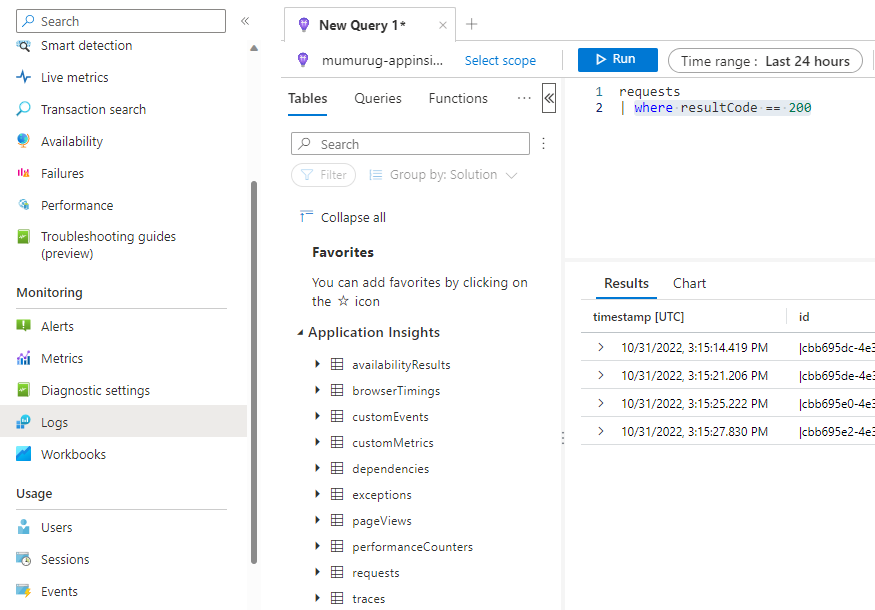
AppRequests, AppTraces, AppExceptions are for Log Analytics endpoint (https://learn.microsoft.com/en-us/rest/api/loganalytics/dataaccess/query/get).
I hope these answers would help with your questions and feel free to add a comment if you have any other questions. We would be happy to assist you. Please 'Accept as answer' and ‘Upvote’ if it helped so that it can help others in the community.
@MuthuKumaranMurugaachari-MSFT thanks for the answer. Just to get clear. I need to get query's result and then parse it to cUrl in order to be able to execute failed request again. So can I get the result using library mentioned in my previous comment?
@Maksymilian Rebrii Yes, you can use Azure Monitor Query client library for Java to query data with workspace instead of appId. Then parse the results and make a HTTP request for the failed results.
Tagging Application Insights to the thread. Let us know if you have any other questions.
@MuthuKumaranMurugaachari-MSFT there is a question about authorization. Where can I find client ID, tenant ID, and client secret of the AAD application.
Also the same question about security using query-get. Could you provide instruction of getting user_impersonation to pass the autentification sending request through the Postman
@Maksymilian Rebrii For #1, you can get the client ID, tenant ID, and add new client secret in the azure portal and refer docs on this (Search App registration for your AAD app -> Overview). For #2, there are lot of ways you can acquire access token from Azure AD for testing it in Postman. You can simply use Try it button in security API and login to your azure account which will generate token like below:

Or refer https://learn.microsoft.com/en-us/azure/azure-monitor/logs/api/authentication-authorization which talks about different flows such as Authorization Code flow, Client Credentials flow etc. I hope this helps with your question.
The question related to Azure Monitor Query us solved. Here is the decision
However, there is another question. There are no headers in the requests log. Can it be configured or there is no such functionality?
@MuthuKumaranMurugaachari-MSFT maybe I'm quite inattentive, but where is Try it button? =)
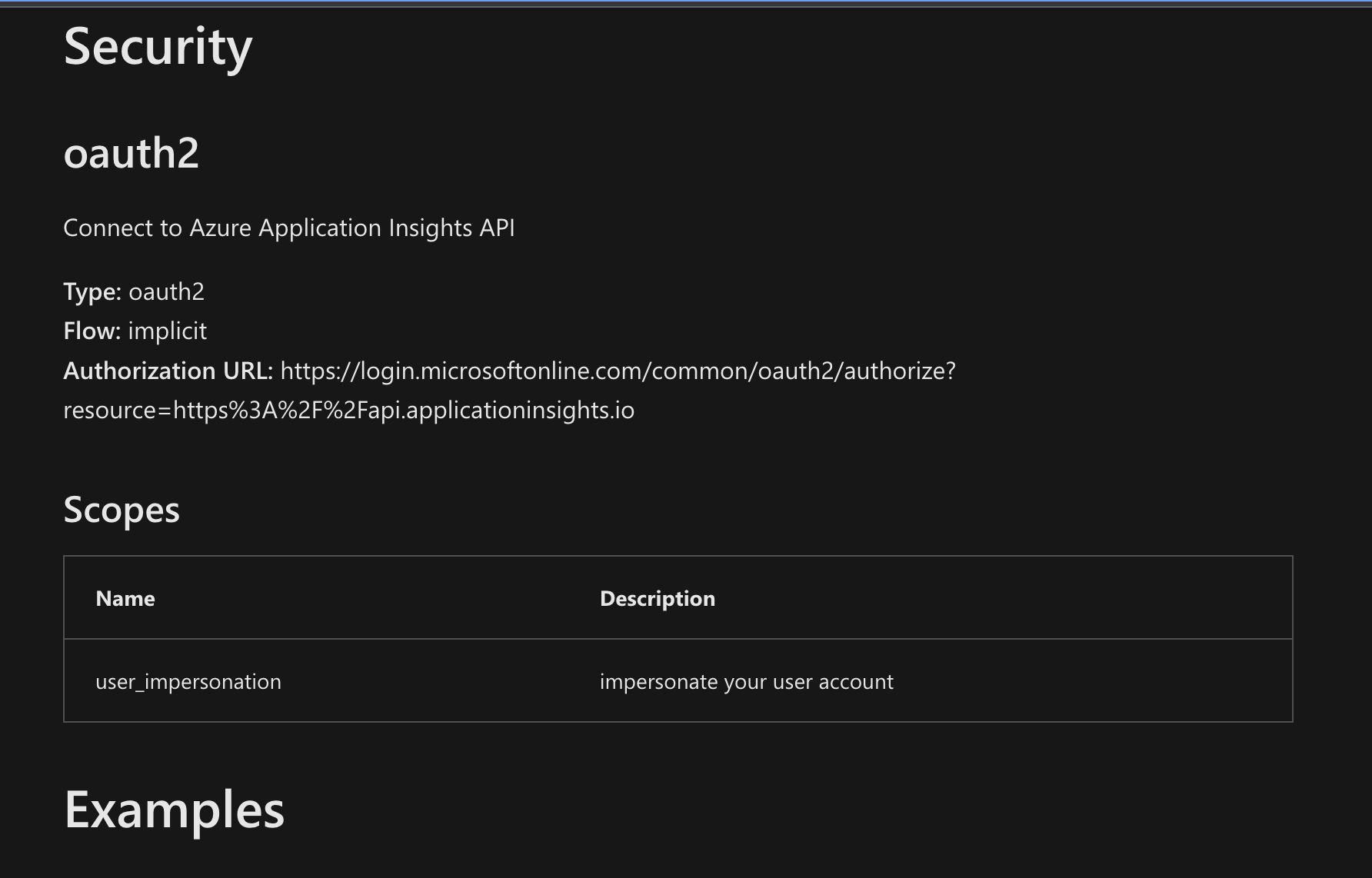
@MuthuKumaranMurugaachari-MSFT Try button is at the top of the page https://learn.microsoft.com/en-us/rest/api/application-insights/query/get
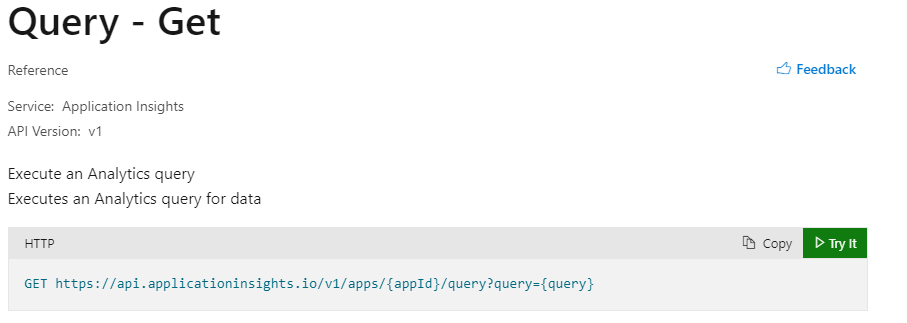
Not sure if I follow the question. You can add headers in the request using Try it button or Postman. If your question is specific to Postman, would recommend posting it in https://community.postman.com/
the both request results (if we perform it in Application Insight - "requests" or if we perform it in Workspase - "AppRequest") don't contain any information about logged request header. So here is my question. Is it's needed to configure logging that request's headers also will be logged, or there is no such functional?
Correct, you need to add it in All APIs (or individual API) like below for either App Insights or Azure Monitor:
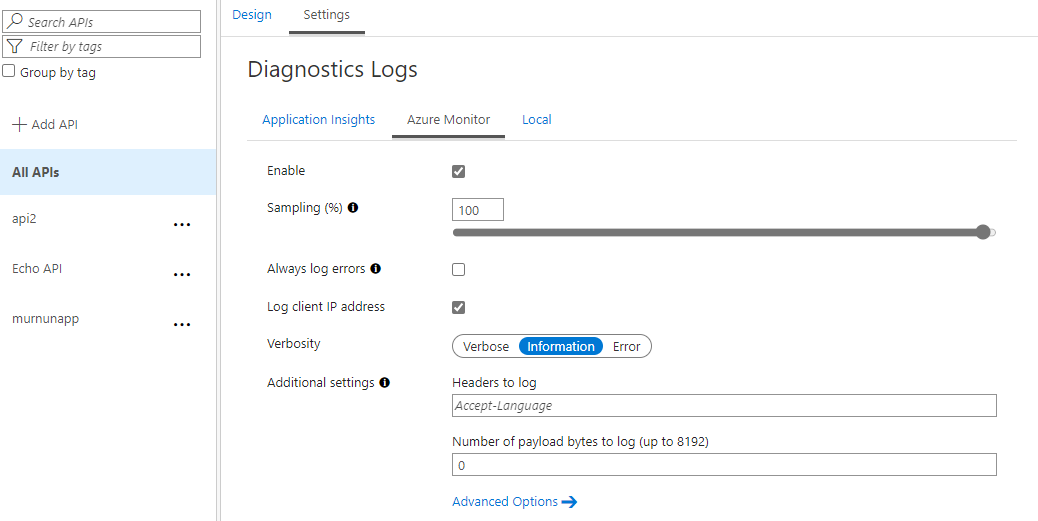
Here are docs: https://learn.microsoft.com/en-us/azure/api-management/api-management-howto-app-insights#enable-application-insights-logging-for-your-api for App Insights.