Azure SQL Database
An Azure relational database service.
This browser is no longer supported.
Upgrade to Microsoft Edge to take advantage of the latest features, security updates, and technical support.
' cx='32' cy='32' r='32' /%3E%3Ctext x='50%25' y='55%25' dominant-baseline='middle' text-anchor='middle' fill='%23FFF' %3EL%3C/text%3E%3C/svg%3E)
@ADALTeam I have setup "Azure Active Directory - Integrated" on my azure development account. I have found that it stops working after not using it, even for short periods of time, less than
one hour, then I get the ADAL error as described on this post: ssms-connection-to-azuresql-database-adal-error.html
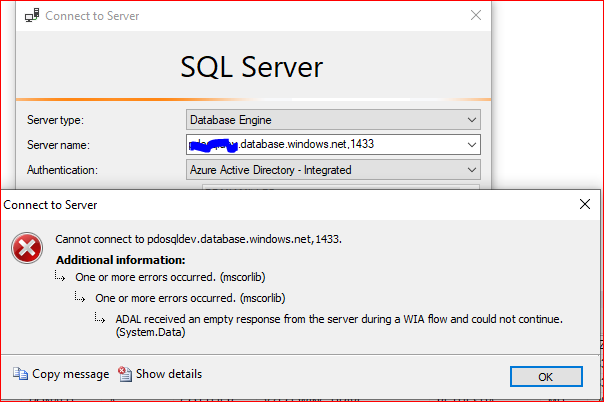
I've been able to have it work again by just going to the Azure portal and open the one user and group I have setup, I followed the suggestions on the above post, and these are the results
1 - I have the latest ODBC driver installed, ODBC Driver 18 for SQL Server
2 - tnc login.windows.net -port 443 works
3 - tnc login.microsoftonline.net -port 443 doesn't work
I was able to sign in early today and most of the day yesterday, but now it is just not working as you can see in the picture below.


On that same forum thread, you shared with us there is a deleted note you may not be able to see that @Oury Ba-MSFT shared with the Community. I am sharing it with you in case it helps:
One customer who reported the same issue was able to get this resolve by recreating the account in the master DB.
Anyone facing this type of issue can try this workaround to see of that resolve the problem.
Thank you, @Alberto Morillo , that's a different issue, I already have set the default database to my database to prevent the login being rejected by no having access to the master database,
I think my issue is related to both my development tenant and office tenant not being properly setup to "talk" to each other, if that is even possible, this is what I discovered:
1 - My development computer, Windows 10 22H2, from where I'm trying to connect, is on my office Domain and I login to it using my Office 365 credentials, and I'm at home.
2- While I'm at the office I can login using SSMS and "Azure Active Directory - Integrated" without a problem.
3 - From home I can't, unless I connect to the VPN, even if I only connect for a few seconds and then disconnect. That's estrange, I don't have to stay connected to the VPN, I can disconnect and I
can log back in SSMS using active directory without a problem.
If I stop using the connection after an undetermined period of time, about one hour, I have to connect again to the VPN, only for a few seconds, for it to work again.
:
Thank you for taking the time.
Luis
@Luis please go to Network Connections in Control Panel and verify on the Properties of the VPN an attribute named "Iddle time before disconnecting" is set to "Never" please.
@Alberto Morillo thank you, I don't have access to that setting. At this point, I'm ok with using the VPN for now, I'll keep researching and if I find a better solution I'll get back to this post. I would have expected this to be black and white, but the fact that I only need to connect to the VPN for a few seconds is confusing, it makes me think that I'm missing something. and this behavior does not show with any other application that needs the VPN, like Remote Desktop, it only behaves this way with Azure. Thank you @Alberto Morillo for your help.

Hi @Luis Thank you for your query and sorry to hear that you are facing ADAL issue connecting to Azure SQL DB using Azure Active directory Integrated.
As mentioned above by @Alberto Morillo a customer was able to resolve his issue by recreating the account in the master DB, but your issue might be related to something else.
Set the connection timeout < 20 and see if that solves the issue.
If not check the followings:
Regards,
Oury
Thank you @Oury Ba-MSFT , I replied to @Alberto Morillo