Azure Data Factory
An Azure service for ingesting, preparing, and transforming data at scale.
This browser is no longer supported.
Upgrade to Microsoft Edge to take advantage of the latest features, security updates, and technical support.
' cx='32' cy='32' r='32' /%3E%3Ctext x='50%25' y='55%25' dominant-baseline='middle' text-anchor='middle' fill='%23FFF' %3ENM%3C/text%3E%3C/svg%3E)
I'm struggling to get pagination to work for a rest request in data factory. Here's a preview of the data that gets returned by the rest call;
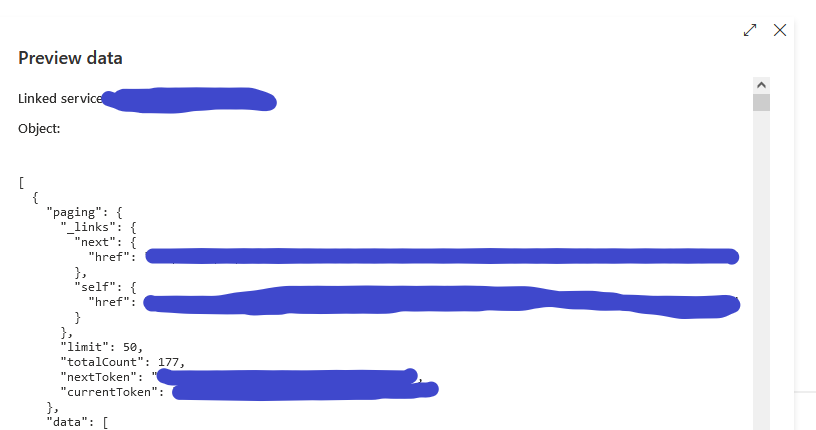
For my settings, I've applied 'AbsoluteURL', with Value 'Body' and the query $.paging._links.next.href
I've tried various other tweaks, but always get the same result... only 50 records return. What am I missing?

$.paging… does not work, because the response is json array [], and not object {}.
"The response body should contain only one JSON object. The JSONPath expression should return a single primitive value, which will be used to issue next request."

Hi @Nicholas Mead ,
Thank you for posting query in Microsoft Q&A Platform.
In your case it seems you are getting array and inside array its json object. Hence you may seeing it not working.
If we see official documentation example from below link, here API response was in json object.
https://learn.microsoft.com/en-us/azure/data-factory/connector-rest?tabs=data-factory#example-5set-end-condition-to-avoid-endless-requests-when-range-rule-is-not-defined
Still, kindly try using below syntax and see if that helps.
$.[0].paging._links.next.href or $[0].paging._links.next.href
If not helps, please try to make that API call using web activity and try to take the next URL in to some variable and then frame new URL and make again API call. That way it will work. If possible please also share the output json screenshot of API call from web activity to understand the API response better here.
Kindly consider checking below video, there I explained a different way of implementing pagination and see that fits in your case.
Copy data from REST API which sends response in Pages using Azure data factory
Check this video for understanding web activity.
Hope this helps. Please let me know how it goes.
-----------
Please consider hitting Accept Answer button. Accepted answers help community as well.
Hi @Nicholas Mead , Just checking in to see if the above answer helped. If this answers your query, do click  and upvote
  for the same. And, if you have any further query do let us know.