Microsoft Security | Intune | Application management
Managing apps and software deployment through Microsoft Intune

This browser is no longer supported.
Upgrade to Microsoft Edge to take advantage of the latest features, security updates, and technical support.
' cx='32' cy='32' r='32' /%3E%3Ctext x='50%25' y='55%25' dominant-baseline='middle' text-anchor='middle' fill='%23FFF' %3ESM%3C/text%3E%3C/svg%3E)
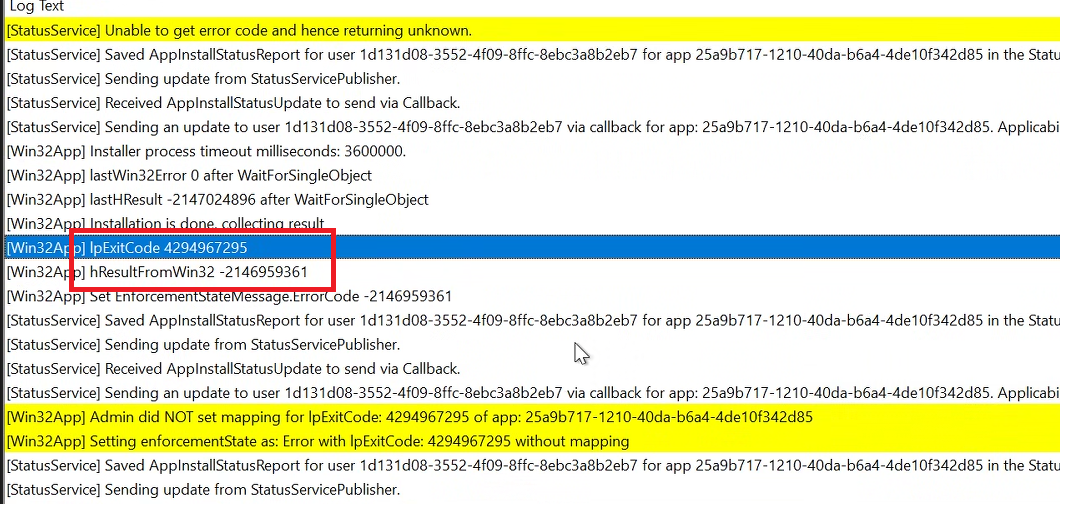
we have some Intune win32 application created with user context that are working fine on all version of win10 and win11 22H1. we have recently upgraded few devices to Win11 22H2. It has been observed that any application deployed with user context gets failed on Win11 22H2 with error Unknown (0x87D30000)
Also we are using ServiceUI.exe in order to bring the SYSTEM Process to Interactive Mode for some packages which are deployed with system context. Such packages are also getting failed with same error code on Win11 22H2.
IntuneManagementExtension.log shows the IPExitCode -4294967295
' cx='32' cy='32' r='32' /%3E%3Ctext x='50%25' y='55%25' dominant-baseline='middle' text-anchor='middle' fill='%23FFF' %3EMV%3C/text%3E%3C/svg%3E)
I exactly experience the same problem just for our Windows 11 (10.0.22621.1105) devices. No error with the application on all older Windows 10 devices. There is nothing wrong with the installer package since manual installation works well in user context of my Windows 11 device.
' cx='32' cy='32' r='32' /%3E%3Ctext x='50%25' y='55%25' dominant-baseline='middle' text-anchor='middle' fill='%23FFF' %3ERJ%3C/text%3E%3C/svg%3E)
I see the same issue. User based app with "%username%" in the command line (cmd) and the log is using the computername instead of the userid. Any news on that?
