Azure App Service
Azure App Service is a service used to create and deploy scalable, mission-critical web apps.
This browser is no longer supported.
Upgrade to Microsoft Edge to take advantage of the latest features, security updates, and technical support.
' cx='32' cy='32' r='32' /%3E%3Ctext x='50%25' y='55%25' dominant-baseline='middle' text-anchor='middle' fill='%23FFF' %3EK%3C/text%3E%3C/svg%3E)
Receiving 400 errors with no additional details when trying to deploy a static file:
az webapp deploy --id <id-omitted> --src-path config.yaml --type static --target-path config.yaml --debug
Results in
   .azure.cli.command_modules.appservice.custom: Deployment API: https://limonapp.scm.azurewebsites.net/api/publish?type=static&path=config.yaml
   urllib3.connectionpool: Starting new HTTPS connection (1): limonapp.scm.azurewebsites.net:443
   urllib3.connectionpool: https://limonapp.scm.azurewebsites.net:443 "POST /api/publish?type=static&path=config.yaml HTTP/1.1" 400 0
   cli.azure.cli.core.util: azure.cli.core.util.handle_exception is called with an exception:
   cli.azure.cli.core.util: Traceback (most recent call last):
     File "/opt/homebrew/Cellar/azure-cli/2.43.0/libexec/lib/python3.10/site-packages/knack/cli.py", line 233, in invoke
       cmd_result = self.invocation.execute(args)
     File "/opt/homebrew/Cellar/azure-cli/2.43.0/libexec/lib/python3.10/site-packages/azure/cli/core/commands/__init__.py", line 663, in execute
       raise ex
     File "/opt/homebrew/Cellar/azure-cli/2.43.0/libexec/lib/python3.10/site-packages/azure/cli/core/commands/__init__.py", line 726, in _run_jobs_serially
       results.append(self._run_job(expanded_arg, cmd_copy))
     File "/opt/homebrew/Cellar/azure-cli/2.43.0/libexec/lib/python3.10/site-packages/azure/cli/core/commands/__init__.py", line 697, in _run_job
       result = cmd_copy(params)
     File "/opt/homebrew/Cellar/azure-cli/2.43.0/libexec/lib/python3.10/site-packages/azure/cli/core/commands/__init__.py", line 333, in __call__
       return self.handler(*args, **kwargs)
     File "/opt/homebrew/Cellar/azure-cli/2.43.0/libexec/lib/python3.10/site-packages/azure/cli/core/commands/command_operation.py", line 121, in handler
       return op(**command_args)
     File "/opt/homebrew/Cellar/azure-cli/2.43.0/libexec/lib/python3.10/site-packages/azure/cli/command_modules/appservice/custom.py", line 4656, in perform_onedeploy
       return _perform_onedeploy_internal(params)
     File "/opt/homebrew/Cellar/azure-cli/2.43.0/libexec/lib/python3.10/site-packages/azure/cli/command_modules/appservice/custom.py", line 4822, in _perform_onedeploy_internal
       response = _make_onedeploy_request(params)
     File "/opt/homebrew/Cellar/azure-cli/2.43.0/libexec/lib/python3.10/site-packages/azure/cli/command_modules/appservice/custom.py", line 4810, in _make_onedeploy_request
       raise CLIError("An error occured during deployment. Status Code: {}, Details: {}"
   knack.util.CLIError: An error occured during deployment. Status Code: 400, Details:

   cli.azure.cli.core.azclierror: An error occured during deployment. Status Code: 400, Details:
   az_command_dataa_logger: An error occured during deployment. Status Code: 400, Details:
   cli.knack.cli: Event: Cli.PostExecute [<function AzCliLogging.deinit_cmd_metadata_logging at 0x1049937f0>]
   az_command_data_logger: exit code: 1
   cli.__main__: Command ran in 5.588 seconds (init: 0.082, invoke: 5.506)
   telemetry.main: Begin splitting cli events and extra events, total events: 1
   telemetry.client: Accumulated 0 events. Flush the clients.
   telemetry.main: Finish splitting cli events and extra events, cli events: 1
   telemetry.save: Save telemetry record of length 3441 in cache

@Kyriacos Thank you for reaching out to Microsoft Q&A, apologize for the inconvenience caused on this.
If you are trying to pass the resource id of the webapp then you need to use the parameter --ids in az webapp deploy cmdlet instead of --id refer to this az web app deploy cmdlet documentation to know more about the optional parameters supported by this cmdlet.
I have tried to reproduce this behavior in my environment (running with AZ cli version 2.43.0 and webapp extension version 0.4.0) by creating 2 webapps (running on windows & Linux app service plan) using the az webapp deploy cmdlet I am able to deploy the static file to the webapp without any issue as shown below.
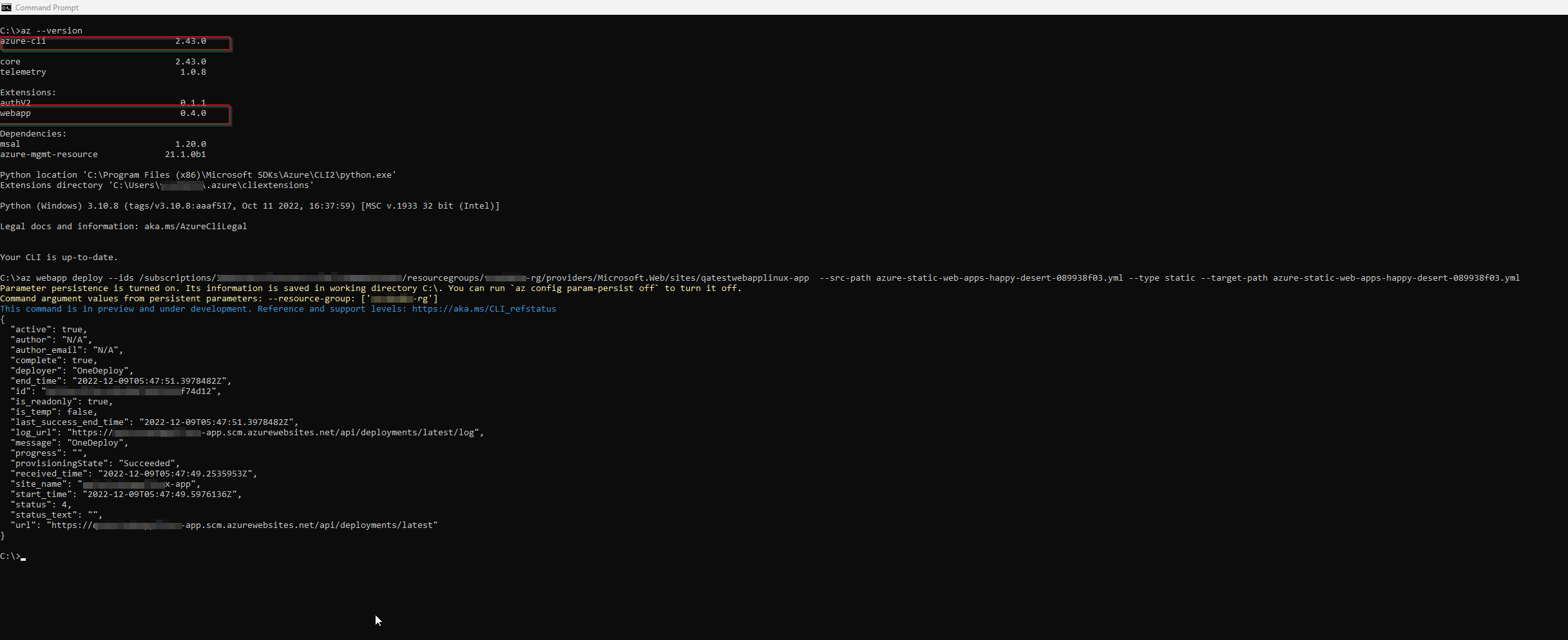
Feel free to reach back to me if you have any further questions on this.
Thanks for the answer!
I'm not using web app anymore so I can't validate the solution - but it certainly looks like I was passing the wrong parameter key. If only error messages were better ... :)
@Kyriacos Thanks for your feedback. I have relayed the feedback internally to our product engineering team. I would suggest you to raise a feedback request in UserVoice - All of the feedback, you share in these forums will be monitored and reviewed by the Microsoft engineering teams responsible for building.