Developer technologies | Windows Presentation Foundation
A part of the .NET Framework that provides a unified programming model for building line-of-business desktop applications on Windows.
This browser is no longer supported.
Upgrade to Microsoft Edge to take advantage of the latest features, security updates, and technical support.
' cx='32' cy='32' r='32' /%3E%3Ctext x='50%25' y='55%25' dominant-baseline='middle' text-anchor='middle' fill='%23FFF' %3ER7%3C/text%3E%3C/svg%3E)
I have a ListBox and a Button on a wpf window (and other controls not relevant here).
<ListBox
    ItemsSource="{Binding ActiveProjects, Mode=OneTime}"
    SelectedValue="{Binding Path=ActiveProject}">
    <i:Interaction.Triggers>
        <i:EventTrigger
            EventName="SelectionChanged">
            <i:InvokeCommandAction
                Command="{Binding SelectionChanged}"
                CommandParameter="Active" />
        </i:EventTrigger>
    </i:Interaction.Triggers>
</ListBox>

<Button
    Command="{Binding Edit}"
    Content="Edit" />
And in the View Model
Private Property _Edit As New RelayCommand(AddressOf EditProject, AddressOf CanEdit)
Private Function CanEdit() As Boolean
    Return ActiveProject <> String.Empty
End Function
public Property Edit as RelayCommand
    <<Get and Set>>
End Property

Private Property _SelectionChanged As New RelayCommand(AddressOf NewSelection)
Public Property SelectionChanged As RelayCommand
    <<Get and Set>>
End Property
Private Sub NewSelection(ProjectLocation As String)
    CommandManager.InvalidateRequerySuggested()
End Sub
My understanding is that the CanEdit function handles the enabling/disabling of the button and that the CommandManager.InvalidateRequerySuggested() forces a re-evaluation of the CanEdit function. However, the enabled property of the button is not being changed by the above code. Why not?
Or do I have to explicitly bind the Enabled property of the button?
EDIT EDIT EDIT
Public Class RelayCommand
    Implements ICommand

    Private ReadOnly clsExecute As Action(Of Object)
    Private ReadOnly clsCanExecute As Predicate(Of Object)
    Private Event ICommand_CanExecuteChanged As EventHandler Implements ICommand.CanExecuteChanged

    Public Sub New(ByVal Execute As Action(Of Object))
        Me.New(Execute, Nothing)
    End Sub
    Public Sub New(ByVal Execute As Action(Of Object), ByVal CanExecute As Predicate(Of Object))
        If Execute Is Nothing Then
            Throw New ArgumentNullException(NameOf(Execute))
        End If
        clsExecute = Execute
        clsCanExecute = CanExecute
    End Sub
    Private Function ICommand_CanExecute(parameter As Object) As Boolean Implements ICommand.CanExecute
        Return clsCanExecute Is Nothing OrElse clsCanExecute(DirectCast(parameter, Object))
    End Function
    Shared Custom Event CanExecuteChanged As EventHandler
        AddHandler(ByVal Value As EventHandler)
            AddHandler CommandManager.RequerySuggested, Value
        End AddHandler
        RemoveHandler(ByVal Value As EventHandler)
            RemoveHandler CommandManager.RequerySuggested, Value
        End RemoveHandler
        RaiseEvent(ByVal s As System.Object, ByVal e As System.EventArgs)
        End RaiseEvent
    End Event
    Private Sub ICommand_Execute(Parameter As Object) Implements ICommand.Execute
        clsExecute(DirectCast(Parameter, Object))
    End Sub

End Class
' cx='32' cy='32' r='32' /%3E%3Ctext x='50%25' y='55%25' dominant-baseline='middle' text-anchor='middle' fill='%23FFF' %3EHL%3C/text%3E%3C/svg%3E)
I reproduced your problem using your RelayCommand. You could use the following code and it will work.
Public Class RelayCommand

    Implements ICommand

    Private ReadOnly _execute As Action(Of Object)

    Private ReadOnly _canExecute As Predicate(Of Object)

    Public Sub New(ByVal execute As Action(Of Object))

        Me.New(execute, Nothing)

    End Sub


    Public Sub New(ByVal execute As Action(Of Object), ByVal canExecute As Predicate(Of Object))

        If execute Is Nothing Then

            Throw New ArgumentNullException("execute")

        End If

        _execute = execute

        _canExecute = canExecute

    End Sub

    Public Function CanExecute(ByVal parameter As Object) As Boolean Implements ICommand.CanExecute

        Return If(_canExecute Is Nothing, True, _canExecute(parameter))

    End Function

    Public Custom Event CanExecuteChanged As EventHandler Implements ICommand.CanExecuteChanged

        AddHandler(ByVal value As EventHandler)

            AddHandler CommandManager.RequerySuggested, value

        End AddHandler

        RemoveHandler(ByVal value As EventHandler)

            RemoveHandler CommandManager.RequerySuggested, value

        End RemoveHandler

        RaiseEvent(ByVal sender As System.Object, ByVal e As System.EventArgs)

        End RaiseEvent

    End Event

    Public Sub Execute(ByVal parameter As Object) Implements ICommand.Execute

        _execute(parameter)

    End Sub

End Class
----------------------------------------------------------------------------
If the response is helpful, please click "Accept Answer" and upvote it.
Note: Please follow the steps in our documentation to enable e-mail notifications if you want to receive the related email notification for this thread.
My error was in my version of the RelayCommand. The one provided by HuiLiu works! The one provided by Peter also works. Many thanks to both of you.

Hi,
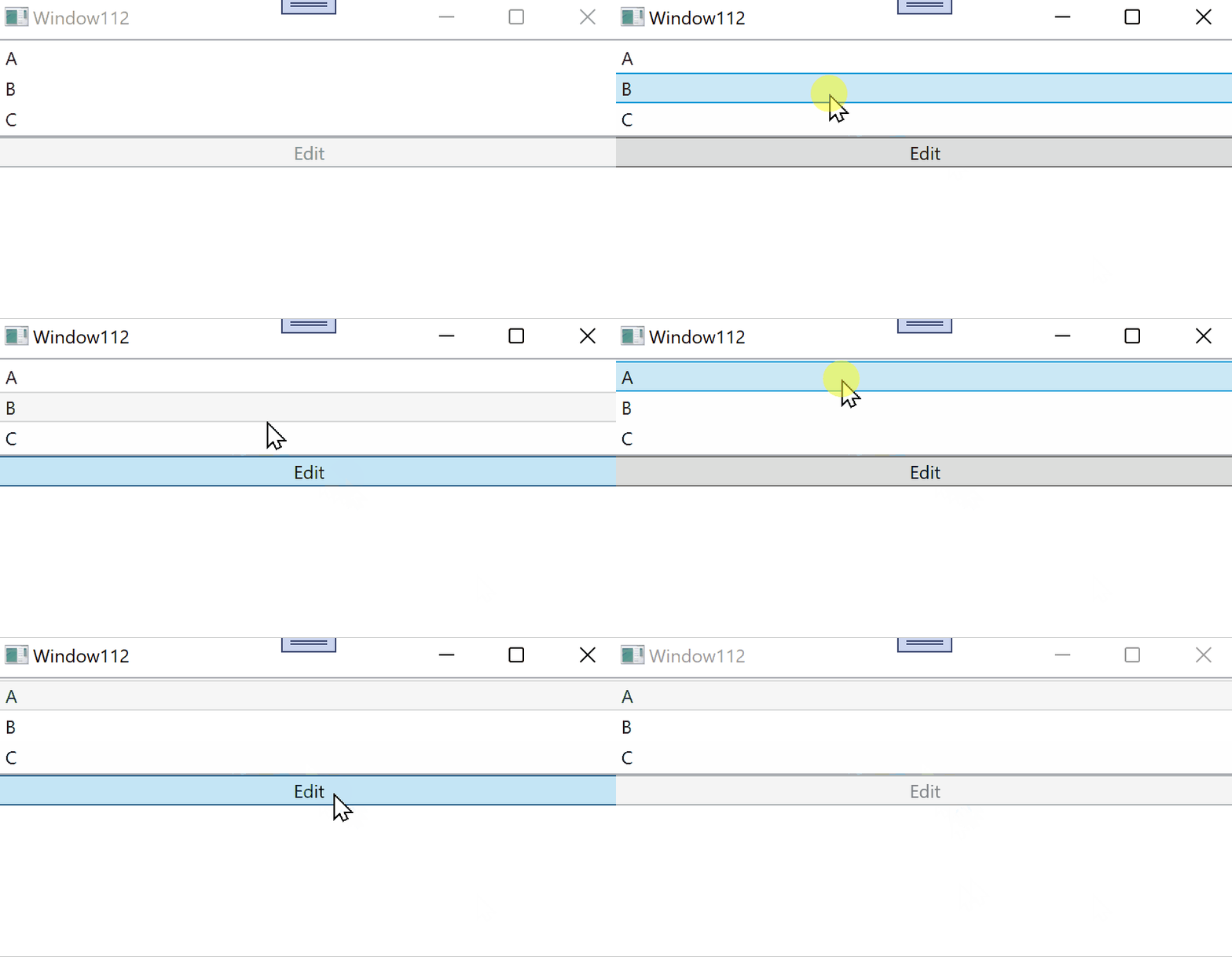
your code work properly. See my test.
<Window x:Class="Window112"
        xmlns="http://schemas.microsoft.com/winfx/2006/xaml/presentation"
        xmlns:x="http://schemas.microsoft.com/winfx/2006/xaml"
        xmlns:d="http://schemas.microsoft.com/expression/blend/2008"
        xmlns:mc="http://schemas.openxmlformats.org/markup-compatibility/2006"
        xmlns:i="clr-namespace:System.Windows.Interactivity;assembly=System.Windows.Interactivity"
        xmlns:local="clr-namespace:WpfApp1.WpfApp112"
        mc:Ignorable="d"
        Title="Window112" Height="450" Width="800">
  <Window.DataContext>
    <local:ViewModel/>
  </Window.DataContext>
  <StackPanel>
    <ListBox
     ItemsSource="{Binding ActiveProjects, Mode=OneTime}"
     SelectedValue="{Binding Path=ActiveProject}">
      <i:Interaction.Triggers>
        <i:EventTrigger
             EventName="SelectionChanged">
          <i:InvokeCommandAction
                 Command="{Binding SelectionChanged}"
                 CommandParameter="Active" />
        </i:EventTrigger>
      </i:Interaction.Triggers>
    </ListBox>

    <Button
     Command="{Binding Edit}"
     Content="Edit" />
  </StackPanel>
</Window>


Namespace WpfApp112
  Public Class ViewModel

    Public Property ActiveProjects As New List(Of String)({"A", "B", "C"})
    Public Property SelectedValue As Object
    Public Property ActiveProject As String

    Private Sub EditProject(obj As Object)
      ActiveProject = String.Empty
    End Sub

    Private Function CanEdit(obj As Object) As Boolean
      Return ActiveProject <> String.Empty
    End Function

    Private Sub NewSelection(ProjectLocation As Object)
      CommandManager.InvalidateRequerySuggested()
    End Sub

    Private Property _Edit As New RelayCommand(AddressOf EditProject, AddressOf CanEdit)
    Public Property Edit As RelayCommand
      Get
        Return Me._Edit
      End Get
      Set(value As RelayCommand)
        Me._Edit = value
      End Set
    End Property
    Private Property _SelectionChanged As New RelayCommand(AddressOf NewSelection)
    Public Property SelectionChanged As RelayCommand
      Get
        Return Me._SelectionChanged
      End Get
      Set(value As RelayCommand)
        Me._SelectionChanged = value
      End Set
    End Property

  End Class
End Namespace
Result:
This is very interesting - and very frustrating. With one exception I copied x.txt into a new project. It runs but the button is never enabled!!
The one exception is that I used xmlns:i="http://schemas.microsoft.com/xaml/behaviors" instead of you definition of i. If I use your definition, the project won't compile the Interation part.
Also note that I use the NuGet package to install behaviors. Did you also use that package?
Hi, @RogerSchlueter-7899 . I tested the code with the Nuget you mentioned and it works. And i added Imports ChangeDataSource to MainWindow.xaml.vb.
Hi,
in demo I used the deprecated version of System.Windows.Interactivity.WPF (2.0.20525).
You can use Microsoft.Xaml.Behavios.Wpf (1.1.39) with xmlns:i="http://schemas.microsoft.com/xaml/behaviors". It works properly.
I still cannot get the code snippet that Peter provided to work. I assume the problem is somewhere else and the first thing that comes to mind is my RelayCommand. I have appended the version I am using to my original post. Is my RelayCommand correct?
I still cannot get the your code snippet to work. I assume the problem is somewhere else and the first thing that comes to mind is my RelayCommand. I have appended the version I am using to my original post. Is my RelayCommand correct?
Hi,
I use this RelayCommand class without problems:
Public Class RelayCommand
  Implements ICommand

#Region "Fields"

  ' delegate to execute '
  Private ReadOnly _execute As Action(Of Object)

  Private ReadOnly _canExecute As Predicate(Of Object)

#End Region ' Fields

#Region "Constructors"

  ''' <summary>
  ''' in ctor get delegate to execute
  ''' </summary>
  ''' <param name="execute">The execution logic.</param>
  Public Sub New(ByVal execute As Action(Of Object))
    Me.New(execute, Nothing)
  End Sub

  ''' <summary>
  ''' in ctor get delegate to execute and predicate to set enabled
  ''' </summary>
  ''' <param name="execute">The execution logic.</param>
  ''' <param name="canExecute">The execution status logic.</param> '
  Public Sub New(ByVal execute As Action(Of Object), ByVal canExecute As Predicate(Of Object))
    If execute Is Nothing Then Throw New ArgumentNullException("execute")
    Me._execute = execute
    Me._canExecute = canExecute
  End Sub

#End Region ' Constructors

#Region "ICommand Members"

  <DebuggerStepThrough()>
  Public Function CanExecute(ByVal parameter As Object) As Boolean Implements ICommand.CanExecute
    ' without predicate return true (Enabled), with predicate get result of predicate '
    If Me._canExecute Is Nothing Then Return True
    Return Me._canExecute(parameter)
  End Function

  Public Custom Event CanExecuteChanged As EventHandler Implements ICommand.CanExecuteChanged
    AddHandler(ByVal value As EventHandler)
      AddHandler CommandManager.RequerySuggested, value
    End AddHandler
    RemoveHandler(ByVal value As EventHandler)
      RemoveHandler CommandManager.RequerySuggested, value
    End RemoveHandler
    RaiseEvent(ByVal sender As Object, ByVal e As EventArgs)
    End RaiseEvent
  End Event

  Public Sub Execute(ByVal parameter As Object) Implements ICommand.Execute
    Me._execute(parameter)
  End Sub

#End Region ' ICommand Members

End Class