Microsoft 365 and Office | SharePoint | Development
The process of building custom applications and tools that interact with Microsoft SharePoint, including SharePoint Online in Microsoft 365.

This browser is no longer supported.
Upgrade to Microsoft Edge to take advantage of the latest features, security updates, and technical support.

Hi,
I'm currently trying to display a custom page property in the search result display template (Item_CommonItem_Body) of a SharePoint Online Classic site.
I have created and added the managed property to the ManagedPropertyMapping element as follows:
Item_CommonItem_Body.html:
<mso:ManagedPropertyMapping msdt:dt="string">'Path':'Path','Description':'Description','EditorOWSUSER':'EditorOWSUSER','LastModifiedTime':'LastModifiedTime','CollapsingStatus':'CollapsingStatus','DocId':'DocId','HitHighlightedSummary':'HitHighlightedSummary','owstaxIdBHFacility':'owstaxIdBHFacility','HitHighlightedProperties':'HitHighlightedProperties','FileExtension':'FileExtension','ViewsLifeTime':'ViewsLifeTime','ParentLink':'ParentLink','FileType':'FileType','IsContainer':'IsContainer','SecondaryFileExtension':'SecondaryFileExtension','DisplayAuthor':'DisplayAuthor','metadatafacetinfo':'metadatafacetinfo','ows_MetadataFacetInfo':'ows_MetadataFacetInfo'</mso:ManagedPropertyMapping>
Search Schema Managed Property: Managed Property

I see this property appearing with the SharePoint Search Query tool:
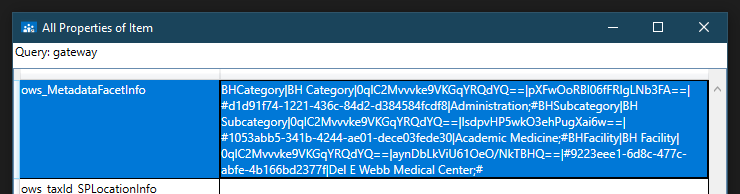
but when I check the display template rendering of the same search result the property is not found (screenshot above is showing the internal property name which we have also tried referencing in the display template with same behavior):
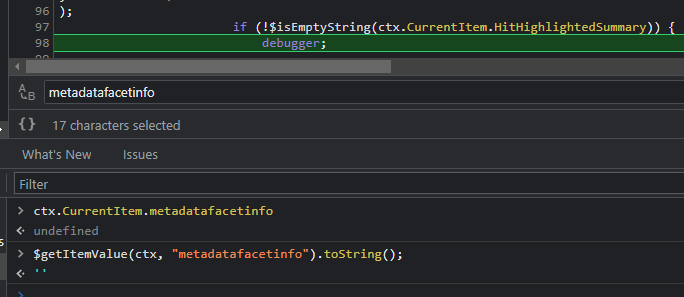
Anyone have any ideas as to what we could be missing here? All the articles and posts I've checked so far haven't worked. This property in question is a managed metadata term in case that makes a difference.
' cx='32' cy='32' r='32' /%3E%3Ctext x='50%25' y='55%25' dominant-baseline='middle' text-anchor='middle' fill='%23FFF' %3ETZ%3C/text%3E%3C/svg%3E)
Hi @Jyoti Rajpurohit ,
We are currently doing some research on this issue, will let you know as soon as possible.
' cx='32' cy='32' r='32' /%3E%3Ctext x='50%25' y='55%25' dominant-baseline='middle' text-anchor='middle' fill='%23FFF' %3ER%3C/text%3E%3C/svg%3E)
Hi @Jyoti Rajpurohit ,
In display template add the "refinablestring00" to the managed property mapping like below
<mso:ManagedPropertyMapping msdt:dt="string">'Title'{Title}:'Title','Department'{Department}:'RefinableString00'</mso:ManagedPropertyMapping>
Please refer to the following document for more details
If the answer is helpful, please click "Accept Answer" and kindly upvote it. If you have extra questions about this answer, please click "Comment".
Note: Please follow the steps in our documentation to enable e-mail notifications if you want to receive the related email notification for this thread.
Hi @Jyoti Rajpurohit ,
Have you tried the solution I proposed?
If you have any questions or progress, you can contact me in time.
Looking forward to your reply
Have a lucky day!
Thanks,
Raytheon Xie
Thanks RaytheonXie-MSFT will check and let you know !!
I have tried the RefinableString00 mapping but it still isn't returning any value:
<mso:ManagedPropertyMapping msdt:dt="string">'Path':'Path','Description':'Description','EditorOWSUSER':'EditorOWSUSER','LastModifiedTime':'LastModifiedTime','CollapsingStatus':'CollapsingStatus','DocId':'DocId','HitHighlightedSummary':'HitHighlightedSummary','BCShowInLeftNavOWSBOOL':'BCShowInLeftNavOWSBOOL','owstaxIdBHFacility':'owstaxIdBHFacility','HitHighlightedProperties':'HitHighlightedProperties','FileExtension':'FileExtension','ViewsLifeTime':'ViewsLifeTime','ParentLink':'ParentLink','FileType':'FileType','IsContainer':'IsContainer','SecondaryFileExtension':'SecondaryFileExtension','DisplayAuthor':'DisplayAuthor','metadatafacetinfo'{metadatafacetinfo}:'RefinableString00','ows_MetadataFacetInfo':'ows_MetadataFacetInfo','ows_MetadataFacetInfo':'RefinableString00'</mso:ManagedPropertyMapping>
Hi @RaytheonXie_MSFT
Any update on this
Thank you