Azure Storage
Globally unique resources that provide access to data management services and serve as the parent namespace for the services.
This browser is no longer supported.
Upgrade to Microsoft Edge to take advantage of the latest features, security updates, and technical support.
' cx='32' cy='32' r='32' /%3E%3Ctext x='50%25' y='55%25' dominant-baseline='middle' text-anchor='middle' fill='%23FFF' %3EZ%3C/text%3E%3C/svg%3E)
I have pdf files in a container. The container has an access level set to (Private no anonymous access). I have changed the access level to (blob anonymous read access for blob only). now I can read the file by copying its URL to another tab. but the problem is anyone who has access to the URL can see the file. Can we restrict access in a way that the document should only open for those accounts that have access to open it and those accounts that do not have access to it, it does not open keeping the container access level (Private no anonymous access).

' cx='32' cy='32' r='32' /%3E%3Ctext x='50%25' y='55%25' dominant-baseline='middle' text-anchor='middle' fill='%23FFF' %3EA%3C/text%3E%3C/svg%3E)
Hi @Zouraiz , are you using RBAC for this? Have you seen this document about adding a role for Blob access? If you have please let me know and I can help you further.
Best,
James
Hi @James Hamil
Thanks for the help.
I am able to generate the SAS token of the Storage Account. but when I generate SAS for the container and signing method is the User Delegation key. I get this error.
let me run a scenario. Suppose 10 people can access the container. they all have read access to it. what I want is one specific person who I allow can open the files having the container set to (Private no anonymous access). The other 9 people despite having a SAS link cannot open the file because they are not authorized to open it.
correct me if I am wrong what I understand from the links you tagged in the answer section is that it can be done by applying SAS on the container Level and using the signing method as the User Delegation key.
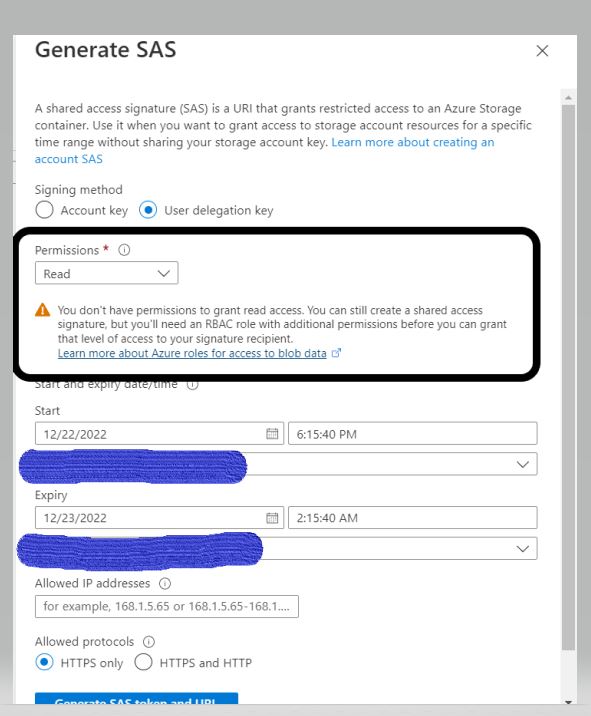
@James Hamil
one more thing James. Could you share some road map on understanding Azure blob storage functionality?
Regards
Zouraiz.
I am actually storing (FIle URL + SAS Token) as a link in the Database. so everyone will have access to the link. that is why I want only specific users to have access to open the files.
Regards,
Zouraiz
Hi @Zouraiz , thanks for following up. For this error, double check your permissions. This thread details the issue pretty well. I'm a bit confused by your scenario. If they all have read access, shouldn't they all be able to open the files? Unless you mean to edit the files? Also, I'll be here for the rest of the day but the team is leaving for our Holiday break so we might not be able to answer back until after we're back in office.
update: Try looking into ABAC for this scenario. It should be easier for Blob access. Let me know what you think.
Hi @Zouraiz , the best way to do this is by generating a SAS token/url. You can configure the settings of these tokens to determine who can access the blob. This document has some more information for other resources as well. Please let me know if you have any questions and I can help you further.
If this answer helped you please mark it as "Verified" so other users can reference it.
Thank you,
James