Microsoft 365 and Office | SharePoint | For business | Windows
A group of Microsoft Products and technologies used for sharing and managing content, knowledge, and applications.

This browser is no longer supported.
Upgrade to Microsoft Edge to take advantage of the latest features, security updates, and technical support.
' cx='32' cy='32' r='32' /%3E%3Ctext x='50%25' y='55%25' dominant-baseline='middle' text-anchor='middle' fill='%23FFF' %3EH%3C/text%3E%3C/svg%3E)
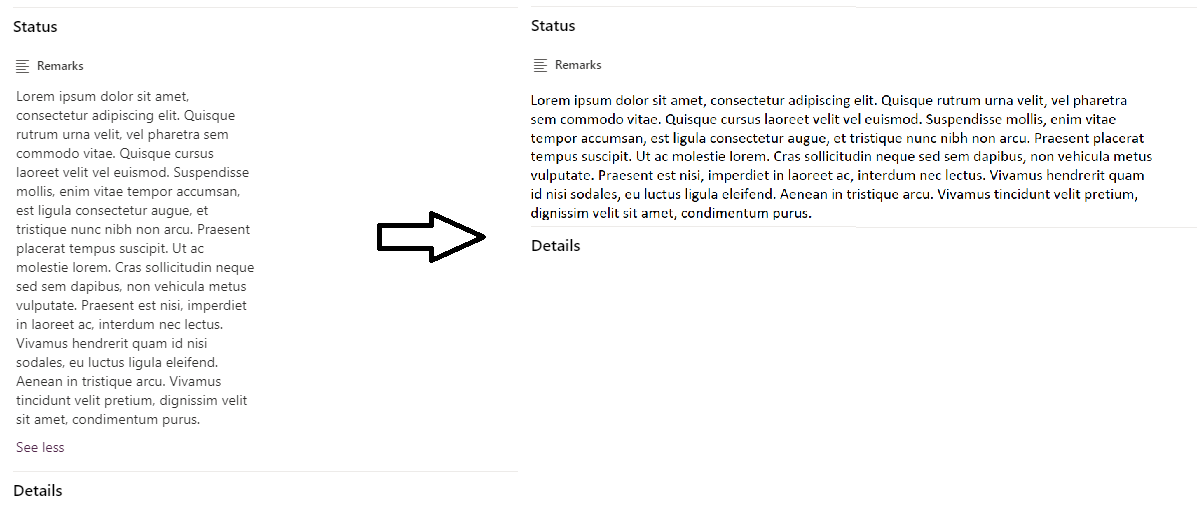
I have an MSlist which I am trying to customize the layout.
I use the following JSON codes to customize the body section.
Under the status section, the texts in the Remark field are displayed in a narrow field. How do I modify my codes to make that particular field wider?
{
"sections": [
{
"displayname": "",
"fields": [
"Country",
"Market Segment"
]
},
{
"displayname": "Status",
"fields": [
"Remarks"
]
},
{
"displayname": "Details",
"fields": [
"Budget"
]
},
{
"displayname": "Others",
"fields": [
"Year"
]
}
]
}
' cx='32' cy='32' r='32' /%3E%3Ctext x='50%25' y='55%25' dominant-baseline='middle' text-anchor='middle' fill='%23FFF' %3EZY%3C/text%3E%3C/svg%3E)
Hi @HaoChan , looks like your issue is related to SharePoint, please kindly understand that the microsoft-graph tag here we mainly focus on general issues about microsoft graph api and we will remove microsoft-graph-sites-lists tag.
Thanks for your understanding and hope your issue would be resolved soon.
' cx='32' cy='32' r='32' /%3E%3Ctext x='50%25' y='55%25' dominant-baseline='middle' text-anchor='middle' fill='%23FFF' %3EAM%3C/text%3E%3C/svg%3E)
Hi @HaoChan ,
As per my knowledge, I'm afraid it is not supported in SharePoint form layout configuration. Unlike the header and the footer, body configuration only allows defining one or more sections and adding one or more columns into each of those sections. We cannot add "style" code to body.
You can provide feedback here: https://feedbackportal.microsoft.com/feedback/forum/06735c62-321c-ec11-b6e7-0022481f8472. Microsoft will take your feedback into consideration if it is highly voted.
----------
If the answer is helpful, please click "Accept Answer" and kindly upvote it. If you have extra questions about this answer, please click "Comment".
Note: Please follow the steps in our documentation to enable e-mail notifications if you want to receive the related email notification for this thread.
@HaoChan ,
Is there any update on this thread? I'm looking forward to your reply.