Microsoft 365 and Office | SharePoint | Development
The process of building custom applications and tools that interact with Microsoft SharePoint, including SharePoint Online in Microsoft 365.

This browser is no longer supported.
Upgrade to Microsoft Edge to take advantage of the latest features, security updates, and technical support.

Hello.
Can anyone help with the origin of this problem and possible solution?
In SharePoint 2016 portal, there are users with read access to a library, but the option "Open in the client application." for office files does not appear (image below).
I have checked the library settings and it is ok (Set to "Open in the client application.")
User 1 (User1.png) has read access and both options appear when clicking on an excel file
User 2 (User2.png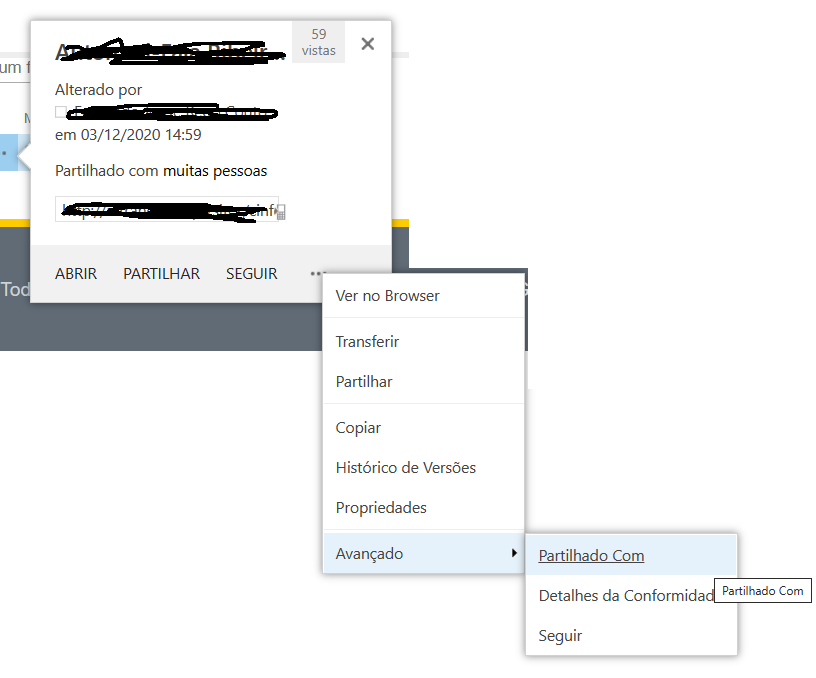 ) has read access and only the "open in browser" option appears
The client application is office 365.
thanks

This is a quick note to let you know that we are performing research on this issue.
Hi @Flórida da Graça Botelho Araújo ,
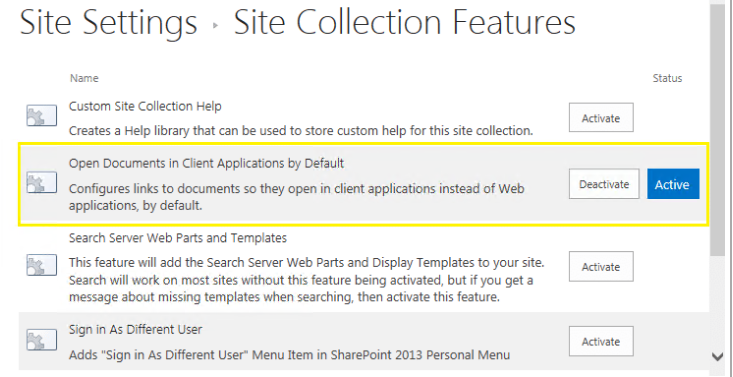
Remove-SPWOPIBinding -all $trueIf the answer is helpful, please click "Accept Answer" and kindly upvote it. If you have extra questions about this answer, please click "Comment".
Note: Please follow the steps in our documentation to enable e-mail notifications if you want to receive the related email notification for this thread.
Hi @Flórida da Graça Botelho Araújo ,
I’m checking how the things are going on about this issue. Whether the answer helps you?
Is there any progress on this thread? Please feel free to let me know.
Hi @Flórida da Graça Botelho Araújo ,
I am checking to see if the problem has been resolved . If you have any questions you can feel free to contact me.