Microsoft 365 and Office | Development | Other
Building custom solutions that extend, automate, and integrate Microsoft 365 apps.

This browser is no longer supported.
Upgrade to Microsoft Edge to take advantage of the latest features, security updates, and technical support.
' cx='32' cy='32' r='32' /%3E%3Ctext x='50%25' y='55%25' dominant-baseline='middle' text-anchor='middle' fill='%23FFF' %3EDS%3C/text%3E%3C/svg%3E)
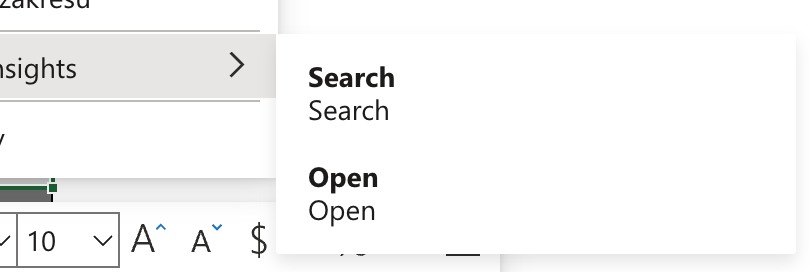
Hello, I work on an Excel add-in, I've added two options to the context menu and they work fine but they are displayed in a strange way (no icons, two labels for each). What do I need to change in my manifest file to show menu items with single labels with icons?
  <Items>
                    <!-- <Context Menu - Search> -->
                    <Item id="SearchItem">
                      <Label resid="label.search" />
                      <Supertip>
                        <Title resid="label.search" />
                        <Description resid="desc.search" />
                      </Supertip>
                      <Icon>
                        <bt:Image size="16" resid="icon-search.16x16"/>
                        <bt:Image size="32" resid="icon-search.32x32"/>
                        <bt:Image size="80" resid="icon-search.80x80"/>
                      </Icon>
                      <Action xsi:type="ExecuteFunction">
                        <FunctionName>action</FunctionName>
                      </Action>
                    </Item>
                    <!-- </Context Menu - Search> -->

                    <!-- <Context Menu - Open Pane> -->
                    <Item id="OpenPaneItem">
                      <Label resid="label.openPane" />
                      <Supertip>
                        <Title resid="label.openPane" />
                        <Description resid="desc.openPane" />
                      </Supertip>
                      <Icon>
                        <bt:Image size="16" resid="icon-ki.16x16"/>
                        <bt:Image size="32" resid="icon-ki.32x32"/>
                        <bt:Image size="80" resid="icon-ki.80x80"/>
                      </Icon>
                      <Action xsi:type="ShowTaskpane">
                        <SourceLocation resid="Taskpane.Url"/>
                      </Action>
                    </Item>
                    <!-- </Context Menu - Open Pane> -->
                  </Items>