Microsoft Security | Intune | Configuration Manager | Updates
Managing and deploying updates via Configuration Manager

This browser is no longer supported.
Upgrade to Microsoft Edge to take advantage of the latest features, security updates, and technical support.
' cx='32' cy='32' r='32' /%3E%3Ctext x='50%25' y='55%25' dominant-baseline='middle' text-anchor='middle' fill='%23FFF' %3ET%3C/text%3E%3C/svg%3E)
Hi,
I am new to SCCM and are deploying Software Update.
We have created a Pilot Group Servers and install Windows Update.
May I ask where can I find out
I find that it is very confusing as there are a number of resources in SCCM, like: Device Collection / Deployment .... etc.
Thanks

Hi TonyJK-1323,
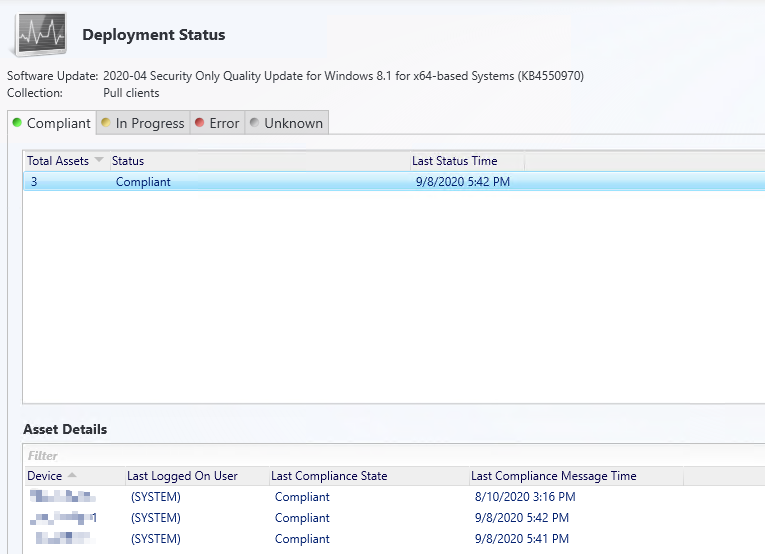
Yes, we could check the deployment status from "Monitoring > Deployments". To review deployment details for each compliance state and the devices in that state, select a deployment, and then, on the Home tab, in the Deployment group, choose View Status to open the Deployment Status pane. Here is the article we could refer to:
https://model-technology.com/blog/understanding-software-update-deployment-status-part-3-viewing-compliance-in-the-sccm-console/
Note: the above links are not from MS, and just for your reference.
Similar picture will be shown in the console:
If the response is helpful, please click "Accept Answer" and upvote it.
Note: Please follow the steps in our documentation to enable e-mail notifications if you want to receive the related email notification for this thread.

Have you reviewed the built-in reports for this?
Dear @Garth Jones ,
Many thanks for your advice.
I have checked the "Management 1 - Deployments of an Update Group".
I find items like: Collection Name / Available / Deadline. When I follow the link, it brings me to the "Management 3 - Updates in a deployment".
For each update, the status is "Required = 3" and "Unknown=4".
May I ask how should I interpret this report to find out the progress ?
Thanks again.
Dear @Garth Jones
In addition to built-in report, a fellow says that we can also check the deployment status from "Monitoring > Deployments". Is it a better way to check the deployment ?
Thanks