
GPO script debugging.

Doria 1,246 Reputation points
2020-10-14T22:59:11.097+00:00

Hi everyone!

I set up a GPO to adjust the time zone for workstations. Here is the script file:

@Echo off
rem by Doria

%SystemRoot%\System32\tzutil.exe /s "SA Western Standard Time"
exit /b
32399-gpsvc.txt

When I run it manually on the workstation (Windows 10 Pro), it works, but when it runs at the start of the station, it doesn't work. Why? Attached is an example station's debug file, recording that it ran the script successfully (line 2020). I do not understand. What am I possibly missing?

GPO ID {72B162A0-80A6-49D2-B274-BDF92AF8381D}

Hope I was clear enough.

Windows for business | Windows Client for IT Pros | User experience | Other
0 comments No comments
{count} votes

Answer accepted by question author
  1. Anonymous
    2020-10-29T08:50:48.797+00:00

    Hello,

    Thank you so much for your feedback.

    The normal users could be able to change the time zone and have access to type the .bat as shown below.

    35953-11.png

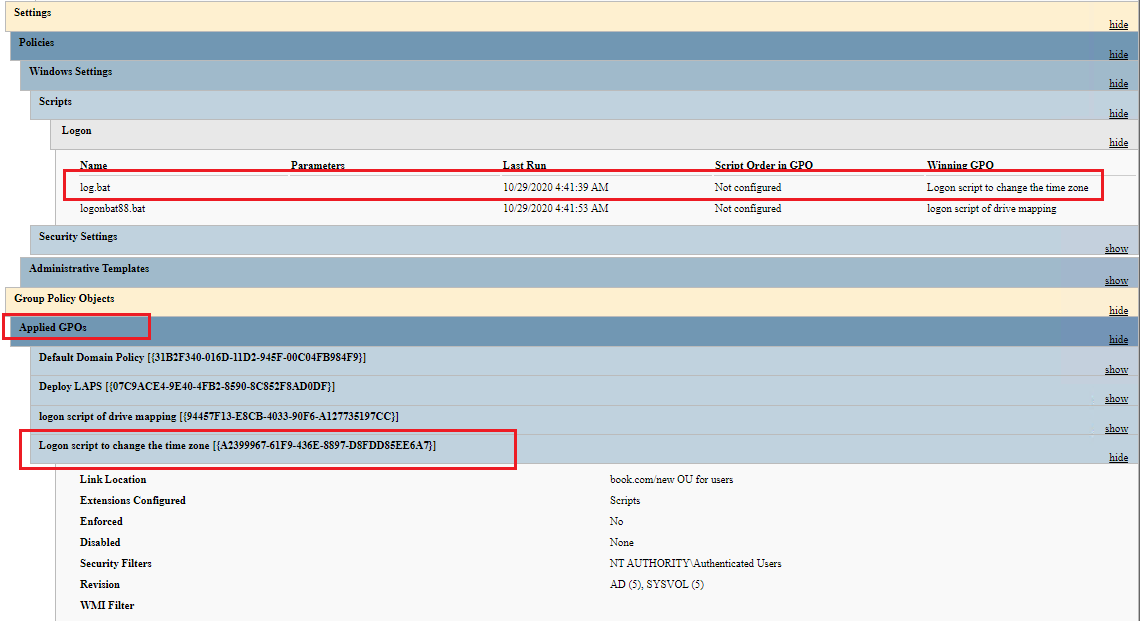
    I did the much more tests but the startup script GPO still could not be applied successfully. And then I tried the logon script. The configuration is as shown below:

    35954-113.png

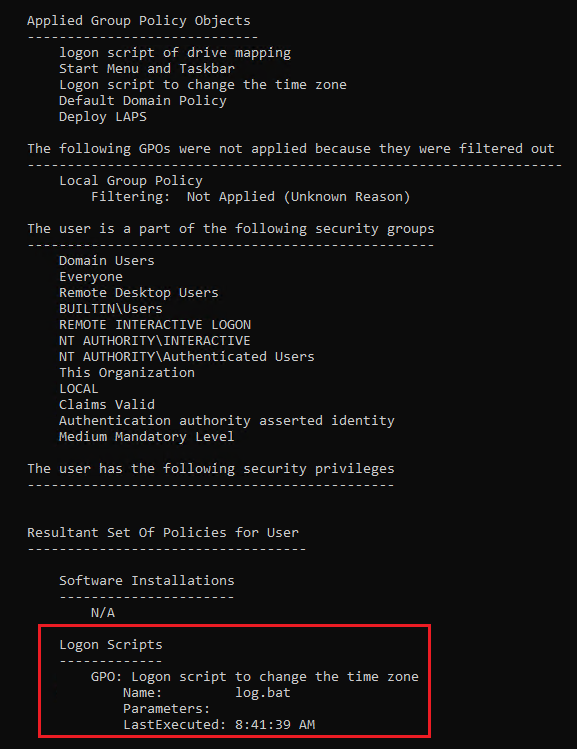
    The logon script GPO could be applied successfully and the Time Zone could be changed.
    36012-111.png

    36021-112.png

    We could try to configure the Logon script to see whether it works. Thanks for your understanding and support.

    Best regards,
    Hannah Xiong

    ============================================

    If the Answer is helpful, please click "Accept Answer" and upvote it.
    Note: Please follow the steps in our documentation to enable e-mail notifications if you want to receive the related email notification for this thread.

    0 comments No comments

9 additional answers

Sort by: Most helpful
  1. Doria 1,246 Reputation points
    2020-11-04T12:37:52.957+00:00

    Hi Hannah Xiong!

    Thanks for your answer and sorry for my late response.

    I can not understand that an simple domain user could change the time zone on his workstation, but system account can not! Weird! Anyway, the user GPO worked! An workaround solution!

    Thanks.

    0 comments No comments

Your answer

Answers can be marked as 'Accepted' by the question author and 'Recommended' by moderators, which helps users know the answer solved the author's problem.