I started experimenting with bat files, I created the file below, but is not running as expected:
@ECHO off
cls
:Start
ECHO 1. SFC
ECHO 2. CheckHealth
ECHO 3. ScanHealth
ECHO 4. RestoreHealth
ECHO 5. Exit
Set choice=
Set /p choice=Selecciona la opción:
if not '%choice%'=='' set choice=%choice:~0,1%
if '%choice%'=='1' goto SFC
if '%choice%'=='2' goto CheckHealth
if '%choice%'=='3' goto ScanHealth
if '%choice%'=='4' goto RestoreHealth
if '%choice%'=='5' goto end
ECHO "%choice%" No es una opción válida
ECHO.
goto Start
:CheckHealth
ECHO DISM /Online /Cleanup-Image /CheckHealth
goto Start
:ScanHealth
ECHO DISM /Online /Cleanup-Image /ScanHealth
goto Start
:SFC
ECHO SFC /scannow
goto Start
:RestoreHealth
ECHO DISM /Online /Cleanup-Image /RestoreHealth
goto Start
:end
The commands are not running I just see, for example, SFC /scannow but does nothing, it takes me back to the menu.
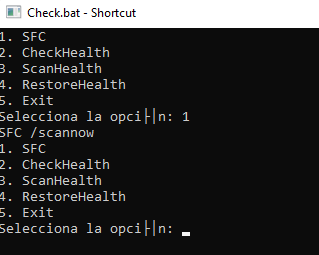
I think the solution should be very easy but a newbie in bat files.
Thanks for your help.
' cx='32' cy='32' r='32' /%3E%3Ctext x='50%25' y='55%25' dominant-baseline='middle' text-anchor='middle' fill='%23FFF' %3EEM%3C/text%3E%3C/svg%3E)

