Exchange Online
A cloud-based service included in Microsoft 365, delivering scalable messaging and collaboration features with simplified management and automatic updates.
This browser is no longer supported.
Upgrade to Microsoft Edge to take advantage of the latest features, security updates, and technical support.
' cx='32' cy='32' r='32' /%3E%3Ctext x='50%25' y='55%25' dominant-baseline='middle' text-anchor='middle' fill='%23FFF' %3EC%3C/text%3E%3C/svg%3E)
Hello,
Simple question that I have not seen asked. Have a previous post where a great resource assisted by helping to clarify some things regarding Receive Connectors. I feel real good with that conversation, but today when I was setting up a few commands to restart the Microsoft Exchange Frontend Transport service (required to restart after making Frontend connector changes), I noticed the following description which I did not expect.
Original Post:
https://learn.microsoft.com/en-us/answers/questions/71815/receive-connector-odd-question.html
Scenario:
I plan to disable the Default Frontend SERVER Receive connectors on all of our Exchange servers. I then plan to re-create a new Frontend Receive connector that is identical in every way except it will be scoped for our inbound SMTP traffic IPs only. I understand that this would prevent internal mail relay that the Default Frontend connector would by default allow for, but we will have internal relay covered via a second and third connector, so we should be all set there.
Question is, the Microsoft Exchange Frontend Transport service has a description that reads as follows:
This service proxies SMTP connections inbound to Hub servers and outbound from Hub servers
This implies that Exchange to Exchange native communication uses this connector for more than JUST inbound SMTP over port 25. Can I disable this connector as I referenced above and have a second one locked to our inbound SMTP IPs without breaking something else regarding Exchange to Exchange mail flow? Could I just add all Exchange server IPs to the new connector we have scoped to get around this if if does break things?
Thanks,
CWT
' cx='32' cy='32' r='32' /%3E%3Ctext x='50%25' y='55%25' dominant-baseline='middle' text-anchor='middle' fill='%23FFF' %3EEY%3C/text%3E%3C/svg%3E)
In my opinion, you've got two things wrong , firstly, see this Default Receive Connectors:
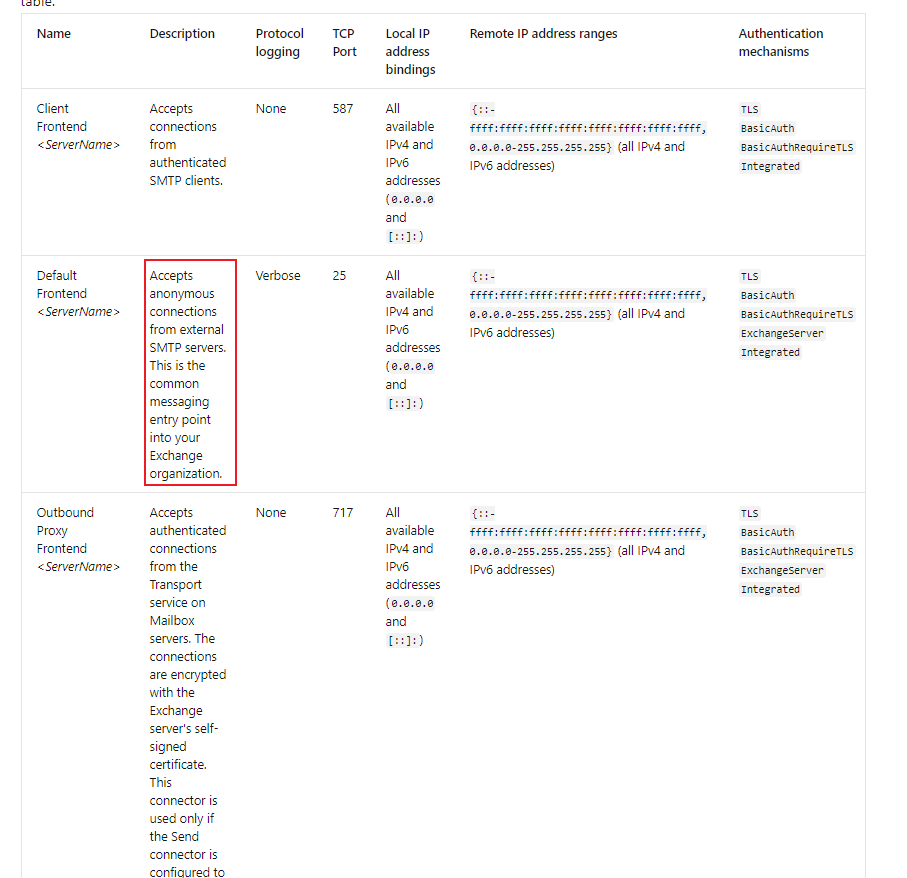
Default Fronted Server does not work for internal mail flow. Also, the description you mentioned might be too old, we don't have hub server since Exchange 2013. In case it is modified to "This service proxies SMTP connections inbound/outbound to mailbox server", it's still not talking about the internal mail flow things, tell me if I misunderstand your meanings.
Secondly, see this transport pipeline:

When mail routing between exchange servers, front end transport service is not involved. The key connector for internal mail flow is named "Default <servername>" and the port is 2525, for further information see Default Receive connectors in the Transport service on Mailbox servers.
If an Answer is helpful, please click "Accept Answer" and upvote it.
Note: Please follow the steps in our documentation to enable e-mail notifications if you want to receive the related email notification for this thread.
To prove what I'm saying above, did an easy test:
Lab with two Exchange 2019 servers, admin account from serverA and user5 from serverB.

EventID RECEIVE: A message was received by the SMTP receive component of the transport service or from the Pickup or Replay directories (source: SMTP), or a message was submitted from a mailbox to the Mailbox Transport Submission service (source: STOREDRIVER).
Thanks for the reply and additional information Eric (much appreciated). I think your correct in that that service description was just never updated to reflect Exchange 2013+ which is what really threw me for a loop in the first place. Made me rethink things when I saw the outbound from Hub servers referenced :o)
Knowing that I can disable the Default Frontend connectors without issue (provided we create another one scoped as needed), substantiates what I previously understood. Not forgetting about other Frontends to account for mail relay requirements of course.
Thanks much,
CWT
' cx='32' cy='32' r='32' /%3E%3Ctext x='50%25' y='55%25' dominant-baseline='middle' text-anchor='middle' fill='%23FFF' %3EC%3C/text%3E%3C/svg%3E)
Hello @CWT, I am facing with simmilar case to resolve. Was your job done without any problems occured? Its my case on reddit, could you take a look? https://www.reddit.com/r/exchangeserver/comments/1i78zjf/comment/m8iteog/?context=3