Hello @Doug,
Welcome to Microsoft Q&A forum.
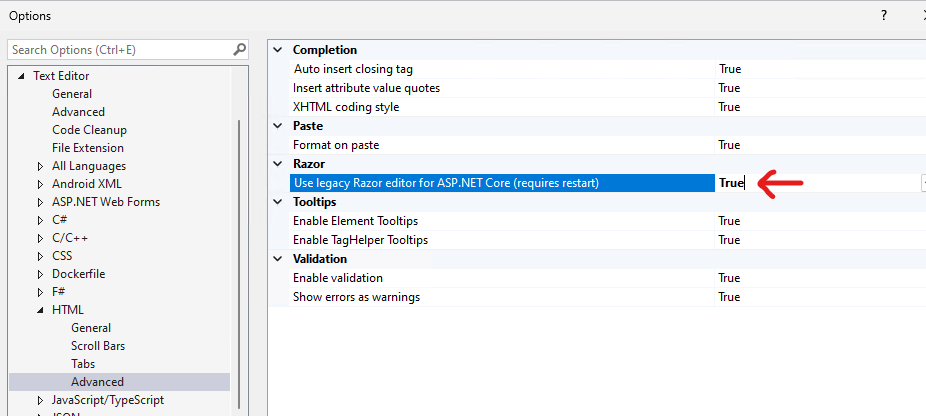
Try to use legacy Razor editor(Tools > Options > Text Editor > HTML > Advanced > Razor > Use legacy Razor editor for ASP.NET Core(requires restart) > set this option to True > restart VS) and test again.
I can reproduce this issue on my side with VS 2022. I see that the same/similar issue was reported before, see this ticket:
Get snippets working in Razor
and this ticket:
Snippets don’t work in Razor Editor
The first ticket is not closed, some features of the Razor Editor are still improving. Please either use the legacy Razor Editor currently, or kindly follow the ticket/submit a new ticket(GitHub - dotnet/razor).
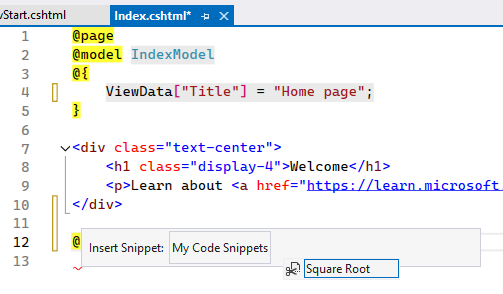
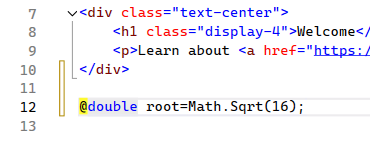
BTW, following is a screenshot which I used the legacy Razor Editor to test(the Square Root is a simple custom code snippet that mentioned in this document: Walkthrough: Create a code snippet in Visual Studio).
Thanks for your understanding, have a nice day :)
Sincerely,
Tianyu
If the answer is the right solution, please click "Accept Answer" and kindly upvote it. If you have extra questions about this answer, please click "Comment".
Note: Please follow the steps in our documentation to enable e-mail notifications if you want to receive the related email notification for this thread.
' cx='32' cy='32' r='32' /%3E%3Ctext x='50%25' y='55%25' dominant-baseline='middle' text-anchor='middle' fill='%23FFF' %3ED%3C/text%3E%3C/svg%3E)
' cx='32' cy='32' r='32' /%3E%3Ctext x='50%25' y='55%25' dominant-baseline='middle' text-anchor='middle' fill='%23FFF' %3ETS%3C/text%3E%3C/svg%3E)