Microsoft 365 and Office | SharePoint Server | For business
A family of Microsoft on-premises document management and storage systems.

This browser is no longer supported.
Upgrade to Microsoft Edge to take advantage of the latest features, security updates, and technical support.
' cx='32' cy='32' r='32' /%3E%3Ctext x='50%25' y='55%25' dominant-baseline='middle' text-anchor='middle' fill='%23FFF' %3EKT%3C/text%3E%3C/svg%3E)
Hi All,
We have a very big issue when our workflow stopped working. I have notice that Sharepoint 2010 workflows are deprecated and now we need to upgrade our. Problem is that the guy who built this workflow quit and no one has the knowledge how to convert this to power automate. It is a simple workflow so I hope that someone can help us. It looks like this
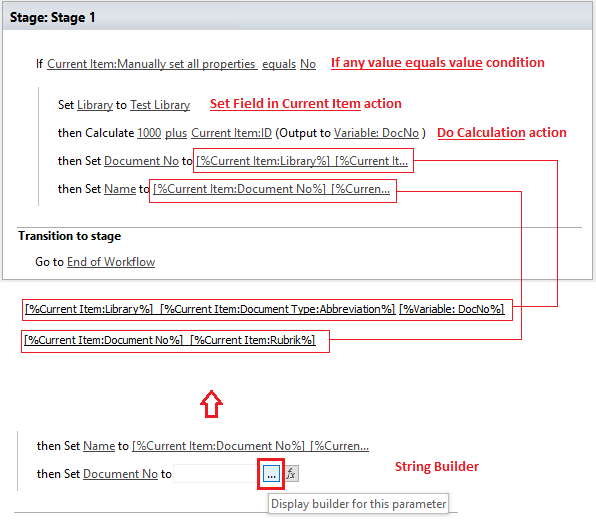
If Current Item:Manually set all properties equals No
    Set Library to <Library Name Here>
    then Calculate 1000 plus Current Item:ID (Output to Variable: DocNo )
    then Set Document No to [%Current Item:Library%]_[%Current Item:Document Type:Abbreviation%] [%Variable:DOcNo%]
    then Set Namn to [%Current Item:Document No%]_[%Curren Item:Rubrik%]
I tried to convert this to 2013 but without success. Can someone please help use to convert to 2013 or to power automate.Please help guys

Hi @Kak Tak
According to your description, this question seems to be related to Sharepoint, so we would move the irrelevant tags.

Please confirm:
Please share detailed configuration of your library and the 2010 workflow, with screenshots if possible.
Here is the sample 2013 workflow built based on my understanding. The values for Document No and Name are built using String Builder in the workflow:
And the sample flow:
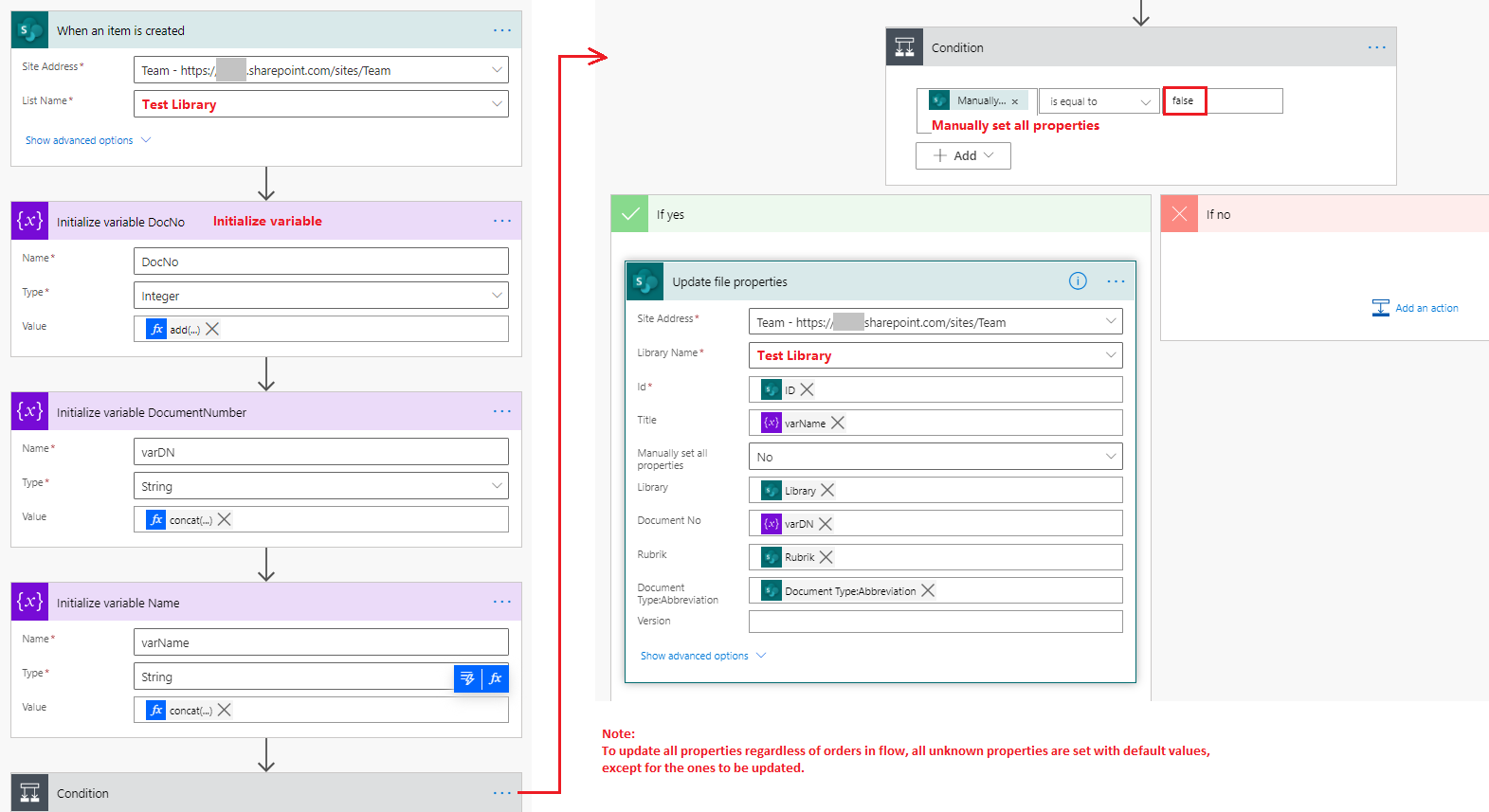
The expressions for variables are:
DocNo = add(1000,triggerOutputs()?['body/ID'])
varDN = concat(triggerOutputs()?['body/Library'],'_',triggerOutputs()?['body/Document_x0020_Type_x003a_Abbreviation'],' ',variables('DocNo'))
varName = concat(variables('varDN'),'_',triggerOutputs()?['body/Rubrik'])
Here are your references:
Workflow actions quick reference (SharePoint Workflow platform).
Create a flow for a list or library in SharePoint or OneDrive.
If an Answer is helpful, please click "Accept Answer" and upvote it.
**Note: Please follow the steps in our documentation to enable e-mail notifications if you want to receive the related email notification for this thread. **
Hi Chelsea,
Many thanks for your help. Here are the answers:
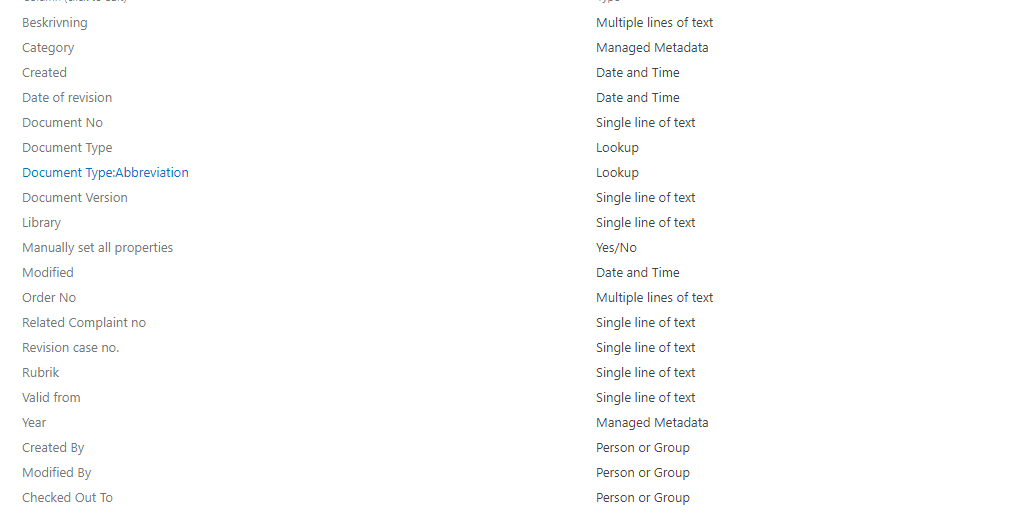
1) What are (types of) the list fields that need to be filled or used by the workflow, for example, “Document Type:Abbreviation”, “Rubrik”?
Document Type:Abbreviation --> Type : Lookup
Rubrik --> Single Line of text
When it comes to workflow it looks like this. There are 3 local variables and one of them is DocNo.
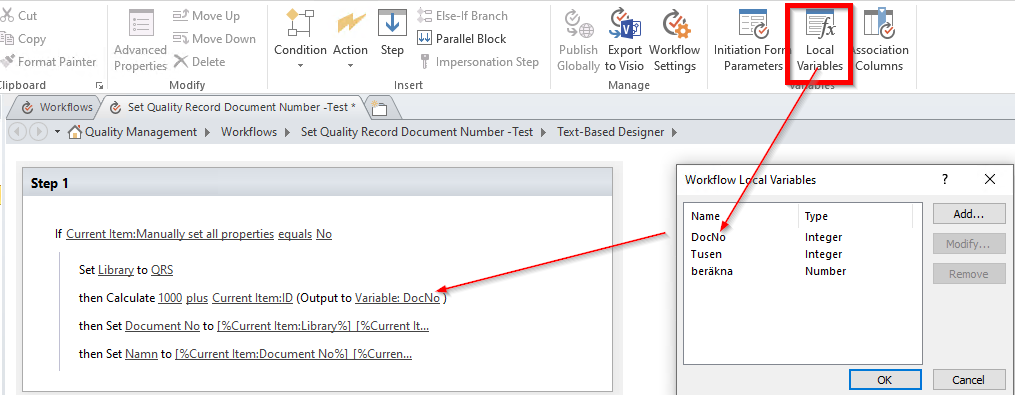
Problem here is when I try to re-create this in Sharepoint 2013 format I am not able to add DocNo variable. Under current Item --> ID (in original workflow is Integer) but in my re-created I am not able to change this to Integer
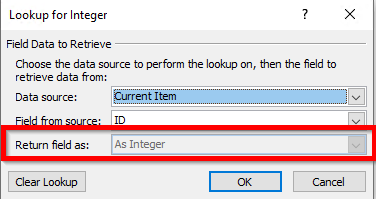
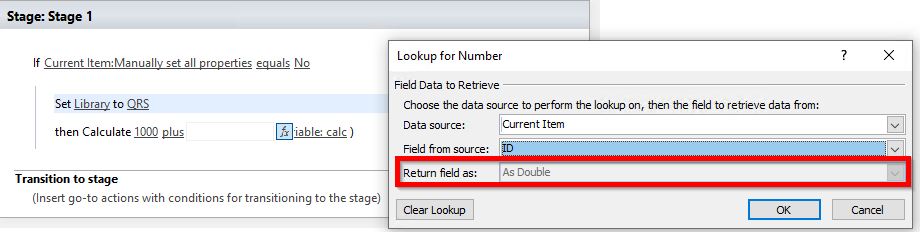
Hi @Kak Tak , that is the expected behavior for Do Calculation action in SharePoint. Quoting this document of description for “Do Calculation”:
For SharePoint, this action supports only the Double numeric type. Integers are not supported. Use of the "+" operator (concatenation) for strings is not supported.
When you use item ID in the formula, it does not affect the output and the workflow should be able to complete without error. For your information, I am using Number type for the variable DocNo.
Hi Chelsea,
I have issues with the workflow. I am not getting DocumentType:Abbreviation, I am getting ID
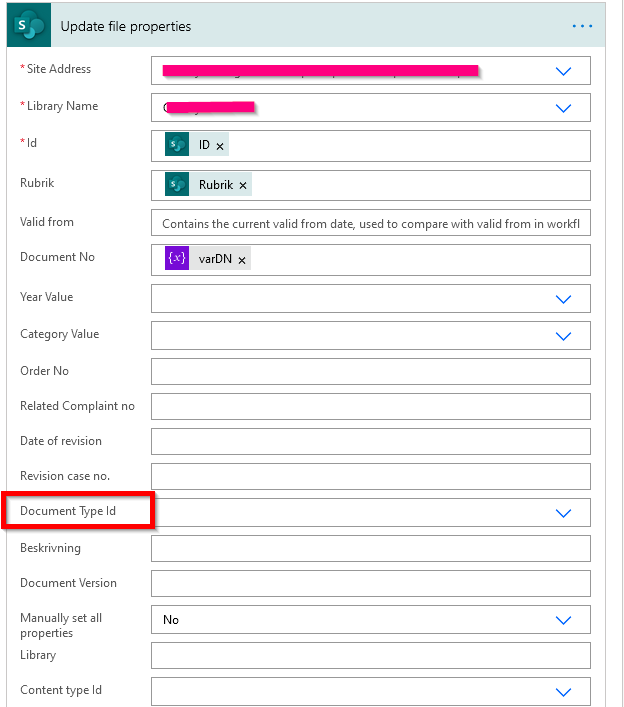
Could be something with this line varDN = concat(triggerOutputs()?['body/Library'],'_',triggerOutputs()?['body/Document_x0020_Type_x003a_Abbreviation'],' ',variables('DocNo'))
I am not getting library field neither and I get a lot more field than you. What could be wrong. Please help
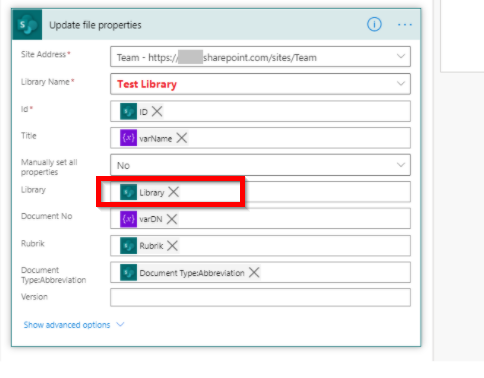
Please see the update in the new Answer of this thread.
Please note:
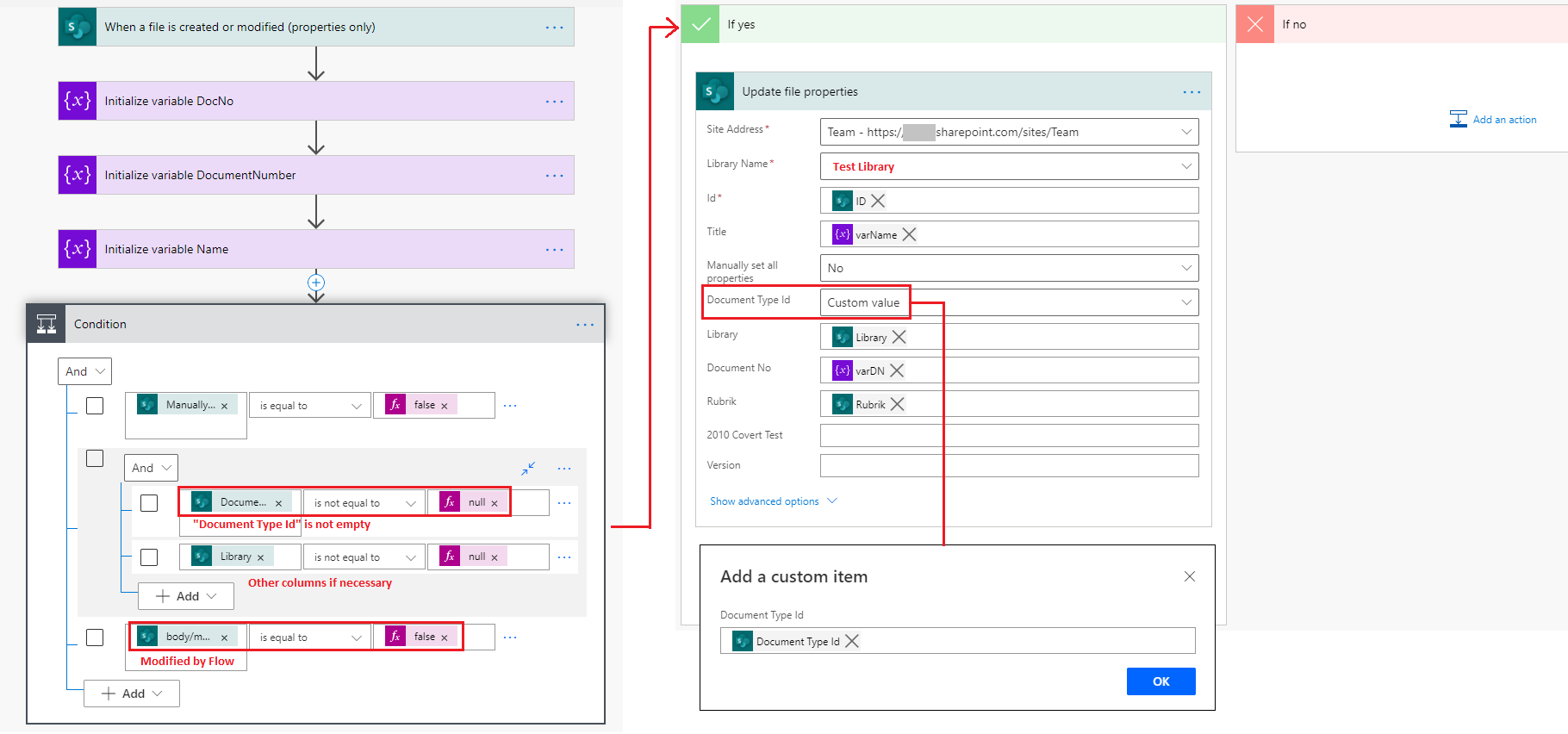
DocumentType field, which in the flow displayed as DocumentType Id. (I was using a Text column in the sample, that is why it is not showing as “DocumentType Id”.) Document Type Id so the flow can finish as expected. Here is the updated expression:
concat(triggerOutputs()?['body/Library'],'_',triggerOutputs()?['body/Document_x0020_Type_x003a_Abbreviation/Value'],' ',variables('DocNo'))
In addition:
In order to fill in all required values (DocumentType, for example) before the flow can do rest of the work, you can change the flow trigger to “When a file is created or modified (properties only)” (by deleting the old trigger and then add a new one), and a condition to identify if all necessary columns are filled under the “Initialize variable” actions.
And one more condition to identify if the last change is done by the flow to prevent infinite trigger:
triggerOutputs()?['body/modifiedbyflow'] is equal to 'false'
In order tenant, there is an OOB feature available for selection named "modified by flow". If you cannot find the property, use the expression to add it manually.
Here is the updated sample:
Hi @Kak Tak , do you have any progress on this thread? Please feel free to let us know if you need further assistance.
Hi @Kak Tak , I’m checking on how things are going on with this thread. If you find any reply helpful, please remember to accept it as answer. It will help others who meet similar questions in this forum. Thank you for your understanding.
Hi Chelsea,
ISorry on late response. It is not working :( That what flow should do is to create a new name of the document based of the document type.
Example if we have a document called TestDocument and if the document type is Level of Concern then when we upload the document it should create new name of it like
QRS_LOC_1300_TestDocument where
QRS - is the name of the library
LOC - is the document type
1300 - is the next available number in ID

Would you please explain what error/trouble do you run into with the flow? You can share your flow process with a screenshot if possible.
Please note that the flow can only change the Title field instead of the Name field of the documents.
Hi Chelsea,
Nothing happens. Flow run successfully but nothing happens when I add a new document. (Your flow ran successfully.)
In the sharepoint designer (as soon as I uploaded document and add rubrik and document type manually under properties the file name was changed as described above QRS_LOC_1300_TestDocument). This is not working anymore because it is worflow sharepoint 2010. The powerautomate should do the same.
Not sure what is wrong.
I am not able to add this part

It seems that the “modified by flow” property is no longer supported in your tenant, so that the condition will always pass as false.
The row is used to prevent infinite trigger with the flow so that it cannot be skipped. There is currently no alternative property for this condition to work.
The task would be a lot more easier using SharePoint Designer workflow. If the flow does not suit your need, consider using SharePoint 2013 workflow instead.
Hi Chelsea,
I tried and everything looks good, I can create the same flow but with one exception. I am not able to see all colums. For example, I am not able to get DocumentType:Abbreviation column when I create 2013 flow. I was not able to find out why.
Here is the example (Is there another way to get all the colums)

If I cannot add the DocumentType:Abbreviation then the name of the document and the rest of the things will not be good. I really hope that there is a way or explanation why I cannot see this lookup column
Please see the new Answer in this thread.
It is by design that SharePoint 2013 platform workflow does not provide the lookup for additional fields of a lookup column.
You can manually retrieve the Document Type:Abbreviation value using Lookup for String in the source list as following:
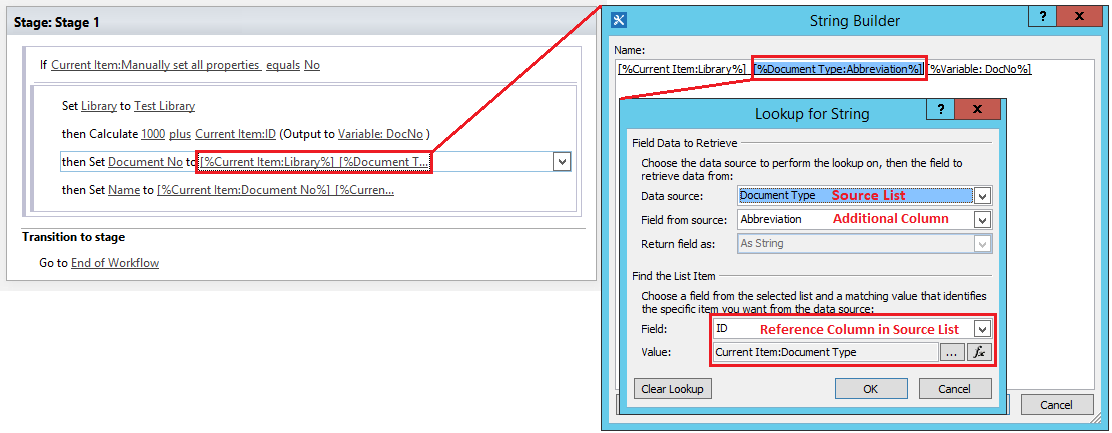
Here is the test outcome:

Hi Chelsea,
I am not able to add abbreviation and I think that I am doing this on the wrong way. I tried every possible option. It looks like this,
We have a list where we take the abbreviation (short name) and import it in the document.

No when it comes to lookup up for the string part:
1) Should I add the list with all abbreviations here (Already tried)
2) Should I add abbreviation column here (Already tried)
3) What should I add in part 3 --> Abbreviation column again or something else (Tried with abbreviation but without luck)
4) Same here, what should I add here
 ]2
]2
That is the only part left, everything else is working. So the result should be QRS(Library Name)_CPP (abbreviation choose we when we import the document)ID and the document name (This changes when we add Rubrik part)
 ]
]
