Developer technologies | Transact-SQL
A Microsoft extension to the ANSI SQL language that includes procedural programming, local variables, and various support functions.
This browser is no longer supported.
Upgrade to Microsoft Edge to take advantage of the latest features, security updates, and technical support.
' cx='32' cy='32' r='32' /%3E%3Ctext x='50%25' y='55%25' dominant-baseline='middle' text-anchor='middle' fill='%23FFF' %3EE%3C/text%3E%3C/svg%3E)
I'm using a c# .net project with tht sqlcommand listed below to get the person government id's out of the json string and insert to a column. The sql command inserts a list. How to I get the idValue to insert into the column?
sqlcommand
command.Parameters.AddWithValue("@persongovernmentIDs", persongovernmentIDs);
list
[{"itemID":"9200418545_3467","idValue":"XXX-XX-XXXX","nameCode":{"codeValue":"SSN","shortName":null,"longName":"Social Security Number"},"countryCode":"US"}]
json string
{
"workers": [
{
"associateOID": "G3HFDMFZ",
"workerID": {
"idValue": "WQV0VLG"
},
"person": {
"birthDate": "0000-00-00",
"genderCode": {
"codeValue": "M",
"shortName": "Male",
"longName": "Male"
},
"tobaccoUserIndicator": false,
"disabledIndicator": false,
"preferredName": {},
"militaryClassificationCodes": [],
"governmentIDs": [
{
"itemID": "920041_3467",
"idValue": "XXX-XX-XXXX",
"nameCode": {
"codeValue": "SSN",
"longName": "Social Security Number"
},
"countryCode": "US"
}
],

Do you want to do it in C# or SQL? It is not clear which SQL query, table and data do you want to affect.
' cx='32' cy='32' r='32' /%3E%3Ctext x='50%25' y='55%25' dominant-baseline='middle' text-anchor='middle' fill='%23FFF' %3ETY%3C/text%3E%3C/svg%3E)
Although we are still not sure about your specific requirements, I think that if you need to do some processing in the code, creating a class based on the Json structure and then loading the Json data should be a necessary step.
The class created according to the Json structure:
public class Rootobject
{
    public Worker[] workers { get; set; }
}

public class Worker
{
    public string associateOID { get; set; }
    public Workerid workerID { get; set; }
    public Person person { get; set; }
}

public class Workerid
{
    public string idValue { get; set; }
}

public class Person
{
    public string birthDate { get; set; }
    public Gendercode genderCode { get; set; }
    public bool tobaccoUserIndicator { get; set; }
    public bool disabledIndicator { get; set; }
    public Preferredname preferredName { get; set; }
    public object[] militaryClassificationCodes { get; set; }
    public Governmentid[] governmentIDs { get; set; }
}

public class Gendercode
{
    public string codeValue { get; set; }
    public string shortName { get; set; }
    public string longName { get; set; }
}

public class Preferredname
{
}

public class Governmentid
{
    public string itemID { get; set; }
    public string idValue { get; set; }
    public Namecode nameCode { get; set; }
    public string countryCode { get; set; }
}

public class Namecode
{
    public string codeValue { get; set; }
    public string longName { get; set; }
}
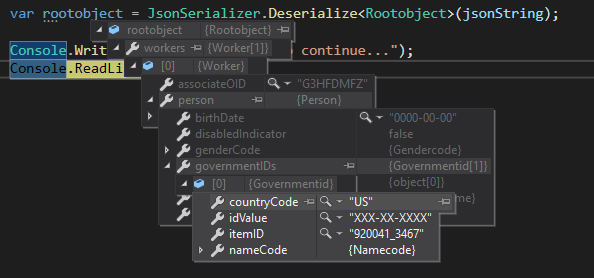
Deserialize Json data:
            string jsonString ="JsonString"
            var rootobject = JsonSerializer.Deserialize<Rootobject>(jsonString);
If the response is helpful, please click "Accept Answer" and upvote it.
Note: Please follow the steps in our documentation to enable e-mail notifications if you want to receive the related email notification for this thread.