Microsoft 365 and Office | SharePoint | For business | Windows
A group of Microsoft Products and technologies used for sharing and managing content, knowledge, and applications.

This browser is no longer supported.
Upgrade to Microsoft Edge to take advantage of the latest features, security updates, and technical support.
' cx='32' cy='32' r='32' /%3E%3Ctext x='50%25' y='55%25' dominant-baseline='middle' text-anchor='middle' fill='%23FFF' %3EST%3C/text%3E%3C/svg%3E)
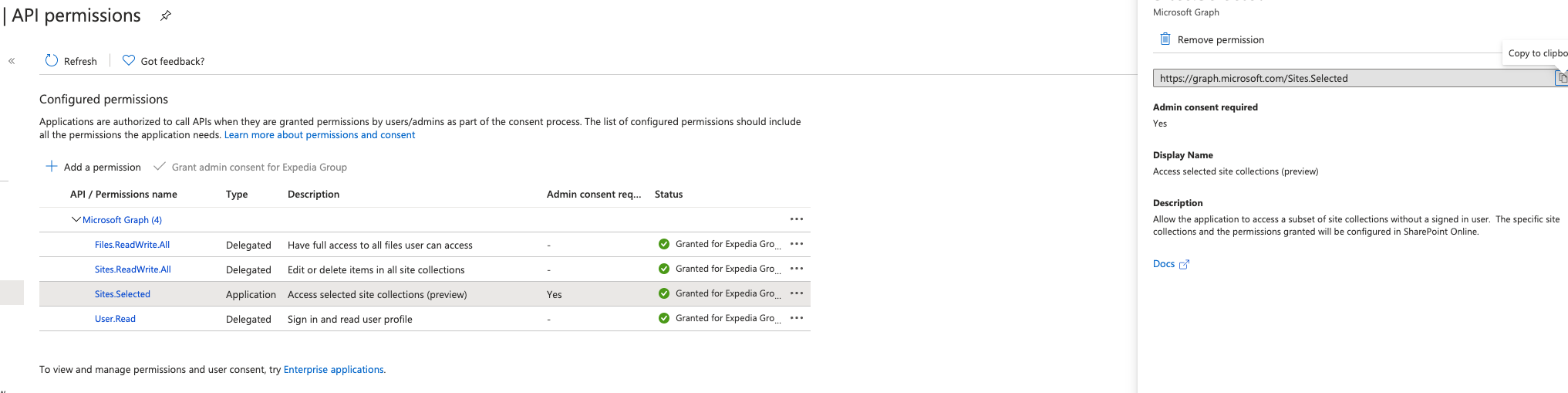
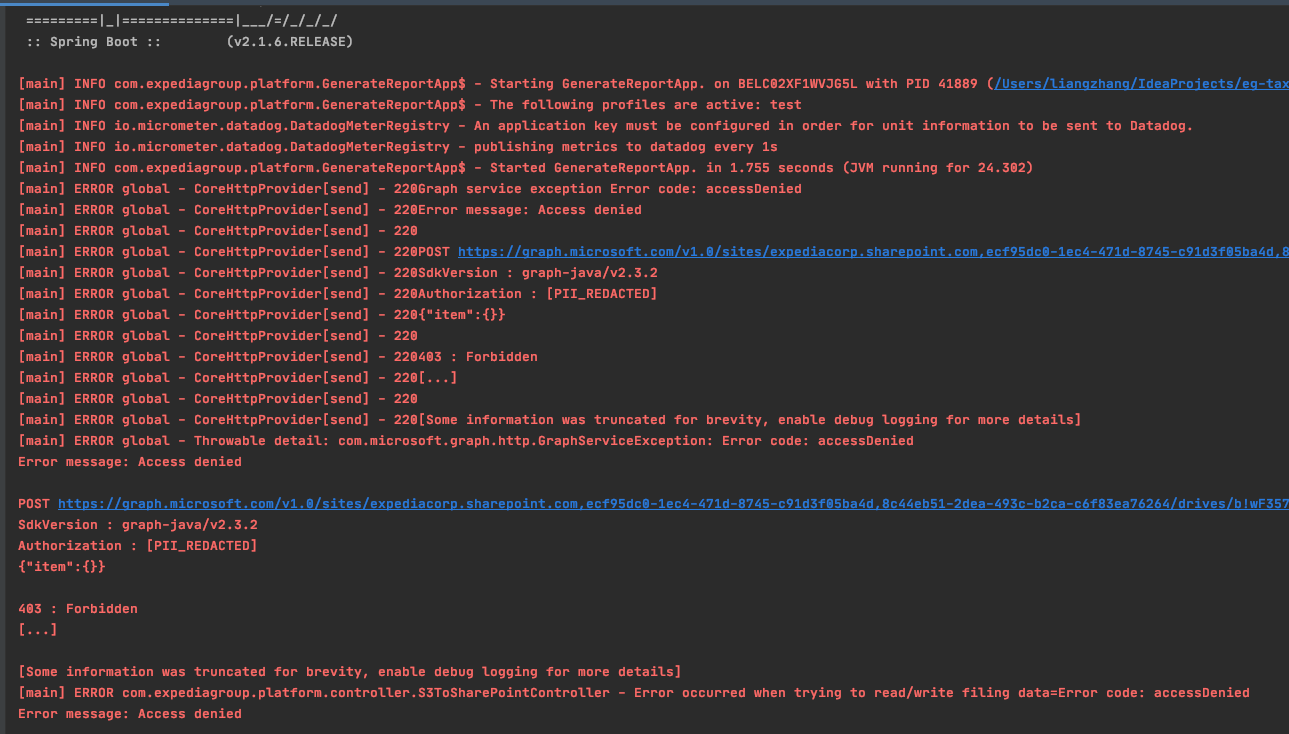
I have application which uploads files from S3 to a specific Sharepoint site using Microsoft graph Java SDK. I registered app called 'S3ToSharePoint' in Azure active directory, add Application type 'Sites.Selected' permission to my app since admin won't grant Sites.ReadWrite.All(Application) for security concern. In the description of 'Sites.Selected', it says 'Allow the application to access a subset of site collections without a signed in user. The specific site collections and the permissions granted will be configured in SharePoint Online. ' So I added this the account as owner(full access) in Sharepoint sites(not sure if this is the correct way to do configuration). But still got 'accessDenied' error when trying to upload to this Sharepoint sites. Does anyone know if this is the correct way? I saw someone use Sites.ReadWrite.All(Application) and that works for them. Not sure 'Sites.Selected' will do the same since it is in preview mode.

' cx='32' cy='32' r='32' /%3E%3Ctext x='50%25' y='55%25' dominant-baseline='middle' text-anchor='middle' fill='%23FFF' %3EJK%3C/text%3E%3C/svg%3E)
Wanted to provide an update, we are in the process of investigating issues with upload and download and the Sites.Selected scope. Apologies for the inconvenience this causes, we're working to resolve it ASAP.
Another update, we've deployed a fix for the upload / download issue, please let me know if you continue to see a problem going forward.
' cx='32' cy='32' r='32' /%3E%3Ctext x='50%25' y='55%25' dominant-baseline='middle' text-anchor='middle' fill='%23FFF' %3EJB%3C/text%3E%3C/svg%3E)
Hi @s-taxcomreporting SA , may I ask how did you add the Application as owner in Sharepoint sites?
So I added this the account as owner(full access) in Sharepoint sites
Just found this question today and wanted to provide some clarity.
There are two components to making the scenario work.
To accomplish #2 you will need a separate application that already has Sites.FullControl.All. The intent here is that the application that manages the permissions would likely be owned by your IT or Tenant Admin group since granting permissions requires the necessary broad scope.
See our blog post (https://developer.microsoft.com/en-us/graph/blogs/controlling-app-access-on-specific-sharepoint-site-collections/) for more details and a demo.
' cx='32' cy='32' r='32' /%3E%3Ctext x='50%25' y='55%25' dominant-baseline='middle' text-anchor='middle' fill='%23FFF' %3EJC%3C/text%3E%3C/svg%3E)
Hi Jeremy I'm not the original poster but I have followed the instructions in the blog and I can read data on the site (lists, documents libraries, etc) but I can't download files. I get an access denied message whenever I try to download the content of a file. I've posted about the issue here:
Any help with this bug would be much appreciated!
' cx='32' cy='32' r='32' /%3E%3Ctext x='50%25' y='55%25' dominant-baseline='middle' text-anchor='middle' fill='%23FFF' %3EDW%3C/text%3E%3C/svg%3E)
have also encountered this bug. It's annoying.
My administrator is not keen on giving me Sites.Read.All permission because of security issues, but it seems that Sites.Selected is bugged.
Any workarounds or solutions?
At present our only work around is to create a service account, give it access only to the sites we need to interact with, then use the client credential flow with the Graph API. It's an ugly work around that we are anxious to get fixed.

This might help, refer this blogpost on how to use this permission in the Azure ad APP
https://ashiqf.com/2021/03/15/how-to-use-microsoft-graph-sharepoint-sites-selected-application-permission-in-a-azure-ad-application-for-more-granular-control/
' cx='32' cy='32' r='32' /%3E%3Ctext x='50%25' y='55%25' dominant-baseline='middle' text-anchor='middle' fill='%23FFF' %3EWR%3C/text%3E%3C/svg%3E)
SharePoint tenant admin has to approve access to AAD app prior to making call. Tenant admin can user graph explorer to grant permissions. you can refer article for details.
Make a post request to https://graph.microsoft.com/v1.0/sites/<<siteId>>/permissions for granting permissions to AAD app on the SPO site.
Headers: Content-Type: application/json
Body
{
“roles”: [“read”],
“grantedToIdentities”: [{
“application”: {
“id”: “<<client id from step 1>>”,
“displayName”: “<<name of aad app created in step 1>>”
}
}]
}