//I have an Access file, file path: C:\Users\QR\Documents\UserDatabase.accdb ; file password is: Pa$$word123;
//The access file has a table called User, and the table has a field called UserID (Employee UserID is unique, it is work PC, employee UserID is same as work PC Environment.UserName)
//If Environment.UserName is not in the table, then it is first time that the person uses this application, and it will loop to another Registration form.
I have asked the question yesterday(visual-studio-c-how-to-check-a-value-against-acces.html), but I think I still want to know ODBC connection. I am not an IT guy, am not sure how OleDbConnection works. I have trouble understanding OleDbConnection, not sure if OleDbConnection drive is installed in my work PC. I just don't know how to describe, just not sure if OleDbConnection connection works in my work PC. Even if I try OleDbConnection code, it runs into the same error.
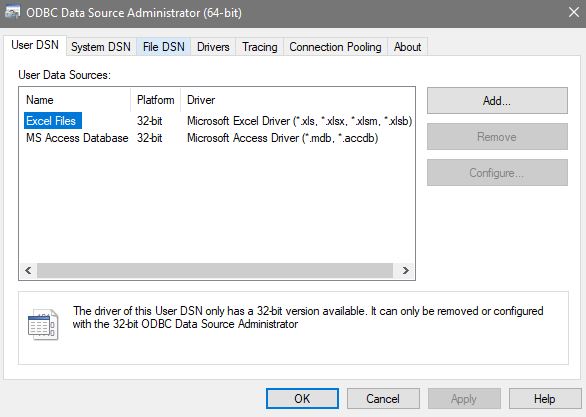
I am not comfortable with OleDbConnection(don't even know the basic concept, as a non IT guy), that is why I would like to go with ODBC connection, since I am able to find ODBC connection from Control Panel > Administrative Tools. I just don't know how to find OleDbConnection in my work PC.
I would like to create this new thread to focus on ODBC connection. How to fix my ODBC connection code? I am not sure if it is 32-bit issue, if that is the case, I will need to find something to replace Access. I don't work for IT department, not able to set up SQL database. If that is the issue, is there a way to connect to 32-bit Access? Or how to compile this application as x86 ?
What does Admin mean in connection string? Should I need to replace it with Environment.UserName? But no matter which way I wrote, it still does not work.

//I have an Access file, file path: C:\Users\QR\Documents\UserDatabase.accdb ; file password is: Pa$$word123;
//The access file has a table called User, and the table has a field called UserID (Employee UserID is unique, it is work PC, employee userID is same as Environment.UserName)

public static string DatabaseConnectionString = "Driver ={Microsoft Access Driver(*.mdb, *.accdb)}; Dbq=" + @"C:\Users\QR\Documents\UserDatabase.accdb;Uid=Admin;Pwd=Pa$$word123;";

public static string DatabaseConnectionString = "Driver ={Microsoft Access Driver(*.mdb, *.accdb)}; Dbq=" + @"C:\Users\QR\Documents\UserDatabase.accdb;Uid=" + Environment.UserName + ";Pwd=Pa$$word123;";

OdbcConnection Cn = new OdbcConnection(GlobalVariables.DatabaseConnectionString);

 Cn.Open();


string select = "SELECT * from User WHERE UserID ='" + Environment.UserName + "'";
                using (OdbcCommand cmd = new OdbcCommand(select, Cn))
                {
                    int count = Convert.ToInt32(cmd.ExecuteScalar());
                    if (count > 0)
                    {
                        MessageBox.Show("Existed!");
                    }
                    else
                    {
                        MessageBox.Show("No existed");
                    }

Cn.Close();