Surface Pro 4 + (Battery Fix) – Disable Simultaneous Multithreading (SMT)
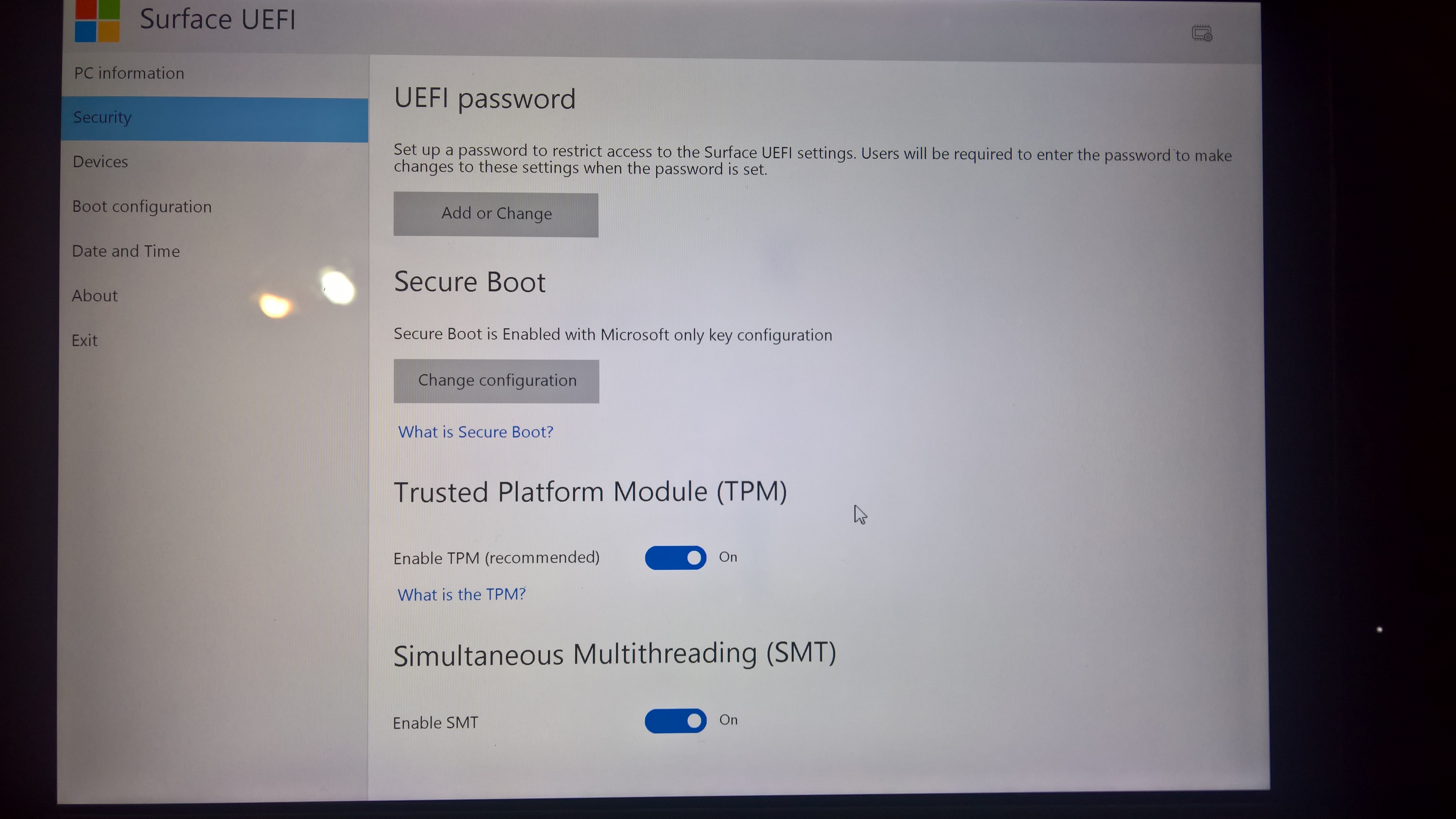
If you are facing high battery utilization drainage, disable the above Simultaneous Multithreading (SMT).
*) What is SMT?
Overview and Impact
Simultaneous multithreading is a processor design that combines hardware multithreading with superscalar processor technology to allow multiple threads to issue instructions each cycle. Unlike other hardware multithreaded architectures (such as the Tera
MTA), in which only a single hardware context (i.e., thread) is active on any given cycle, SMT permits all thread contexts to simultaneously compete for and share processor resources. Unlike conventional superscalar processors, which suffer from a lack of
per-thread instruction-level parallelism, simultaneous multithreading uses multiple threads to compensate for low single-thread ILP. The performance consequence is significantly higher instruction throughput and program speedups on a variety of workloads that
include commercial databases, web servers and scientific applications in both multiprogrammed and parallel environments.
Simultaneous multithreading has already had impact in both the academic and commercial communities. The project has produced numerous papers, most of which have been published in journals or the top, journal-quality architecture conferences, and one of which
was the most recent paper selected for the 25th Anniversary Anthology of the International Symposium on Computer Architecture, a competition in which the criteria for acceptance was impact. The SMT project at the University of Washington has also spawned other
university projects in simultaneous multithreading. Lastly, several U.S. chip manufacturers (Intel, IBM, Sun and Compaq (when it still supported the Alpha microprocessor line) have designed and manufactured SMT processors for the high-end desktop market. Several
startups are also building SMT processors.
REF: https://dada.cs.washington.edu/smt/
*) If you also scroll down via the website above you'll notice that Intel Xeon is listed with the most up2date support for Surface via Device Manager @ Surface Update (Intel Xeon E3 -1200/1500 Series v5th/6th Gen Intel Core Gaussian Mixture Model - 1911
(Fuzzy)
*) What are the advantages and disadvantages of SMT
- Disadvantage = Due to per call via instruction sets via OS every process and processes are monitored and then inspected with integrity for safe processing of task per thread, which causes high battery utilization.
- Disadvantage = Low level execution of malicious software such as Spectre & Meltdown, etc. will be able to be executed in a sophisticated manner if per thread is not tested with integrity.
- Disadvantage = The current state of SMT is still a work in progress, not all CPUs by Intel and AMD are 100% proven to resolve and or mitigate on going issues via Mal-Software.
- Advantage = Fixes Surface Pro 3, 4, Surface Book 1, 2, Surface Laptop 1,2, if effected.
- Advantage = Normal behavior of Compute Unit.
Let me know if this fixes your issue with battery drain via Surface 3, 4 and etc.
\!--------------------------------Instructions Below---------------------------------------\
- Power off machine.
2)Boot into UEFI / Firmware Power + Volume Up key
- Turn off SMT
- Drain Battery until Surface unit turns off by itself not via command is needed
- Repeat step 4.
- After second battery drain for full re-calibration, power on unit and set your battery configuration to Better, while doing so generate a energy (not a battery report and see what is indicated as a High Warning and or error)
- Go down the list of high and medium errors (If found) and fix one by one
- drain the battery once more (Not Shutdown) and then plug-in Surface unit and use like normal.
9)Once the unit is fully charged at 100% switch back and forth between Best & Better performance and see the difference.
- -(Optional, But for testing) Turn MST back on. Generate both reports once again and compare.
10)If battery is still draining quick and or while it is shut off & turning it back on, then do a refresh and reinstall windows if needed.
11) After all is well and battery seems to be okay, reboot and turn SMT back on & evaluate Surface unit as in step 10
For Enterprise Users, ask your Admin (Security Officer) on how to go about it, if it is safe to disable and meets compliancy for mobile operational usage.
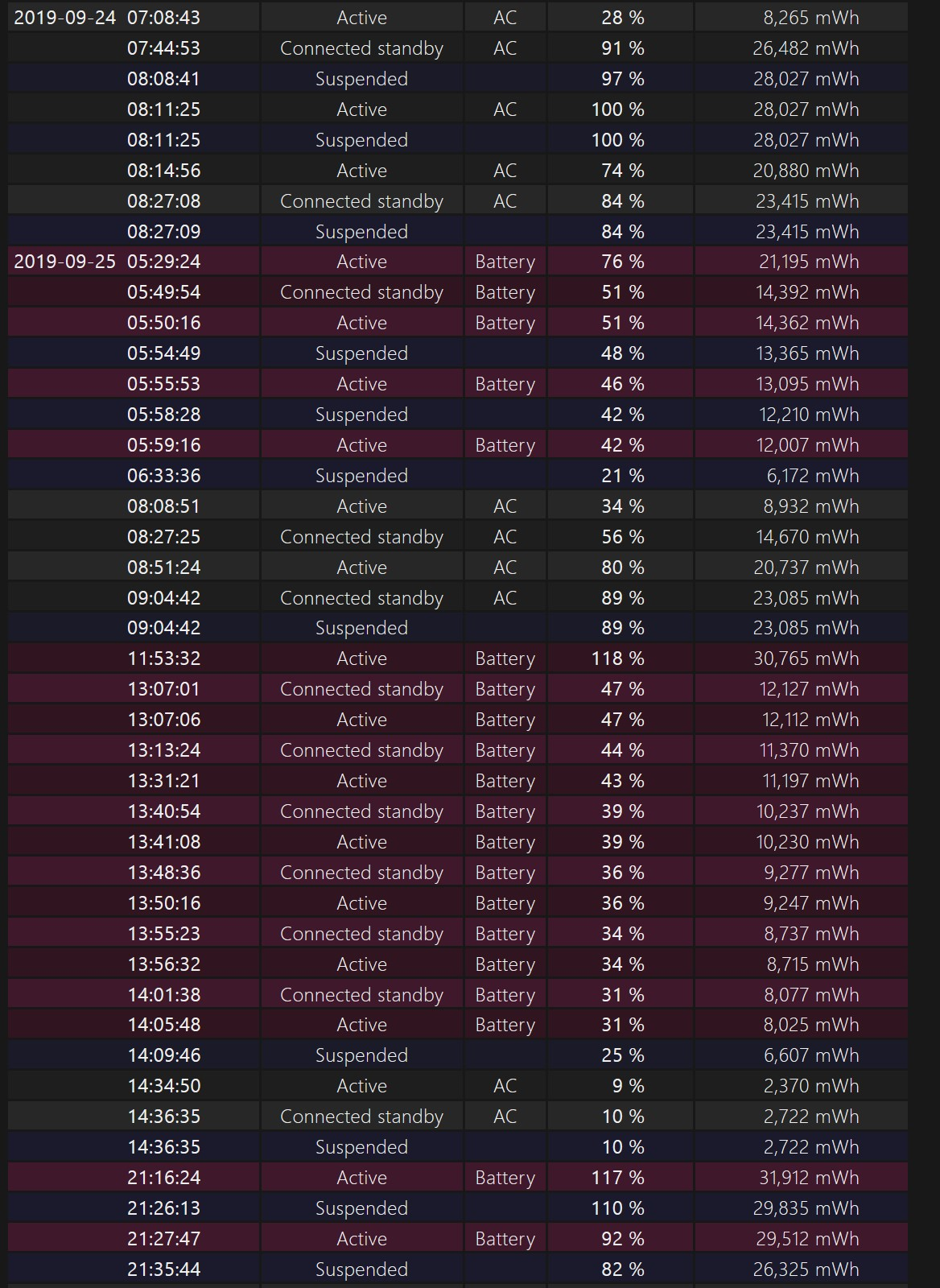
Before Disabling SMT with all up2date drivers and updates via 1903 build. 18362.387
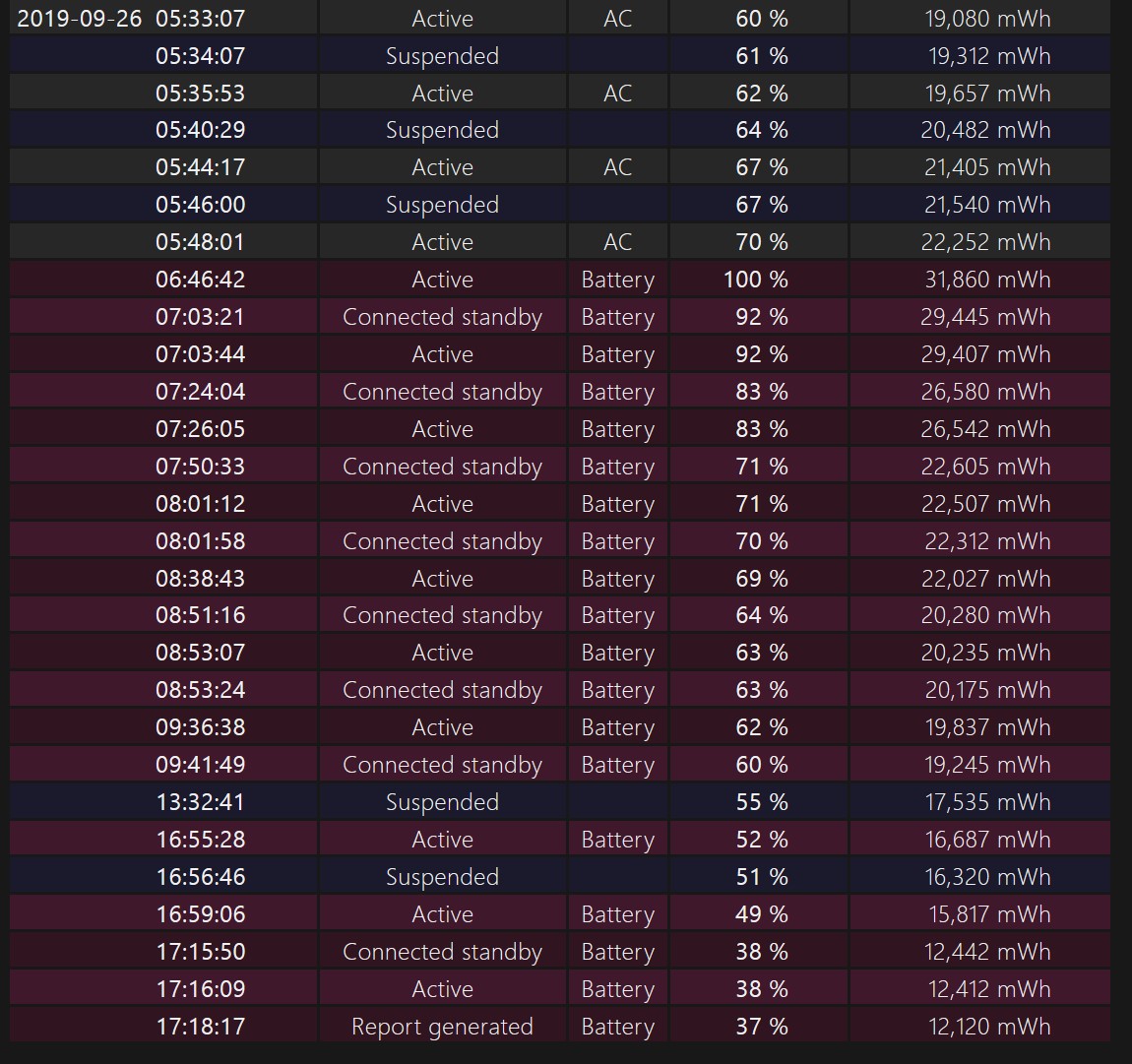
After while having SMT disabled..
' cx='32' cy='32' r='32' /%3E%3Ctext x='50%25' y='55%25' dominant-baseline='middle' text-anchor='middle' fill='%23FFF' %3EA%3C/text%3E%3C/svg%3E)
