Azure Machine Learning
An Azure machine learning service for building and deploying models.
This browser is no longer supported.
Upgrade to Microsoft Edge to take advantage of the latest features, security updates, and technical support.
' cx='32' cy='32' r='32' /%3E%3Ctext x='50%25' y='55%25' dominant-baseline='middle' text-anchor='middle' fill='%23FFF' %3EPP%3C/text%3E%3C/svg%3E)
This is my code
do.call ( rbind, with( dataset1, tapply(ShotonScreen2, interaction(LotnoS=LotnoS , ProductCode=ProductCode), quantile,
probs=c(0, .25,.5, 0.75, 1) ) ) )
maml.mapOutputPort("dataset1");
R device port (Loading variable ) show "Loading variable port1..."
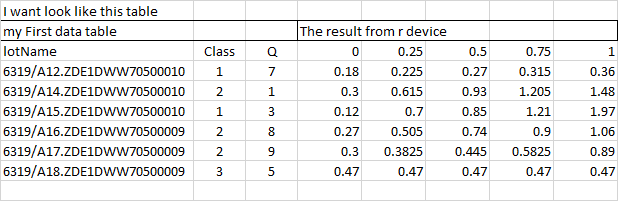
0% 25% 50% 75% 100%
6319/A16.ZDE1DWW70500009 0.270 0.5050 0.740 0.9000 1.06
6319/A17.ZDE1DWW70500009 0.300 0.3825 0.445 0.5825 0.89
6319/A18.ZDE1DWW70500009 0.470 0.4700 0.470 0.4700 0.47
6320/A01.ZDE1DWW70500009 0.330 0.3725 0.475 1.2675 1.99
How to import this in table format for analysis
I try to use
data.set <- data.frame (
do.call ( rbind, with( dataset1, tapply(ShotonScreen2, interaction(LotnoS=LotnoS , ProductCode=ProductCode), quantile,
probs=c(0, .25,.5, 0.75, 1) ) ) )
)
I get this that has not first column ( ex. 6319/A16.ZDE1DWW70500009)
0. X25. X50. X75. X100.
0.27 0.505 0.74 0.9 1.06
0.3 0.3825 0.445 0.5825 0.89
0.47 0.47 0.47 0.47 0.47
0.33 0.3725 0.475 1.2675 1.99
0.2 0.2675 0.33 0.3925 0.52
Please suggest me,
I sorry for my english is not good.

@Phattha Phokasuntarangkoon I am not really familiar with R but it looks like you are trying to load your R module with a dataframe of input data and after processing the first column is not in the output dataset or port. Did you try just putting a simple code to return the input as-is as a list as mentioned in this first example? Just wanted to ensure the pre-processing is not stripping the first column and if the code above works outside R module of Azure machine learning designer. Thanks!!
I am very new in azure, would like to give more information.
I want the result show in my dataset, not in r device.