PowerShell File copy - Source path is not fixed.

~OSD~ 2,201 Reputation points
2021-01-27T21:48:21.05+00:00

Hi,

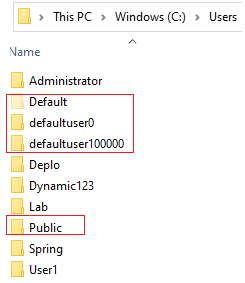
I have several directories under C:\Users\ folder and I need to copy a file Z:\MyDemoFile.txt to each user profile.

61046-image.png

Currently, I am doing this one-by-one like this:

$SourceDir ="Z:\DemoFile.txt"  
$DestinationDir = "C:\Users\$env:USERNAME\"  

Is it possible to do this with PS to copy a file to each subfolder under C:\Users (skipping Default and Public folders) and not to children directories. For example, for user User1, DemoFile.txt should only be copy to C:\User1\DemoFile.txt.

Windows for business | Windows Server | User experience | PowerShell
Windows for business | Windows Client for IT Pros | User experience | Other
0 comments No comments
{count} votes

Answer accepted by question author
  1. Anonymous
    2021-01-28T10:07:53.127+00:00

    The foreach-object is missing

     $SourceDir ="Z:\DemoFile.txt"  
     Get-ChildItem -Path "C:\Users" -Directory -Exclude "Public","Default","default*" | foreach-object{Copy-Item -Path $SourceDir -Destination $_}  
    

    Best Regards,
    Ian Xue

    ============================================

    If the Answer is helpful, please click "Accept Answer" and upvote it.
    Note: Please follow the steps in our documentation to enable e-mail notifications if you want to receive the related email notification for this thread.


    1 person found this answer helpful.
    0 comments No comments

3 additional answers

Sort by: Most helpful
  1. Andreas Baumgarten 129.4K Reputation points MVP Volunteer Moderator
    2021-01-27T21:54:12.613+00:00

    Maybe this is helpful (not tested):

    $SourceDir ="Z:\DemoFile.txt"
    Get-ChildItem -Path "C:\Users" -Directory -Exclude "Public","Default","default*" | Copy-Item -Path $SourceDir -Destination $_
    

    (If the reply was helpful please don't forget to upvote and/or accept as answer, thank you)

    Regards
    Andreas Baumgarten

    1 person found this answer helpful.

  2. ~OSD~ 2,201 Reputation points
    2021-01-28T09:50:40.153+00:00

    Thanks Andreas for reply, unfortunately it return error (one per each user), see below.

    61399-image.png

    0 comments No comments

  3. ~OSD~ 2,201 Reputation points
    2021-01-28T10:33:20.453+00:00

    Thanks Ian, it worked flawlessly, thanks for sharing.

    0 comments No comments

Your answer

Answers can be marked as 'Accepted' by the question author and 'Recommended' by moderators, which helps users know the answer solved the author's problem.