Hi Siva,
I would suggest you to check if there is any options to fix the bad sectors in the Digital Data Lifegaurd diagnostics tool that reported the bad sectors. Most of these software have the option to detect and fix the bad sectors
in the drive.
If you couldn’t find any option in the tool, then I would suggest you to use the Windows Error checking utility to find and repair bad sectors in a drive. Refer to the section “To repair a drive” in this article:
http://windows.microsoft.com/en-in/windows-8/improve-performance-optimizing-hard-drive
Hope you find this helpful. Feel free to use this forum for any other queries in the future; we’d be happy to help.
Hi Bennet Martin,
Thanks for replying to my post, but i have already scanned my western digital passport HDD with western digital data lifeguard diagnostics tool and it detected bad sectors and when it attempt to fix bad sectors then error displays that Test Error Code: 08-Error was detected while repairing bad sectors. y fdf
Here are the test result
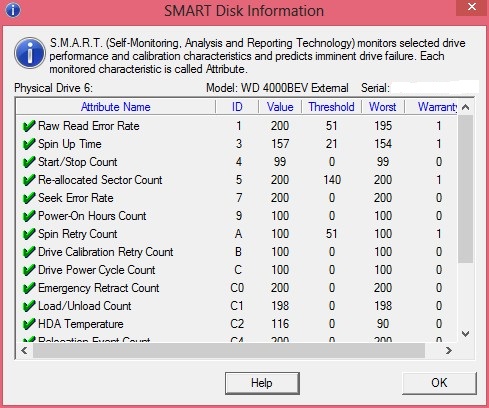
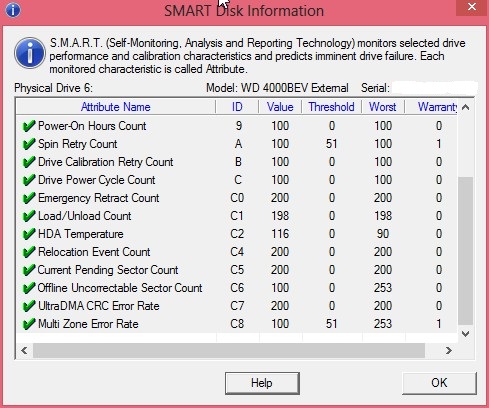
Also tried chkdsk /f /r
Checking file system on O:
The type of the file system is NTFS.
Volume label is Siva Passport Media.
A disk check has been scheduled.
Windows will now check the disk.
CHKDSK is verifying files (stage 1 of 5)...
256 file records processed. File verification completed.
0 large file records processed. 0 bad file records processed.
CHKDSK is verifying indexes (stage 2 of 5)...
280 index entries processed. Index verification completed.
0 unindexed files scanned. 0 unindexed files recovered.
CHKDSK is verifying security descriptors (stage 3 of 5)...
Cleaning up 1 unused index entries from index $SII of file 0x9.
Cleaning up 1 unused index entries from index $SDH of file 0x9.
Cleaning up 1 unused security descriptors.
Security descriptor verification completed.
12 data files processed.
CHKDSK is verifying file data (stage 4 of 5)...
240 files processed. File data verification completed.
CHKDSK is verifying free space (stage 5 of 5)...
44958179 free clusters processed. Free space verification is complete.
Adding 1 bad clusters to the Bad Clusters File.
Correcting errors in the Volume Bitmap.
Windows has made corrections to the file system.
No further action is required.
179944447 KB total disk space.
40020 KB in 7 files.
12 KB in 14 indexes.
4 KB in bad sectors.
71695 KB in use by the system.
65536 KB occupied by the log file.
179832716 KB available on disk.
4096 bytes in each allocation unit.
44986111 total allocation units on disk.
44958179 allocation units available on disk.
Internal Info:
00 01 00 00 20 00 00 00 1c 00 00 00 00 00 00 00 .... ...........
01 00 00 00 00 00 00 00 00 00 00 00 00 00 00 00 ................
68 c6 e5 00 00 00 00 00 50 aa 04 01 00 00 00 00 h.......P.......
Checking file system on N:
The type of the file system is NTFS.
Volume label is Siva Passport Data.
A disk check has been scheduled.
Windows will now check the disk.
CHKDSK is verifying files (stage 1 of 5)...
256 file records processed. File verification completed.
0 large file records processed. 0 bad file records processed.
CHKDSK is verifying indexes (stage 2 of 5)...
280 index entries processed. Index verification completed.
0 unindexed files scanned. 0 unindexed files recovered.
CHKDSK is verifying security descriptors (stage 3 of 5)...
Security descriptor verification completed.
12 data files processed.
CHKDSK is verifying file data (stage 4 of 5)...
240 files processed. File data verification completed.
CHKDSK is verifying free space (stage 5 of 5)...
52660472 free clusters processed. Free space verification is complete.
Windows has scanned the file system and found no problems.
No further action is required.
210763775 KB total disk space.
49236 KB in 7 files.
12 KB in 14 indexes.
0 KB in bad sectors.
72635 KB in use by the system.
65536 KB occupied by the log file.
210641892 KB available on disk.
4096 bytes in each allocation unit.
52690943 total allocation units on disk.
52660473 allocation units available on disk.
Internal Info:
00 01 00 00 20 00 00 00 1c 00 00 00 00 00 00 00 .... ...........
01 00 00 00 00 00 00 00 00 00 00 00 00 00 00 00 ................
68 c6 e5 00 00 00 00 00 50 ae 0b 01 00 00 00 00 h.......P.......
' cx='32' cy='32' r='32' /%3E%3Ctext x='50%25' y='55%25' dominant-baseline='middle' text-anchor='middle' fill='%23FFF' %3EA%3C/text%3E%3C/svg%3E)
